
اختار اللغة

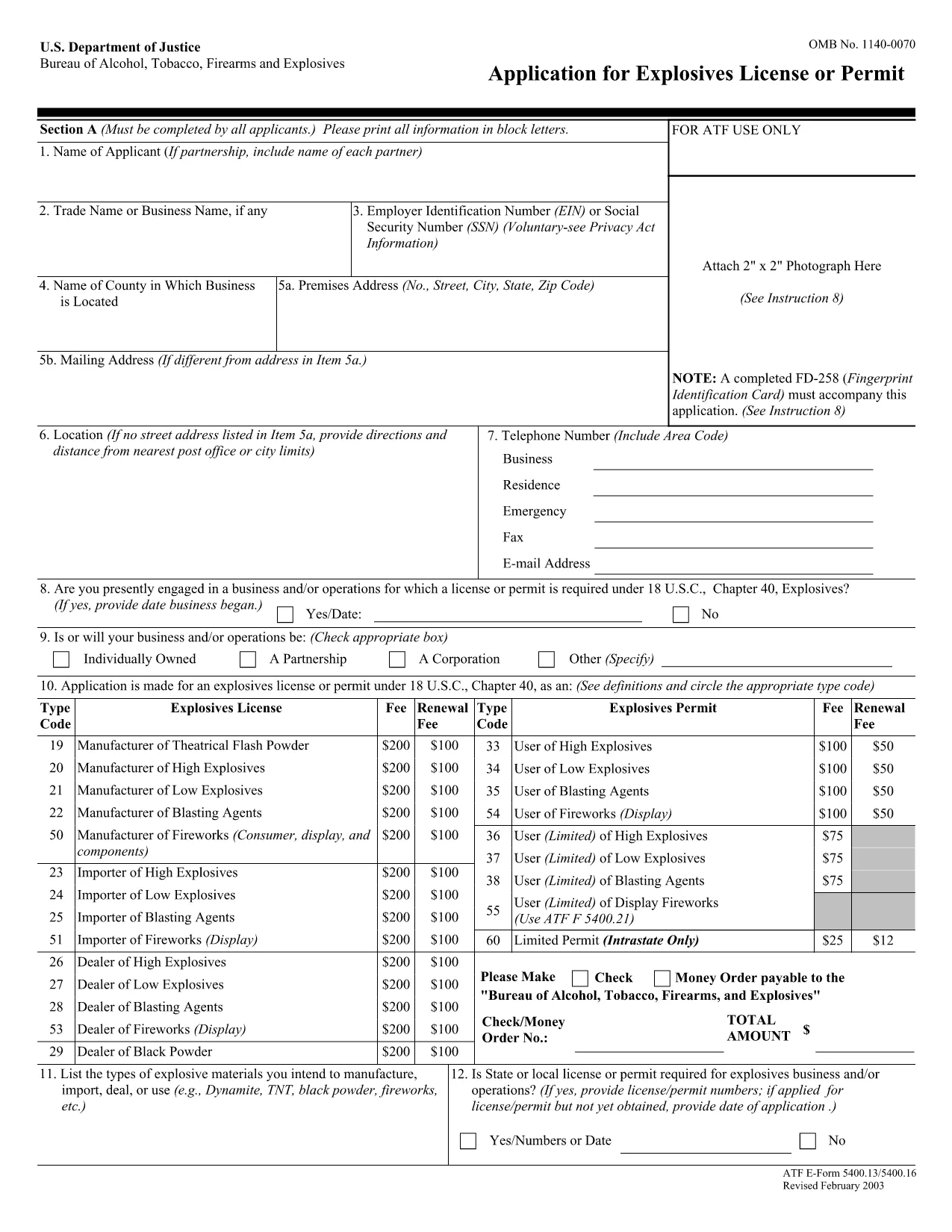
The ATF Form 5400.13 (Responsible Person Questionnaire) and its companion Form 5400.16 are required for anyone applying for an explosives license or permit. These forms collect detailed information about each responsible person associated with the business, ensuring compliance with the Bureau of Alcohol, Tobacco, Firearms and Explosives (ATF) regulations.

What Is ATF Form 5400.13/5400.16?

Form 5400.13 gathers personal, business, and background data for each responsible person, while Form 5400.16 provides additional certification and signature fields. Together, they form the core of the ATF’s Responsible Person Questionnaire, a mandatory part of every explosives license or permit application.

How to Complete the Form Online with Formize

  • Step 1: Click the "Fill out this form" button on this page.
  • Step 2: Wait a few seconds while the Formize PDF Filler app loads the fillable PDF.
  • Step 3: Enter the requested information in each field. The interface saves your progress automatically.
  • Step 4: When all sections are complete, download the finished PDF or submit it directly to the ATF portal.

Common Mistakes & Tips for a Successful Submission

Don’t leave any required fields blank. The ATF will reject applications with missing data. Use the "Add another responsible person" button if you have more than one individual to report.

Use legal names only. Include maiden names, previous married names, and any aliases exactly as they appear on official documents.

Double‑check dates. Ensure birth dates, licensing dates, and expiration dates follow the MM/DD/YYYY format.

Where to Send the Completed Form

After you download the completed PDF, mail or fax it to the ATF National Services Center, Federal Explosives Licensing Center, P.O. Box 6200‑18, Portland, OR 97228‑6200. Refer to the ATF instructions for any additional submission requirements.

Need a printable version? Use the download link below to get the original PDF.

التعليمات
  • Who must complete ATF Form 5400.13/5400.16?

    Every individual who will act as a responsible person for an explosives business – owners, partners, officers, and key employees – must complete the questionnaire.

  • Can I submit a paper copy instead of the fillable PDF?

    Yes, a printed version is accepted, but using the fillable PDF reduces errors and speeds up processing.

  • What if I have more than three responsible persons?

    Use the "Add another responsible person" button in the online filler, or attach additional sheets if you print the form.

  • How long is the form valid after I submit it?

    The information is valid for the duration of the license or permit. Any changes (e.g., new responsible person) must be reported to the ATF promptly.

  • Do I need a digital signature?

    A typed name in the signature field is acceptable for the online version. For paper submissions, sign with a pen.

  • Is there a filing fee associated with this questionnaire?

    The questionnaire itself has no fee, but it is part of the overall explosives license application, which may have associated fees.

  • What should I do if I make a mistake after saving?

    Open the saved PDF in the Formize filler again, correct the error, and re‑download the updated file.

  • Where can I find the official ATF instructions?

    The ATF publishes detailed guidance on its website under the Explosives Licensing section; a link is included on the form’s cover page.

كيف

كيفية ملء ATF Form 5400.13 مجانًا عبر الإنترنت في 4 خطوات سهلة:

  1. 1
    Click the Fill‑out Button
    Press the "Fill out this form" button on the page to launch the Formize PDF Filler.
  2. 2
    Wait for the Filler to Load
    A few seconds later the fillable PDF appears in the browser. No download or extra software is needed.
  3. 3
    Enter All Required Information
    Complete each field for every responsible person. The app auto‑saves as you type.
  4. 4
    Download or Submit
    When finished, click "Download PDF" to save a copy or follow ATF instructions to submit the form.
Formize تطبيق PDF Filler
حول

نماذج الكحول والتبغ والأسلحة النارية والمتفجرات (ATF).

ATF Form 5400.13 هو أحد النماذج الرسمية التي تستخدمها ATF، وهي وكالة إنفاذ القانون الفيدرالية داخل وزارة العدل الأمريكية. ATF مسؤول عن إنفاذ القوانين واللوائح الفيدرالية المتعلقة بالكحول والتبغ والأسلحة النارية والمتفجرات. تُستخدم هذه النماذج لأغراض مختلفة، بما في ذلك تسجيل وترخيص وتنظيم الشركات والأفراد المشاركين في هذه الصناعات. فيما يلي بعض الأمثلة على نماذج ATF:

نموذج ATF 4473: يُستخدم هذا النموذج في عملية التحقق من الخلفية عندما يشتري شخص ما سلاحًا ناريًا من تاجر أسلحة نارية مرخص فيدراليًا. فهو يجمع معلومات حول هوية المشتري وخلفيته وأهليته لامتلاك أسلحة نارية.

نموذج ATF 1: يُستخدم هذا النموذج لتقديم طلب لصنع وتسجيل سلاح ناري. يتم استخدامه عادةً للأفراد الذين يرغبون في تصنيع سلاح ناري للاستخدام الشخصي أو تحويل سلاح ناري موجود إلى تكوين مختلف.

نموذج ATF 4: يُستخدم هذا النموذج لنقل وتسجيل سلاح ناري من فرد أو كيان إلى آخر. يتم استخدامه بشكل شائع في عملية شراء سلاح ناري من جهة خاصة أو نقل سلاح ناري إلى صندوق ائتماني أو شركة.

نموذج ATF 6: يُستخدم هذا النموذج لاستيراد الأسلحة النارية والذخيرة وبعض العناصر الأخرى التي ينظمها ATF. إنه مطلوب للأفراد أو الشركات الذين يرغبون في استيراد مثل هذه العناصر إلى الولايات المتحدة.

نموذج ATF 7: يُستخدم هذا النموذج لتطبيق وتجديد ترخيص الأسلحة النارية الفيدرالي (FFL). وهو مطلوب للأفراد أو الشركات العاملة في مجال تصنيع الأسلحة النارية أو التعامل بها أو استيرادها.

نموذج ATF 5320.20: يُستخدم هذا النموذج للإخطار والموافقة على نقل الأسلحة النارية أو الأجهزة التدميرية عبر خطوط الولاية.

نموذج ATF 5400.13: يُستخدم هذا النموذج للتسجيل والإبلاغ عن المواد والأجهزة المتفجرة.

هذه مجرد أمثلة قليلة على نماذج ATF المستخدمة لأغراض مختلفة تتعلق بتنظيم وإنفاذ القوانين الفيدرالية التي تحكم الكحول والتبغ والأسلحة النارية والمتفجرات. تعتمد النماذج المحددة المطلوبة على النشاط أو المعاملة المعينة التي يتم إجراؤها واللوائح المطبقة. من المهم الرجوع إلى الموقع الرسمي لمكتب الكحول والتبغ والأسلحة النارية والمتفجرات (www.atf.gov) أو طلب التوجيه المهني للحصول على معلومات دقيقة وحديثة فيما يتعلق بنماذج ATF المحددة ذات الصلة بحالتك.

سمات

حشو PDF

أسهل طريقة لملء نماذج PDF عبر الإنترنت

  • املأ بسرعة ATF Form 5400.13
    هل تبحث عن طريقة لملء كلمة ATF Form 5400.13 بسرعة عبر الإنترنت؟ من خلال برنامج تعبئة نماذج PDF المجاني عبر الإنترنت ، ستعرف كيفية تحرير وتعبئة مستند pdf هذا في أقل من دقيقة.
  • محرر PDF سهل الاستخدام عبر الإنترنت
    هل سئمت طباعة ملفات PDF حتى تتمكن من تحريرها قبل إعادة مسحها ضوئيًا وإرسالها مرة أخرى؟ تحرير مستندات PDF مجانًا عبر الإنترنت. استخدم محرر pdf على الإنترنت لتوفير الوقت والورق.
  • أدوات رائعة ، جميع المنصات
    هل تتساءل عن كيفية ملء ATF Form 5400.13 على جهاز Mac ، أو ربما كيفية استخدام حشو PDF مجانًا؟ تعمل أدوات PDF الخاصة بنا عبر الإنترنت على جميع الأنظمة الأساسية.
  • تخزين الملفات الآمن
    يتم تخزين ملفات "ATF Form 5400.13" المكتملة في قاعدة بيانات آمنة تديرها استضافة Amazon Cloud. يمكنك حذف ملفاتك من نظامنا في أي وقت. على أي حال ، يتم حذف هذه الملفات تلقائيًا بعد 24 ساعة.
  • الدردشة مع {كلمة رئيسية}
    قم بالدردشة مع "ATF Form 5400.13" على Chatize وهو مساعد مجاني لقارئ PDF. اطرح الأسئلة واحصل على الإجابات من "ATF Form 5400.13". فقط انقر على زر الدردشة مع المستند أعلاه.

حذف جلسة التعبئة

حذف جلسة التعبئة المحددة؟ في هذه الحالة، سيتم فقد تقدمك في إكمال النموذج.

حذف جلسة التحرير

هل تريد حذف جلسة التحرير المحددة؟ في هذه الحالة، سيتم فقدان التقدم الذي أحرزته في إنشاء النموذج وتحريره.