
اختار اللغة

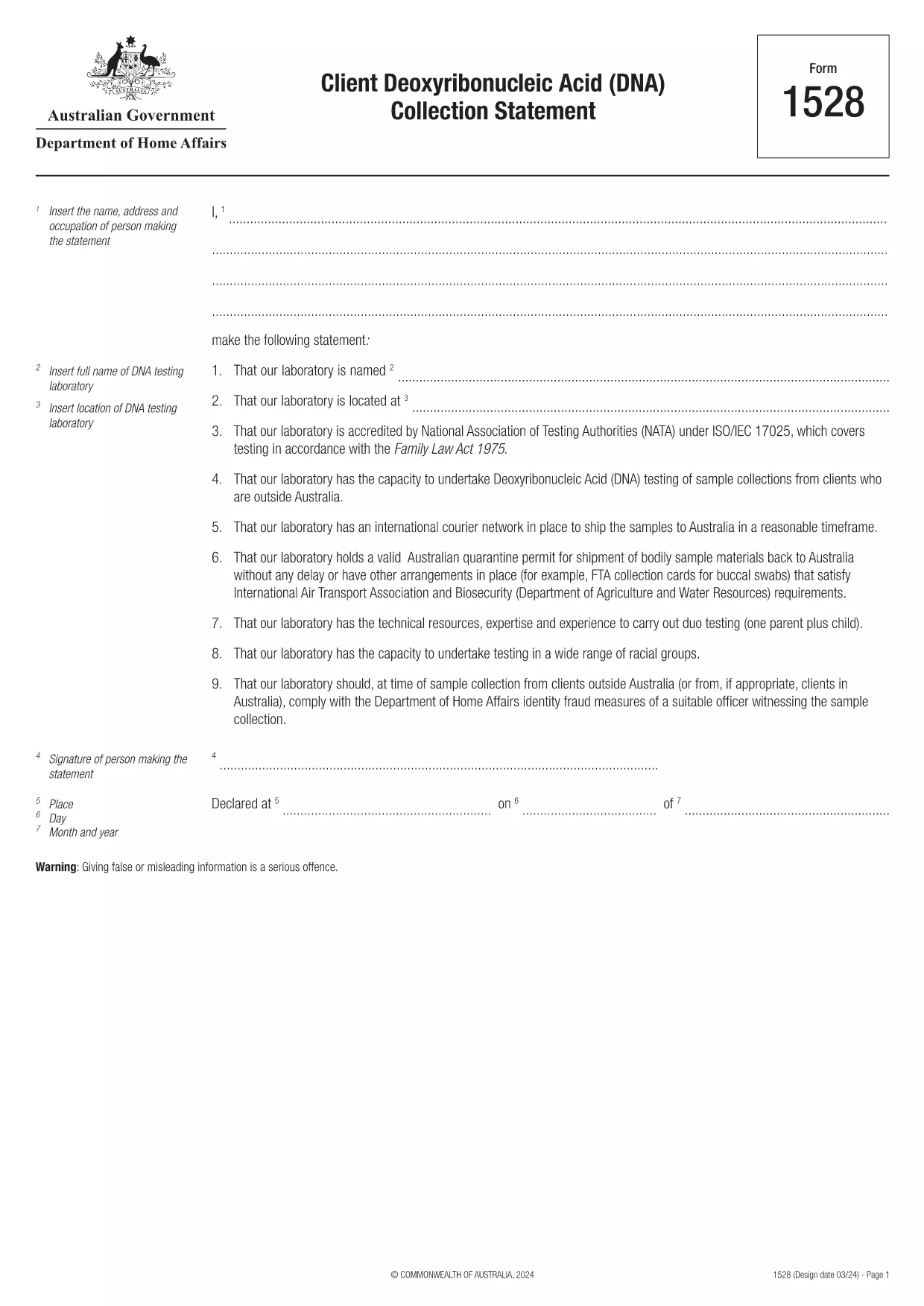
Form 1528 – Client DNA Collection Statement (Fillable PDF)

  1. دولة أستراليا
  2. لغة إنجليزي
  3. نشاط الشخصية أو الهوية
Form 1528 – Client DNA Collection Statement (Fillable PDF)

Form 1528 is the official Client Deoxyribonucleic Acid (DNA) Collection Statement required by the Australian Department of Home Affairs. The form captures the name, address and occupation of the person making the statement, as well as details of the DNA testing laboratory.

What Is Form 1528?

This form is used when an individual must provide a DNA sample for immigration, visa, or forensic purposes. It must be completed by the person providing the sample and signed by an authorised DNA testing laboratory.

How to Fill Out Form 1528 with Formize

Instead of printing, scanning, or editing the PDF manually, simply click the “Fill out this form” button on this page. The Formize PDF Filler app will load the fillable version, letting you enter data, add signatures, and save the completed document in seconds.

Common Mistakes & Tips

  • Leave no blank fields – the Department rejects forms with empty required sections.
  • Use the exact laboratory name and address as it appears on the lab’s official letterhead.
  • Check date formats – use DD/MM/YYYY throughout.
  • Sign electronically only after all information is verified; a digital signature is accepted.

Where to Submit the Completed Form

After you download the completed PDF, you can upload it through your online visa portal, email it to the requesting officer, or deliver a printed copy to the nearest Australian Visa Application Centre.

Need More Help?

For detailed guidance, review the instructions on the Department of Home Affairs website or contact your DNA testing laboratory for clarification on laboratory‑specific fields.

التعليمات
  • Is an electronic signature accepted on Form 1528?

    Yes. The Department of Home Affairs accepts a clear electronic signature created with the Formize PDF Filler.

  • Can I print the form after filling it online?

    Absolutely. After completing the form, you can download the PDF and print a hard copy if you prefer a physical submission.

  • What if I make a mistake after saving the form?

    Open the saved PDF again in Formize, edit the incorrect fields, and re‑save. The fillable PDF allows unlimited edits before final submission.

  • Do I need to attach any supporting documents?

    Typically, the DNA laboratory will provide a separate certification letter. Attach that letter alongside the completed Form 1528 when you submit your application.

  • How long does it take to process Form 1528?

    Processing time varies by case, but the Department generally reviews the statement within 5‑10 business days after receipt.

  • Is there a fee for using Formize’s PDF filler?

    Formize offers a free basic fillable version for Form 1528. Advanced features such as bulk signing require a paid plan, but are not needed for a single submission.

  • Can I fill out Form 1528 on a mobile device?

    Yes. The Formize PDF Filler works on smartphones and tablets, allowing you to complete the form anywhere.

  • What format should I use when uploading the completed form?

    Upload the final document as a PDF file. Ensure the file size does not exceed the portal’s limit (usually 5 MB).

كيف

كيفية ملء Form 1528 مجانًا عبر الإنترنت في 5 خطوات سهلة:

  1. 1
    Open the Fillable Form
    Click the “Fill out this form” button on the page. The Formize PDF Filler app will launch in a new tab with the fillable version of Form 1528.
  2. 2
    Enter Your Information
    Type the required details – personal data, laboratory name, and address – directly into the highlighted fields.
  3. 3
    Add Electronic Signatures
    Use the signature tool to sign the statement and, if required, the laboratory representative’s signature.
  4. 4
    Review & Validate
    Double‑check every field for accuracy, especially dates and laboratory information.
  5. 5
    Download or Submit
    When you’re satisfied, click “Save & Download” to get the completed PDF, or use the built‑in “Submit” button to send it directly to the Home Affairs portal.
Formize تطبيق PDF Filler
حول

نماذج الشخصية أو الهوية

Form 1528 هي أحد المستندات أو النماذج المتعلقة بتحديد هوية الفرد أو التحقق منها. تتطلب هذه النماذج عادةً معلومات ووثائق شخصية لتأكيد هوية الشخص. فيما يلي بعض الأمثلة على النماذج المرتبطة عادةً بالتحقق من الهوية:

نماذج التحقق من الهوية: يتم استخدام هذه النماذج من قبل المنظمات، مثل أصحاب العمل أو الوكالات الحكومية أو المؤسسات المالية، للتحقق من هوية الأفراد. يطلبون عادةً معلومات شخصية، مثل الاسم والعنوان وتاريخ الميلاد ورقم الضمان الاجتماعي، وقد يطلبون وثائق داعمة مثل بطاقة الهوية الصادرة عن الحكومة أو جواز السفر أو شهادة الميلاد.

نماذج إثبات العنوان: تُستخدم هذه النماذج للتحقق من عنوان إقامة الفرد. وقد يطلبون من الشخص تقديم فاتورة مرافق أو كشف حساب مصرفي أو عقد إيجار أو أي مستندات أخرى توضح عنوانه الحالي.

نماذج تفويض التحقق من الخلفية: عندما تجري إحدى المؤسسات فحصًا أمنيًا لأحد الأفراد، فغالبًا ما تطلب من الشخص ملء نموذج يسمح بالفحص. قد تطلب هذه النماذج معلومات شخصية، بما في ذلك الاسم وتاريخ الميلاد ورقم الضمان الاجتماعي، مما يساعد في تحديد هوية الشخص.

نماذج إقرار سرقة الهوية: في حالات سرقة الهوية، قد يحتاج الضحايا إلى ملء نموذج إقرار سرقة الهوية. يساعد هذا النموذج الأفراد على الإبلاغ عن الاستخدام الاحتيالي لهويتهم ويوفر سجلاً قانونيًا للحادث.

من المهم ملاحظة أن النماذج والمتطلبات المحددة لتحديد الهوية أو التحقق منها يمكن أن تختلف وفقًا للسياق، مثل الغرض أو الولاية القضائية أو المنظمة المعنية. قم دائمًا بالرجوع إلى النماذج المحددة التي تقدمها المنظمة أو المؤسسة التي تطلب التحقق من الهوية للحصول على المعلومات الأكثر دقة وحداثة.

سمات

حشو PDF

أسهل طريقة لملء نماذج PDF عبر الإنترنت

  • املأ بسرعة Form 1528
    هل تبحث عن طريقة لملء كلمة Form 1528 بسرعة عبر الإنترنت؟ من خلال برنامج تعبئة نماذج PDF المجاني عبر الإنترنت ، ستعرف كيفية تحرير وتعبئة مستند pdf هذا في أقل من دقيقة.
  • محرر PDF سهل الاستخدام عبر الإنترنت
    هل سئمت طباعة ملفات PDF حتى تتمكن من تحريرها قبل إعادة مسحها ضوئيًا وإرسالها مرة أخرى؟ تحرير مستندات PDF مجانًا عبر الإنترنت. استخدم محرر pdf على الإنترنت لتوفير الوقت والورق.
  • أدوات رائعة ، جميع المنصات
    هل تتساءل عن كيفية ملء Form 1528 على جهاز Mac ، أو ربما كيفية استخدام حشو PDF مجانًا؟ تعمل أدوات PDF الخاصة بنا عبر الإنترنت على جميع الأنظمة الأساسية.
  • تخزين الملفات الآمن
    يتم تخزين ملفات "Form 1528" المكتملة في قاعدة بيانات آمنة تديرها استضافة Amazon Cloud. يمكنك حذف ملفاتك من نظامنا في أي وقت. على أي حال ، يتم حذف هذه الملفات تلقائيًا بعد 24 ساعة.
  • الدردشة مع {كلمة رئيسية}
    قم بالدردشة مع "Form 1528" على Chatize وهو مساعد مجاني لقارئ PDF. اطرح الأسئلة واحصل على الإجابات من "Form 1528". فقط انقر على زر الدردشة مع المستند أعلاه.

حذف جلسة التعبئة

حذف جلسة التعبئة المحددة؟ في هذه الحالة، سيتم فقد تقدمك في إكمال النموذج.

حذف جلسة التحرير

هل تريد حذف جلسة التحرير المحددة؟ في هذه الحالة، سيتم فقدان التقدم الذي أحرزته في إنشاء النموذج وتحريره.