اختار اللغة

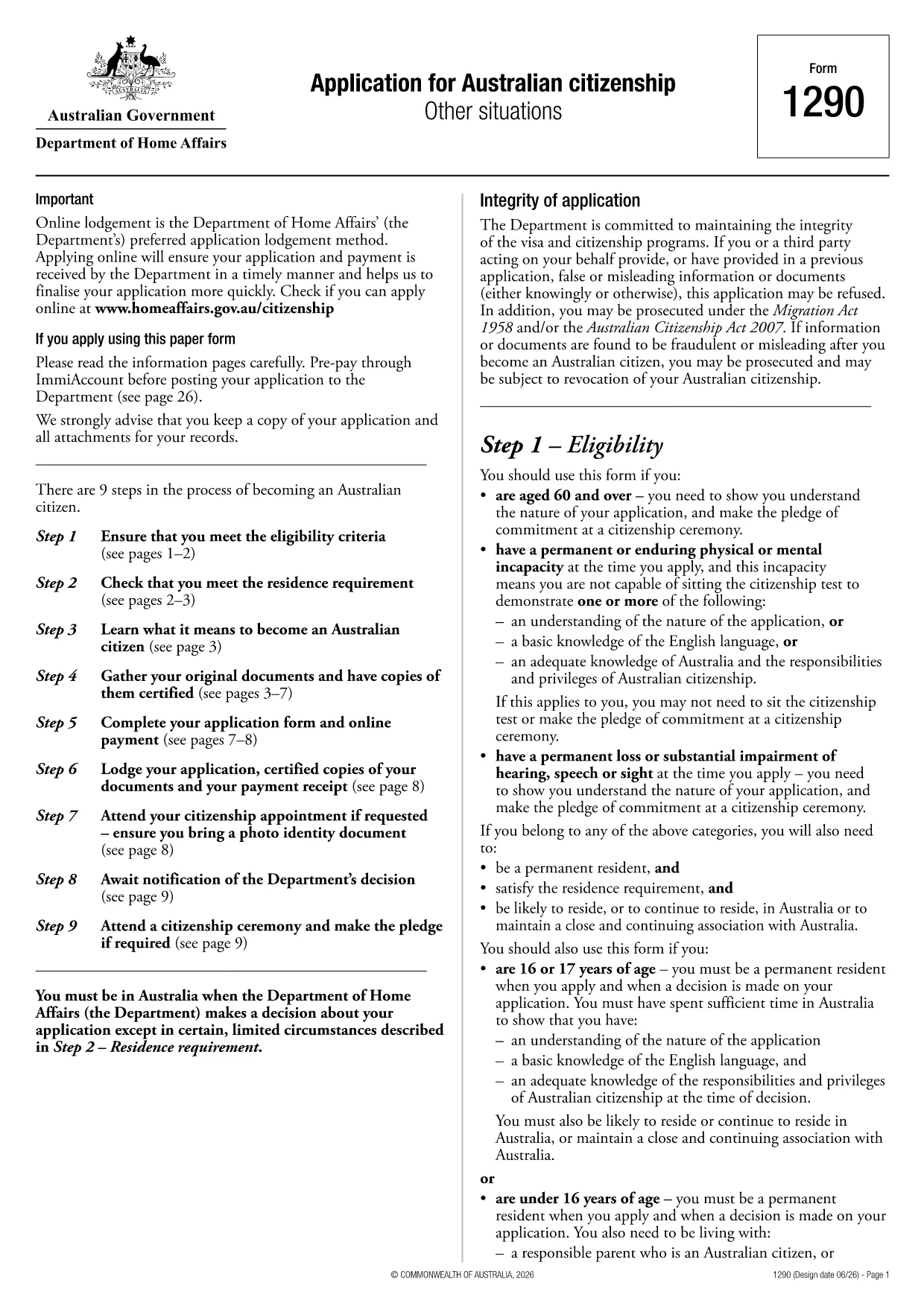
Australian Citizenship Application Form (Form 1290)

  1. دولة أستراليا
  2. لغة إنجليزي
  3. نشاط الهجرة
  4. قسم وزارة الشؤون الداخلية والعدل
Australian Citizenship Application Form (Form 1290)

Looking for a quick and reliable way to submit your Australian citizenship application? Formize.com offers a fully fillable PDF version of the official Form 1290 used by the Department of Home Affairs. No more printing, scanning, or handwriting – simply fill the form online, save a copy, and submit it with confidence.

Why Choose Our Fillable PDF?

  • Exact replica of the government‑issued Form 1290.
  • All fields are interactive – type, select dates, and upload supporting documents.
  • Auto‑save feature prevents data loss.
  • Compliant with Australian privacy standards.

How to Complete the Form in Minutes

Our step‑by‑step guide walks you through each section, from personal details to residency history. The built‑in validation highlights missing information before you submit, reducing the risk of delays.

Common Mistakes to Avoid

  • Leaving the "Date of Birth" field blank or using the wrong format.
  • Uploading unsupported file types for supporting documents.
  • Failing to sign the declaration electronically.
  • Submitting an outdated version of the form.

Submission & Next Steps

Once the form is completed, you can download a PDF copy for your records and upload the same file directly through ImmiAccount. Keep a backup copy and track your application status online.

Ready to get started? Click the button below, let the Formize PDF Filler load, and finish your citizenship application in just a few clicks.

التعليمات
  • Is this fillable PDF the same as the paper form?

    Yes. It mirrors the official Form 1290 exactly, with all fields converted to interactive fields for online completion.

  • Do I need Adobe Acrobat to use this form?

    No. The Formize PDF Filler runs in any modern browser, so you don’t need additional software.

  • Can I save my progress and return later?

    Absolutely. The filler auto‑saves your entries locally, and you can download a draft version at any time.

  • What file format should I upload to ImmiAccount?

    Upload the completed form as a standard PDF. The filler ensures the file meets the Department’s specifications.

  • Is my personal data secure while I’m filling the form?

    Yes. All data stays on your device; Formize does not store any personal information on its servers.

  • What if I make a mistake after submitting?

    If you spot an error after submission, you can request a correction through ImmiAccount within 30 days of filing.

  • Do I need to print the form after filling it online?

    Printing is optional. The Department accepts electronic PDFs submitted via ImmiAccount.

  • How long does it take to complete the form?

    Most applicants finish in 10‑15 minutes, provided they have all required information on hand.

كيف

كيفية ملء Australian citizenship application مجانًا عبر الإنترنت في 5 خطوات سهلة:

  1. 1
    Open the Fillable Form
    Click the "Fill out this form" button on the page. The Formize PDF Filler app will load automatically in your browser.
  2. 2
    Enter Your Information
    Type directly into each field, select dates from the calendar widget, and upload any required supporting documents.
  3. 3
    Review and Validate
    Use the built‑in validation to check for missing or incorrectly formatted entries. Correct any highlighted issues.
  4. 4
    Save and Download
    When you’re satisfied, click "Save" to store a copy on your device. You can also download the completed PDF for your records.
  5. 5
    Submit via ImmiAccount
    Log in to your ImmiAccount, upload the saved PDF, and follow the portal’s instructions to finalize your citizenship application.
Formize تطبيق PDF Filler
حول

نموذج Australian citizenship application

باستخدام مجموعة الميزات التقليدية لعرض مستند PDF وتعبئته ، جنبًا إلى جنب مع مزايا تطبيق الويب والتخطيط سريع الاستجابة ، يمكنك إكمال Australian citizenship application في دقائق.

سمات

حشو PDF

أسهل طريقة لملء نماذج PDF عبر الإنترنت

  • املأ بسرعة Australian citizenship application
    هل تبحث عن طريقة لملء كلمة Australian citizenship application بسرعة عبر الإنترنت؟ من خلال برنامج تعبئة نماذج PDF المجاني عبر الإنترنت ، ستعرف كيفية تحرير وتعبئة مستند pdf هذا في أقل من دقيقة.
  • محرر PDF سهل الاستخدام عبر الإنترنت
    هل سئمت طباعة ملفات PDF حتى تتمكن من تحريرها قبل إعادة مسحها ضوئيًا وإرسالها مرة أخرى؟ تحرير مستندات PDF مجانًا عبر الإنترنت. استخدم محرر pdf على الإنترنت لتوفير الوقت والورق.
  • أدوات رائعة ، جميع المنصات
    هل تتساءل عن كيفية ملء Australian citizenship application على جهاز Mac ، أو ربما كيفية استخدام حشو PDF مجانًا؟ تعمل أدوات PDF الخاصة بنا عبر الإنترنت على جميع الأنظمة الأساسية.
  • تخزين الملفات الآمن
    يتم تخزين ملفات "Australian citizenship application" المكتملة في قاعدة بيانات آمنة تديرها استضافة Amazon Cloud. يمكنك حذف ملفاتك من نظامنا في أي وقت. على أي حال ، يتم حذف هذه الملفات تلقائيًا بعد 24 ساعة.
  • الدردشة مع {كلمة رئيسية}
    قم بالدردشة مع "Australian citizenship application" على Chatize وهو مساعد مجاني لقارئ PDF. اطرح الأسئلة واحصل على الإجابات من "Australian citizenship application". فقط انقر على زر الدردشة مع المستند أعلاه.

حذف جلسة التعبئة

حذف جلسة التعبئة المحددة؟ في هذه الحالة، سيتم فقد تقدمك في إكمال النموذج.

حذف جلسة التحرير

هل تريد حذف جلسة التحرير المحددة؟ في هذه الحالة، سيتم فقدان التقدم الذي أحرزته في إنشاء النموذج وتحريره.