اختار اللغة

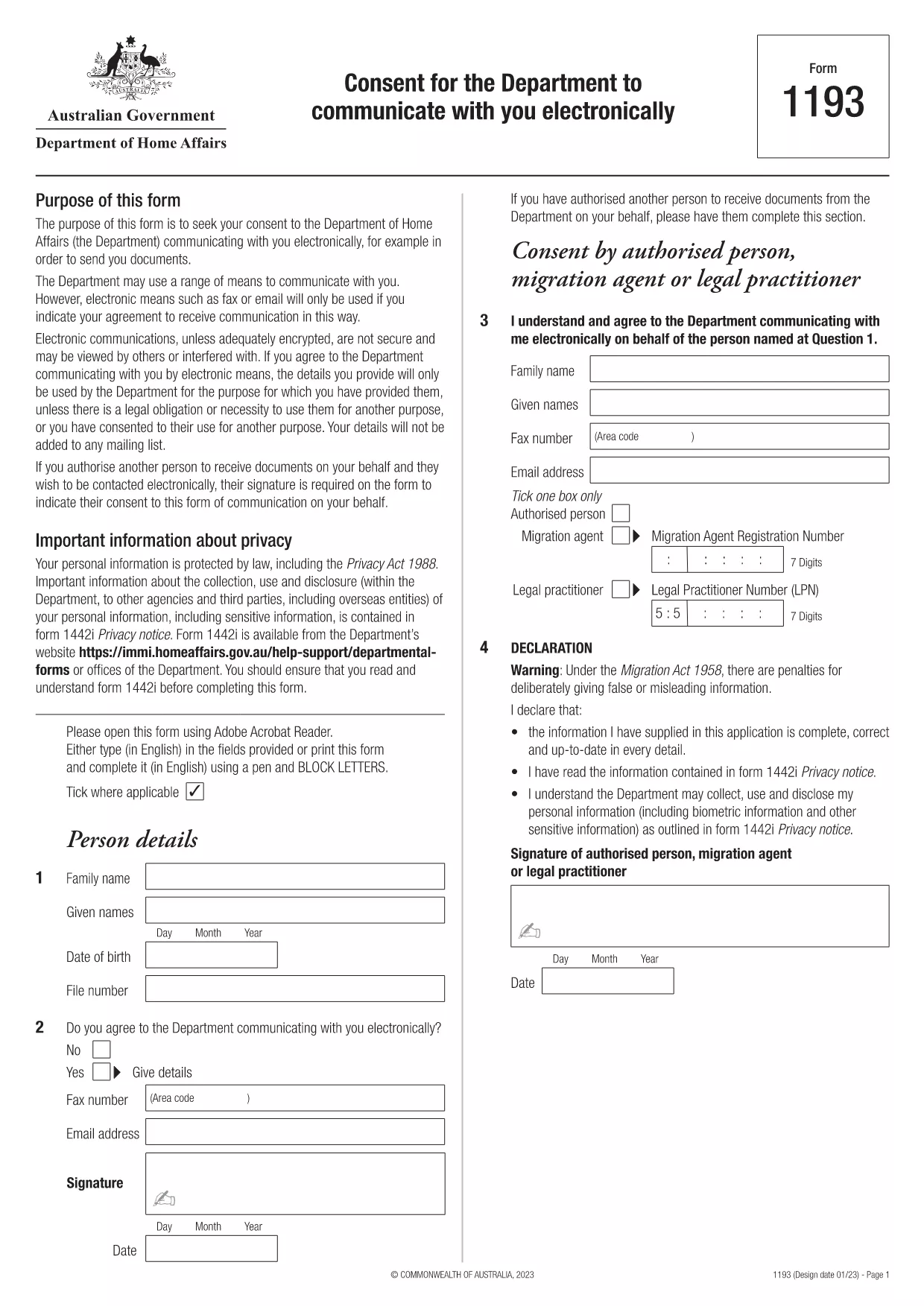
Students applying for financial aid through NSFAS (National Student Financial Aid Scheme) must provide written consent for the agency to share personal and academic information with selected parties. Our fillable PDF version lets you complete the consent form quickly, securely, and without any extra software.

Although the PDF originates from the Australian Department of Home Affairs, the structure is a standard electronic‑consent template that matches the requirements of NSFAS. You can customize the recipient details, sign digitally, and submit the form directly to your university or the NSFAS office.

Why You Need an NSFAS Consent Form

The consent form authorises NSFAS to disclose your records to lenders, scholarship bodies, or any third‑party you designate. Without a signed consent, processing of your aid application may be delayed or rejected.

How to Fill the Form Online with Formize

Follow these simple steps – no PDF editor required:

  • Click the "Fill out this form" button on this page.
  • Wait a few seconds while Formize’s PDF Filler loads.
  • Enter your personal details, select the organisations you want to grant access to, and add your digital signature.
  • Review the completed form and click Submit to download a copy or email it directly.

Common Mistakes to Avoid

  • Leaving required fields blank – the filler will highlight missing information.
  • Using an outdated email address for the recipient.
  • Forgetting to sign the form – a digital signature is mandatory.
  • Downloading the PDF before completing it – the form must be saved after all fields are filled.

Download & Print Options

If you prefer a hard copy, you can download the completed PDF and print it on standard A4 paper. The file is fully searchable and retains all entered data.

Start your NSFAS consent process now – click the button, fill the form, and submit with confidence.

التعليمات
  • Is the NSFAS consent form required for all students?

    Yes, any applicant who wants NSFAS to share their information with third parties must submit a signed consent form.

  • Can I use this PDF for other South African agencies?

    The form follows a generic electronic‑consent format, so it can be adapted for other agencies that require written permission.

  • Do I need a special PDF reader to fill the form?

    No. Formize’s online PDF filler works in any modern web browser without additional software.

  • Will my digital signature be accepted by NSFAS?

    NSFAS accepts electronic signatures that meet their authenticity standards, and Formize’s signature tool complies with those requirements.

  • How long does the form stay valid?

    A consent form is typically valid for 12 months from the date of signing, unless NSFAS specifies a different period.

  • Can I edit the form after I have downloaded it?

    Once saved, the PDF can be reopened in Formize to make further edits before final submission.

  • Is my personal information safe while using Formize?

    Formize uses SSL encryption and does not store your data on its servers after the session ends.

كيف

كيفية ملء NSFAS consent form مجانًا عبر الإنترنت في 4 خطوات سهلة:

  1. 1
    Open the Fillable Form
    Click the "Fill out this form" button on the page. The Formize PDF Filler will open in a new tab.
  2. 2
    Enter Your Details
    Complete all required fields such as name, student ID, and the organisations you wish to authorize.
  3. 3
    Add a Digital Signature
    Use the signature tool in the filler to draw or type your signature. This satisfies NSFAS’s signing requirement.
  4. 4
    Review and Submit
    Check the form for any errors, then click the Submit button to download the finished PDF or email it directly.
Formize تطبيق PDF Filler
حول

نموذج NSFAS consent form

باستخدام مجموعة الميزات التقليدية لعرض مستند PDF وتعبئته ، جنبًا إلى جنب مع مزايا تطبيق الويب والتخطيط سريع الاستجابة ، يمكنك إكمال NSFAS consent form في دقائق.

سمات

حشو PDF

أسهل طريقة لملء نماذج PDF عبر الإنترنت

  • املأ بسرعة NSFAS consent form
    هل تبحث عن طريقة لملء كلمة NSFAS consent form بسرعة عبر الإنترنت؟ من خلال برنامج تعبئة نماذج PDF المجاني عبر الإنترنت ، ستعرف كيفية تحرير وتعبئة مستند pdf هذا في أقل من دقيقة.
  • محرر PDF سهل الاستخدام عبر الإنترنت
    هل سئمت طباعة ملفات PDF حتى تتمكن من تحريرها قبل إعادة مسحها ضوئيًا وإرسالها مرة أخرى؟ تحرير مستندات PDF مجانًا عبر الإنترنت. استخدم محرر pdf على الإنترنت لتوفير الوقت والورق.
  • أدوات رائعة ، جميع المنصات
    هل تتساءل عن كيفية ملء NSFAS consent form على جهاز Mac ، أو ربما كيفية استخدام حشو PDF مجانًا؟ تعمل أدوات PDF الخاصة بنا عبر الإنترنت على جميع الأنظمة الأساسية.
  • تخزين الملفات الآمن
    يتم تخزين ملفات "NSFAS consent form" المكتملة في قاعدة بيانات آمنة تديرها استضافة Amazon Cloud. يمكنك حذف ملفاتك من نظامنا في أي وقت. على أي حال ، يتم حذف هذه الملفات تلقائيًا بعد 24 ساعة.
  • الدردشة مع {كلمة رئيسية}
    قم بالدردشة مع "NSFAS consent form" على Chatize وهو مساعد مجاني لقارئ PDF. اطرح الأسئلة واحصل على الإجابات من "NSFAS consent form". فقط انقر على زر الدردشة مع المستند أعلاه.

حذف جلسة التعبئة

حذف جلسة التعبئة المحددة؟ في هذه الحالة، سيتم فقد تقدمك في إكمال النموذج.

حذف جلسة التحرير

هل تريد حذف جلسة التحرير المحددة؟ في هذه الحالة، سيتم فقدان التقدم الذي أحرزته في إنشاء النموذج وتحريره.