
اختار اللغة

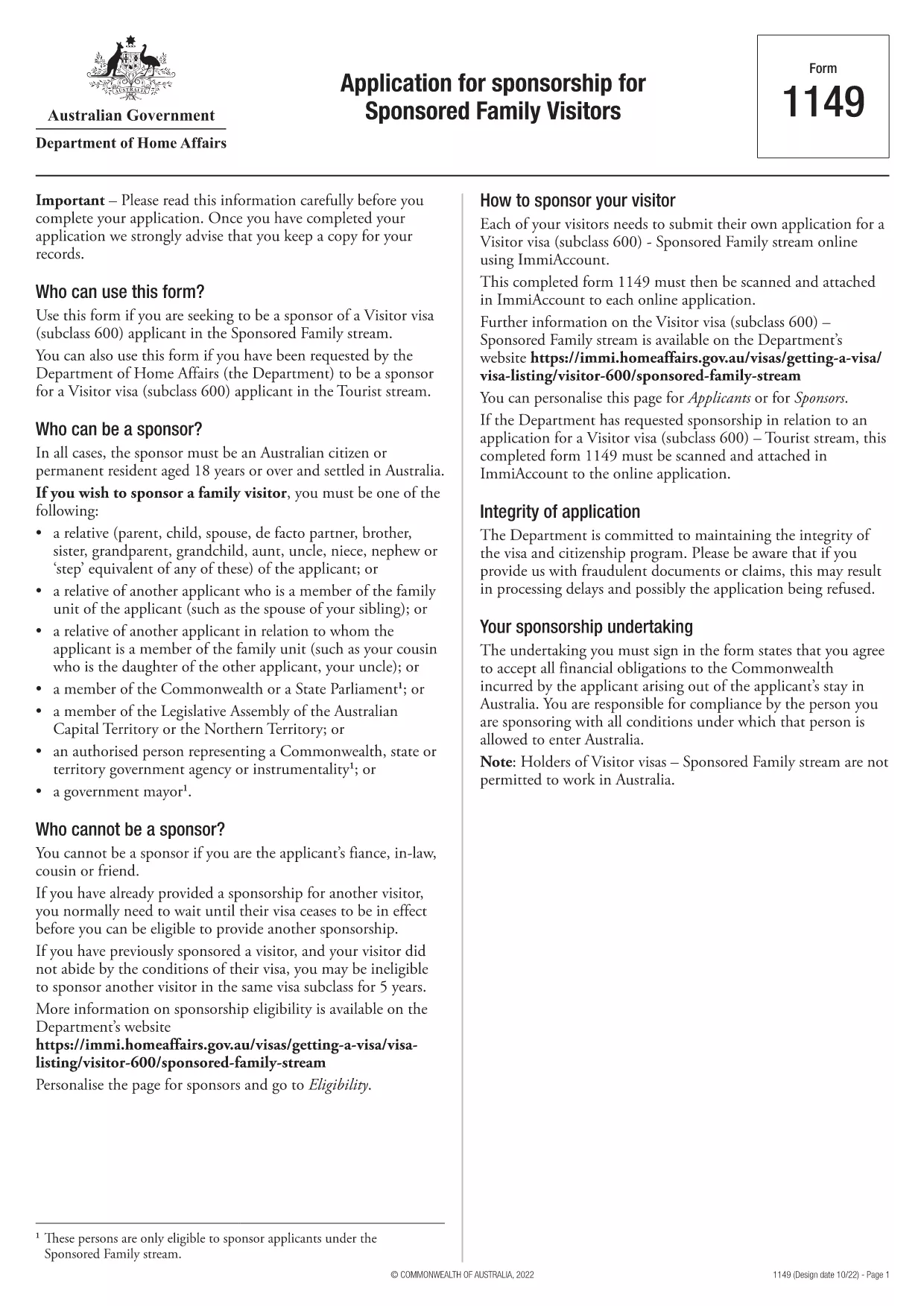
Form 1149 – Application for Sponsorship of a Family Visitor (Visitor Visa 600)

  1. دولة أستراليا
  2. لغة إنجليزي
  3. نشاط انضم أو أحضر العائلة
Form 1149 – Application for Sponsorship of a Family Visitor (Visitor Visa 600)

Form 1149 is the official Application for Sponsorship for Sponsored Family Visitors used by Australian citizens or permanent residents who wish to sponsor a relative, a member of the Commonwealth, or a state parliamentarian for a Visitor visa (subclass 600). The form outlines the sponsor’s obligations, eligibility criteria, and any security bond requirements.

Traditionally the form is a static PDF that must be printed, handwritten, and mailed. With Formize you can complete the same form entirely online – just click Fill out this form and let our secure PDF filler do the work.

What Is Form 1149?

Form 1149 collects detailed information about the sponsor (name, address, citizenship status), the invited visitor (relationship, passport details, travel dates), and the financial support the sponsor will provide. It also asks about any previous sponsorships and the sponsor’s ability to meet the visa conditions.

Who Needs to Complete This Form?

  • Australian citizens or permanent residents sponsoring a family member for a Visitor visa (subclass 600).
  • Members of the Commonwealth or state parliament who are inviting a guest for official duties.
  • Anyone required to provide a security bond for the visitor’s stay.

How to Fill Form 1149 Online with Formize

Follow these simple steps to complete the form without printing:

  1. Click the Fill out this form button on this page.
  2. Wait a few seconds while the Formize PDF Filler loads the fillable version of Form 1149.
  3. Enter all required details in the highlighted fields. The filler validates dates, passport numbers, and numeric entries in real‑time.
  4. Review the summary page, correct any highlighted errors, and click Submit to download the completed PDF.
  5. Print the signed PDF (if a physical signature is required) and attach it to your visa application package.

Common Mistakes to Avoid

  • Incorrect passport numbers: Double‑check each digit; a single typo can delay processing.
  • Missing sponsor’s financial details: Provide clear evidence of income or savings to satisfy the bond requirement.
  • Leaving optional fields blank: If a field asks for “previous sponsorships”, answer “None” rather than leaving it empty.
  • Using an outdated version: Always use the latest PDF – the link on this page points to the current 2024 version.

Where to Submit the Completed Form

After filling and printing the form, include it with the Visitor visa (subclass 600) application packet and submit to the Department of Home Affairs either online via ImmiAccount or by post to the address indicated in the visa instructions.

Using Formize’s online filler saves time, reduces errors, and ensures you are working with the most up‑to‑date version of Form 1149.

التعليمات
  • Who can act as a sponsor on Form 1149?

    Only Australian citizens or permanent residents may sponsor a family visitor for a subclass 600 visa. Commonwealth or state parliament members may also sponsor for official visits.

  • Do I need to provide a security bond?

    A bond is required if the sponsor cannot demonstrate sufficient financial capacity. The amount is determined by the Department of Home Affairs based on the visitor’s length of stay and circumstances.

  • Can I submit the form electronically?

    Yes. Fill the form online with Formize, download the completed PDF, and attach it to your ImmiAccount submission. Some cases may still require a printed, signed copy.

  • How long is Form 1149 valid?

    The form does not have an expiry date, but you should use the latest version available on the Department of Home Affairs website.

  • What common errors cause delays?

    Incorrect passport numbers, missing financial information, and leaving optional fields blank are the most frequent reasons for processing delays.

  • Is there a fee to use Formize’s PDF filler?

    Formize offers a free basic filler for most government forms, including Form 1149. Premium features are optional and not required for this form.

  • Do I need to sign the PDF digitally?

    A digital signature is accepted for most online submissions. If you submit a paper application, print the PDF and sign it with a pen.

كيف

كيفية ملء Form 1149 مجانًا عبر الإنترنت في 5 خطوات سهلة:

  1. 1
    Open the Fillable Form
    Click the "Fill out this form" button on this page. The Formize PDF Filler will open in a new tab.
  2. 2
    Enter Your Details
    Fill each highlighted field with accurate information. The tool validates entries in real time.
  3. 3
    Review and Correct Errors
    Check the summary page for any highlighted errors, correct them, and confirm the data.
  4. 4
    Download the Completed PDF
    Click "Submit" to download the fully completed PDF. Print and sign if a physical signature is required.
  5. 5
    Attach to Your Visa Application
    Include the signed PDF with your Visitor visa (subclass 600) application and submit to the Department of Home Affairs.
Formize تطبيق PDF Filler
حول

الانضمام أو إحضار نماذج الأسرة

Form 1149 هو أحد نماذج الطلبات التي يستخدمها الأفراد لرعاية وتسهيل الهجرة أو لم شمل أفراد أسرهم في بلد مختلف. غالبًا ما ترتبط هذه النماذج ببرامج أو سياسات الهجرة القائمة على الأسرة والتي تسمح للأفراد المقيمين بالفعل في بلد معين بإحضار أفراد أسرهم المباشرين للانضمام إليهم. قد تختلف النماذج المحددة اعتمادًا على البلد ونظام الهجرة الخاص به، ولكن إليك بعض الأمثلة الشائعة:

نموذج طلب رعاية الأسرة: هذا هو النموذج الرئيسي الذي يستخدمه الأفراد الذين يرغبون في رعاية أفراد أسرهم للهجرة. فهو يجمع معلومات عن الكفيل (الشخص المقيم بالفعل في الدولة) وأفراد الأسرة المكفولين، بما في ذلك علاقتهم والتفاصيل الشخصية والوثائق الداعمة.

نموذج طلب تأشيرة المعالين: في بعض أنظمة الهجرة، يجوز للأفراد المقيمين بالفعل في بلد ما التقدم للحصول على تأشيرات تابعة لإحضار أفراد أسرهم المباشرين، مثل الأزواج أو الأطفال أو الوالدين. يجمع نموذج طلب التأشيرة التابعة معلومات حول الكفيل وأفراد الأسرة المعالين وعلاقتهم والوثائق الداعمة.

إقرار الدعم: في بعض البلدان، قد يُطلب من الجهات الراعية تقديم إقرار خطي بالدعم، وهو مستند قانوني يؤكد مسؤوليتهم المالية تجاه أفراد الأسرة المكفولين. غالبًا ما تتضمن هذه الوثيقة تفاصيل حول دخل الكفيل وأصوله وقدرته على دعم أفراد الأسرة ماليًا.

نماذج الفحص الطبي: قد يُطلب من أفراد الأسرة الذين يتم رعايتهم للهجرة الخضوع لفحص طبي للتأكد من استيفائهم للمتطلبات الصحية لبلد المقصد. تجمع نماذج الفحص الطبي المعلومات الصحية اللازمة ونتائج الاختبارات.

نماذج توثيق العلاقة: من أجل إثبات العلاقة العائلية بين الكفيل وأفراد الأسرة الذين يتم رعايتهم، قد تكون هناك حاجة إلى وثائق مختلفة. يمكن أن تشمل هذه الشهادات شهادات الميلاد أو شهادات الزواج أو أوراق التبني أو غيرها من الأدلة الداعمة للعلاقة الأسرية.

من المهم ملاحظة أن النماذج والمتطلبات المحددة يمكن أن تختلف بشكل كبير اعتمادًا على البلد وقوانين وسياسات الهجرة الخاصة به. يُنصح باستشارة الموقع الرسمي لهيئة الهجرة أو طلب المشورة القانونية للحصول على معلومات دقيقة وحديثة فيما يتعلق بالنماذج والعمليات اللازمة لرعاية أفراد الأسرة أو إحضارهم إلى بلد معين.

سمات

حشو PDF

أسهل طريقة لملء نماذج PDF عبر الإنترنت

  • املأ بسرعة Form 1149
    هل تبحث عن طريقة لملء كلمة Form 1149 بسرعة عبر الإنترنت؟ من خلال برنامج تعبئة نماذج PDF المجاني عبر الإنترنت ، ستعرف كيفية تحرير وتعبئة مستند pdf هذا في أقل من دقيقة.
  • محرر PDF سهل الاستخدام عبر الإنترنت
    هل سئمت طباعة ملفات PDF حتى تتمكن من تحريرها قبل إعادة مسحها ضوئيًا وإرسالها مرة أخرى؟ تحرير مستندات PDF مجانًا عبر الإنترنت. استخدم محرر pdf على الإنترنت لتوفير الوقت والورق.
  • أدوات رائعة ، جميع المنصات
    هل تتساءل عن كيفية ملء Form 1149 على جهاز Mac ، أو ربما كيفية استخدام حشو PDF مجانًا؟ تعمل أدوات PDF الخاصة بنا عبر الإنترنت على جميع الأنظمة الأساسية.
  • تخزين الملفات الآمن
    يتم تخزين ملفات "Form 1149" المكتملة في قاعدة بيانات آمنة تديرها استضافة Amazon Cloud. يمكنك حذف ملفاتك من نظامنا في أي وقت. على أي حال ، يتم حذف هذه الملفات تلقائيًا بعد 24 ساعة.
  • الدردشة مع {كلمة رئيسية}
    قم بالدردشة مع "Form 1149" على Chatize وهو مساعد مجاني لقارئ PDF. اطرح الأسئلة واحصل على الإجابات من "Form 1149". فقط انقر على زر الدردشة مع المستند أعلاه.

حذف جلسة التعبئة

حذف جلسة التعبئة المحددة؟ في هذه الحالة، سيتم فقد تقدمك في إكمال النموذج.

حذف جلسة التحرير

هل تريد حذف جلسة التحرير المحددة؟ في هذه الحالة، سيتم فقدان التقدم الذي أحرزته في إنشاء النموذج وتحريره.