اختار اللغة

Driving Licence Renewal Application for Age 70

  1. دولة أستراليا
  2. لغة إنجليزي
  3. نشاط Driver Licensing
  4. قسم Transport
Driving Licence Renewal Application for Age 70

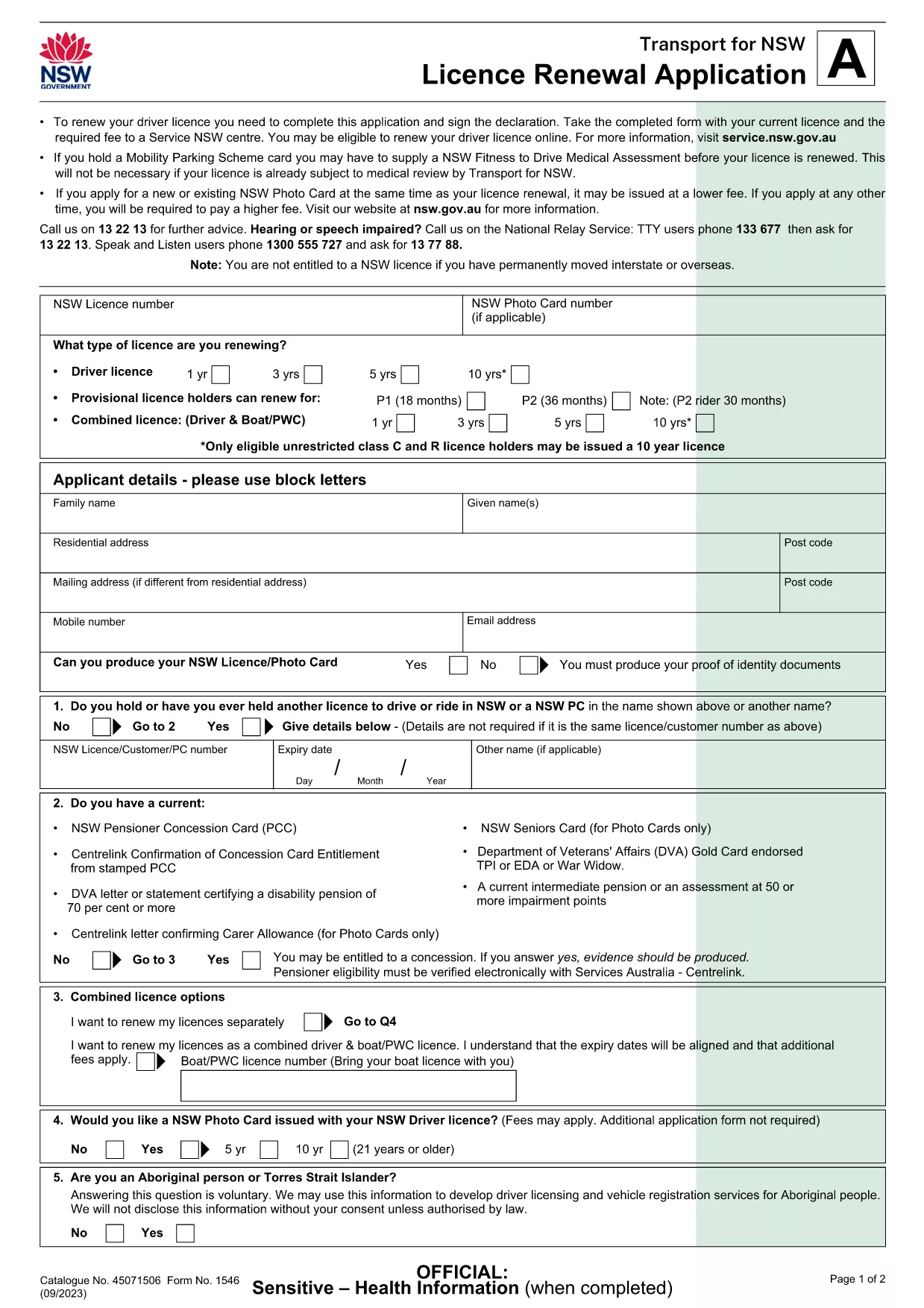
Turning 70 means it’s time to update your driver’s licence to meet the latest safety standards. The Licence Renewal Application (Form 1546) is a fillable PDF that lets you provide all required details from the comfort of home.

This page gives you everything you need – a direct download, an instant online filler, clear instructions, and answers to the most common questions.

Why Renew Your Licence at Age 70?

  • Legal requirement in many jurisdictions to re‑validate fitness to drive.
  • Update your photo and address to keep your record current.
  • Access any new concessions or senior driver programs.

Download & Fill the PDF Form

Click the Fill out this form button below. The Formize PDF Filler app will load the official Licence Renewal Application (PDF) directly in your browser, so you never need to install additional software.

Step‑by‑Step Guide to Complete the Form

Follow the simple steps in the How To section to finish your renewal quickly.

Common Mistakes to Avoid

  • Leaving mandatory fields blank – the filler will highlight them.
  • Using a low‑resolution photo – upload a clear, recent headshot.
  • Forgetting to sign the declaration – you can add a digital signature or print and sign.

Frequently Asked Questions

Scroll down for quick answers to the questions most drivers ask when renewing at 70.

التعليمات
  • Do I need to print the form after filling it online?

    Yes. The Service NSW centre requires a hard copy with your original signature and supporting documents.

  • Can I submit the form electronically?

    Currently the NSW government accepts only paper submissions for licence renewal, so you must print and deliver the form.

  • What identification documents do I need to bring?

    Bring your current driver’s licence, proof of residence (e.g., utility bill), and a recent passport‑style photo.

  • Is there an extra fee for renewing at age 70?

    The renewal fee is the standard rate for senior drivers in NSW; check the Service NSW website for the exact amount.

  • How long does the renewal process take?

    Processing at the centre usually takes 15‑30 minutes once you submit the completed form and payment.

  • What if I make a mistake on the form?

    If you notice an error before printing, simply go back to the Formize filler, correct the field, and re‑download the PDF.

  • Can I use a mobile device to fill the form?

    The Formize filler works best on a desktop or laptop. Mobile browsers may not display all fields correctly.

  • Do I need a separate medical certificate?

    If you have a medical condition that could affect driving, attach a Doctor’s Certificate with the form.

كيف

كيفية ملء renew driving licence at 70 مجانًا عبر الإنترنت في 6 خطوات سهلة:

  1. 1
    Click the Fill‑Out Button
    Press the “Fill out this form” button on this page. The Formize PDF Filler will open the licence renewal PDF in a secure window.
  2. 2
    Wait for the Filler to Load
    The app loads the fillable fields automatically. This usually takes a few seconds depending on your connection.
  3. 3
    Enter Your Details
    Type your personal information, address, and any medical declarations directly into the highlighted fields.
  4. 4
    Add a Digital Signature (Optional)
    If you have a digital signature, click the signature field and follow the prompts. Otherwise, you can print later to sign.
  5. 5
    Save and Download
    When all fields are complete, click “Save” to download the completed PDF to your device.
  6. 6
    Print, Sign, and Submit
    Print the saved form, sign with a black or blue pen if required, and bring it together with your current licence and fee to the nearest Service NSW centre.
Formize تطبيق PDF Filler
حول

نموذج renew driving licence at 70

باستخدام مجموعة الميزات التقليدية لعرض مستند PDF وتعبئته ، جنبًا إلى جنب مع مزايا تطبيق الويب والتخطيط سريع الاستجابة ، يمكنك إكمال renew driving licence at 70 في دقائق.

سمات

حشو PDF

أسهل طريقة لملء نماذج PDF عبر الإنترنت

  • املأ بسرعة renew driving licence at 70
    هل تبحث عن طريقة لملء كلمة renew driving licence at 70 بسرعة عبر الإنترنت؟ من خلال برنامج تعبئة نماذج PDF المجاني عبر الإنترنت ، ستعرف كيفية تحرير وتعبئة مستند pdf هذا في أقل من دقيقة.
  • محرر PDF سهل الاستخدام عبر الإنترنت
    هل سئمت طباعة ملفات PDF حتى تتمكن من تحريرها قبل إعادة مسحها ضوئيًا وإرسالها مرة أخرى؟ تحرير مستندات PDF مجانًا عبر الإنترنت. استخدم محرر pdf على الإنترنت لتوفير الوقت والورق.
  • أدوات رائعة ، جميع المنصات
    هل تتساءل عن كيفية ملء renew driving licence at 70 على جهاز Mac ، أو ربما كيفية استخدام حشو PDF مجانًا؟ تعمل أدوات PDF الخاصة بنا عبر الإنترنت على جميع الأنظمة الأساسية.
  • تخزين الملفات الآمن
    يتم تخزين ملفات "renew driving licence at 70" المكتملة في قاعدة بيانات آمنة تديرها استضافة Amazon Cloud. يمكنك حذف ملفاتك من نظامنا في أي وقت. على أي حال ، يتم حذف هذه الملفات تلقائيًا بعد 24 ساعة.
  • الدردشة مع {كلمة رئيسية}
    قم بالدردشة مع "renew driving licence at 70" على Chatize وهو مساعد مجاني لقارئ PDF. اطرح الأسئلة واحصل على الإجابات من "renew driving licence at 70". فقط انقر على زر الدردشة مع المستند أعلاه.

حذف جلسة التعبئة

حذف جلسة التعبئة المحددة؟ في هذه الحالة، سيتم فقد تقدمك في إكمال النموذج.

حذف جلسة التحرير

هل تريد حذف جلسة التحرير المحددة؟ في هذه الحالة، سيتم فقدان التقدم الذي أحرزته في إنشاء النموذج وتحريره.