
اختار اللغة

RTB-40 Tenant Direct Request Worksheet (Fillable PDF)

  1. لغة إنجليزي
  2. دولة كندا
  3. نشاط الإيجار
  4. دولة كولومبيا البريطانية
RTB-40 Tenant Direct Request Worksheet (Fillable PDF)

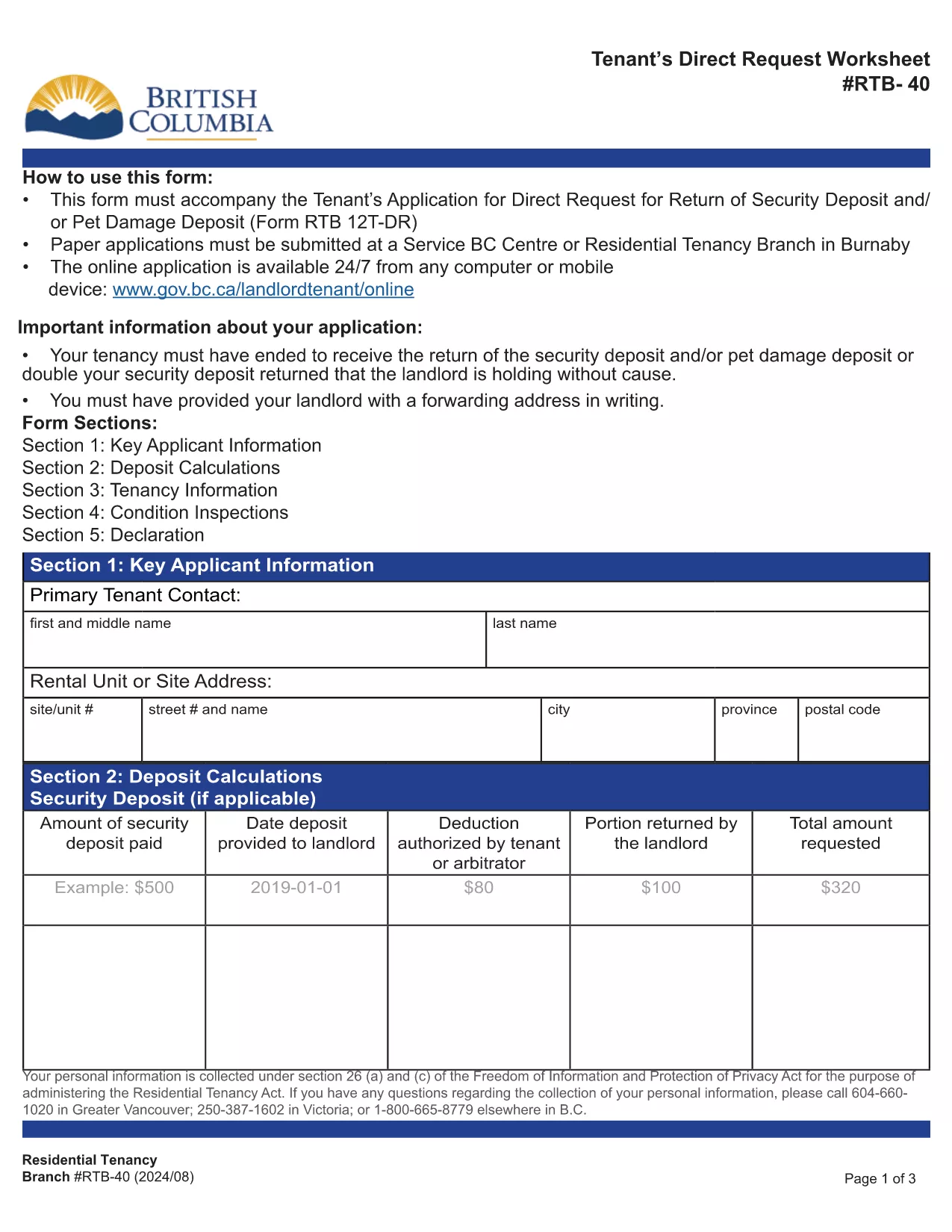
The RTB-40, also known as the Tenant Direct Request Worksheet, is the official British Columbia Residential Tenancy Branch form used when a tenant requests the return of a security or pet‑damage deposit. It allows you to present evidence, list amounts owed, and provide your forwarding address.

Formize hosts a fully‑fillable, web‑based version of this PDF so you can complete the worksheet from any device without installing Adobe Reader. Your data is saved securely and the final PDF can be downloaded or emailed directly to the Residential Tenancy Branch.

Using the online filler saves time, eliminates printing errors, and ensures the form meets the latest BC tenancy regulations.

التعليمات
  • Do I need Adobe Reader to fill the RTB‑40?

    No. Formize’s online filler works in any modern browser, so you can complete the form without installing additional software.

  • Can I save my progress and finish later?

    Yes. The filler allows you to download a partially completed PDF, which you can reopen in Formize to continue editing.

  • Is the online version accepted by the Residential Tenancy Branch?

    Absolutely. The PDF generated by Formize is identical to the official government version, so it meets all submission requirements.

  • What supporting documents should I attach?

    Include copies of the original lease, receipts for any deductions, and proof of the deposit amount. List each item in the worksheet’s evidence section.

  • How do I correct a mistake after I’ve saved the PDF?

    Open the saved PDF again in Formize, make the necessary edits, and re‑save. The file remains fully editable until it is signed.

  • Is there a fee to use Formize’s PDF filler?

    No. The filler is free for all government forms, including the RTB‑40.

كيف

كيفية ملء RTB-40 مجانًا عبر الإنترنت في 4 خطوات سهلة:

  1. 1
    Open the Fillable Form
    Click the blue “Fill out this form” button on this page. The Formize PDF Filler will open in a new tab.
  2. 2
    Enter Your Information
    Type directly into each field – the worksheet includes sections for tenant details, deposit amounts, and supporting evidence.
  3. 3
    Review and Save
    Check all entries for accuracy, then click “Save PDF”. The completed RTB‑40 will be downloaded to your computer.
  4. 4
    Submit to the Residential Tenancy Branch
    Print the saved PDF or attach it to an email as instructed in your tenancy dispute package.
Formize تطبيق PDF Filler
حول

نماذج لأصحاب العقارات و / أو المستأجرين لاقتراح إجراءات تتعلق باتفاقيات الإيجار.

RTB-40 هو نوع اتفاقيات الإيجار السكني المستخدمة من قبل معظم الملاك وجمعيات الإسكان الخاصة.

هناك عدد من الأمور التي يجب على الملاك أو المستأجرين اتباع بعض القواعد المنصوص عليها في اللوائح. في بعض الحالات قد يكون من الضروري بالنسبة لهم إكمال نموذج يسمى "نموذج محدد" يقترح إجراء قد يؤثر على الطرف الآخر في اتفاقية الإيجار.

تسمى النماذج بالنماذج الموصوفة لأن الصياغة الواردة فيها تمت صياغتها بعناية للتأكد من أن الشخص الذي يكمل النموذج والشخص الذي يتم تقديمه له قد يفهم ما يتم اقتراحه وما قد يفعله ردًا على ذلك. قد يؤدي عدم تقديم النموذج الصحيح إلى إبطال الإجراء المقترح.

لا يجوز لك تغيير الصياغة في هذه النماذج ما لم ينص النموذج على أنه يمكنك القيام بذلك. إذا قمت بتعديل الصياغة ، فقد يتم إبطال النموذج. يجب عليك أيضًا الالتزام بأي فترات إشعار محددة في النموذج.

سمات

حشو PDF

أسهل طريقة لملء نماذج PDF عبر الإنترنت

  • املأ بسرعة RTB-40
    هل تبحث عن طريقة لملء كلمة RTB-40 بسرعة عبر الإنترنت؟ من خلال برنامج تعبئة نماذج PDF المجاني عبر الإنترنت ، ستعرف كيفية تحرير وتعبئة مستند pdf هذا في أقل من دقيقة.
  • محرر PDF سهل الاستخدام عبر الإنترنت
    هل سئمت طباعة ملفات PDF حتى تتمكن من تحريرها قبل إعادة مسحها ضوئيًا وإرسالها مرة أخرى؟ تحرير مستندات PDF مجانًا عبر الإنترنت. استخدم محرر pdf على الإنترنت لتوفير الوقت والورق.
  • أدوات رائعة ، جميع المنصات
    هل تتساءل عن كيفية ملء RTB-40 على جهاز Mac ، أو ربما كيفية استخدام حشو PDF مجانًا؟ تعمل أدوات PDF الخاصة بنا عبر الإنترنت على جميع الأنظمة الأساسية.
  • تخزين الملفات الآمن
    يتم تخزين ملفات "RTB-40" المكتملة في قاعدة بيانات آمنة تديرها استضافة Amazon Cloud. يمكنك حذف ملفاتك من نظامنا في أي وقت. على أي حال ، يتم حذف هذه الملفات تلقائيًا بعد 24 ساعة.
  • الدردشة مع {كلمة رئيسية}
    قم بالدردشة مع "RTB-40" على Chatize وهو مساعد مجاني لقارئ PDF. اطرح الأسئلة واحصل على الإجابات من "RTB-40". فقط انقر على زر الدردشة مع المستند أعلاه.

حذف جلسة التعبئة

حذف جلسة التعبئة المحددة؟ في هذه الحالة، سيتم فقد تقدمك في إكمال النموذج.

حذف جلسة التحرير

هل تريد حذف جلسة التحرير المحددة؟ في هذه الحالة، سيتم فقدان التقدم الذي أحرزته في إنشاء النموذج وتحريره.