
اختار اللغة

IMM 5476 – Use of a Representative (Canada)

  1. دولة كندا
  2. لغة إنجليزي فرنسي
  3. نشاط التأشيرات
IMM 5476 – Use of a Representative (Canada)

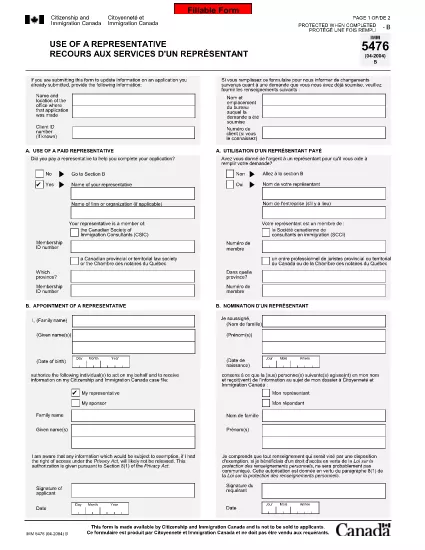
The IMM 5476 – Use of a Representative form allows you to officially appoint an immigration consultant, lawyer, or another authorized person to act on your behalf with Immigration, Refugees and Citizenship Canada (IRCC) and the Canada Border Services Agency (CBSA). This form is required for most permanent‑resident, temporary‑resident, and citizenship applications.

What Is the IMM 5476 Form?

IMM 5476 is a government‑issued PDF that records the details of your chosen representative, their contact information, and the scope of authority you are granting. It is available in both English and French and must be signed by both you (the applicant) and your representative.

How to Fill Out IMM 5476 Online

Instead of downloading the PDF and editing it manually, simply click the "Fill out this form" button on the page. Our Formize PDF Filler app will load the fillable version instantly, letting you complete the form directly in your browser.

Common Mistakes to Avoid

  • Incorrect Representative Details: Double‑check the name, address, and CRA‑issued client number of your representative.
  • Missing Signatures: Both the applicant and the representative must sign; unsigned forms are rejected.
  • Wrong Language Version: Use the official English or French version that matches the rest of your application package.
  • Out‑of‑Date Form: Always use the latest version – the link below always points to the current PDF.

When to Submit the Form

Attach IMM 5476 to the same package as your main application (e.g., Express Entry, Study Permit, Visitor Visa). If you change representatives later, submit a new, signed IMM 5476 with your updated request.

Need More Help?

While Formize does not provide live support, you can find detailed guidance on the IRCC website or consult a licensed immigration professional.

التعليمات
  • Do I need a lawyer to fill out IMM 5476?

    No. You can appoint any authorized representative, such as a licensed immigration consultant, lawyer, or family member, as long as they have a valid client number.

  • Can I change my representative after submitting the form?

    Yes. Submit a new, signed IMM 5476 with the updated representative’s details and include a brief letter explaining the change.

  • Is a digital signature accepted?

    IRCC accepts electronic signatures generated within a fillable PDF application like Formize, provided the signature field is clearly marked.

  • What happens if I forget to sign the form?

    An unsigned IMM 5476 will be considered incomplete and may delay processing of your entire application.

  • Do I need to submit both English and French versions?

    Submit only the language version that matches the rest of your application package. IRCC does not require both versions.

  • Is there a fee to use the Formize PDF Filler?

    No. Formize provides free access to fillable PDFs for government forms like IMM 5476.

  • Can I print the form after filling it online?

    Yes. Once you finish, click "Download PDF" and print a hard copy if your submission requires a physical signature.

  • Where can I find the latest version of IMM 5476?

    The link on this page always points to the most recent version published by Immigration, Refugees and Citizenship Canada.

كيف

كيفية ملء IMM 5476 مجانًا عبر الإنترنت في 5 خطوات سهلة:

  1. 1
    Open the Fillable Form
    Click the "Fill out this form" button on the page. The Formize PDF Filler app will load the IMM 5476 form directly in your browser.
  2. 2
    Enter Applicant Information
    Fill in your full name, client ID, and contact details in the Applicant section. All fields are required.
  3. 3
    Enter Representative Details
    Provide the representative’s name, firm, address, phone, and email. Make sure the CRA client number matches the one on record.
  4. 4
    Add Signatures
    Use the built‑in signature fields to sign electronically. Both you and your representative must sign before saving.
  5. 5
    Download or Submit
    After completing the form, click "Download PDF" to save a copy for your records, then attach it to your immigration application package.
Formize تطبيق PDF Filler
حول

نماذج التأشيرات

IMM 5476 هي إحدى نماذج التأشيرات التي هي مستندات تُستخدم لتقديم طلب للحصول على تأشيرة لدخول بلد أجنبي. التأشيرة هي وثيقة تسمح للمواطن الأجنبي بالدخول والإقامة والعمل أحيانًا في بلد أجنبي لفترة زمنية محددة. تختلف الأشكال والمتطلبات الدقيقة للحصول على التأشيرة حسب البلد ونوع التأشيرة.

تتطلب نماذج التأشيرات عادةً معلومات شخصية مثل الاسم وتاريخ الميلاد ومعلومات جواز السفر ، بالإضافة إلى معلومات حول الغرض من الرحلة ومدتها ، والوجهة المقصودة ، وما إذا كان مقدم الطلب قد سبق رفض منحه تأشيرة أو تم ترحيله من بلد ما. قد تتطلب النماذج أيضًا مستندات داعمة مثل جواز السفر والصور وإثبات الدعم المالي.

في الولايات المتحدة ، أكثر أشكال التأشيرات شيوعًا هي نماذج DS-160 و DS-260. يُستخدم النموذج DS-160 للتقدم للحصول على تأشيرة لغير المهاجرين ، بينما يُستخدم النموذج DS-260 للتقدم للحصول على تأشيرة هجرة. تتطلب هذه النماذج معلومات مفصلة حول السجل الشخصي وتاريخ السفر لمقدم الطلب ، بالإضافة إلى الوثائق الداعمة مثل جواز السفر وخط سير الرحلة والسجلات المالية.

قد يكون لدى البلدان الأخرى نماذج ومتطلبات مختلفة للتأشيرات ، لكن العملية الأساسية تتضمن عادةً إكمال طلب التأشيرة ، وتقديم الوثائق الداعمة ، وحضور مقابلة مع مسؤول قنصلي في سفارة أو قنصلية أمريكية. من المهم ملاحظة أن عملية طلب التأشيرة يمكن أن تكون معقدة وتستغرق وقتًا طويلاً ، ومن المستحسن أن يقوم الأفراد الذين يسعون للحصول على تأشيرة بالتشاور مع محامي الهجرة أو غيره من المهنيين المؤهلين لضمان تلبية جميع النماذج والمتطلبات الضرورية.

سمات

حشو PDF

أسهل طريقة لملء نماذج PDF عبر الإنترنت

  • املأ بسرعة IMM 5476
    هل تبحث عن طريقة لملء كلمة IMM 5476 بسرعة عبر الإنترنت؟ من خلال برنامج تعبئة نماذج PDF المجاني عبر الإنترنت ، ستعرف كيفية تحرير وتعبئة مستند pdf هذا في أقل من دقيقة.
  • محرر PDF سهل الاستخدام عبر الإنترنت
    هل سئمت طباعة ملفات PDF حتى تتمكن من تحريرها قبل إعادة مسحها ضوئيًا وإرسالها مرة أخرى؟ تحرير مستندات PDF مجانًا عبر الإنترنت. استخدم محرر pdf على الإنترنت لتوفير الوقت والورق.
  • أدوات رائعة ، جميع المنصات
    هل تتساءل عن كيفية ملء IMM 5476 على جهاز Mac ، أو ربما كيفية استخدام حشو PDF مجانًا؟ تعمل أدوات PDF الخاصة بنا عبر الإنترنت على جميع الأنظمة الأساسية.
  • تخزين الملفات الآمن
    يتم تخزين ملفات "IMM 5476" المكتملة في قاعدة بيانات آمنة تديرها استضافة Amazon Cloud. يمكنك حذف ملفاتك من نظامنا في أي وقت. على أي حال ، يتم حذف هذه الملفات تلقائيًا بعد 24 ساعة.
  • الدردشة مع {كلمة رئيسية}
    قم بالدردشة مع "IMM 5476" على Chatize وهو مساعد مجاني لقارئ PDF. اطرح الأسئلة واحصل على الإجابات من "IMM 5476". فقط انقر على زر الدردشة مع المستند أعلاه.

حذف جلسة التعبئة

حذف جلسة التعبئة المحددة؟ في هذه الحالة، سيتم فقد تقدمك في إكمال النموذج.

حذف جلسة التحرير

هل تريد حذف جلسة التحرير المحددة؟ في هذه الحالة، سيتم فقدان التقدم الذي أحرزته في إنشاء النموذج وتحريره.