اختار اللغة

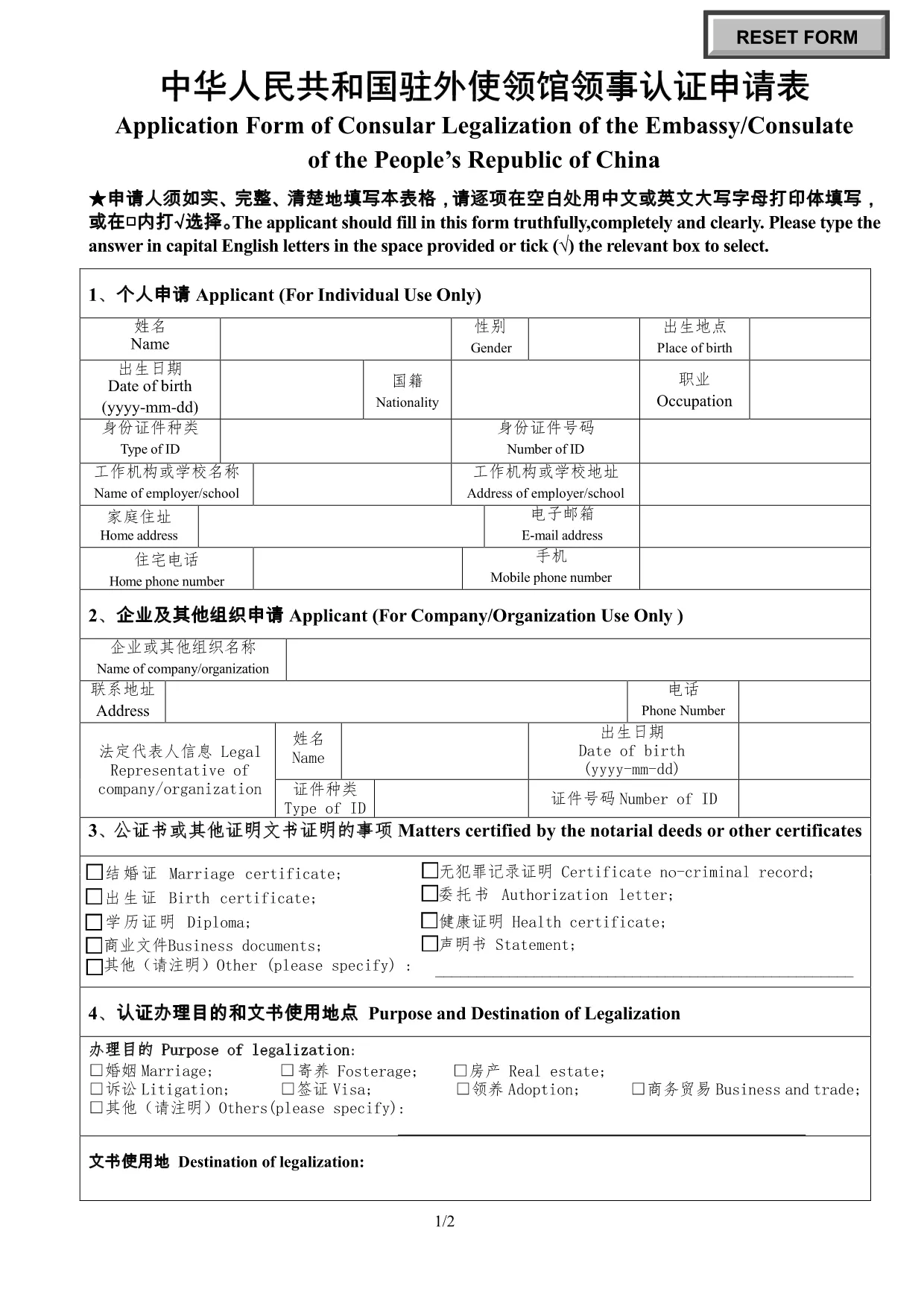
Application Form of Consular Legalization – Embassy of China

  1. دولة China
  2. لغة إنجليزي
  3. نشاط Legalization
  4. قسم Embassy
Application Form of Consular Legalization – Embassy of China

Need to authenticate a document for use in China? The Application Form of Consular Legalization is the official paperwork required by the Embassy or Consulate of the People’s Republic of China. This fillable PDF lets you submit your request quickly and accurately.

What Is Consular Legalization?

Consular legalization (also called consular authentication) is the final step in verifying foreign documents for use in China. After a document is notarized and apostilled, the Chinese embassy or consulate adds its seal, confirming the document’s authenticity.

How to Complete the Application Form

Follow these simple steps to fill out the form online with Formize’s PDF Filler:

  1. Click the "Fill out this form" button below.
  2. Wait a few seconds while the Formize PDF Filler app loads.
  3. Enter your information in capital English letters or Chinese characters as instructed.
  4. Save the completed form, print it, and attach any required supporting documents.
  5. Submit the printed form to the nearest Chinese embassy or consulate.

Common Mistakes to Avoid

  • Leaving blanks: Every field must be completed, even if the answer is “N/A”.
  • Using cursive handwriting: Print in clear block letters; the form is not accepted if the text is illegible.
  • Incorrect document type: Verify that your document is eligible for consular legalization before filling the form.
  • Mismatched languages: Use Chinese or English as requested; mixing both in the same field can cause delays.

Download & Fill the Form Instantly

Our integrated Formize PDF Filler loads the official PDF directly in your browser—no extra software needed. Click the button, fill the fields, and you’re ready to print and submit.

Fill out this form

التعليمات
  • What is consular legalization?

    Consular legalization is the process by which a Chinese embassy or consulate certifies the authenticity of foreign public documents so they can be used in China.

  • Who needs to fill out this form?

    Anyone who wants a foreign document (e.g., birth certificate, academic diploma, power of attorney) recognized in China must submit this application.

  • Can I edit the form after I’ve saved it?

    Yes. The Formize PDF Filler lets you reopen the saved PDF and make changes before printing the final version.

  • How long does the legalization process take?

    Processing time varies by embassy, but most consulates complete legalization within 3–5 business days after receiving a complete application.

  • Is there a fee for consular legalization?

    Yes. Each embassy sets its own fee schedule. Check the specific embassy’s website for the current cost.

  • Do I need to bring the original document?

    Yes. Submit the original document together with the completed application form and any required copies.

  • Can I submit the form electronically?

    The form itself must be printed and signed, but you can fill it out electronically with Formize before printing.

  • What languages are accepted on the form?

    The form may be completed in either English or Chinese. Use clear block letters; cursive handwriting is not accepted.

  • Where can I find the official PDF?

    The official fillable PDF is available for download via the link below, hosted on the Chinese embassy’s website.

  • What should I do if I make a mistake?

    If you notice an error after printing, cross out the mistake neatly, initial it, and write the correct information in the space provided.

كيف

كيفية ملء Consular legalization form China مجانًا عبر الإنترنت في 5 خطوات سهلة:

  1. 1
    Open the Form
    Click the "Fill out this form" button on the page. The Formize PDF Filler will open the official consular legalization PDF in a new tab.
  2. 2
    Load the PDF Filler
    Allow a few seconds for the online filler to load. No download or installation is required.
  3. 3
    Enter Your Information
    Complete every field using capital English letters or Chinese characters as indicated. Use the tab key to move quickly between fields.
  4. 4
    Save and Print
    When all sections are filled, click "Save" to download a copy, then print the form on plain A4 paper.
  5. 5
    Submit to the Embassy
    Attach the printed form to your supporting documents and submit them to the nearest Chinese embassy or consulate for legalization.
Formize تطبيق PDF Filler
حول

نموذج Consular legalization form China

باستخدام مجموعة الميزات التقليدية لعرض مستند PDF وتعبئته ، جنبًا إلى جنب مع مزايا تطبيق الويب والتخطيط سريع الاستجابة ، يمكنك إكمال Consular legalization form China في دقائق.

سمات

حشو PDF

أسهل طريقة لملء نماذج PDF عبر الإنترنت

  • املأ بسرعة Consular legalization form China
    هل تبحث عن طريقة لملء كلمة Consular legalization form China بسرعة عبر الإنترنت؟ من خلال برنامج تعبئة نماذج PDF المجاني عبر الإنترنت ، ستعرف كيفية تحرير وتعبئة مستند pdf هذا في أقل من دقيقة.
  • محرر PDF سهل الاستخدام عبر الإنترنت
    هل سئمت طباعة ملفات PDF حتى تتمكن من تحريرها قبل إعادة مسحها ضوئيًا وإرسالها مرة أخرى؟ تحرير مستندات PDF مجانًا عبر الإنترنت. استخدم محرر pdf على الإنترنت لتوفير الوقت والورق.
  • أدوات رائعة ، جميع المنصات
    هل تتساءل عن كيفية ملء Consular legalization form China على جهاز Mac ، أو ربما كيفية استخدام حشو PDF مجانًا؟ تعمل أدوات PDF الخاصة بنا عبر الإنترنت على جميع الأنظمة الأساسية.
  • تخزين الملفات الآمن
    يتم تخزين ملفات "Consular legalization form China" المكتملة في قاعدة بيانات آمنة تديرها استضافة Amazon Cloud. يمكنك حذف ملفاتك من نظامنا في أي وقت. على أي حال ، يتم حذف هذه الملفات تلقائيًا بعد 24 ساعة.
  • الدردشة مع {كلمة رئيسية}
    قم بالدردشة مع "Consular legalization form China" على Chatize وهو مساعد مجاني لقارئ PDF. اطرح الأسئلة واحصل على الإجابات من "Consular legalization form China". فقط انقر على زر الدردشة مع المستند أعلاه.

حذف جلسة التعبئة

حذف جلسة التعبئة المحددة؟ في هذه الحالة، سيتم فقد تقدمك في إكمال النموذج.

حذف جلسة التحرير

هل تريد حذف جلسة التحرير المحددة؟ في هذه الحالة، سيتم فقدان التقدم الذي أحرزته في إنشاء النموذج وتحريره.