اختار اللغة

Form 15H – Senior Citizens’ Interest Income Declaration (Fillable PDF)

  1. لغة إنجليزي
  2. دولة الهند
  3. نشاط الضرائب
Form 15H – Senior Citizens’ Interest Income Declaration (Fillable PDF)

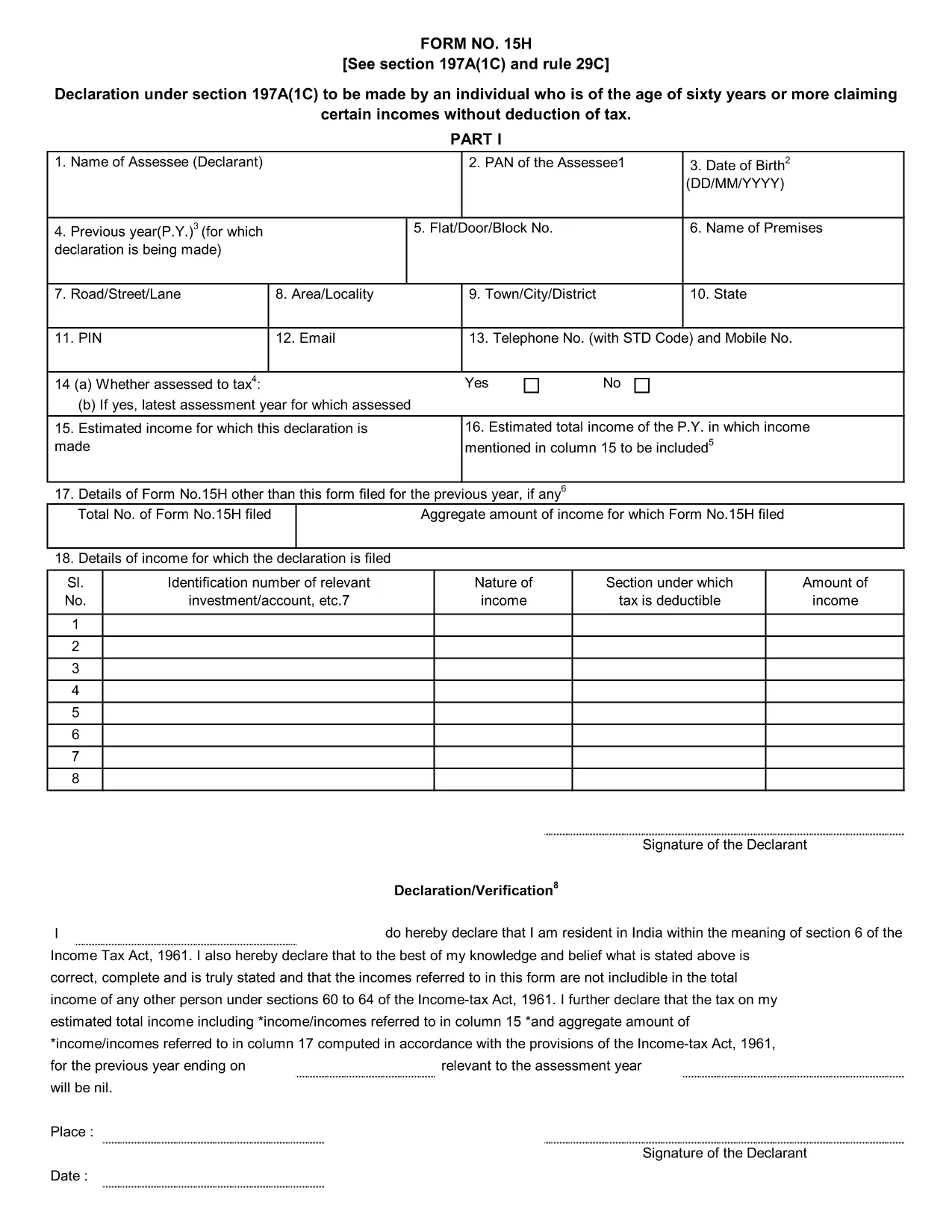
Form 15H is a declaration under sub‑section (1C) of section 197A of the Income‑Tax Act, 1961. It allows senior citizens (aged 60 years or more) to request that tax be **not deducted at source (TDS)** on interest earned from bank or post‑office deposits, provided they meet certain income thresholds.

Who Can Use Form 15H?

  • Resident individuals aged 60 years or above.
  • Those whose total taxable income does not exceed the limits set by the Act (₹3 lakhs for ages 60‑79, ₹5 lakhs for 80 years and above).
  • Taxpayers who receive interest income from banks, post offices, or cooperative societies.

Eligibility & Income Limits

The Income‑Tax Department defines two income caps:

  • Age 60‑79: Taxable income ≤ ₹300,000 per financial year.
  • Age 80 and above: Taxable income ≤ ₹500,000 per financial year.

If your interest earnings are below ₹50,000 in a year, you are not required to submit Form 15H – the bank will not deduct TDS automatically.

How to Fill Form 15H Online

Instead of downloading the PDF and editing it locally, simply click the "Fill out this form" button on this page. The Formize PDF Filler app will load in your browser, allowing you to complete the declaration in a few easy steps:

  1. Enter your name, PAN, and address as they appear on your PAN card.
  2. Provide your bank account details where the interest is credited.
  3. Declare the total interest earned and confirm it is within the eligible limit.
  4. Sign electronically (or print, sign, and scan if you prefer a hard copy).
  5. Submit the form to your bank or download it for manual submission.

Common Mistakes to Avoid

  • Entering an incorrect PAN – the bank will reject the form.
  • Mis‑calculating total taxable income; always include salary, rent, and other earnings.
  • Submitting the form after the interest has already been taxed – it must be given **before** the bank deducts TDS.
  • Leaving the "Signature" field blank; an electronic signature is acceptable in most banks.

Download & Save the Fillable PDF

If you prefer a local copy, you can download the official fillable PDF below. The file retains the original layout and can be opened with any modern PDF reader.

Download Form 15H – Fillable PDF

Using Formize’s online filler saves time, reduces errors, and lets you submit the declaration instantly to your bank.

التعليمات
  • What is the purpose of Form 15H?

    Form 15H allows senior citizens (60 years or older) to request that TDS be **not deducted** on interest income when their total taxable income is below the specified thresholds.

  • Can I use Form 15H if I am below 60 years?

    No. Individuals under 60 should use Form 15G, which serves the same purpose for younger taxpayers.

  • Do I need to submit Form 15H every financial year?

    Yes. The declaration is valid only for the financial year in which it is submitted. A new Form 15H must be provided each year you wish to claim the exemption.

  • What if my interest income exceeds ₹50,000?

    If interest exceeds ₹50,000, the bank will automatically deduct TDS unless you submit a valid Form 15H before the interest is credited.

  • Is an electronic signature accepted?

    Most banks accept an electronic signature entered via the Formize PDF Filler. If your bank requires a handwritten signature, print, sign, and scan the completed form.

  • Can I submit Form 15H online to the Income‑Tax Department?

    Form 15H is submitted to the **bank or post‑office** where the interest is credited, not directly to the Income‑Tax Department.

  • What happens if I submit an incorrect PAN?

    The bank will reject the form and may still deduct TDS. Ensure the PAN matches the one on your PAN card.

  • Do I need to attach any supporting documents?

    Generally no. The form itself is sufficient, but keep your interest statements handy in case the bank requests verification.

كيف

كيفية ملء Form 15H مجانًا عبر الإنترنت في 5 خطوات سهلة:

  1. 1
    Click the Fill‑out Button
    Press the "Fill out this form" button on the page. The Formize PDF Filler loads instantly in your browser.
  2. 2
    Enter Your Details
    Provide your name, PAN, address, bank account number, and total interest earned as prompted.
  3. 3
    Verify Income Limits
    The filler will automatically check that your total taxable income is within the ₹3 Lakh or ₹5 Lakh limits based on age.
  4. 4
    Add Your Signature
    Use the electronic signature tool or upload a scanned signature image.
  5. 5
    Submit or Download
    Send the completed form directly to your bank via their portal, or download the PDF for manual submission.
Formize تطبيق PDF Filler
حول

نماذج دائرة ضريبة الدخل

Form 15H هو أحد النماذج الرسمية التي تستخدمها دائرة ضريبة الدخل في الهند لإدارة ضرائب الدخل وتحصيلها. ويستخدم دافعو الضرائب هذه النماذج للإبلاغ عن دخلهم وخصوماتهم والتزاماتهم الضريبية إلى السلطات الضريبية.

فيما يلي بعض نماذج دائرة ضريبة الدخل شائعة الاستخدام في الهند:

ITR-1 (Sahaj): يتم استخدام هذا النموذج بواسطة الأفراد الذين لديهم دخل من الراتب أو ملكية منزل واحد أو مصادر أخرى مثل الفوائد أو المعاش التقاعدي أو المعاش العائلي. ينطبق على الأفراد الذين يصل إجمالي دخلهم إلى روبية. 50 ألف.

ITR-2: يستخدم هذا النموذج الأفراد والهندوس العائلات غير المقسمة (HUFs) التي لديها دخل من مصادر أخرى غير العمل أو المهنة. ينطبق على الأفراد الذين يتجاوز إجمالي دخلهم روبية. 50 كهس أو وجود أصول / دخل أجنبي.

ITR-3: يتم استخدام هذا النموذج من قبل الأفراد وHUFs وجود دخل من العمل أو المهنة. ينطبق هذا على الأفراد الذين لديهم دخل من شركة شراكة والمهنيين الذين يمارسون مهنة ما.

ITR-4 (Sugam): يتم استخدام هذا النموذج بواسطة الأفراد وHUFs والشركات (بخلاف LLP) الذين اختاروا نظام الضرائب المفترض بموجب الأقسام 44AD أو 44ADA أو 44AE من قانون ضريبة الدخل.

النموذج 16: يقدم أصحاب العمل هذا النموذج للموظفين ويحتوي على تفاصيل الراتب والضرائب المخصومة من المصدر (TDS) والمعلومات الأخرى ذات الصلة. يساعد الموظفين في تقديم إقرارات ضريبة الدخل الخاصة بهم بدقة.

النموذج 26AS: هذا ليس نموذجًا ولكنه بيان ضريبي سنوي موحد الذي يوفر ملخصًا للمعلومات المتعلقة بالضرائب مثل TDS والضريبة المسبقة وضريبة التقييم الذاتي التي يدفعها دافعو الضرائب. فهو يساعد دافعي الضرائب على التحقق من التزاماتهم الضريبية أثناء تقديم إقرارات ضريبة الدخل الخاصة بهم.

هذه مجرد أمثلة قليلة لنماذج دائرة ضريبة الدخل في الهند. قد تختلف النماذج والمتطلبات المحددة بناءً على طبيعة الدخل وفئة دافعي الضرائب وقوانين الضرائب السائدة في الهند. من المهم الرجوع إلى الموقع الرسمي لإدارة ضريبة الدخل في الهند (www. Incometaxindia.gov.in) أو طلب المشورة المهنية للحصول على معلومات دقيقة وحديثة بخصوص نماذج ضريبة الدخل المحددة ذات الصلة بوضعك الضريبي في الهند.

سمات

حشو PDF

أسهل طريقة لملء نماذج PDF عبر الإنترنت

  • املأ بسرعة Form 15H
    هل تبحث عن طريقة لملء كلمة Form 15H بسرعة عبر الإنترنت؟ من خلال برنامج تعبئة نماذج PDF المجاني عبر الإنترنت ، ستعرف كيفية تحرير وتعبئة مستند pdf هذا في أقل من دقيقة.
  • محرر PDF سهل الاستخدام عبر الإنترنت
    هل سئمت طباعة ملفات PDF حتى تتمكن من تحريرها قبل إعادة مسحها ضوئيًا وإرسالها مرة أخرى؟ تحرير مستندات PDF مجانًا عبر الإنترنت. استخدم محرر pdf على الإنترنت لتوفير الوقت والورق.
  • أدوات رائعة ، جميع المنصات
    هل تتساءل عن كيفية ملء Form 15H على جهاز Mac ، أو ربما كيفية استخدام حشو PDF مجانًا؟ تعمل أدوات PDF الخاصة بنا عبر الإنترنت على جميع الأنظمة الأساسية.
  • تخزين الملفات الآمن
    يتم تخزين ملفات "Form 15H" المكتملة في قاعدة بيانات آمنة تديرها استضافة Amazon Cloud. يمكنك حذف ملفاتك من نظامنا في أي وقت. على أي حال ، يتم حذف هذه الملفات تلقائيًا بعد 24 ساعة.
  • الدردشة مع {كلمة رئيسية}
    قم بالدردشة مع "Form 15H" على Chatize وهو مساعد مجاني لقارئ PDF. اطرح الأسئلة واحصل على الإجابات من "Form 15H". فقط انقر على زر الدردشة مع المستند أعلاه.

حذف جلسة التعبئة

حذف جلسة التعبئة المحددة؟ في هذه الحالة، سيتم فقد تقدمك في إكمال النموذج.

حذف جلسة التحرير

هل تريد حذف جلسة التحرير المحددة؟ في هذه الحالة، سيتم فقدان التقدم الذي أحرزته في إنشاء النموذج وتحريره.