
اختار اللغة

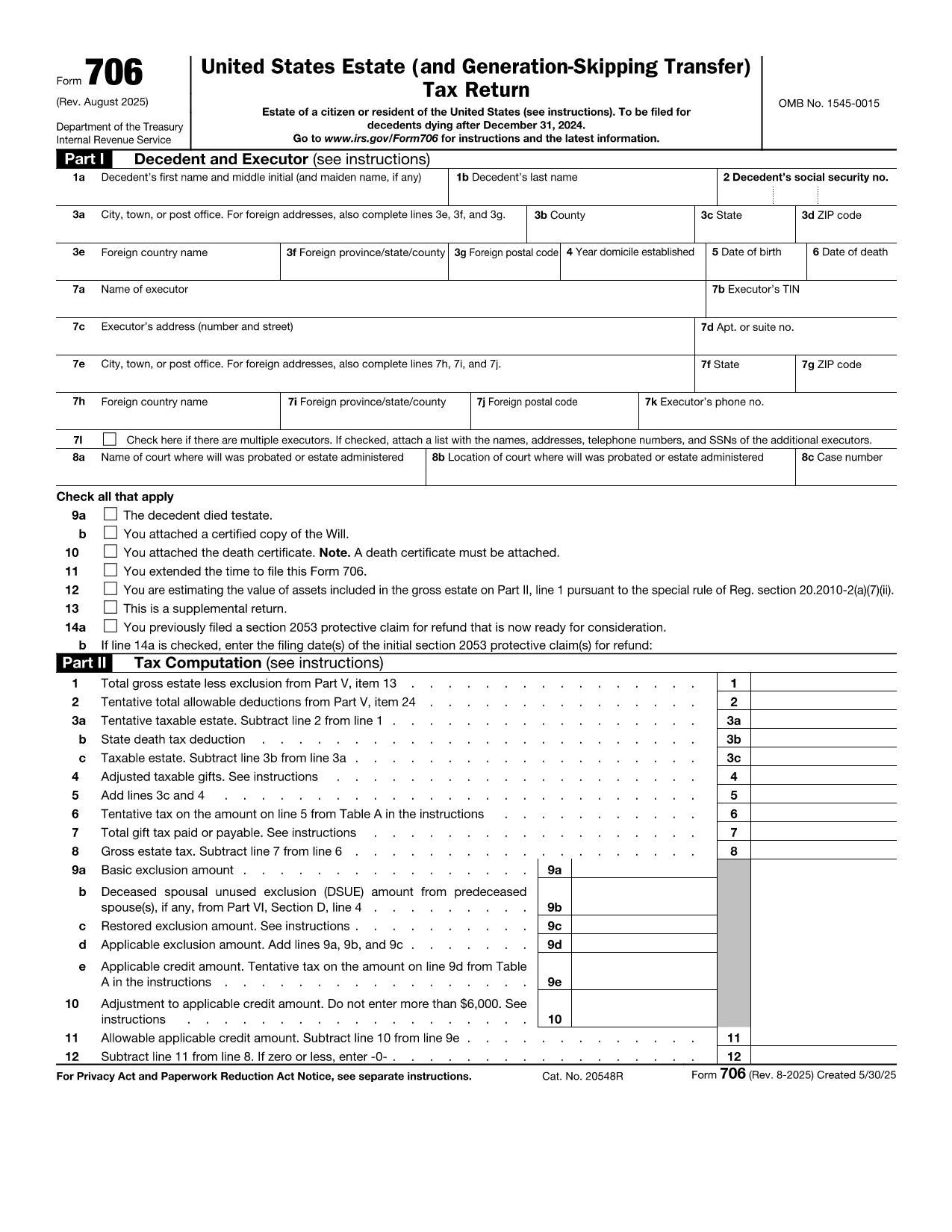
Form 706 is the United States federal estate (and generation‑skipping transfer) tax return. Executors use it to report the value of a decedent’s estate, claim deductions, and calculate any estate tax owed. The official fillable PDF is now hosted on Formize, allowing you to complete the form directly in your browser without installing additional software.

What Is IRS Form 706?

Form 706 must be filed when the gross estate exceeds the annual exemption limit (e.g., $12.92 million for 2023). It includes sections for:

  • Decedent’s personal information
  • Gross estate valuation
  • Allowable deductions (funeral expenses, state death taxes, charitable gifts, etc.)
  • Tax computation and credits
  • Schedules for assets, liabilities, and generation‑skipping transfers

Key Features of the Fillable PDF

  • Interactive fields that auto‑advance as you type
  • Built‑in calculations for taxable estate and tax due
  • Easy navigation with a table of contents
  • Direct export to PDF for printing or electronic filing

How to Complete Form 706 with Formize

Instead of downloading the PDF and opening a separate editor, simply click the "Fill out this form" button on this page. The Formize PDF Filler app will load in seconds, and you can start entering data immediately.

Common Mistakes to Avoid

  • Missing signatures: Both the executor and any paid preparer must sign.
  • Incorrect exemption amount: Verify the exemption limit for the year of death.
  • Omitting Schedule R‑1: Required when state death taxes are paid.
  • Late filing: File within nine months of death or request a six‑month extension.

Where to Submit the Completed Form

Mail the signed Form 706 to the address listed in the official instructions (based on the estate’s location). If you are filing electronically, use the IRS e‑file system for estate tax returns.

تعليمات

  • الاستمارة 706 - Instructions for Form 706, United States Estate (and Generation-Skipping Transfer Tax Return)
التعليمات
  • Who must file IRS Form 706?

    The executor (or personal representative) of a decedent’s estate must file Form 706 when the gross estate exceeds the federal exemption amount for the year of death.

  • What is the filing deadline for Form 706?

    Form 706 is due nine months after the date of death. An automatic six‑month extension can be requested, but any tax owed must be paid by the original deadline.

  • Can I file Form 706 electronically?

    Yes. After completing the fillable PDF, you can submit the form through the IRS’s e‑file system for estate tax returns.

  • Do I need a professional to complete Form 706?

    While the form is complex, the fillable PDF with built‑in calculations simplifies the process. However, many executors still consult a tax professional for large or complicated estates.

  • What if the estate is below the exemption limit?

    If the gross estate is less than the exemption amount, you are not required to file Form 706, but you should keep records in case the IRS requests them later.

  • How are generation‑skipping transfers reported?

    Schedule G of Form 706 captures generation‑skipping transfer (GST) tax information. The fillable PDF includes prompts to enter GST taxable amounts and credits.

  • What deductions can I claim on Form 706?

    Common deductions include funeral expenses, administrative costs, state death taxes paid, charitable contributions, and certain mortgage interest.

  • Is there a penalty for filing Form 706 late?

    Yes. Late filing may result in a penalty of 5% of the tax due for each month the return is late, up to a maximum of 25%.

كيف

كيفية ملء Form 706 مجانًا عبر الإنترنت في 5 خطوات سهلة:

  1. 1
    Open the Fillable Form
    Click the "Fill out this form" button on the page. The Formize PDF Filler will launch in a new tab.
  2. 2
    Enter Estate Information
    Start with the decedent’s name, SSN, and date of death. Then fill in the gross estate values and any deductions.
  3. 3
    Review Calculations
    The filler automatically updates the taxable estate and tax due. Verify the numbers against your supporting documents.
  4. 4
    Add Signatures
    Use the built‑in signature tool to sign as the executor and, if applicable, the paid preparer.
  5. 5
    Save and Export
    When finished, click "Export PDF". Save the file to your computer, print a copy, or submit electronically as instructed.
Formize تطبيق PDF Filler
حول

نماذج الضرائب الفيدرالية

Form 706 هو أحد نماذج الضرائب الفيدرالية التي تعد مستندات تُستخدم للإبلاغ عن ضرائب الدخل الفيدرالية وتقديمها إلى دائرة الإيرادات الداخلية (IRS) في الولايات المتحدة. يتم استخدام هذه النماذج من قبل الأفراد والشركات والمنظمات للإبلاغ عن دخلهم وخصوماتهم والمعلومات الأخرى ذات الصلة اللازمة لحساب التزاماتهم الضريبية الفيدرالية.

نموذج الضرائب الفيدرالية الأكثر استخدامًا هو النموذج 1040، والذي يستخدمه دافعو الضرائب الأفراد للإبلاغ عن ضريبة الدخل الشخصي الخاصة بهم. تشمل النماذج الأخرى شائعة الاستخدام نموذج 1065 للشراكات، النموذج 1120 للشركات، والنموذج 990 للمؤسسات المعفاة من الضرائب.

تتطلب نماذج الضرائب الفيدرالية عادةً من دافعي الضرائب الإبلاغ عن مصادر الدخل المختلفة، مثل الأجور والرواتب والإكراميات، بالإضافة إلى الدخل من الاستثمارات وتأجير العقارات ومصادر أخرى. تسمح النماذج أيضًا لدافعي الضرائب بالمطالبة بالخصومات والائتمانات لمختلف النفقات، مثل المساهمات الخيرية وفوائد الرهن العقاري ونفقات الرعاية الصحية.

من المهم تقديم نماذج الضرائب الفيدرالية بدقة وفي الوقت المحدد، لأن عدم القيام بذلك قد يؤدي إلى فرض عقوبات ورسوم فائدة من مصلحة الضرائب الأمريكية.

سمات

حشو PDF

أسهل طريقة لملء نماذج PDF عبر الإنترنت

  • املأ بسرعة Form 706
    هل تبحث عن طريقة لملء كلمة Form 706 بسرعة عبر الإنترنت؟ من خلال برنامج تعبئة نماذج PDF المجاني عبر الإنترنت ، ستعرف كيفية تحرير وتعبئة مستند pdf هذا في أقل من دقيقة.
  • محرر PDF سهل الاستخدام عبر الإنترنت
    هل سئمت طباعة ملفات PDF حتى تتمكن من تحريرها قبل إعادة مسحها ضوئيًا وإرسالها مرة أخرى؟ تحرير مستندات PDF مجانًا عبر الإنترنت. استخدم محرر pdf على الإنترنت لتوفير الوقت والورق.
  • أدوات رائعة ، جميع المنصات
    هل تتساءل عن كيفية ملء Form 706 على جهاز Mac ، أو ربما كيفية استخدام حشو PDF مجانًا؟ تعمل أدوات PDF الخاصة بنا عبر الإنترنت على جميع الأنظمة الأساسية.
  • تخزين الملفات الآمن
    يتم تخزين ملفات "Form 706" المكتملة في قاعدة بيانات آمنة تديرها استضافة Amazon Cloud. يمكنك حذف ملفاتك من نظامنا في أي وقت. على أي حال ، يتم حذف هذه الملفات تلقائيًا بعد 24 ساعة.
  • الدردشة مع {كلمة رئيسية}
    قم بالدردشة مع "Form 706" على Chatize وهو مساعد مجاني لقارئ PDF. اطرح الأسئلة واحصل على الإجابات من "Form 706". فقط انقر على زر الدردشة مع المستند أعلاه.

حذف جلسة التعبئة

حذف جلسة التعبئة المحددة؟ في هذه الحالة، سيتم فقد تقدمك في إكمال النموذج.

حذف جلسة التحرير

هل تريد حذف جلسة التحرير المحددة؟ في هذه الحالة، سيتم فقدان التقدم الذي أحرزته في إنشاء النموذج وتحريره.