
اختار اللغة

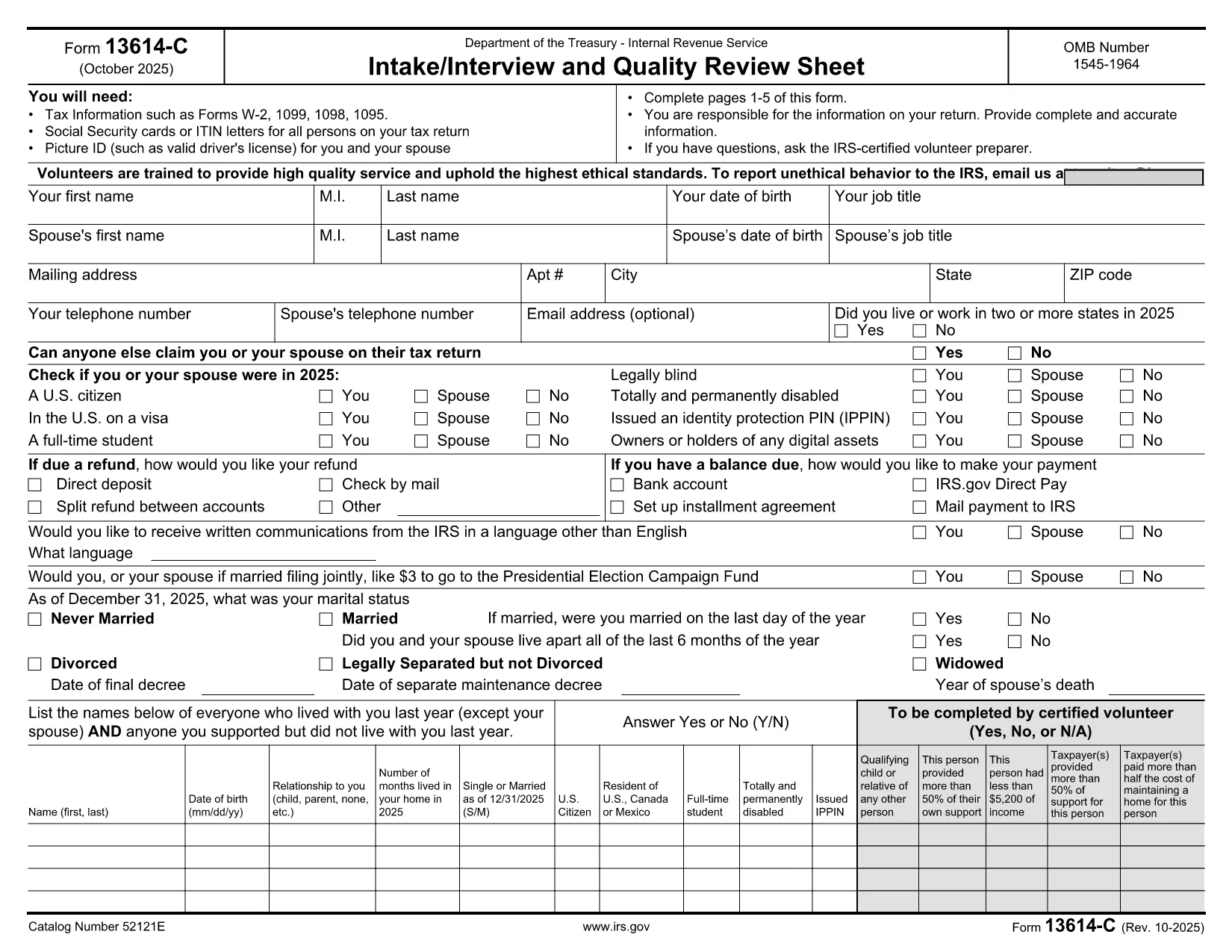
The IRS Form 13614-C (DE) is the Intake/Interview and Quality Review Sheet used by tax professionals to collect detailed taxpayer information. With Formize you can open the official fillable PDF directly in your browser, complete every field, and save a clean, error‑free version for submission.

What Is Form 13614-C (DE)?

This form gathers personal, income, deduction, and credit data required for accurate individual tax returns. The “(DE)” designation indicates the German‑language version, but the layout and fields are identical to the English edition, making it compatible with the standard IRS version.

How to Fill Out Form 13614-C (DE) Online

Instead of downloading, printing, and scanning, simply click the “Fill out this form” button below. The Formize PDF Filler app loads the fillable PDF, lets you type, check boxes, and add dates instantly.

Common Mistakes to Avoid

  • Leaving required fields blank – the filler highlights missing entries.
  • Using the wrong tax year – verify the revision date (10‑2025) at the top of the form.
  • Entering numbers in text fields – use numeric fields only for amounts.

Where to Submit the Completed Form

After saving, you can upload the PDF to your tax professional’s portal, email it securely, or attach it to your e‑file submission. The IRS does not accept handwritten versions for electronic filing.

Benefits of Using Formize PDF Filler

  • Instant online editing – no extra software needed.
  • Automatic validation – reduces IRS rejections.
  • Secure cloud storage – keep a copy for your records.

Ready to start? Click the button below, fill out the form, and download your completed PDF in seconds.

التعليمات
  • Is the Form 13614-C (DE) the same as the English version?

    Yes. The German‑language version contains the same fields and instructions; only the labels are translated.

  • Do I need special software to fill out the PDF?

    No. Formize’s online PDF Filler works in any modern browser – no Adobe Acrobat or other editor required.

  • Can I edit the form after I download it?

    Yes. The saved PDF remains fillable, so you can reopen it in Formize or any standard PDF editor for further changes.

  • What happens if I miss a required field?

    Formize highlights missing required fields before you can save, preventing common IRS rejections.

  • Is my data secure while using Formize?

    All data is encrypted in transit and at rest. Files are stored on secure servers and are not shared without your permission.

  • Do I need to print the form for IRS submission?

    No. The IRS accepts the completed fillable PDF electronically; printing is only necessary if you prefer a hard copy for your records.

كيف

كيفية ملء Form 13614-C DE مجانًا عبر الإنترنت في 3 خطوات سهلة:

  1. 1
    Open the Fillable Form
    Click the “Fill out this form” button on the page. The Formize PDF Filler loads the official Form 13614-C (DE) directly in your browser.
  2. 2
    Enter Your Information
    Type into each field, select check boxes, and use the date picker where needed. The app validates required fields in real time.
  3. 3
    Save and Download
    When all sections are complete, click “Save” to store the file in the cloud, then download the finished PDF to your computer or share it with your tax professional.
Formize تطبيق PDF Filler
حول

نماذج الضرائب الفيدرالية

Form 13614-C DE هو أحد نماذج الضرائب الفيدرالية التي تعد مستندات تُستخدم للإبلاغ عن ضرائب الدخل الفيدرالية وتقديمها إلى دائرة الإيرادات الداخلية (IRS) في الولايات المتحدة. يتم استخدام هذه النماذج من قبل الأفراد والشركات والمنظمات للإبلاغ عن دخلهم وخصوماتهم والمعلومات الأخرى ذات الصلة اللازمة لحساب التزاماتهم الضريبية الفيدرالية.

نموذج الضرائب الفيدرالية الأكثر استخدامًا هو النموذج 1040، والذي يستخدمه دافعو الضرائب الأفراد للإبلاغ عن ضريبة الدخل الشخصي الخاصة بهم. تشمل النماذج الأخرى شائعة الاستخدام نموذج 1065 للشراكات، النموذج 1120 للشركات، والنموذج 990 للمؤسسات المعفاة من الضرائب.

تتطلب نماذج الضرائب الفيدرالية عادةً من دافعي الضرائب الإبلاغ عن مصادر الدخل المختلفة، مثل الأجور والرواتب والإكراميات، بالإضافة إلى الدخل من الاستثمارات وتأجير العقارات ومصادر أخرى. تسمح النماذج أيضًا لدافعي الضرائب بالمطالبة بالخصومات والائتمانات لمختلف النفقات، مثل المساهمات الخيرية وفوائد الرهن العقاري ونفقات الرعاية الصحية.

من المهم تقديم نماذج الضرائب الفيدرالية بدقة وفي الوقت المحدد، لأن عدم القيام بذلك قد يؤدي إلى فرض عقوبات ورسوم فائدة من مصلحة الضرائب الأمريكية.

سمات

حشو PDF

أسهل طريقة لملء نماذج PDF عبر الإنترنت

  • املأ بسرعة Form 13614-C DE
    هل تبحث عن طريقة لملء كلمة Form 13614-C DE بسرعة عبر الإنترنت؟ من خلال برنامج تعبئة نماذج PDF المجاني عبر الإنترنت ، ستعرف كيفية تحرير وتعبئة مستند pdf هذا في أقل من دقيقة.
  • محرر PDF سهل الاستخدام عبر الإنترنت
    هل سئمت طباعة ملفات PDF حتى تتمكن من تحريرها قبل إعادة مسحها ضوئيًا وإرسالها مرة أخرى؟ تحرير مستندات PDF مجانًا عبر الإنترنت. استخدم محرر pdf على الإنترنت لتوفير الوقت والورق.
  • أدوات رائعة ، جميع المنصات
    هل تتساءل عن كيفية ملء Form 13614-C DE على جهاز Mac ، أو ربما كيفية استخدام حشو PDF مجانًا؟ تعمل أدوات PDF الخاصة بنا عبر الإنترنت على جميع الأنظمة الأساسية.
  • تخزين الملفات الآمن
    يتم تخزين ملفات "Form 13614-C DE" المكتملة في قاعدة بيانات آمنة تديرها استضافة Amazon Cloud. يمكنك حذف ملفاتك من نظامنا في أي وقت. على أي حال ، يتم حذف هذه الملفات تلقائيًا بعد 24 ساعة.
  • الدردشة مع {كلمة رئيسية}
    قم بالدردشة مع "Form 13614-C DE" على Chatize وهو مساعد مجاني لقارئ PDF. اطرح الأسئلة واحصل على الإجابات من "Form 13614-C DE". فقط انقر على زر الدردشة مع المستند أعلاه.

حذف جلسة التعبئة

حذف جلسة التعبئة المحددة؟ في هذه الحالة، سيتم فقد تقدمك في إكمال النموذج.

حذف جلسة التحرير

هل تريد حذف جلسة التحرير المحددة؟ في هذه الحالة، سيتم فقدان التقدم الذي أحرزته في إنشاء النموذج وتحريره.