
اختار اللغة

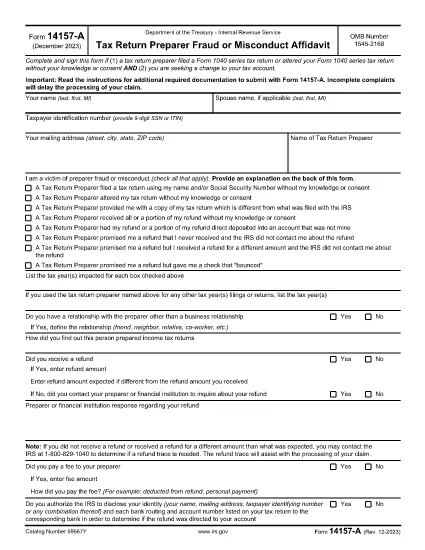
Form 14157‑A (SP) is the IRS’s official affidavit used to report fraud, misconduct, or other serious issues involving a tax return preparer. The “(SP)” designation indicates the Spanish‑language version of the form, but the same filing requirements apply to all taxpayers.

What Is Form 14157‑A (SP)?

This form must be submitted together with Form 14157 and any supporting documentation referenced in the instructions. It provides the IRS with detailed information about the alleged misconduct, allowing the agency to investigate and take corrective action.

How to Complete the Fillable PDF on Formize

Instead of downloading the PDF and opening it in a separate editor, you can fill it out directly on our site:

  1. Click the **"Fill out this form"** button below.
  2. Wait a few seconds while the Formize PDF Filler app loads.
  3. Enter all required information in the highlighted fields.
  4. Upload or draw your electronic signature in the signature field.
  5. Review the completed form for accuracy, then click **Submit** to download the signed PDF.

Common Mistakes to Avoid

  • Leaving fields blank: Every required field must be completed; otherwise the IRS will reject the form.
  • Incorrect SSN or EIN: Double‑check numbers to prevent processing delays.
  • Missing signature: The form must be signed under penalty of perjury. Use the built‑in e‑signature tool.
  • Failing to attach supporting documents: Include copies of any notices, letters, or evidence referenced in the affidavit.

Where to Send Your Completed Form

After you download the signed PDF, mail it to the address listed in the official Form 14157‑A instructions. The address varies by state, so be sure to consult the latest IRS guidance before sending.

Key Keywords for Quick Reference

Use these terms when searching for help or additional resources:

  • IRS Form 14157‑A
  • tax preparer fraud affidavit
  • fill‑able 14157‑A PDF
  • Spanish form 14157‑A
  • IRS fraud reporting form
  • electronic signature IRS form

Ready to start? Click the button below to open the fillable version instantly.

التعليمات
  • Do I need to file Form 14157‑A if I’m not sure the preparer committed fraud?

    Only file the form when you have concrete evidence or a strong belief that a preparer engaged in fraud, misconduct, or willful non‑compliance. Unsubstantiated claims may delay investigations.

  • Can I submit the form electronically?

    The IRS currently requires a printed, signed copy mailed to the appropriate address. However, you can use the fillable PDF to ensure accuracy before printing.

  • What supporting documents should I attach?

    Attach any IRS notices, correspondence, receipts, or other evidence that supports your claim. Clearly label each attachment.

  • Is the Spanish version (SP) any different from the English version?

    The content and required information are identical; only the language of the instructions and field labels changes.

  • How long does the IRS take to respond?

    Response times vary. The IRS typically acknowledges receipt within 30 days, but investigations can take several months depending on complexity.

  • What penalties exist for filing a false affidavit?

    Providing false information under penalty of perjury can result in criminal charges, fines, and possible imprisonment.

  • Do I need a tax professional to help me fill out Form 14157‑A?

    While not required, a tax professional can help ensure accuracy, especially if the case involves complex issues.

كيف

كيفية ملء IRS Form 14157-A مجانًا عبر الإنترنت في 5 خطوات سهلة:

  1. 1
    Open the Fillable Form
    Click the "Fill out this form" button on the page. The Formize PDF Filler will open in a new window.
  2. 2
    Load the Form
    Wait a few seconds while the fillable PDF loads completely.
  3. 3
    Enter Your Information
    Complete each highlighted field with accurate data, including SSN, tax year, and details of the alleged misconduct.
  4. 4
    Add an Electronic Signature
    Use the built‑in e‑signature tool to sign under penalty of perjury.
  5. 5
    Download and Submit
    Review the form, then click "Submit" to download the signed PDF. Mail it to the IRS address shown in the official instructions.
Formize تطبيق PDF Filler
حول

نماذج خدمة الإيرادات الداخلية (IRS).

IRS Form 14157-A هو أحد نماذج الضرائب الرسمية المستخدمة في الولايات المتحدة للإبلاغ عن الدخل والمطالبة بالخصومات والائتمانات وحساب الالتزام الضريبي والوفاء بالالتزامات الأخرى المتعلقة بالضرائب. مصلحة الضرائب الأمريكية هي الوكالة الفيدرالية المسؤولة عن إدارة وتنفيذ قوانين الإيرادات الداخلية في الولايات المتحدة.

فيما يلي بعض الأمثلة على نماذج خدمة الإيرادات الداخلية:

النموذج 1040: هذا هو نموذج إقرار ضريبة الدخل الفردي الأساسي الذي يستخدمه معظم دافعي الضرائب. يتم استخدامه للإبلاغ عن أنواع مختلفة من الدخل، والمطالبة بالخصومات والائتمانات، وحساب الالتزام الضريبي، وتحديد ما إذا كان دافع الضرائب مدينًا بضريبة إضافية أو يحق له استردادها.

النموذج 1099: هناك أشكال مختلفة للنموذج 1099، مثل 1099-MISC, 1099-INT, 1099-DIV، وما إلى ذلك. تُستخدم هذه النماذج للإبلاغ عن الدخل الذي يتلقاه الأفراد أو الشركات من مصادر مختلفة بخلاف التوظيف، مثل العمل الحر الدخل، وإيرادات الفوائد، وإيرادات توزيعات الأرباح، وإيرادات الإيجار.

النموذج W-2: يستخدم أصحاب العمل هذا النموذج للإبلاغ عن الأجور المدفوعة للموظفين والضرائب منقطع عن رواتبهم يستخدم الموظفون المعلومات الموجودة في النموذج W-2 لإكمال إقراراتهم الضريبية الفردية.

النموذج 941: يستخدم أصحاب العمل هذا النموذج للإبلاغ عن ضرائب التوظيف، بما في ذلك ضريبة الدخل الفيدرالية المحتجزة، وضريبة الضمان الاجتماعي، وضريبة الرعاية الطبية، لموظفيهم.

النموذج 1065: يتم استخدام هذا النموذج من قبل الشراكات للإبلاغ عن دخلها وخصوماتها والتزاماتها الضريبية. الشراكات نفسها لا تدفع ضريبة الدخل؛ وبدلا من ذلك، يقوم الشركاء بالإبلاغ عن حصتهم من دخل الشراكة في إقراراتهم الضريبية الفردية.

النموذج 1120: هذا هو نموذج إقرار ضريبة دخل الشركات الذي تستخدمه الشركات C للإبلاغ عن دخلها، الخصومات والمسؤولية الضريبية.

النموذج 990: يتم استخدام هذا النموذج من قبل المؤسسات المعفاة من الضرائب، مثل المنظمات غير الربحية والجمعيات الخيرية، من أجل الإبلاغ عن معلوماتهم المالية وأنشطتهم وامتثالهم لقوانين الضرائب.

النموذج 8862: يتم استخدام هذا النموذج من قبل دافعي الضرائب الذين طالبوا سابقًا بائتمان ضريبة الدخل المكتسب (EITC) ولكن تم رفضه، وأريد الآن المطالبة به مرة أخرى.

هذه مجرد أمثلة قليلة على نماذج IRS العديدة الموجودة للوفاء بالالتزامات المختلفة المتعلقة بالضرائب. تعتمد النماذج المحددة المطلوبة للفرد أو الشركة على ظروفها الفريدة ومصادر دخلها وخصوماتها. يُنصح باستشارة الموقع الإلكتروني الرسمي لدائرة الإيرادات الداخلية (www.irs.gov) أو طلب المشورة الضريبية المتخصصة للحصول على معلومات دقيقة وحديثة بخصوص مصلحة الضرائب الأمريكية المحددة النماذج ذات الصلة بوضعك الضريبي.

سمات

حشو PDF

أسهل طريقة لملء نماذج PDF عبر الإنترنت

  • املأ بسرعة IRS Form 14157-A
    هل تبحث عن طريقة لملء كلمة IRS Form 14157-A بسرعة عبر الإنترنت؟ من خلال برنامج تعبئة نماذج PDF المجاني عبر الإنترنت ، ستعرف كيفية تحرير وتعبئة مستند pdf هذا في أقل من دقيقة.
  • محرر PDF سهل الاستخدام عبر الإنترنت
    هل سئمت طباعة ملفات PDF حتى تتمكن من تحريرها قبل إعادة مسحها ضوئيًا وإرسالها مرة أخرى؟ تحرير مستندات PDF مجانًا عبر الإنترنت. استخدم محرر pdf على الإنترنت لتوفير الوقت والورق.
  • أدوات رائعة ، جميع المنصات
    هل تتساءل عن كيفية ملء IRS Form 14157-A على جهاز Mac ، أو ربما كيفية استخدام حشو PDF مجانًا؟ تعمل أدوات PDF الخاصة بنا عبر الإنترنت على جميع الأنظمة الأساسية.
  • تخزين الملفات الآمن
    يتم تخزين ملفات "IRS Form 14157-A" المكتملة في قاعدة بيانات آمنة تديرها استضافة Amazon Cloud. يمكنك حذف ملفاتك من نظامنا في أي وقت. على أي حال ، يتم حذف هذه الملفات تلقائيًا بعد 24 ساعة.
  • الدردشة مع {كلمة رئيسية}
    قم بالدردشة مع "IRS Form 14157-A" على Chatize وهو مساعد مجاني لقارئ PDF. اطرح الأسئلة واحصل على الإجابات من "IRS Form 14157-A". فقط انقر على زر الدردشة مع المستند أعلاه.

حذف جلسة التعبئة

حذف جلسة التعبئة المحددة؟ في هذه الحالة، سيتم فقد تقدمك في إكمال النموذج.

حذف جلسة التحرير

هل تريد حذف جلسة التحرير المحددة؟ في هذه الحالة، سيتم فقدان التقدم الذي أحرزته في إنشاء النموذج وتحريره.