
اختار اللغة

IRS Form 14335 – VITA/TCE Grant Contact Information (Fillable PDF)

  1. دولة الولايات المتحدة الأمريكية
  2. لغة إنجليزي
  3. نشاط الضرائب
  4. قسم دائرة الإيرادات الداخلية
IRS Form 14335 – VITA/TCE Grant Contact Information (Fillable PDF)

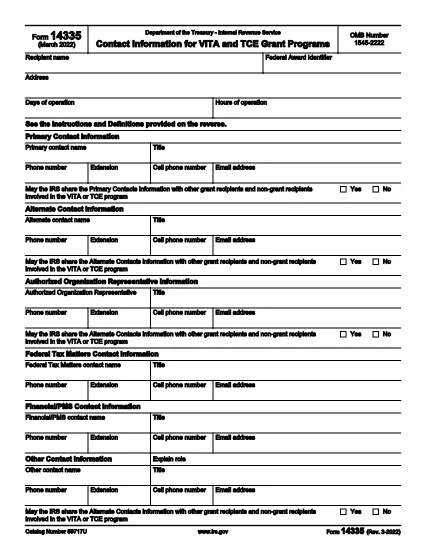
Form 14335 is the official IRS document used by VITA (Volunteer Income Tax Assistance) and TCE (Tax Counseling for the Elderly) grant programs to collect contact information for individuals who can answer questions about the grant. This fillable PDF lets you enter the required details quickly, save a copy for your records, and submit the form electronically.

What Is IRS Form 14335?

The form requests the names, phone numbers, email addresses, and mailing addresses of a primary contact and at least one alternate contact. It also includes a brief definition of each contact’s role and a certification section for the grant recipient.

How to Fill Out Form 14335 Online

Instead of downloading the PDF and opening a separate editor, simply click the "Fill out this form" button on this page. The Formize PDF Filler app will load directly in your browser, providing a seamless, fillable experience.

  • Step 1: Click the button and wait for the filler to appear.
  • Step 2: Complete each field—required fields are marked with an asterisk.
  • Step 3: Review your entries for accuracy.
  • Step 4: Click Save to download a copy or Submit if the grant program offers direct upload.

Common Mistakes to Avoid

  • Leaving the alternate contact section blank – the IRS requires at least one backup contact.
  • Using outdated phone numbers or email addresses.
  • Forgetting to sign the certification section; an unsigned form will be rejected.
  • Entering information that does not match the grant award documentation.

Where to Submit the Completed Form

After filling out Form 14335, follow the instructions provided in your grant award letter. Typically you will either:

  1. Email the PDF to the designated grant administrator.
  2. Upload it through the grant’s online portal.
  3. Mail a printed copy to the address listed in the award notice.

Download the Fillable PDF

If you prefer to work offline, you can still download the official IRS PDF version below. The file is the same document that powers the online filler.

Download IRS Form 14335 (PDF)

التعليمات
  • What is the purpose of IRS Form 14335?

    Form 14335 collects contact details for individuals who can answer questions about a VITA or TCE grant. It ensures the IRS can reach the right people if clarification is needed.

  • Do I need to provide both a primary and an alternate contact?

    Yes. The IRS requires at least one primary contact and one alternate contact to guarantee continuity of communication.

  • Can I fill out Form 14335 on a mobile device?

    Absolutely. The Formize PDF Filler is responsive and works on smartphones, tablets, and desktop browsers.

  • Is there a filing fee for Form 14335?

    No. Form 14335 is a free, government‑provided document used solely for grant‑related contact information.

  • What should I do if I make a mistake after submitting?

    Contact the grant administrator immediately and provide a corrected version of the form. Keep a signed copy for your records.

  • Do I need to print and mail the form?

    Only if the grant award instructions specify a paper submission. Many programs now accept an electronic PDF upload or email.

  • How long should I keep a copy of the completed form?

    Retain the signed PDF for at least three years, the same period required for most tax‑related records.

  • Is the PDF downloadable if I prefer offline editing?

    Yes. Use the direct download link at the bottom of the page to obtain the official IRS PDF.

كيف

كيفية ملء Form 14335 مجانًا عبر الإنترنت في 5 خطوات سهلة:

  1. 1
    Click the Fill Out Button
    Press the “Fill out this form” button on this page. The Formize PDF Filler will open in a new browser window.
  2. 2
    Wait for the Filler to Load
    A short loading indicator will appear while the fillable version of Form 14335 is prepared.
  3. 3
    Enter Your Information
    Complete each required field. Use the tab key or click to move between sections.
  4. 4
    Save or Submit
    When finished, click “Save” to download a copy for your records, or click “Submit” if the grant program allows direct upload.
  5. 5
    Confirm Submission
    Check your email for a confirmation message or follow the grant’s instructions to ensure the form was received.
Formize تطبيق PDF Filler
حول

استمارات الضرائب

Form 14335 هي أحد النماذج الضريبية التي تُستخدم للإبلاغ عن المعلومات المتعلقة بالضرائب إلى مصلحة الضرائب ذات الصلة. هناك أنواع مختلفة من أشكال الضرائب ، بما في ذلك أشكال الضرائب الفيدرالية والولائية والمحلية ، والتي يمكن أن تختلف تبعًا لظروف دافع الضرائب وموقعه.

سمات

حشو PDF

أسهل طريقة لملء نماذج PDF عبر الإنترنت

  • املأ بسرعة Form 14335
    هل تبحث عن طريقة لملء كلمة Form 14335 بسرعة عبر الإنترنت؟ من خلال برنامج تعبئة نماذج PDF المجاني عبر الإنترنت ، ستعرف كيفية تحرير وتعبئة مستند pdf هذا في أقل من دقيقة.
  • محرر PDF سهل الاستخدام عبر الإنترنت
    هل سئمت طباعة ملفات PDF حتى تتمكن من تحريرها قبل إعادة مسحها ضوئيًا وإرسالها مرة أخرى؟ تحرير مستندات PDF مجانًا عبر الإنترنت. استخدم محرر pdf على الإنترنت لتوفير الوقت والورق.
  • أدوات رائعة ، جميع المنصات
    هل تتساءل عن كيفية ملء Form 14335 على جهاز Mac ، أو ربما كيفية استخدام حشو PDF مجانًا؟ تعمل أدوات PDF الخاصة بنا عبر الإنترنت على جميع الأنظمة الأساسية.
  • تخزين الملفات الآمن
    يتم تخزين ملفات "Form 14335" المكتملة في قاعدة بيانات آمنة تديرها استضافة Amazon Cloud. يمكنك حذف ملفاتك من نظامنا في أي وقت. على أي حال ، يتم حذف هذه الملفات تلقائيًا بعد 24 ساعة.
  • الدردشة مع {كلمة رئيسية}
    قم بالدردشة مع "Form 14335" على Chatize وهو مساعد مجاني لقارئ PDF. اطرح الأسئلة واحصل على الإجابات من "Form 14335". فقط انقر على زر الدردشة مع المستند أعلاه.

حذف جلسة التعبئة

حذف جلسة التعبئة المحددة؟ في هذه الحالة، سيتم فقد تقدمك في إكمال النموذج.

حذف جلسة التحرير

هل تريد حذف جلسة التحرير المحددة؟ في هذه الحالة، سيتم فقدان التقدم الذي أحرزته في إنشاء النموذج وتحريره.