
اختار اللغة

IRS Form 433‑B – Fillable PDF Collection Statement for Businesses

  1. دولة الولايات المتحدة الأمريكية
  2. لغة إنجليزي
  3. نشاط الضرائب
  4. قسم دائرة الإيرادات الداخلية
IRS Form 433‑B – Fillable PDF Collection Statement for Businesses

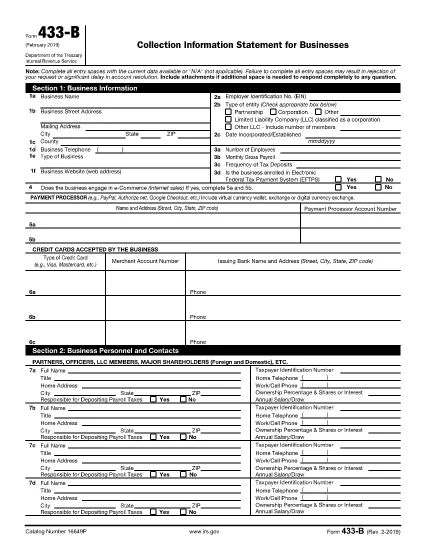
Form 433‑B, Collection Information Statement for Businesses, is the IRS’s standard form for gathering detailed financial data from corporations, partnerships, LLCs, and other business entities that owe tax. Completing this form accurately is essential when you are pursuing an Offer in Compromise, requesting a payment plan, or negotiating any other tax‑relief option.

What Is Form 433‑B and Who Needs It?

The form captures business information, assets, income, expenses, and the minimum offer amount the IRS will accept. It is required for:

  • Corporations (C‑corp, S‑corp)
  • Partnerships
  • LLCs taxed as corporations or partnerships
  • Any other entity with unpaid federal tax liabilities

Step‑by‑Step Guide to Fill Out Form 433‑B

Follow these simple steps using Formize’s built‑in PDF filler:

  1. Open the Fillable Form – Click the “Fill out this form” button on this page. The Formize PDF Filler loads automatically.
  2. Enter Business Information – Provide the legal name, EIN, address, phone, and a brief description of your business.
  3. Provide Officer/Owner Details – List each partner, officer, or member with name, title, ownership percentage, and salary.
  4. Report Assets – Include cash, bank accounts, real‑estate, equipment, vehicles, and any other valuable assets.
  5. Report Income & Expenses – Fill in monthly gross receipts, cost of goods sold, payroll, rent, utilities, and other operating costs.
  6. Calculate Minimum Offer – The form automatically totals the data; use the built‑in calculator to see the IRS‑required minimum offer amount.
  7. Review & Sign – Double‑check every field, then add the authorized signature and date.

Common Mistakes to Avoid

  • Leaving required fields blank – the IRS will reject the form.
  • Using outdated asset valuations – provide current market values.
  • Misclassifying the business entity – select the correct box for corporation, partnership, or LLC.
  • Forgetting to attach supporting documents – statements, depreciation schedules, and loan agreements are often required.

How to Submit the Completed Form

Once you finish, you have three options:

  • Download PDF and mail it to the IRS address indicated in the instructions.
  • Print & fax a hard copy to the appropriate IRS office.
  • Save securely and upload it through your IRS online account if you are working with a tax professional.

Using Formize ensures the PDF stays fillable and printable without losing formatting.

التعليمات
  • What types of businesses must use Form 433‑B?

    Corporations, partnerships, and LLCs (taxed as corporations or partnerships) with unpaid federal tax liabilities are required to complete Form 433‑B.

  • Can I use Form 433‑B for a sole proprietorship?

    No. Sole proprietors should use Form 433‑A, the collection statement for wage earners and self‑employed individuals.

  • Is the PDF on Formize really fillable?

    Yes. The PDF retains all fillable fields, and the Formize online filler lets you type, save, and print without altering the original layout.

  • Do I need to attach supporting documents?

    Attach recent bank statements, asset appraisals, loan balances, and depreciation schedules as referenced in the form’s instructions.

  • How long does the IRS take to process a completed Form 433‑B?

    Processing time varies, but expect 30‑60 days for the IRS to review the information and respond to your request.

  • Can I submit the form electronically?

    The IRS does not accept an electronic upload for Form 433‑B directly. You must mail or fax the printed form, or provide it to your tax professional for electronic submission through the IRS portal.

  • What happens if I make a mistake on the form?

    Correct any errors before signing. If you discover a mistake after submission, send a revised form with “Amended” noted at the top of the first page.

كيف

كيفية ملء IRS Form 433-B مجانًا عبر الإنترنت في 5 خطوات سهلة:

  1. 1
    Open the Fillable Form
    Click the “Fill out this form” button on this page. The Formize PDF Filler loads in your browser, no download required.
  2. 2
    Enter Business Information
    Type the legal name, EIN, address, phone number, and a short description of your business into the highlighted fields.
  3. 3
    Add Asset and Income Details
    Provide current values for cash, bank accounts, real‑estate, equipment, and vehicles. Then enter monthly income and expense figures.
  4. 4
    Review Calculations
    Use the built‑in calculator to verify the minimum offer amount and ensure all totals are correct.
  5. 5
    Submit or Print
    When you’re satisfied, click “Save PDF” to download a completed copy, or print directly from the filler to mail to the IRS.
Formize تطبيق PDF Filler
حول

نماذج خدمة الإيرادات الداخلية (IRS).

IRS Form 433-B هو أحد نماذج الضرائب الرسمية المستخدمة في الولايات المتحدة للإبلاغ عن الدخل والمطالبة بالخصومات والائتمانات وحساب الالتزام الضريبي والوفاء بالالتزامات الأخرى المتعلقة بالضرائب. مصلحة الضرائب الأمريكية هي الوكالة الفيدرالية المسؤولة عن إدارة وتنفيذ قوانين الإيرادات الداخلية في الولايات المتحدة.

فيما يلي بعض الأمثلة على نماذج خدمة الإيرادات الداخلية:

النموذج 1040: هذا هو نموذج إقرار ضريبة الدخل الفردي الأساسي الذي يستخدمه معظم دافعي الضرائب. يتم استخدامه للإبلاغ عن أنواع مختلفة من الدخل، والمطالبة بالخصومات والائتمانات، وحساب الالتزام الضريبي، وتحديد ما إذا كان دافع الضرائب مدينًا بضريبة إضافية أو يحق له استردادها.

النموذج 1099: هناك أشكال مختلفة للنموذج 1099، مثل 1099-MISC, 1099-INT, 1099-DIV، وما إلى ذلك. تُستخدم هذه النماذج للإبلاغ عن الدخل الذي يتلقاه الأفراد أو الشركات من مصادر مختلفة بخلاف التوظيف، مثل العمل الحر الدخل، وإيرادات الفوائد، وإيرادات توزيعات الأرباح، وإيرادات الإيجار.

النموذج W-2: يستخدم أصحاب العمل هذا النموذج للإبلاغ عن الأجور المدفوعة للموظفين والضرائب منقطع عن رواتبهم يستخدم الموظفون المعلومات الموجودة في النموذج W-2 لإكمال إقراراتهم الضريبية الفردية.

النموذج 941: يستخدم أصحاب العمل هذا النموذج للإبلاغ عن ضرائب التوظيف، بما في ذلك ضريبة الدخل الفيدرالية المحتجزة، وضريبة الضمان الاجتماعي، وضريبة الرعاية الطبية، لموظفيهم.

النموذج 1065: يتم استخدام هذا النموذج من قبل الشراكات للإبلاغ عن دخلها وخصوماتها والتزاماتها الضريبية. الشراكات نفسها لا تدفع ضريبة الدخل؛ وبدلا من ذلك، يقوم الشركاء بالإبلاغ عن حصتهم من دخل الشراكة في إقراراتهم الضريبية الفردية.

النموذج 1120: هذا هو نموذج إقرار ضريبة دخل الشركات الذي تستخدمه الشركات C للإبلاغ عن دخلها، الخصومات والمسؤولية الضريبية.

النموذج 990: يتم استخدام هذا النموذج من قبل المؤسسات المعفاة من الضرائب، مثل المنظمات غير الربحية والجمعيات الخيرية، من أجل الإبلاغ عن معلوماتهم المالية وأنشطتهم وامتثالهم لقوانين الضرائب.

النموذج 8862: يتم استخدام هذا النموذج من قبل دافعي الضرائب الذين طالبوا سابقًا بائتمان ضريبة الدخل المكتسب (EITC) ولكن تم رفضه، وأريد الآن المطالبة به مرة أخرى.

هذه مجرد أمثلة قليلة على نماذج IRS العديدة الموجودة للوفاء بالالتزامات المختلفة المتعلقة بالضرائب. تعتمد النماذج المحددة المطلوبة للفرد أو الشركة على ظروفها الفريدة ومصادر دخلها وخصوماتها. يُنصح باستشارة الموقع الإلكتروني الرسمي لدائرة الإيرادات الداخلية (www.irs.gov) أو طلب المشورة الضريبية المتخصصة للحصول على معلومات دقيقة وحديثة بخصوص مصلحة الضرائب الأمريكية المحددة النماذج ذات الصلة بوضعك الضريبي.

سمات

حشو PDF

أسهل طريقة لملء نماذج PDF عبر الإنترنت

  • املأ بسرعة IRS Form 433-B
    هل تبحث عن طريقة لملء كلمة IRS Form 433-B بسرعة عبر الإنترنت؟ من خلال برنامج تعبئة نماذج PDF المجاني عبر الإنترنت ، ستعرف كيفية تحرير وتعبئة مستند pdf هذا في أقل من دقيقة.
  • محرر PDF سهل الاستخدام عبر الإنترنت
    هل سئمت طباعة ملفات PDF حتى تتمكن من تحريرها قبل إعادة مسحها ضوئيًا وإرسالها مرة أخرى؟ تحرير مستندات PDF مجانًا عبر الإنترنت. استخدم محرر pdf على الإنترنت لتوفير الوقت والورق.
  • أدوات رائعة ، جميع المنصات
    هل تتساءل عن كيفية ملء IRS Form 433-B على جهاز Mac ، أو ربما كيفية استخدام حشو PDF مجانًا؟ تعمل أدوات PDF الخاصة بنا عبر الإنترنت على جميع الأنظمة الأساسية.
  • تخزين الملفات الآمن
    يتم تخزين ملفات "IRS Form 433-B" المكتملة في قاعدة بيانات آمنة تديرها استضافة Amazon Cloud. يمكنك حذف ملفاتك من نظامنا في أي وقت. على أي حال ، يتم حذف هذه الملفات تلقائيًا بعد 24 ساعة.
  • الدردشة مع {كلمة رئيسية}
    قم بالدردشة مع "IRS Form 433-B" على Chatize وهو مساعد مجاني لقارئ PDF. اطرح الأسئلة واحصل على الإجابات من "IRS Form 433-B". فقط انقر على زر الدردشة مع المستند أعلاه.

حذف جلسة التعبئة

حذف جلسة التعبئة المحددة؟ في هذه الحالة، سيتم فقد تقدمك في إكمال النموذج.

حذف جلسة التحرير

هل تريد حذف جلسة التحرير المحددة؟ في هذه الحالة، سيتم فقدان التقدم الذي أحرزته في إنشاء النموذج وتحريره.