
اختار اللغة

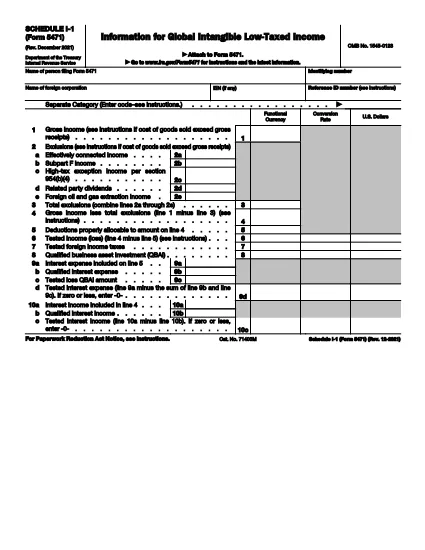
Form 5471 Schedule I‑1 is a supplemental attachment to the IRS Form 5471 series. It is used to report Global Intangible Low‑Taxed Income (GILTI) and related foreign oil and gas extraction income for U.S. shareholders of controlled foreign corporations.

Why Use a Fillable PDF?

Downloading the official IRS PDF guarantees you have the most current version. With Formize’s online PDF filler you can:

  • Complete the schedule directly in your browser – no extra software needed.
  • Save progress and return later.
  • Export a clean, printable PDF ready for filing.
  • Maintain data security with SSL‑encrypted connections.

How the Form Works

Schedule I‑1 captures detailed information on:

  • Foreign oil and gas extraction income (lines 2a‑2e).
  • Total exclusions and deductions.
  • GILTI calculations required for the 2021‑2025 tax years.

Common Mistakes to Avoid

  • Leaving lines blank: Even if a line is zero, enter “0” to avoid processing delays.
  • Mismatched totals: Ensure the sum of lines 2a‑2e matches the total exclusion amount.
  • Using an outdated version: Always use the latest PDF (Rev. December 2021) linked below.
  • Incorrect rounding: Follow IRS rounding rules – round to the nearest whole dollar unless otherwise specified.

Download the Official PDF

Click the button below to download the IRS‑approved Schedule I‑1 PDF. Then use the Fill out this form button on the page to open the Formize PDF filler.

تعليمات

التعليمات
  • Who must file Form 5471 Schedule I-1?

    U.S. shareholders of controlled foreign corporations who have GILTI or foreign oil and gas extraction income must attach Schedule I‑1 to their Form 5471 filing.

  • Is the Schedule I-1 available as a fillable PDF?

    Yes. The IRS provides a fillable PDF (Rev. December 2021) which can be completed online using Formize’s PDF filler.

  • Can I edit the PDF on my computer without Formize?

    You can use any PDF editor, but Formize’s online filler saves your work automatically and requires no installation.

  • What is GILTI and why does it matter?

    GILTI stands for Global Intangible Low‑Taxed Income. It is a category of income that U.S. shareholders must report to prevent tax deferral on foreign earnings.

  • Do I need to attach supporting documents to Schedule I-1?

    Only if the IRS specifically requests additional detail for the items reported on lines 2a‑2e. Otherwise, the schedule itself is sufficient.

  • What if I make a mistake after filing?

    Amend the original return by filing Form 1040X and attach a corrected Schedule I‑1. Include an explanation of the changes.

  • Is there a filing deadline for Schedule I-1?

    Schedule I‑1 is due with the taxpayer’s Form 5471, which is attached to the individual’s annual tax return (typically April 15, with extensions as applicable).

كيف

كيفية ملء Form 5471 Schedule I-1 مجانًا عبر الإنترنت في 4 خطوات سهلة:

  1. 1
    Open the Fillable Form
    Click the **Fill out this form** button on the page. The Formize PDF Filler app will load in a new browser tab.
  2. 2
    Enter Your Information
    Type directly into each field of Schedule I‑1. Use the on‑screen guidance for line numbers and required data.
  3. 3
    Save or Export
    When you finish, click **Save** to store the document in your Formize account or **Export** to download a completed PDF for filing.
  4. 4
    Review Before Submitting
    Double‑check totals, ensure no fields are left blank, and verify that all required signatures are included.
Formize تطبيق PDF Filler
حول

استمارات الضرائب

Form 5471 Schedule I-1 هي أحد النماذج الضريبية التي تُستخدم للإبلاغ عن المعلومات المتعلقة بالضرائب إلى مصلحة الضرائب ذات الصلة. هناك أنواع مختلفة من أشكال الضرائب ، بما في ذلك أشكال الضرائب الفيدرالية والولائية والمحلية ، والتي يمكن أن تختلف تبعًا لظروف دافع الضرائب وموقعه.

سمات

حشو PDF

أسهل طريقة لملء نماذج PDF عبر الإنترنت

  • املأ بسرعة Form 5471 Schedule I-1
    هل تبحث عن طريقة لملء كلمة Form 5471 Schedule I-1 بسرعة عبر الإنترنت؟ من خلال برنامج تعبئة نماذج PDF المجاني عبر الإنترنت ، ستعرف كيفية تحرير وتعبئة مستند pdf هذا في أقل من دقيقة.
  • محرر PDF سهل الاستخدام عبر الإنترنت
    هل سئمت طباعة ملفات PDF حتى تتمكن من تحريرها قبل إعادة مسحها ضوئيًا وإرسالها مرة أخرى؟ تحرير مستندات PDF مجانًا عبر الإنترنت. استخدم محرر pdf على الإنترنت لتوفير الوقت والورق.
  • أدوات رائعة ، جميع المنصات
    هل تتساءل عن كيفية ملء Form 5471 Schedule I-1 على جهاز Mac ، أو ربما كيفية استخدام حشو PDF مجانًا؟ تعمل أدوات PDF الخاصة بنا عبر الإنترنت على جميع الأنظمة الأساسية.
  • تخزين الملفات الآمن
    يتم تخزين ملفات "Form 5471 Schedule I-1" المكتملة في قاعدة بيانات آمنة تديرها استضافة Amazon Cloud. يمكنك حذف ملفاتك من نظامنا في أي وقت. على أي حال ، يتم حذف هذه الملفات تلقائيًا بعد 24 ساعة.
  • الدردشة مع {كلمة رئيسية}
    قم بالدردشة مع "Form 5471 Schedule I-1" على Chatize وهو مساعد مجاني لقارئ PDF. اطرح الأسئلة واحصل على الإجابات من "Form 5471 Schedule I-1". فقط انقر على زر الدردشة مع المستند أعلاه.

حذف جلسة التعبئة

حذف جلسة التعبئة المحددة؟ في هذه الحالة، سيتم فقد تقدمك في إكمال النموذج.

حذف جلسة التحرير

هل تريد حذف جلسة التحرير المحددة؟ في هذه الحالة، سيتم فقدان التقدم الذي أحرزته في إنشاء النموذج وتحريره.