
اختار اللغة

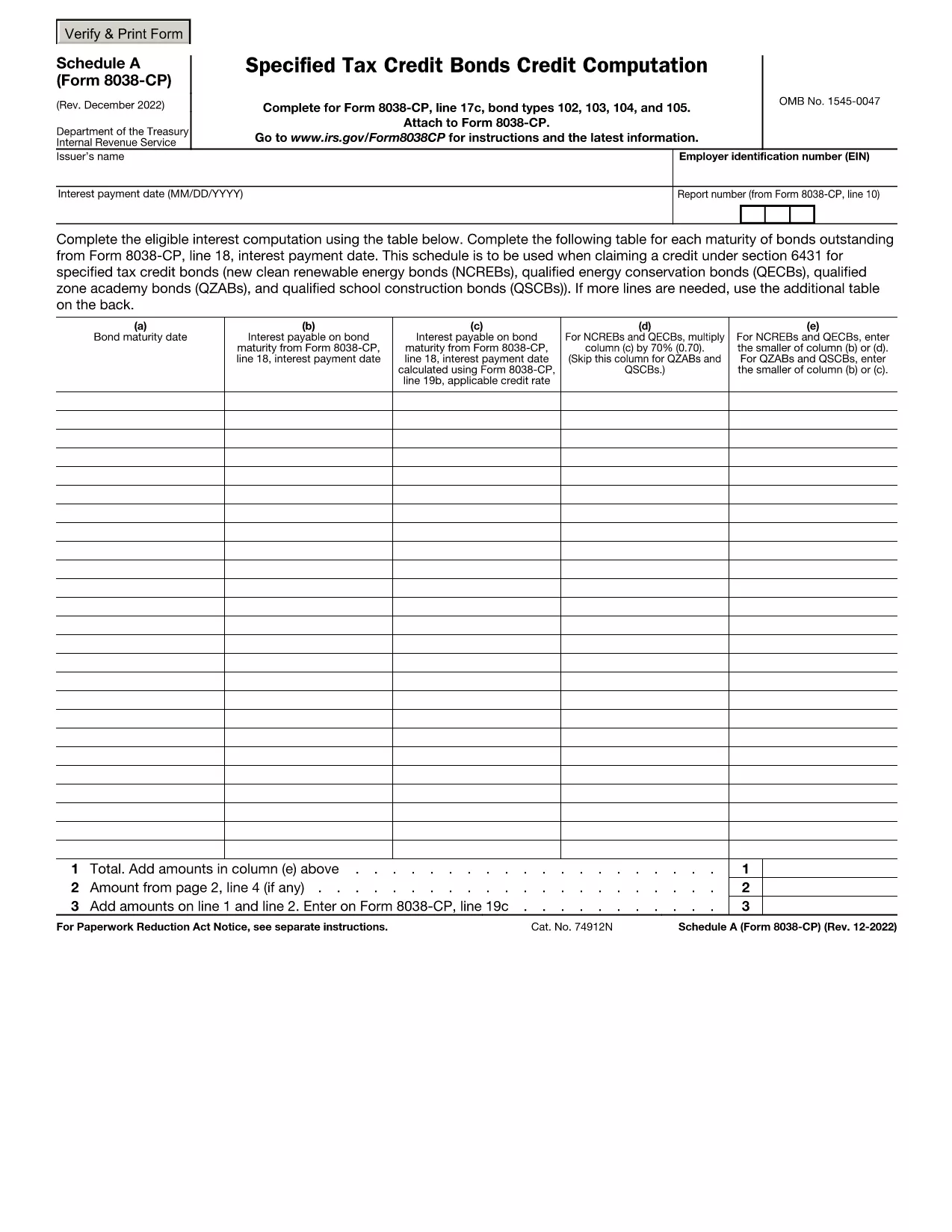
Schedule A (Form 8038‑CP) is the worksheet used to calculate eligible interest for tax‑credit bonds such as New Clean Renewable Energy Bonds (NCREB) and Qualified Energy Conservation Bonds (QECB). The form must be attached to the corporate tax return when claiming a credit under Section 6431.

Our fillable PDF version lets you enter bond maturity dates, interest payments, and credit amounts directly in the browser. No desktop PDF editor is required—just click the button, fill the fields, and save or submit your completed schedule.

Key benefits of using the Formize fillable PDF:

  • Auto‑save prevents data loss.
  • Built‑in calculations reduce manual errors.
  • Instant PDF download for record‑keeping.

Whether you are a tax professional or a corporate finance team, this online tool speeds up the preparation of Schedule A and helps you stay compliant with IRS guidelines.

التعليمات
  • Do I need to print Schedule A after filling it online?

    No. The filled PDF can be saved and attached electronically to your tax return. Printing is only required if your filing method demands a hard copy.

  • Is the Formize filler compatible with all browsers?

    Yes. It works in Chrome, Edge, Firefox, and Safari without any plugins.

  • Can I edit the form after I’ve downloaded it?

    Once downloaded, the PDF is static. To make changes, return to the online filler, adjust the fields, and download the updated version.

  • What tax credits does Schedule A support?

    Schedule A is used for credits under Section 6431, including NCREBs, QECBs, and Qualified Zone Academy Bonds (QZABs).

  • Is there a cost to use the fillable PDF on Formize?

    Filling out and downloading the PDF is free. Advanced features like cloud storage are optional premium services.

  • How do I ensure my calculations are correct?

    The Formize filler automatically totals eligible interest for each bond maturity, minimizing manual calculation errors.

كيف

كيفية ملء Form 8038-CP Schedule A مجانًا عبر الإنترنت في 4 خطوات سهلة:

  1. 1
    Click the Fill‑out Button
    On this page, click the bright “Fill out this form” button to launch the Formize PDF Filler app.
  2. 2
    Wait for the Filler to Load
    The online filler loads in seconds. You’ll see the PDF with editable fields directly in your browser.
  3. 3
    Enter the Required Data
    Complete each table row – bond maturity date, interest payment date, and eligible interest amount. The app will automatically calculate totals.
  4. 4
    Save or Download Your Completed Form
    When you’re finished, click “Save” to store the PDF in your Formize account or “Download” to get a copy for your records.
Formize تطبيق PDF Filler
حول

استمارات الضرائب

Form 8038-CP Schedule A هي أحد النماذج الضريبية التي تُستخدم للإبلاغ عن المعلومات المتعلقة بالضرائب إلى مصلحة الضرائب ذات الصلة. هناك أنواع مختلفة من أشكال الضرائب ، بما في ذلك أشكال الضرائب الفيدرالية والولائية والمحلية ، والتي يمكن أن تختلف تبعًا لظروف دافع الضرائب وموقعه.

سمات

حشو PDF

أسهل طريقة لملء نماذج PDF عبر الإنترنت

  • املأ بسرعة Form 8038-CP Schedule A
    هل تبحث عن طريقة لملء كلمة Form 8038-CP Schedule A بسرعة عبر الإنترنت؟ من خلال برنامج تعبئة نماذج PDF المجاني عبر الإنترنت ، ستعرف كيفية تحرير وتعبئة مستند pdf هذا في أقل من دقيقة.
  • محرر PDF سهل الاستخدام عبر الإنترنت
    هل سئمت طباعة ملفات PDF حتى تتمكن من تحريرها قبل إعادة مسحها ضوئيًا وإرسالها مرة أخرى؟ تحرير مستندات PDF مجانًا عبر الإنترنت. استخدم محرر pdf على الإنترنت لتوفير الوقت والورق.
  • أدوات رائعة ، جميع المنصات
    هل تتساءل عن كيفية ملء Form 8038-CP Schedule A على جهاز Mac ، أو ربما كيفية استخدام حشو PDF مجانًا؟ تعمل أدوات PDF الخاصة بنا عبر الإنترنت على جميع الأنظمة الأساسية.
  • تخزين الملفات الآمن
    يتم تخزين ملفات "Form 8038-CP Schedule A" المكتملة في قاعدة بيانات آمنة تديرها استضافة Amazon Cloud. يمكنك حذف ملفاتك من نظامنا في أي وقت. على أي حال ، يتم حذف هذه الملفات تلقائيًا بعد 24 ساعة.
  • الدردشة مع {كلمة رئيسية}
    قم بالدردشة مع "Form 8038-CP Schedule A" على Chatize وهو مساعد مجاني لقارئ PDF. اطرح الأسئلة واحصل على الإجابات من "Form 8038-CP Schedule A". فقط انقر على زر الدردشة مع المستند أعلاه.

حذف جلسة التعبئة

حذف جلسة التعبئة المحددة؟ في هذه الحالة، سيتم فقد تقدمك في إكمال النموذج.

حذف جلسة التحرير

هل تريد حذف جلسة التحرير المحددة؟ في هذه الحالة، سيتم فقدان التقدم الذي أحرزته في إنشاء النموذج وتحريره.