
اختار اللغة

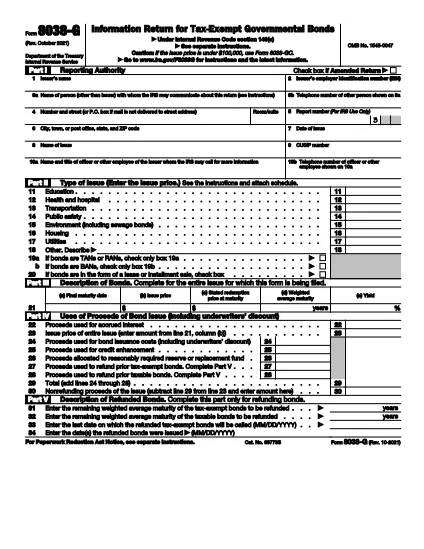
The IRS Form 8038‑G is the official document used by governmental entities to report the issuance of tax‑exempt bonds under Internal Revenue Code §149(e). Accurate reporting on this form helps maintain the bond’s tax‑exempt status and keeps the issuer compliant with federal regulations.

What Is Form 8038‑G?

Form 8038‑G collects essential details such as the issuer’s name, bond issue date, CUSIP number, amount of interest, and the purpose of the bond. The IRS uses this information to verify that the bonds meet the requirements for tax exemption.

How to Complete the Form Online

Instead of printing and scanning, you can fill out Form 8038‑G directly in your browser:

  1. Click the "Fill out this form" button on this page.
  2. Our Formize PDF Filler app loads the fillable PDF instantly.
  3. Enter the required information in each field. The form automatically validates dates and numeric entries.
  4. When all fields are complete, use the built‑in e‑signature tool to sign the form.
  5. Save a copy for your records or submit the PDF to the IRS as instructed.

Common Mistakes to Avoid

  • Incorrect CUSIP number: Double‑check the 9‑digit identifier before saving.
  • Missing officer contact info: The IRS may request clarification; incomplete contact details cause delays.
  • Wrong issue date: The form must reflect the actual issuance date, not the resolution date.
  • Failure to sign: An unsigned form is considered incomplete and will be rejected.

Download the Fillable PDF

Need a local copy? The official, fillable PDF is available from the IRS:

Download Form 8038‑G (PDF)

Whether you choose to edit offline or use Formize’s online filler, you’ll have a fully interactive version ready for submission.

Frequently Asked Questions

Below are the most common queries about Form 8038‑G.

التعليمات
  • Who must file Form 8038‑G?

    Any governmental entity that issues tax‑exempt bonds under IRC §149(e) is required to file Form 8038‑G with the IRS.

  • When is the filing deadline?

    The form must be filed within 90 days of the bond issuance date, unless an extension is granted.

  • Can I file Form 8038‑G electronically?

    Yes. After completing the fillable PDF, you can submit it electronically through the IRS e‑file system or mail a printed copy.

  • Is a signature required on the form?

    An authorized officer’s signature is mandatory. The Formize PDF Filler provides a secure e‑signature option.

  • What happens if I submit an incomplete form?

    The IRS will reject the submission, which can delay bond issuance and may result in penalties or loss of tax‑exempt status.

  • Do I need to attach supporting documents?

    Typically, you must attach the bond resolution, financial statements, and any other documentation that explains the bond’s purpose.

  • Is there a cost to download the fillable PDF?

    No. The IRS provides the fillable PDF for free, and Formize’s online filler is also free to use for this form.

كيف

كيفية ملء IRS Form 8038-G مجانًا عبر الإنترنت في 4 خطوات سهلة:

  1. 1
    Open the Form
    Visit this landing page and click the "Fill out this form" button to launch the Formize PDF Filler.
  2. 2
    Enter Required Information
    Fill each highlighted field with accurate data—issuer details, bond issue date, CUSIP, interest amount, and officer contact info.
  3. 3
    Review and e‑Sign
    Check all entries for errors, then use the built‑in e‑signature tool to sign where required.
  4. 4
    Save or Submit
    Download the completed PDF for your records or follow IRS instructions to submit it electronically or by mail.
Formize تطبيق PDF Filler
حول

نماذج الضرائب الفيدرالية

IRS Form 8038-G هو أحد نماذج الضرائب الفيدرالية التي تعد مستندات تُستخدم للإبلاغ عن ضرائب الدخل الفيدرالية وتقديمها إلى دائرة الإيرادات الداخلية (IRS) في الولايات المتحدة. يتم استخدام هذه النماذج من قبل الأفراد والشركات والمنظمات للإبلاغ عن دخلهم وخصوماتهم والمعلومات الأخرى ذات الصلة اللازمة لحساب التزاماتهم الضريبية الفيدرالية.

نموذج الضرائب الفيدرالية الأكثر استخدامًا هو النموذج 1040، والذي يستخدمه دافعو الضرائب الأفراد للإبلاغ عن ضريبة الدخل الشخصي الخاصة بهم. تشمل النماذج الأخرى شائعة الاستخدام نموذج 1065 للشراكات، النموذج 1120 للشركات، والنموذج 990 للمؤسسات المعفاة من الضرائب.

تتطلب نماذج الضرائب الفيدرالية عادةً من دافعي الضرائب الإبلاغ عن مصادر الدخل المختلفة، مثل الأجور والرواتب والإكراميات، بالإضافة إلى الدخل من الاستثمارات وتأجير العقارات ومصادر أخرى. تسمح النماذج أيضًا لدافعي الضرائب بالمطالبة بالخصومات والائتمانات لمختلف النفقات، مثل المساهمات الخيرية وفوائد الرهن العقاري ونفقات الرعاية الصحية.

من المهم تقديم نماذج الضرائب الفيدرالية بدقة وفي الوقت المحدد، لأن عدم القيام بذلك قد يؤدي إلى فرض عقوبات ورسوم فائدة من مصلحة الضرائب الأمريكية.

سمات

حشو PDF

أسهل طريقة لملء نماذج PDF عبر الإنترنت

  • املأ بسرعة IRS Form 8038-G
    هل تبحث عن طريقة لملء كلمة IRS Form 8038-G بسرعة عبر الإنترنت؟ من خلال برنامج تعبئة نماذج PDF المجاني عبر الإنترنت ، ستعرف كيفية تحرير وتعبئة مستند pdf هذا في أقل من دقيقة.
  • محرر PDF سهل الاستخدام عبر الإنترنت
    هل سئمت طباعة ملفات PDF حتى تتمكن من تحريرها قبل إعادة مسحها ضوئيًا وإرسالها مرة أخرى؟ تحرير مستندات PDF مجانًا عبر الإنترنت. استخدم محرر pdf على الإنترنت لتوفير الوقت والورق.
  • أدوات رائعة ، جميع المنصات
    هل تتساءل عن كيفية ملء IRS Form 8038-G على جهاز Mac ، أو ربما كيفية استخدام حشو PDF مجانًا؟ تعمل أدوات PDF الخاصة بنا عبر الإنترنت على جميع الأنظمة الأساسية.
  • تخزين الملفات الآمن
    يتم تخزين ملفات "IRS Form 8038-G" المكتملة في قاعدة بيانات آمنة تديرها استضافة Amazon Cloud. يمكنك حذف ملفاتك من نظامنا في أي وقت. على أي حال ، يتم حذف هذه الملفات تلقائيًا بعد 24 ساعة.
  • الدردشة مع {كلمة رئيسية}
    قم بالدردشة مع "IRS Form 8038-G" على Chatize وهو مساعد مجاني لقارئ PDF. اطرح الأسئلة واحصل على الإجابات من "IRS Form 8038-G". فقط انقر على زر الدردشة مع المستند أعلاه.

حذف جلسة التعبئة

حذف جلسة التعبئة المحددة؟ في هذه الحالة، سيتم فقد تقدمك في إكمال النموذج.

حذف جلسة التحرير

هل تريد حذف جلسة التحرير المحددة؟ في هذه الحالة، سيتم فقدان التقدم الذي أحرزته في إنشاء النموذج وتحريره.