
اختار اللغة

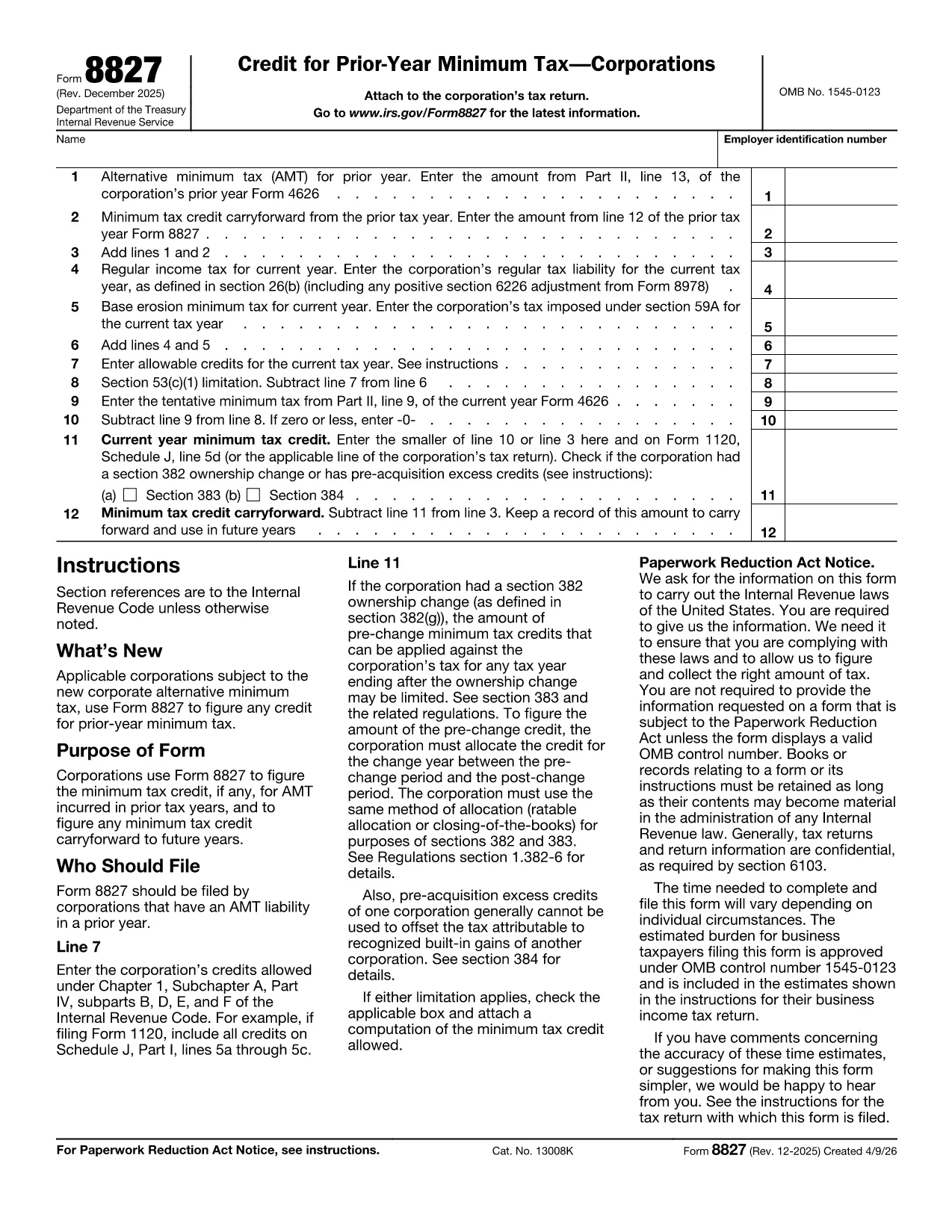
Form 8827, "Credit for Prior Year Minimum Tax (Corporations)," is the IRS form corporations use to claim a credit for alternative minimum tax (AMT) paid in earlier years and to track any credit carryforward. By completing this form correctly, businesses can reduce future regular tax liabilities.

What Is Form 8827 and Who Needs It?

This form is required for any corporation that has incurred AMT in a prior tax year and wishes to claim the resulting credit. The credit can be applied against regular tax in the current year and any unused portion can be carried forward indefinitely.

How to Fill Out Form 8827 Online with Formize

Instead of downloading the PDF and editing it manually, simply click the "Fill out this form" button on the page. The Formize PDF Filler app will load, letting you type directly into each field, save progress, and export a completed PDF.

Common Mistakes to Avoid on Form 8827

  • Entering the prior‑year AMT amount from the wrong line of Form 4626.
  • Leaving the reserved line (Line 2) blank when the form requires a zero entry.
  • Mismatching the EIN on the form with the one on the corporate tax return.
  • Forgetting to subtract the credit from the tentative minimum tax correctly, which can cause an overstated credit.

Where to Find the Official PDF and Additional Resources

The official, up‑to‑date fillable PDF is hosted by the IRS. You can download it directly or use our integrated Formize filler for a smoother experience.

For detailed line‑by‑line instructions, refer to the IRS Instructions for Form 8827, which explain each calculation and provide examples.

التعليمات
  • Who must file Form 8827?

    Any corporation that paid alternative minimum tax (AMT) in a previous year and wants to claim a credit against current‑year regular tax must file Form 8827.

  • Can I carry forward an unused minimum tax credit?

    Yes. Unused credits can be carried forward indefinitely until they are fully utilized against regular tax.

  • Do I need to attach Form 8827 to my Form 1120?

    Yes. The completed Form 8827 should be attached to your corporate income tax return (Form 1120) when filing.

  • What line on Form 4626 provides the prior‑year AMT amount?

    Use the amount shown on line 13 of Form 4626 from the prior tax year as the prior‑year AMT input on Form 8827, line 1.

  • Is there a paper‑only version of Form 8827?

    A printable PDF is available, but using the fillable version through Formize reduces errors and speeds up filing.

  • What happens if I enter the wrong EIN?

    An incorrect EIN can delay processing of your credit. Verify the EIN matches the one on your corporate tax return before submitting.

  • Can I amend a previously filed Form 8827?

    Yes. File an amended corporate return (Form 1120‑X) and include a corrected Form 8827.

  • Is there a deadline to claim the credit?

    The credit must be claimed on the corporate return for the tax year in which you want to use it. There is no separate filing deadline.

كيف

كيفية ملء Form 8827 مجانًا عبر الإنترنت في 5 خطوات سهلة:

  1. 1
    Open the Fillable Form
    Click the "Fill out this form" button on the page. The Formize PDF Filler will open in a new tab.
  2. 2
    Enter Corporate Information
    Type your corporation’s name, EIN, and prior‑year AMT amounts into the highlighted fields.
  3. 3
    Calculate the Credit
    Follow the on‑screen prompts to add lines, subtract credits, and let the calculator display the current‑year credit and any carryforward.
  4. 4
    Review and Save
    Check each entry for accuracy, then click "Save" to download the completed PDF or store it in your Formize account.
  5. 5
    Submit with Your Tax Return
    Attach the finished Form 8827 to your corporate tax return (Form 1120) when filing electronically or by mail.
Formize تطبيق PDF Filler
حول

نماذج الضرائب الفيدرالية

Form 8827 هو أحد نماذج الضرائب الفيدرالية التي تعد مستندات تُستخدم للإبلاغ عن ضرائب الدخل الفيدرالية وتقديمها إلى دائرة الإيرادات الداخلية (IRS) في الولايات المتحدة. يتم استخدام هذه النماذج من قبل الأفراد والشركات والمنظمات للإبلاغ عن دخلهم وخصوماتهم والمعلومات الأخرى ذات الصلة اللازمة لحساب التزاماتهم الضريبية الفيدرالية.

نموذج الضرائب الفيدرالية الأكثر استخدامًا هو النموذج 1040، والذي يستخدمه دافعو الضرائب الأفراد للإبلاغ عن ضريبة الدخل الشخصي الخاصة بهم. تشمل النماذج الأخرى شائعة الاستخدام نموذج 1065 للشراكات، النموذج 1120 للشركات، والنموذج 990 للمؤسسات المعفاة من الضرائب.

تتطلب نماذج الضرائب الفيدرالية عادةً من دافعي الضرائب الإبلاغ عن مصادر الدخل المختلفة، مثل الأجور والرواتب والإكراميات، بالإضافة إلى الدخل من الاستثمارات وتأجير العقارات ومصادر أخرى. تسمح النماذج أيضًا لدافعي الضرائب بالمطالبة بالخصومات والائتمانات لمختلف النفقات، مثل المساهمات الخيرية وفوائد الرهن العقاري ونفقات الرعاية الصحية.

من المهم تقديم نماذج الضرائب الفيدرالية بدقة وفي الوقت المحدد، لأن عدم القيام بذلك قد يؤدي إلى فرض عقوبات ورسوم فائدة من مصلحة الضرائب الأمريكية.

سمات

حشو PDF

أسهل طريقة لملء نماذج PDF عبر الإنترنت

  • املأ بسرعة Form 8827
    هل تبحث عن طريقة لملء كلمة Form 8827 بسرعة عبر الإنترنت؟ من خلال برنامج تعبئة نماذج PDF المجاني عبر الإنترنت ، ستعرف كيفية تحرير وتعبئة مستند pdf هذا في أقل من دقيقة.
  • محرر PDF سهل الاستخدام عبر الإنترنت
    هل سئمت طباعة ملفات PDF حتى تتمكن من تحريرها قبل إعادة مسحها ضوئيًا وإرسالها مرة أخرى؟ تحرير مستندات PDF مجانًا عبر الإنترنت. استخدم محرر pdf على الإنترنت لتوفير الوقت والورق.
  • أدوات رائعة ، جميع المنصات
    هل تتساءل عن كيفية ملء Form 8827 على جهاز Mac ، أو ربما كيفية استخدام حشو PDF مجانًا؟ تعمل أدوات PDF الخاصة بنا عبر الإنترنت على جميع الأنظمة الأساسية.
  • تخزين الملفات الآمن
    يتم تخزين ملفات "Form 8827" المكتملة في قاعدة بيانات آمنة تديرها استضافة Amazon Cloud. يمكنك حذف ملفاتك من نظامنا في أي وقت. على أي حال ، يتم حذف هذه الملفات تلقائيًا بعد 24 ساعة.
  • الدردشة مع {كلمة رئيسية}
    قم بالدردشة مع "Form 8827" على Chatize وهو مساعد مجاني لقارئ PDF. اطرح الأسئلة واحصل على الإجابات من "Form 8827". فقط انقر على زر الدردشة مع المستند أعلاه.

حذف جلسة التعبئة

حذف جلسة التعبئة المحددة؟ في هذه الحالة، سيتم فقد تقدمك في إكمال النموذج.

حذف جلسة التحرير

هل تريد حذف جلسة التحرير المحددة؟ في هذه الحالة، سيتم فقدان التقدم الذي أحرزته في إنشاء النموذج وتحريره.