
اختار اللغة

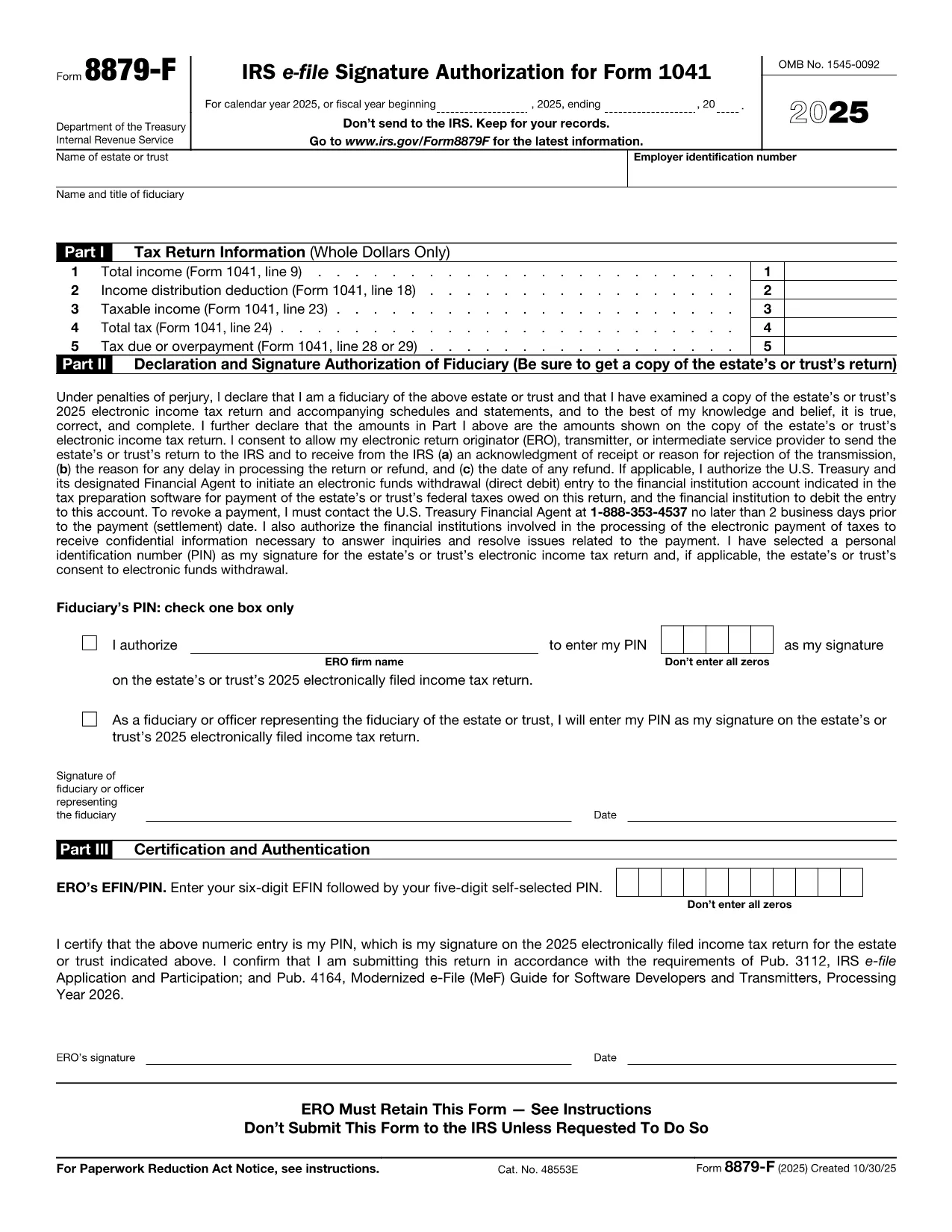
Form 8879‑F, IRS E‑File Signature Authorization for Form 1041, is used by fiduciaries of estates and trusts to give their tax professional permission to electronically sign and file the income‑tax return (Form 1041). This one‑page, fillable PDF lets you securely provide the required information without printing or scanning.

What Is Form 8879‑F?

The form consists of three parts:

  • Part I – Tax Return Information: Copies key figures from the 1041 (total income, taxable income, tax due, etc.).
  • Part II – Declaration and Signature Authorization: The fiduciary declares under penalty of perjury that the return is true and authorizes the electronic return originator (ERO) to sign.
  • Part III – Certification and Authorization: The tax professional certifies that the return was reviewed and that the fiduciary’s PIN is correct.

How to Complete the Fillable PDF with Formize

Instead of downloading the PDF and editing it in a separate editor, you can fill it out directly on our site using the Formize PDF Filler app. Follow the steps below.

Common Mistakes & Tips for Fiduciaries

Being a fiduciary carries legal responsibility. Avoid these pitfalls:

  • Enter the exact Fiscal Year dates – a mismatch will cause the IRS to reject the filing.
  • Double‑check the EIN and trust name; typos trigger processing delays.
  • Use a five‑digit PIN that you can remember but is not easily guessable.
  • Sign the form only after you have reviewed the entire Form 1041 for accuracy.

Where to Submit the Completed Form

After you finish the fillable form, you can:

  • Save a PDF copy for your records.
  • Send the signed PDF to your tax preparer – they will upload it with the electronic return.
  • Retain the form for at least three years in case the IRS requests it.

Remember, the IRS only requires the form when the ERO specifically asks for it. Otherwise, keep it on file.

التعليمات
  • Do I need to print Form 8879‑F after filling it online?

    No. The fillable PDF can be saved and sent electronically. Printing is only required if the IRS explicitly asks for a hard copy.

  • Can I use the same PIN for multiple tax years?

    Yes, but it’s recommended to change the PIN each year for added security.

  • What if my estate uses a fiscal year that isn’t January 1 – December 31?

    Enter the exact beginning and ending dates of the fiscal year in the top section of Part I. The IRS will reject the form if the dates don’t match the return.

  • Who is allowed to act as the Electronic Return Originator (ERO)?

    A licensed tax professional, an authorized e‑file service provider, or an intermediate service provider that the fiduciary has hired.

  • Is Form 8879‑F required for every Form 1041 filing?

    It is required only when the fiduciary authorizes an ERO to sign the return electronically. If you file a paper return, the form isn’t needed.

  • What happens if I make a mistake on the form?

    Correct the error in the Formize filler, re‑sign, and resend the updated PDF to your preparer. The IRS will not accept a form with incorrect data.

  • Can I submit Form 8879‑F directly to the IRS?

    No. The form is sent to the tax professional who includes it with the electronic filing. The IRS receives it as part of the e‑file package.

كيف

كيفية ملء Form 8879-F مجانًا عبر الإنترنت في 5 خطوات سهلة:

  1. 1
    Open the Fillable Form
    Click the **"Fill out this form"** button on the page. The Formize PDF Filler app loads in your browser.
  2. 2
    Enter Required Information
    Fill in Part I with the figures from your Form 1041, then complete Part II and Part III. Use the drop‑down menus and date pickers for accurate entry.
  3. 3
    Set Your PIN
    Choose a five‑digit Personal Identification Number (PIN). You can let the ERO enter it for you or type it yourself.
  4. 4
    Review and Sign
    Review all fields for accuracy. Click the **"Sign"** button to apply an electronic signature that complies with IRS regulations.
  5. 5
    Save or Send
    After signing, download the completed PDF for your records or email it directly to your tax professional using the **"Send to preparer"** option.
Formize تطبيق PDF Filler
حول

استمارات الضرائب

Form 8879-F هو أحد نماذج الضرائب التي تعد مستندات تُستخدم للإبلاغ عن معلومات حول دخل الفرد أو الشركة، والخصومات، والالتزامات الضريبية إلى هيئة الضرائب ذات الصلة. هذه النماذج ضرورية للامتثال لقوانين الضرائب والوفاء بالالتزامات الضريبية. تختلف النماذج الضريبية حسب البلد والمتطلبات الضريبية المحددة المعمول بها. فيما يلي بعض الأنواع الشائعة من النماذج الضريبية:

نماذج الضرائب الفردية: يستخدم دافعو الضرائب الأفراد هذه النماذج للإبلاغ عن دخلهم الشخصي والمطالبة بالخصومات والائتمانات والإعفاءات. تتضمن الأمثلة نموذج 1040 في الولايات المتحدة أو نموذج إقرار ضريبة التقييم الذاتي في المملكة المتحدة.

نماذج ضريبة الأعمال: يتم استخدام نماذج ضريبة الأعمال من قبل الشركات أو الشراكات أو الأفراد العاملين لحسابهم الخاص للإبلاغ عن دخل أعمالهم ونفقاتهم والمعلومات الأخرى المتعلقة بالضرائب. تتضمن الأمثلة نموذج الجدول C (الربح أو الخسارة من الأعمال) في الولايات المتحدة أو نموذج CT600 (الإقرار الضريبي للشركة) في المملكة المتحدة.

نماذج ضريبة الرواتب: يستخدم أصحاب العمل هذه النماذج للإبلاغ عن الأجور والرواتب والضرائب المحتجزة من رواتب موظفيهم. تشمل الأمثلة نموذج W-2 في الولايات المتحدة أو نموذج P60 في المملكة المتحدة.

نماذج ضريبة المبيعات: تستخدم الشركات نماذج ضريبة المبيعات للإبلاغ عن ضريبة المبيعات المحصلة على السلع أو الخدمات الخاضعة للضريبة وتحويلها. تختلف نماذج ضريبة المبيعات المحددة حسب الولاية القضائية.

نماذج ضريبة القيمة المضافة (VAT): تُستخدم نماذج ضريبة القيمة المضافة في البلدان التي تفرض ضريبة القيمة المضافة للإبلاغ عن ضريبة القيمة المضافة المحصلة على المبيعات وتحويلها والمطالبة بأرصدة ضريبة القيمة المضافة على المشتريات. تتضمن الأمثلة نماذج إقرارات ضريبة القيمة المضافة المستخدمة في العديد من البلدان.

نماذج الضرائب المقدرة: تُستخدم نماذج الضرائب المقدرة للإبلاغ عن الضرائب المقدرة ودفعها على الدخل الذي لا يخضع للاقتطاع، مثل دخل العمل الحر أو دخل الاستثمار.

هذه مجرد أمثلة قليلة على الأشكال الضريبية العديدة التي قد تكون موجودة. تعتمد النماذج المحددة المطلوبة على قوانين ولوائح الضرائب في بلدك أو نطاق سلطتك القضائية. من المهم الرجوع إلى إرشادات مصلحة الضرائب أو طلب المشورة المهنية لتحديد النماذج التي تنطبق على حالتك.

سمات

حشو PDF

أسهل طريقة لملء نماذج PDF عبر الإنترنت

  • املأ بسرعة Form 8879-F
    هل تبحث عن طريقة لملء كلمة Form 8879-F بسرعة عبر الإنترنت؟ من خلال برنامج تعبئة نماذج PDF المجاني عبر الإنترنت ، ستعرف كيفية تحرير وتعبئة مستند pdf هذا في أقل من دقيقة.
  • محرر PDF سهل الاستخدام عبر الإنترنت
    هل سئمت طباعة ملفات PDF حتى تتمكن من تحريرها قبل إعادة مسحها ضوئيًا وإرسالها مرة أخرى؟ تحرير مستندات PDF مجانًا عبر الإنترنت. استخدم محرر pdf على الإنترنت لتوفير الوقت والورق.
  • أدوات رائعة ، جميع المنصات
    هل تتساءل عن كيفية ملء Form 8879-F على جهاز Mac ، أو ربما كيفية استخدام حشو PDF مجانًا؟ تعمل أدوات PDF الخاصة بنا عبر الإنترنت على جميع الأنظمة الأساسية.
  • تخزين الملفات الآمن
    يتم تخزين ملفات "Form 8879-F" المكتملة في قاعدة بيانات آمنة تديرها استضافة Amazon Cloud. يمكنك حذف ملفاتك من نظامنا في أي وقت. على أي حال ، يتم حذف هذه الملفات تلقائيًا بعد 24 ساعة.
  • الدردشة مع {كلمة رئيسية}
    قم بالدردشة مع "Form 8879-F" على Chatize وهو مساعد مجاني لقارئ PDF. اطرح الأسئلة واحصل على الإجابات من "Form 8879-F". فقط انقر على زر الدردشة مع المستند أعلاه.

حذف جلسة التعبئة

حذف جلسة التعبئة المحددة؟ في هذه الحالة، سيتم فقد تقدمك في إكمال النموذج.

حذف جلسة التحرير

هل تريد حذف جلسة التحرير المحددة؟ في هذه الحالة، سيتم فقدان التقدم الذي أحرزته في إنشاء النموذج وتحريره.