
اختار اللغة

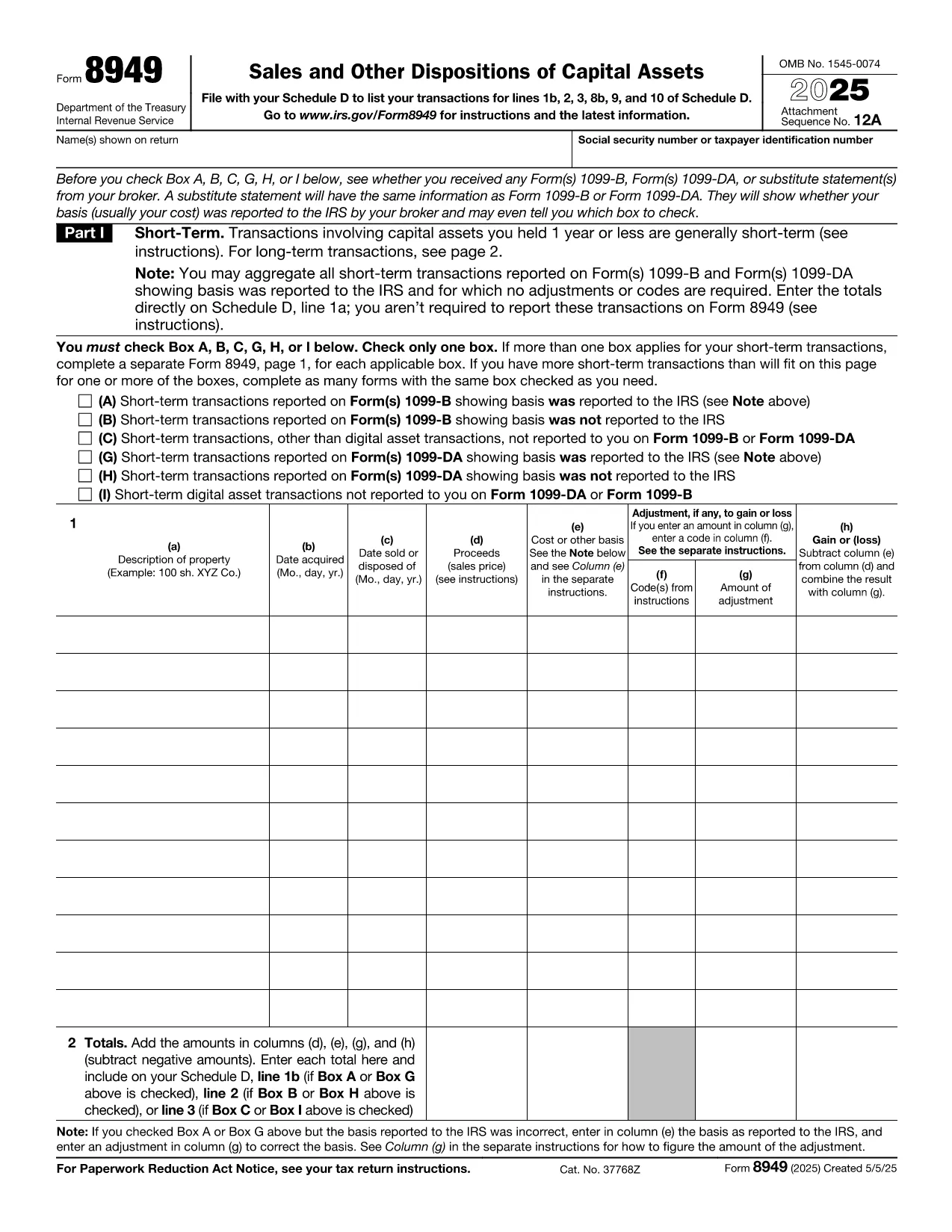
Form 8949, titled Sales and Other Dispositions of Capital Assets, is the IRS form you use to report the sale of stocks, bonds, real estate, and other investment assets. Whether you have a short‑term trade (held ≤ 1 year) or a long‑term investment, each transaction must be listed on Form 8949 before the totals are transferred to Schedule D of your 1040.

What Is Form 8949?

The form captures essential details for every capital‑asset transaction: description of the property, acquisition and sale dates, proceeds, cost basis, adjustments (such as wash‑sale losses), and the resulting gain or loss. The IRS provides three separate boxes (A, B, C) for short‑term sales and three for long‑term sales, letting you indicate whether the basis was reported to the IRS.

How to Fill Out Form 8949 Online with Formize

Formize lets you complete the official PDF without installing any software. Just click the “Fill out this form” button, wait a moment for the Formize PDF Filler to load, and you’ll see an interactive, fillable version of Form 8949 ready for data entry.

Common Mistakes to Avoid

  • Leaving Box A, B, or C unchecked – the IRS will reject the submission.
  • Mismatching dates – acquisition and sale dates must be accurate to determine short‑ vs long‑term status.
  • Incorrect basis adjustments – ensure wash‑sale codes and other adjustments are entered in column (g).
  • Summing totals incorrectly – double‑check the sums before copying them to Schedule D.

When Do You Need to Use Form 8949?

You must file Form 8949 for any capital‑asset transaction that is not already reported on a 1099‑B with a “basis reported to the IRS” checkbox checked, or when you need to report adjustments, codes, or a basis that was not reported.

Download, Print, or Save Your Completed Form

After you finish entering data, you can:

  • Download a completed PDF to attach to your e‑file.
  • Print a hard copy for a mailed return.
  • Save to your cloud storage for future reference.

All actions are performed directly within the browser, keeping your information secure and private.

تعليمات

التعليمات
  • Do I need to fill out Form 8949 if my broker already reported the basis?

    If the broker reported the basis to the IRS and no adjustments or codes are required, you can aggregate the totals on Schedule D. Otherwise, you must list each transaction on Form 8949.

  • What is the difference between Box A, B, and C?

    Box A: Basis reported to the IRS, no adjustments. Box B: Basis reported, but you have adjustments or codes. Box C: Basis not reported to the IRS.

  • Can I use the same Form 8949 for both short‑term and long‑term sales?

    Form 8949 has separate sections: Part I for short‑term (held ≤ 1 year) and Part II for long‑term (held > 1 year). Fill each transaction in the appropriate part.

  • Is the PDF on Formize editable on mobile devices?

    Yes. The Formize PDF Filler works on modern smartphones and tablets, allowing you to complete the form on the go.

  • How do I report a wash‑sale loss on Form 8949?

    Enter the loss in column (g) with code “W” and adjust the basis accordingly. The adjusted amount flows to Schedule D.

  • Do I need a separate Form 8949 for each tax year?

    Yes. Each tax year requires its own Form 8949 reflecting that year’s transactions.

  • Can I e‑file Form 8949 directly from Formize?

    Formize provides a completed PDF that you can upload to your tax‑software’s e‑file portal or attach to your electronic return.

كيف

كيفية ملء IRS Form 8949 مجانًا عبر الإنترنت في 5 خطوات سهلة:

  1. 1
    Click the Fill‑out Button
    On the page, click the bright “Fill out this form” button to launch the Formize PDF Filler.
  2. 2
    Wait for the Filler to Load
    The browser will load a secure, interactive version of Form 8949 – this usually takes just a few seconds.
  3. 3
    Enter Transaction Details
    Fill in each row with the description, dates, proceeds, cost basis, and any adjustments. Choose the correct box (A, B, or C) for short‑term or long‑term sales.
  4. 4
    Review and Validate
    Double‑check totals, ensure all required boxes are checked, and use the built‑in calculator to verify gains or losses.
  5. 5
    Save, Download, or Print
    When finished, click “Save” to store the PDF in the cloud, “Download” to get a copy for e‑filing, or “Print” to send a hard copy with your mailed return.
Formize تطبيق PDF Filler
حول

استمارات الضرائب

IRS Form 8949 هو أحد نماذج الضرائب التي تعد مستندات تُستخدم للإبلاغ عن معلومات حول دخل الفرد أو الشركة، والخصومات، والالتزامات الضريبية إلى هيئة الضرائب ذات الصلة. هذه النماذج ضرورية للامتثال لقوانين الضرائب والوفاء بالالتزامات الضريبية. تختلف النماذج الضريبية حسب البلد والمتطلبات الضريبية المحددة المعمول بها. فيما يلي بعض الأنواع الشائعة من النماذج الضريبية:

نماذج الضرائب الفردية: يستخدم دافعو الضرائب الأفراد هذه النماذج للإبلاغ عن دخلهم الشخصي والمطالبة بالخصومات والائتمانات والإعفاءات. تتضمن الأمثلة نموذج 1040 في الولايات المتحدة أو نموذج إقرار ضريبة التقييم الذاتي في المملكة المتحدة.

نماذج ضريبة الأعمال: يتم استخدام نماذج ضريبة الأعمال من قبل الشركات أو الشراكات أو الأفراد العاملين لحسابهم الخاص للإبلاغ عن دخل أعمالهم ونفقاتهم والمعلومات الأخرى المتعلقة بالضرائب. تتضمن الأمثلة نموذج الجدول C (الربح أو الخسارة من الأعمال) في الولايات المتحدة أو نموذج CT600 (الإقرار الضريبي للشركة) في المملكة المتحدة.

نماذج ضريبة الرواتب: يستخدم أصحاب العمل هذه النماذج للإبلاغ عن الأجور والرواتب والضرائب المحتجزة من رواتب موظفيهم. تشمل الأمثلة نموذج W-2 في الولايات المتحدة أو نموذج P60 في المملكة المتحدة.

نماذج ضريبة المبيعات: تستخدم الشركات نماذج ضريبة المبيعات للإبلاغ عن ضريبة المبيعات المحصلة على السلع أو الخدمات الخاضعة للضريبة وتحويلها. تختلف نماذج ضريبة المبيعات المحددة حسب الولاية القضائية.

نماذج ضريبة القيمة المضافة (VAT): تُستخدم نماذج ضريبة القيمة المضافة في البلدان التي تفرض ضريبة القيمة المضافة للإبلاغ عن ضريبة القيمة المضافة المحصلة على المبيعات وتحويلها والمطالبة بأرصدة ضريبة القيمة المضافة على المشتريات. تتضمن الأمثلة نماذج إقرارات ضريبة القيمة المضافة المستخدمة في العديد من البلدان.

نماذج الضرائب المقدرة: تُستخدم نماذج الضرائب المقدرة للإبلاغ عن الضرائب المقدرة ودفعها على الدخل الذي لا يخضع للاقتطاع، مثل دخل العمل الحر أو دخل الاستثمار.

هذه مجرد أمثلة قليلة على الأشكال الضريبية العديدة التي قد تكون موجودة. تعتمد النماذج المحددة المطلوبة على قوانين ولوائح الضرائب في بلدك أو نطاق سلطتك القضائية. من المهم الرجوع إلى إرشادات مصلحة الضرائب أو طلب المشورة المهنية لتحديد النماذج التي تنطبق على حالتك.

سمات

حشو PDF

أسهل طريقة لملء نماذج PDF عبر الإنترنت

  • املأ بسرعة IRS Form 8949
    هل تبحث عن طريقة لملء كلمة IRS Form 8949 بسرعة عبر الإنترنت؟ من خلال برنامج تعبئة نماذج PDF المجاني عبر الإنترنت ، ستعرف كيفية تحرير وتعبئة مستند pdf هذا في أقل من دقيقة.
  • محرر PDF سهل الاستخدام عبر الإنترنت
    هل سئمت طباعة ملفات PDF حتى تتمكن من تحريرها قبل إعادة مسحها ضوئيًا وإرسالها مرة أخرى؟ تحرير مستندات PDF مجانًا عبر الإنترنت. استخدم محرر pdf على الإنترنت لتوفير الوقت والورق.
  • أدوات رائعة ، جميع المنصات
    هل تتساءل عن كيفية ملء IRS Form 8949 على جهاز Mac ، أو ربما كيفية استخدام حشو PDF مجانًا؟ تعمل أدوات PDF الخاصة بنا عبر الإنترنت على جميع الأنظمة الأساسية.
  • تخزين الملفات الآمن
    يتم تخزين ملفات "IRS Form 8949" المكتملة في قاعدة بيانات آمنة تديرها استضافة Amazon Cloud. يمكنك حذف ملفاتك من نظامنا في أي وقت. على أي حال ، يتم حذف هذه الملفات تلقائيًا بعد 24 ساعة.
  • الدردشة مع {كلمة رئيسية}
    قم بالدردشة مع "IRS Form 8949" على Chatize وهو مساعد مجاني لقارئ PDF. اطرح الأسئلة واحصل على الإجابات من "IRS Form 8949". فقط انقر على زر الدردشة مع المستند أعلاه.

حذف جلسة التعبئة

حذف جلسة التعبئة المحددة؟ في هذه الحالة، سيتم فقد تقدمك في إكمال النموذج.

حذف جلسة التحرير

هل تريد حذف جلسة التحرير المحددة؟ في هذه الحالة، سيتم فقدان التقدم الذي أحرزته في إنشاء النموذج وتحريره.