
اختار اللغة

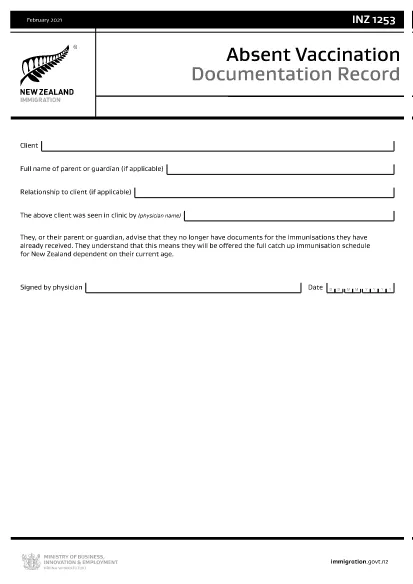
INZ1253 – Absent Vaccination Documentation Record (Fillable PDF)

  1. لغة إنجليزي
  2. دولة نيوزيلندا
  3. نشاط الصحة
INZ1253 – Absent Vaccination Documentation Record (Fillable PDF)

The INZ1253 is the official Absent Vaccination Documentation Record used by Immigration New Zealand when an applicant cannot produce proof of previously received immunisations. This form allows the applicant (or a parent/guardian) to declare the missing records and request the appropriate catch‑up vaccination schedule.

What is the INZ1253 Form?

The form is required for anyone applying for a New Zealand visa or residency who does not have the original vaccination certificates. By completing INZ1253 you acknowledge that you will follow the full catch‑up immunisation schedule based on your age.

How to Complete the INZ1253 Online

Instead of downloading, printing, and scanning, you can fill out the form directly on our site:

  • Click the “Fill out this form” button below.
  • Wait a few seconds while the Formize PDF Filler app loads.
  • Enter the required information in the fillable fields (personal details, reason for missing records, etc.).
  • Save the completed PDF to your device or submit it directly to Immigration New Zealand.

Common Mistakes to Avoid

  • Leaving mandatory fields blank – the system will highlight any missing information before you can save.
  • Using an outdated version – always use the latest INZ1253 PDF provided below.
  • Incorrect date formats – follow the DD/MM/YYYY format as shown in the example.
  • Not signing the form – the electronic signature field must be completed before submission.

Where to Submit the Completed Form

After you have saved the filled PDF, attach it to your visa or residency application through the Immigration New Zealand online portal. If you are applying by paper, include the printed form with your supporting documents.

Need help? Review the FAQs below or contact Immigration New Zealand directly.

التعليمات
  • Do I need to print the INZ1253 form after filling it online?

    No. The Formize filler creates a fully signed PDF that can be uploaded directly to the Immigration New Zealand portal.

  • Can I edit the form after I have saved it?

    Yes. Open the saved PDF again with the Formize filler to make any changes, then re‑save.

  • What if I don’t have any vaccination records at all?

    Select “No records available” in the form and provide a brief explanation. You will be scheduled for the full catch‑up immunisation program.

  • Is the electronic signature legally accepted?

    Immigration New Zealand accepts electronic signatures on the INZ1253 when the form is completed using a certified PDF filler like Formize.

  • How long does it take for Immigration New Zealand to process the form?

    Processing times vary, but most applicants receive a response within 5‑10 business days after submission.

كيف

كيفية ملء INZ1253 مجانًا عبر الإنترنت في 4 خطوات سهلة:

  1. 1
    Open the Fillable Form
    Click the “Fill out this form” button on the page. The Formize PDF Filler will launch in your browser.
  2. 2
    Enter Your Details
    Complete each highlighted field – personal information, reason for missing vaccination records, and any additional notes.
  3. 3
    Save or Submit
    When all required fields are filled, click “Save PDF” to download the completed form or use the built‑in “Submit” button to send it directly to Immigration New Zealand.
  4. 4
    Confirm Receipt
    Check your email or the immigration portal for a confirmation that the form has been received.
Formize تطبيق PDF Filler
حول

نماذج طلب ميديكير

INZ1253 هو أحد نماذج الرعاية الطبية التي تعد مستندات مستخدمة في إدارة برنامج الرعاية الطبية، وهو برنامج تأمين صحي فيدرالي في الولايات المتحدة مخصص بشكل أساسي للأفراد الذين تبلغ أعمارهم 65 عامًا فما فوق، بالإضافة إلى بعض الأفراد الأصغر سنًا ذوي الإعاقة أو حالات طبية معينة شروط. تُستخدم هذه النماذج لأغراض مختلفة تتعلق بالتسجيل في مزايا Medicare وإدارتها والوصول إليها. فيما يلي بعض نماذج الرعاية الطبية الشائعة:

نماذج طلب Medicare: تُستخدم هذه النماذج، مثل CMS-40B، لتقديم طلب للحصول على مزايا Medicare، بما في ذلك الجزء أ (تأمين المستشفى) و/أو الجزء ب (التأمين الطبي). أنها تتطلب معلومات شخصية، مثل الاسم والعنوان ورقم الضمان الاجتماعي ومعلومات حول تغطية التأمين الصحي الحالية.

نماذج التسجيل في برنامج Medicare: يتم استخدام هذه النماذج، مثل CMS-855B لمقدمي الرعاية الصحية، بواسطة متخصصي الرعاية الصحية والموردين والمنظمات للتسجيل في برنامج Medicare. يقومون بجمع معلومات حول مقدم الخدمة أو المنظمة ومؤهلاتهم للمشاركة في برنامج Medicare.

نماذج مطالبة Medicare: تُستخدم هذه النماذج، مثل CMS-1500 أو UB-04، لتقديم مطالبات بسداد تكاليف الخدمات الطبية المقدمة للمستفيدين من Medicare. يقوم مقدمو الرعاية الصحية أو الموردون بإكمال هذه النماذج لطلب الدفع مقابل الخدمات المغطاة.

نماذج خطة أدوية الوصفات الطبية لبرنامج Medicare: تُستخدم هذه النماذج، مثل CMS-10260، للتسجيل في خطط أدوية الوصفات الطبية للجزء D من برنامج Medicare أو لإجراء تغييرات على الخطط الحالية. أنها تتطلب معلومات حول الأدوية التي يتناولها المستفيد والصيدلية المفضلة لديه.

نماذج تفويض Medicare: تُستخدم هذه النماذج، مثل CMS-10114، للسماح بإطلاق المعلومات الصحية الشخصية من سجلات Medicare إلى أفراد أو مؤسسات معينة. يتيح ذلك للمستفيدين إمكانية الوصول إلى سجلاتهم الطبية لأغراض محددة.

نماذج استئناف Medicare: تُستخدم هذه النماذج، مثل CMS-20027، لطلب استئناف في حالة رفض المطالبة أو في حالة وجود خلاف مع قرار Medicare. أنها توفر عملية للمستفيدين أو ممثليهم لطلب مراجعة قرارات التغطية أو قرارات الدفع.

هذه مجرد أمثلة قليلة على أشكال الرعاية الطبية المختلفة الموجودة. قد تختلف النماذج والمتطلبات المحددة، لذا من المهم استشارة موقع Medicare الرسمي أو الاتصال بالسلطة الإدارية لبرنامج Medicare للحصول على معلومات دقيقة وحديثة.

سمات

حشو PDF

أسهل طريقة لملء نماذج PDF عبر الإنترنت

  • املأ بسرعة INZ1253
    هل تبحث عن طريقة لملء كلمة INZ1253 بسرعة عبر الإنترنت؟ من خلال برنامج تعبئة نماذج PDF المجاني عبر الإنترنت ، ستعرف كيفية تحرير وتعبئة مستند pdf هذا في أقل من دقيقة.
  • محرر PDF سهل الاستخدام عبر الإنترنت
    هل سئمت طباعة ملفات PDF حتى تتمكن من تحريرها قبل إعادة مسحها ضوئيًا وإرسالها مرة أخرى؟ تحرير مستندات PDF مجانًا عبر الإنترنت. استخدم محرر pdf على الإنترنت لتوفير الوقت والورق.
  • أدوات رائعة ، جميع المنصات
    هل تتساءل عن كيفية ملء INZ1253 على جهاز Mac ، أو ربما كيفية استخدام حشو PDF مجانًا؟ تعمل أدوات PDF الخاصة بنا عبر الإنترنت على جميع الأنظمة الأساسية.
  • تخزين الملفات الآمن
    يتم تخزين ملفات "INZ1253" المكتملة في قاعدة بيانات آمنة تديرها استضافة Amazon Cloud. يمكنك حذف ملفاتك من نظامنا في أي وقت. على أي حال ، يتم حذف هذه الملفات تلقائيًا بعد 24 ساعة.
  • الدردشة مع {كلمة رئيسية}
    قم بالدردشة مع "INZ1253" على Chatize وهو مساعد مجاني لقارئ PDF. اطرح الأسئلة واحصل على الإجابات من "INZ1253". فقط انقر على زر الدردشة مع المستند أعلاه.

حذف جلسة التعبئة

حذف جلسة التعبئة المحددة؟ في هذه الحالة، سيتم فقد تقدمك في إكمال النموذج.

حذف جلسة التحرير

هل تريد حذف جلسة التحرير المحددة؟ في هذه الحالة، سيتم فقدان التقدم الذي أحرزته في إنشاء النموذج وتحريره.