
اختار اللغة

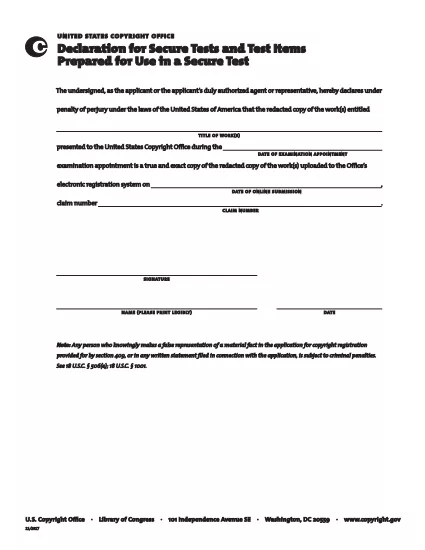
The Secure Test Declaration is a legally‑required statement used by the United States Copyright Office to certify that a test item is protected and will be handled securely. Our fillable PDF version lets you complete the form quickly, accurately, and without installing any extra software.

With Formize’s integrated PDF Filler, you can open the document directly in your browser, enter the required information, and save or print a certified copy. This eliminates the hassle of downloading, editing, and re‑uploading static PDFs.

Below you’ll find a brief overview of the form’s sections, tips for avoiding common errors, and step‑by‑step instructions for completing the declaration online.

What Is a Secure Test Declaration?

A Secure Test Declaration confirms that the test material you are submitting is confidential, that you have the authority to submit it, and that you understand the penalties for false statements. It is commonly required for copyrighted works that involve proprietary testing methods or confidential data.

Key Sections of the Form

  • Applicant Information – Name, address, and contact details.
  • Test Description – Title, purpose, and nature of the test.
  • Security Measures – How the test will be protected.
  • Declaration Statement – Signature line confirming truthfulness.

How to Fill Out the Secure Test Declaration Online

Instead of downloading the PDF and opening it in a separate editor, simply click the "Fill out this form" button on this page. The Formize PDF Filler app will load automatically, allowing you to complete every field directly in your browser.

Common Mistakes to Avoid

  • Leaving required fields blank – the filler will highlight missing information.
  • Using an unofficial signature image – type your name in the signature field for a legally accepted electronic signature.
  • Submitting outdated contact details – double‑check phone numbers and email addresses before saving.

Where to Submit the Completed Form

After saving the completed declaration, you can either:

  1. Upload the PDF through the Copyright Office’s online portal.
  2. Print, sign physically (if required), and mail it to the address listed on the form.

For most users, the electronic submission option is faster and provides immediate confirmation of receipt.

التعليمات
  • Do I need Adobe Acrobat to fill out the Secure Test Declaration?

    No. Formize’s online PDF Filler works in any modern browser, so you don’t need Acrobat or any other software.

  • Can I edit the form after I’ve saved it?

    Yes. Open the saved PDF with Formize again, make any necessary changes, and re‑save.

  • Is an electronic signature accepted by the Copyright Office?

    For the Secure Test Declaration, an electronic signature entered through the Formize filler is considered valid, provided the form is submitted electronically.

  • What happens if I submit incomplete information?

    The filler will highlight missing required fields before you can save. Submitting an incomplete form may delay processing.

  • Is there a fee to download or use the Secure Test Declaration form?

    The PDF download and online filling are free. Any filing fees are set by the Copyright Office and are paid separately during submission.

كيف

كيفية ملء secure test declaration مجانًا عبر الإنترنت في 4 خطوات سهلة:

  1. 1
    Open the Fillable Form
    Click the "Fill out this form" button on the page. The Formize PDF Filler loads in a new tab.
  2. 2
    Enter Your Information
    Complete each highlighted field – the filler will guide you through Applicant Information, Test Description, and Security Measures.
  3. 3
    Sign Electronically
    Type your name in the signature field. The system records a timestamp for legal validity.
  4. 4
    Save and Submit
    Click "Save PDF" to download a copy, then upload it to the Copyright Office portal or print and mail as instructed.
Formize تطبيق PDF Filler
حول

نماذج مكتب حقوق التأليف والنشر

secure test declaration هو أحد النماذج الرسمية التي يستخدمها مكتب حقوق الطبع والنشر بالولايات المتحدة، وهو أحد أقسام مكتبة الكونجرس، لتسجيل حقوق الطبع والنشر وحمايتها. مكتب حقوق النشر هو المسؤول عن إدارة قوانين حقوق النشر في الولايات المتحدة، بما في ذلك تسجيل حقوق النشر، وتسجيل عمليات نقل حقوق النشر والتراخيص، وتوفير المعلومات والخدمات المتعلقة بحقوق النشر.

فيما يلي بعض الأمثلة على نماذج مكتب حقوق الطبع والنشر:

طلب تسجيل حقوق الطبع والنشر: هذا هو النموذج الرئيسي المستخدم لتسجيل حقوق الطبع والنشر لدى مكتب حقوق الطبع والنشر بالولايات المتحدة. تتوفر نماذج طلبات مختلفة لأنواع مختلفة من الأعمال، مثل الأعمال الأدبية والفنون البصرية والمقطوعات الموسيقية والتسجيلات الصوتية والصور المتحركة والمزيد. يقوم التطبيق بجمع معلومات حول العمل الذي يتم تسجيله، والمؤلف، والمطالب، وغيرها من التفاصيل ذات الصلة.

نماذج تسجيل المستندات: تُستخدم هذه النماذج لتسجيل عمليات نقل حقوق الطبع والنشر، مثل التنازلات أو التراخيص، لدى مكتب حقوق الطبع والنشر. أنها توفر وسيلة لإنشاء سجل عام لنقل ملكية حقوق الطبع والنشر.

نموذج دليل الوكيل المعين بموجب قانون الألفية الجديدة لحقوق طبع ونشر المواد الرقمية: يُستخدم هذا النموذج لتعيين وكيل لدى مكتب حقوق الطبع والنشر بموجب قانون الألفية الجديدة لحقوق طبع ونشر المواد الرقمية (DMCA). الوكيل المعين مسؤول عن تلقي ومعالجة إشعارات الإزالة المتعلقة بانتهاك حقوق الطبع والنشر عبر الإنترنت.

جدول رسوم مكتب حقوق الطبع والنشر: على الرغم من أنه ليس نموذجًا محددًا، إلا أن جدول الرسوم يوفر معلومات حول الرسوم المرتبطة بخدمات حقوق الطبع والنشر المتنوعة، بما في ذلك التسجيل والتسجيل والخدمات الأخرى ذات الصلة.

من المهم ملاحظة أن النماذج والمتطلبات المحددة قد تتغير بمرور الوقت، وقد تكون هناك حاجة إلى نماذج مختلفة لأنواع مختلفة من تسجيلات أو خدمات حقوق الطبع والنشر. يُنصح بزيارة الموقع الإلكتروني الرسمي لمكتب حقوق الطبع والنشر بالولايات المتحدة (www.copyright.gov) أو استشارة المتخصصين القانونيين المتخصصين في قانون حقوق الطبع والنشر للحصول على معلومات دقيقة وحديثة فيما يتعلق بنماذج مكتب حقوق الطبع والنشر المحددة ذات الصلة باحتياجاتك المتعلقة بحقوق الطبع والنشر.

سمات

حشو PDF

أسهل طريقة لملء نماذج PDF عبر الإنترنت

  • املأ بسرعة secure test declaration
    هل تبحث عن طريقة لملء كلمة secure test declaration بسرعة عبر الإنترنت؟ من خلال برنامج تعبئة نماذج PDF المجاني عبر الإنترنت ، ستعرف كيفية تحرير وتعبئة مستند pdf هذا في أقل من دقيقة.
  • محرر PDF سهل الاستخدام عبر الإنترنت
    هل سئمت طباعة ملفات PDF حتى تتمكن من تحريرها قبل إعادة مسحها ضوئيًا وإرسالها مرة أخرى؟ تحرير مستندات PDF مجانًا عبر الإنترنت. استخدم محرر pdf على الإنترنت لتوفير الوقت والورق.
  • أدوات رائعة ، جميع المنصات
    هل تتساءل عن كيفية ملء secure test declaration على جهاز Mac ، أو ربما كيفية استخدام حشو PDF مجانًا؟ تعمل أدوات PDF الخاصة بنا عبر الإنترنت على جميع الأنظمة الأساسية.
  • تخزين الملفات الآمن
    يتم تخزين ملفات "secure test declaration" المكتملة في قاعدة بيانات آمنة تديرها استضافة Amazon Cloud. يمكنك حذف ملفاتك من نظامنا في أي وقت. على أي حال ، يتم حذف هذه الملفات تلقائيًا بعد 24 ساعة.
  • الدردشة مع {كلمة رئيسية}
    قم بالدردشة مع "secure test declaration" على Chatize وهو مساعد مجاني لقارئ PDF. اطرح الأسئلة واحصل على الإجابات من "secure test declaration". فقط انقر على زر الدردشة مع المستند أعلاه.

حذف جلسة التعبئة

حذف جلسة التعبئة المحددة؟ في هذه الحالة، سيتم فقد تقدمك في إكمال النموذج.

حذف جلسة التحرير

هل تريد حذف جلسة التحرير المحددة؟ في هذه الحالة، سيتم فقدان التقدم الذي أحرزته في إنشاء النموذج وتحريره.