
اختار اللغة

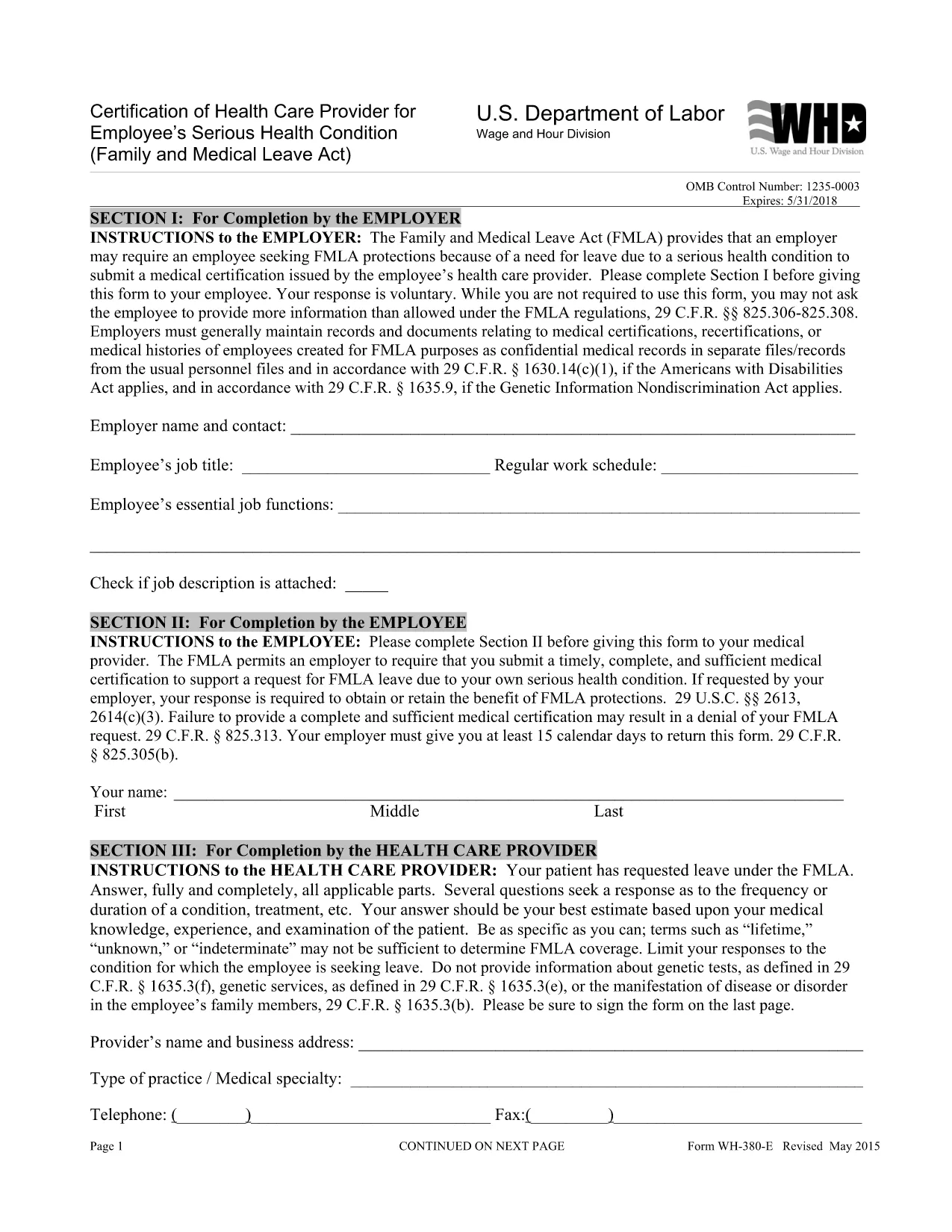
WH‑380‑E Fillable PDF – Family & Medical Leave Act Medical Certification

  1. لغة إنجليزي
  2. دولة الولايات المتحدة الأمريكية
  3. قسم قسم العمل
  4. وكالة تقسيم الأجور والساعات
WH‑380‑E Fillable PDF – Family & Medical Leave Act Medical Certification

The WH‑380‑E is the official certification of a health care provider required under the Family and Medical Leave Act (FMLA). Employers use this form to verify an employee’s serious health condition, a newborn or newly‑adopted child, or a need for caretaker leave.

What Is the WH‑380‑E Form?

This government‑issued PDF collects detailed medical information, including diagnosis, treatment dates, and the provider’s certification that the condition qualifies for FMLA leave. It is used by federal, state, and private employers across the United States.

How to Complete the WH‑380‑E Online

Instead of downloading and editing the PDF in a separate editor, simply click the “Fill out this form” button on this page. The Formize PDF Filler app will load the fillable version instantly. Follow these steps:

  • Step 1: Click the “Fill out this form” button.
  • Step 2: The Formize filler loads – the document becomes interactive.
  • Step 3: Enter the employee’s information, health‑care provider details, and medical certification data.
  • Step 4: Review for completeness and accuracy.
  • Step 5: Click “Save & Download” to obtain a completed PDF you can print or email to HR.

Common Mistakes to Avoid

  • Leaving any required field blank – every asterisk (*) field must be completed.
  • Providing a diagnosis when the form states it is optional (unless your employer requests it).
  • Using illegible handwriting – the online filler ensures clear, typed text.
  • Submitting the form without the provider’s signature and date.

Where to Submit the Certified Form

After saving the completed WH‑380‑E, send it to your employer’s Human Resources or Benefits department according to your company’s leave‑request policy. Federal employees may also submit it to the agency’s HR office.

Download the Fillable WH‑380‑E PDF

If you prefer to keep a copy of the original document, you can download the official WH‑380‑E PDF from the West Virginia Legislature site. Our online filler uses the same version, guaranteeing compliance.

التعليمات
  • What is the purpose of the WH‑380‑E form?

    The WH‑380‑E certifies that an employee’s serious health condition (or a family member’s condition) meets the eligibility criteria for FMLA leave.

  • Can I fill out WH‑380‑E on a mobile device?

    Yes. The Formize PDF Filler works on smartphones and tablets, allowing you to complete the form on any modern browser.

  • Do I need to include a diagnosis on the form?

    A diagnosis is optional unless your employer specifically requests it. The form’s instructions note that the provider may omit the diagnosis while still meeting FMLA requirements.

  • How many copies of the completed WH‑380‑E do I need?

    Typically one completed, signed copy is submitted to HR. Keep a personal copy for your records.

  • Is the WH‑380‑E required for all FMLA leave types?

    The form is required for serious health conditions of the employee or an immediate family member. Separate certification forms exist for newborn or adopted child care.

  • What if I make a mistake after submitting the form?

    Contact your HR department immediately. You can submit a corrected WH‑380‑E with a note explaining the changes.

  • Is the WH‑380‑E a federal or state form?

    It is a federal form issued under the Family and Medical Leave Act, but many states adopt the same version for their own leave programs.

  • Do I need a notary for the WH‑380‑E?

    No. The health‑care provider’s signature and date satisfy the certification requirements.

كيف

كيفية ملء WH-380-E مجانًا عبر الإنترنت في 5 خطوات سهلة:

  1. 1
    Open the Fillable Form
    Click the “Fill out this form” button on the page. The Formize PDF Filler loads the WH‑380‑E as an interactive document.
  2. 2
    Enter Required Information
    Type the employee’s name, dates of care, and the health‑care provider’s details into the highlighted fields.
  3. 3
    Complete the Medical Certification
    Provide the diagnosis (if required), treatment plan, and any functional limitations. Ensure the provider signs and dates the form.
  4. 4
    Review and Save
    Double‑check all entries for accuracy, then click “Save & Download” to get a completed PDF you can print or email.
  5. 5
    Submit to HR
    Send the saved PDF to your employer’s HR or Benefits department following your organization’s leave‑submission guidelines.
Formize تطبيق PDF Filler
حول

نماذج وزارة العمل (DOL).

WH-380-E هو أحد النماذج الرسمية التي تستخدمها وزارة العمل الأمريكية ووكالاتها المختلفة لجمع المعلومات وإدارة البرامج وتنفيذ القوانين واللوائح المتعلقة بالعمل. وزارة العمل هي إدارة تنفيذية اتحادية مسؤولة عن تعزيز وحماية رفاهية العمال، وضمان ممارسات التوظيف العادلة، والإشراف على مختلف جوانب العمل والتوظيف في الولايات المتحدة.

فيما يلي بعض الأمثلة على نماذج وزارة العمل:

التحقق من أهلية التوظيف (النموذج I-9): أثناء إدارته بواسطة خدمات المواطنة والهجرة الأمريكية (USCIS)، غالبًا ما يرتبط النموذج I-9 بوزارة العمل. يتم استخدامه من قبل أصحاب العمل للتحقق من هوية الأفراد المعينين للعمل في الولايات المتحدة وأهليتهم للتوظيف.

نماذج قانون الإجازة الطبية والعائلية (FMLA): يتولى قسم الأجور والساعات التابع لوزارة العمل إدارة قانون الإجازة الطبية والعائلية (FMLA)، ويتم استخدام نماذج مختلفة لتنفيذ أحكام هذا القانون الفيدرالي والامتثال لها، بما في ذلك شهادة الرعاية الصحية نموذج الموفر ونموذج إشعار FMLA بالأهلية والحقوق والمسؤوليات.

نماذج إدارة السلامة والصحة المهنية (OSHA): تتطلب إدارة السلامة والصحة المهنية، وهي أحد أقسام وزارة العمل، من بعض أصحاب العمل الاحتفاظ بسجلات للإصابات والأمراض في مكان العمل باستخدام نماذج مثل نموذج إدارة السلامة والصحة المهنية 300، ونموذج إدارة السلامة والصحة المهنية 300A، وإدارة السلامة والصحة المهنية النموذج 301.

نماذج التأمين ضد البطالة: تشرف إدارة التوظيف والتدريب في وزارة العمل على برنامج التأمين ضد البطالة (UI)، ويتم استخدام نماذج مختلفة من قبل وكالات القوى العاملة الحكومية لإدارة ومعالجة مطالبات مزايا التأمين ضد البطالة.

نماذج الامتثال للأجور وساعات العمل: يقوم قسم الأجور وساعات العمل بوزارة العمل بإنفاذ قوانين العمل المختلفة، بما في ذلك قانون معايير العمل العادلة (FLSA) وقانون الإجازة العائلية والطبية (FMLA). قد يُطلب من أصحاب العمل استخدام نماذج محددة للحفاظ على الامتثال لهذه القوانين، مثل سجلات ساعات العمل ومعدلات الأجور والمعلومات الأخرى ذات الصلة.

تمثل هذه الأمثلة بعض الفئات الشائعة من نماذج وزارة العمل، ولكن هناك العديد من النماذج الأخرى التي تستخدمها وزارة العمل ووكالاتها المختلفة لتنفيذ مسؤولياتها المتعلقة بالعمل والتوظيف. قد تختلف النماذج المحددة المطلوبة اعتمادًا على البرنامج أو اللوائح أو إجراءات التنفيذ المعنية. يُنصح بزيارة الموقع الرسمي لوزارة العمل الأمريكية (www.dol.gov) أو استشارة وكالات وزارة العمل ذات الصلة أو المتخصصين القانونيين للحصول على بيانات دقيقة وحديثة. معلومات التاريخ المتعلقة بنماذج DOL المحددة ذات الصلة باحتياجاتك المتعلقة بالعمل أو متطلبات الامتثال.

سمات

حشو PDF

أسهل طريقة لملء نماذج PDF عبر الإنترنت

  • املأ بسرعة WH-380-E
    هل تبحث عن طريقة لملء كلمة WH-380-E بسرعة عبر الإنترنت؟ من خلال برنامج تعبئة نماذج PDF المجاني عبر الإنترنت ، ستعرف كيفية تحرير وتعبئة مستند pdf هذا في أقل من دقيقة.
  • محرر PDF سهل الاستخدام عبر الإنترنت
    هل سئمت طباعة ملفات PDF حتى تتمكن من تحريرها قبل إعادة مسحها ضوئيًا وإرسالها مرة أخرى؟ تحرير مستندات PDF مجانًا عبر الإنترنت. استخدم محرر pdf على الإنترنت لتوفير الوقت والورق.
  • أدوات رائعة ، جميع المنصات
    هل تتساءل عن كيفية ملء WH-380-E على جهاز Mac ، أو ربما كيفية استخدام حشو PDF مجانًا؟ تعمل أدوات PDF الخاصة بنا عبر الإنترنت على جميع الأنظمة الأساسية.
  • تخزين الملفات الآمن
    يتم تخزين ملفات "WH-380-E" المكتملة في قاعدة بيانات آمنة تديرها استضافة Amazon Cloud. يمكنك حذف ملفاتك من نظامنا في أي وقت. على أي حال ، يتم حذف هذه الملفات تلقائيًا بعد 24 ساعة.
  • الدردشة مع {كلمة رئيسية}
    قم بالدردشة مع "WH-380-E" على Chatize وهو مساعد مجاني لقارئ PDF. اطرح الأسئلة واحصل على الإجابات من "WH-380-E". فقط انقر على زر الدردشة مع المستند أعلاه.

حذف جلسة التعبئة

حذف جلسة التعبئة المحددة؟ في هذه الحالة، سيتم فقد تقدمك في إكمال النموذج.

حذف جلسة التحرير

هل تريد حذف جلسة التحرير المحددة؟ في هذه الحالة، سيتم فقدان التقدم الذي أحرزته في إنشاء النموذج وتحريره.