
اختار اللغة

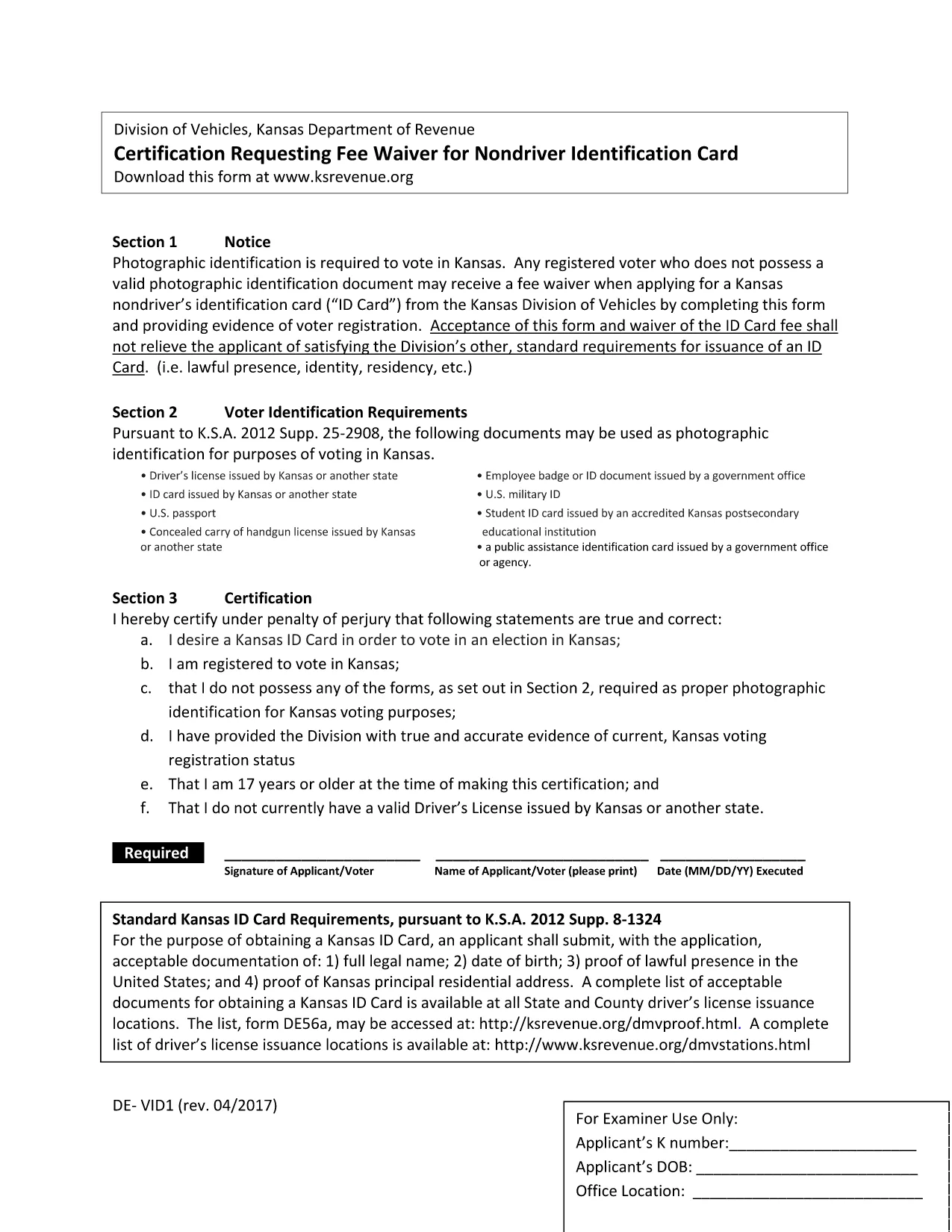
The DE-VID1 form is a standard fillable PDF used for reporting vehicle identification details to the relevant authority. Whether you need it for registration, insurance, or compliance, Formize lets you complete the form instantly in your browser – no software download required.

What Is the DE-VID1 Form?

The DE-VID1 is a single‑page, fillable PDF that captures:

  • Vehicle make, model, and year
  • Vehicle Identification Number (VIN)
  • Owner’s personal and contact information
  • Registration and insurance details

It is commonly required by state motor vehicle departments and insurance carriers across the United States.

How to Fill the DE-VID1 Form Online

Instead of downloading the PDF and opening it in a desktop editor, simply click the "Fill out this form" button below. The Formize PDF Filler app will load in seconds, presenting a clean, responsive interface.

  1. Click Fill out this form and wait for the Formize PDF Filler to appear.
  2. Enter the requested information in each field. The filler validates data in real time.
  3. Use the Save button to download a completed copy or the Submit button to send it directly to the designated email address.

Common Mistakes to Avoid

  • Incorrect VIN format: The VIN must be exactly 17 characters – letters and numbers only.
  • Leaving required fields blank: Required fields are highlighted in red until completed.
  • Mismatched addresses: Ensure the mailing address matches the one on the vehicle title.

Where to Submit the Completed Form

After you finish, you can:

  • Download the filled PDF and upload it to your state DMV portal.
  • Email the PDF to your insurance provider.
  • Print a hard copy for in‑person submission.

Need Help?

Formize’s built‑in help tooltip appears next to every field, offering brief explanations. For detailed guidance, refer to the official DE-VID1 instructions provided by the issuing agency.

التعليمات
  • Do I need Adobe Acrobat to fill the DE-VID1 form?

    No. Formize’s online PDF filler works in any modern browser without additional software.

  • Can I save my progress and return later?

    Yes. Click the "Save Draft" button to download a partially completed PDF that you can reopen later.

  • Is my data secure while using Formize?

    All data is encrypted in transit (HTTPS) and never stored on our servers after you download or submit the form.

  • What if I make a mistake after submitting?

    You can download the completed PDF, correct the error in any PDF editor, and re‑submit it to the appropriate agency.

  • Which browsers are supported?

    Formize works with Chrome, Firefox, Edge, Safari, and most up‑to‑date browsers.

  • Do I need to print the form after filling it online?

    Only if the receiving agency requires a hard copy. Otherwise, a digital PDF is usually accepted.

كيف

كيفية ملء DE-VID1 مجانًا عبر الإنترنت في 4 خطوات سهلة:

  1. 1
    Click the Fill Button
    Press the "Fill out this form" button on the page. The Formize PDF Filler will open in a new window.
  2. 2
    Wait for the Filler to Load
    The app loads in seconds. You’ll see a preview of the DE-VID1 form with editable fields.
  3. 3
    Enter Your Information
    Type directly into each field. Real‑time validation helps you avoid errors.
  4. 4
    Review and Save
    Use the "Save" button to download a completed PDF or the "Submit" button to email it directly.
Formize تطبيق PDF Filler
حول

استمارات تسجيل المركبة

إذا كنت تمتلك أو تستأجر سيارة أو مقطورة أو قاربًا ، فيجب عليك الوفاء بالتزامات معينة للحفاظ على سيارتك مسجلة قانونيًا وآمنة.

يُعد DE-VID1 أحد نماذج تسجيل المركبات التي تُستخدم لتسجيل مركبة بمحرك مع سلطة الولاية أو المقاطعة ذات الصلة. عادة ما تكون هذه النماذج مطلوبة عندما يشتري شخص ما سيارة جديدة أو مستعملة أو عندما ينتقل إلى ولاية أو مقاطعة جديدة بسيارة.

يمكن أن تختلف المتطلبات والنماذج الدقيقة اللازمة لتسجيل السيارة حسب الموقع ، ولكن بشكل عام ، تتضمن العملية تقديم معلومات حول السيارة والمالك وأي امتيازات على السيارة.

بمجرد تقديم استمارات التسجيل والرسوم ، ستصدر سلطة الولاية أو المقاطعة شهادة تسجيل أو لوحة ترخيص لمالك السيارة. يسمح هذا التسجيل بتشغيل السيارة بشكل قانوني على الطرق العامة والطرق السريعة.

سمات

حشو PDF

أسهل طريقة لملء نماذج PDF عبر الإنترنت

  • املأ بسرعة DE-VID1
    هل تبحث عن طريقة لملء كلمة DE-VID1 بسرعة عبر الإنترنت؟ من خلال برنامج تعبئة نماذج PDF المجاني عبر الإنترنت ، ستعرف كيفية تحرير وتعبئة مستند pdf هذا في أقل من دقيقة.
  • محرر PDF سهل الاستخدام عبر الإنترنت
    هل سئمت طباعة ملفات PDF حتى تتمكن من تحريرها قبل إعادة مسحها ضوئيًا وإرسالها مرة أخرى؟ تحرير مستندات PDF مجانًا عبر الإنترنت. استخدم محرر pdf على الإنترنت لتوفير الوقت والورق.
  • أدوات رائعة ، جميع المنصات
    هل تتساءل عن كيفية ملء DE-VID1 على جهاز Mac ، أو ربما كيفية استخدام حشو PDF مجانًا؟ تعمل أدوات PDF الخاصة بنا عبر الإنترنت على جميع الأنظمة الأساسية.
  • تخزين الملفات الآمن
    يتم تخزين ملفات "DE-VID1" المكتملة في قاعدة بيانات آمنة تديرها استضافة Amazon Cloud. يمكنك حذف ملفاتك من نظامنا في أي وقت. على أي حال ، يتم حذف هذه الملفات تلقائيًا بعد 24 ساعة.
  • الدردشة مع {كلمة رئيسية}
    قم بالدردشة مع "DE-VID1" على Chatize وهو مساعد مجاني لقارئ PDF. اطرح الأسئلة واحصل على الإجابات من "DE-VID1". فقط انقر على زر الدردشة مع المستند أعلاه.

حذف جلسة التعبئة

حذف جلسة التعبئة المحددة؟ في هذه الحالة، سيتم فقد تقدمك في إكمال النموذج.

حذف جلسة التحرير

هل تريد حذف جلسة التحرير المحددة؟ في هذه الحالة، سيتم فقدان التقدم الذي أحرزته في إنشاء النموذج وتحريره.