اختار اللغة

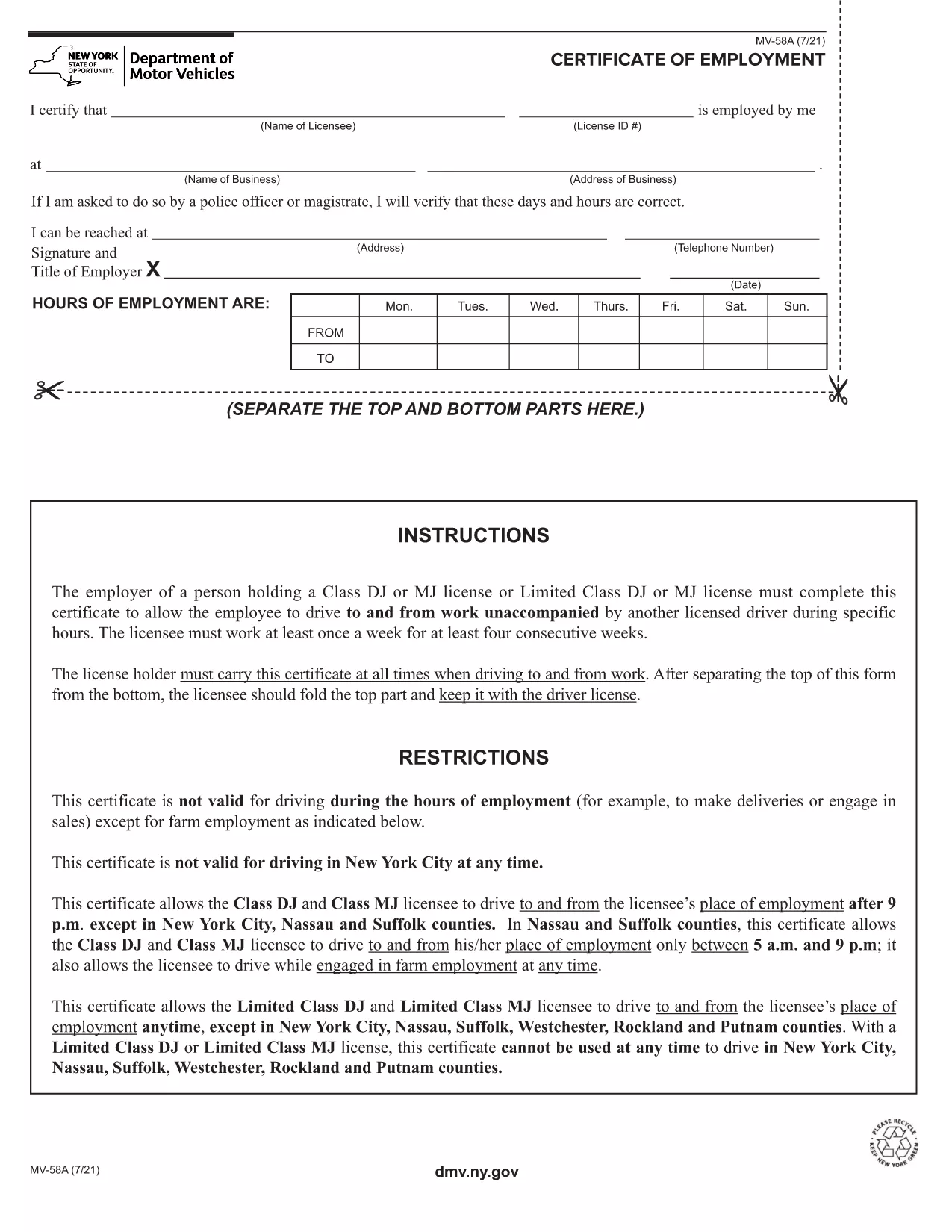
The MV-58A is the New York State Department of Motor Vehicles (DMV) form used for specific vehicle‑related transactions. Whether you need to correct registration details, request a duplicate, or handle a special circumstance, the MV-58A is the official document required by the NY DMV.

Formize.com offers a fillable PDF version of the MV-58A that lets you complete the form instantly in your browser—no extra software needed. Simply click the “Fill out this form” button, let the Formize PDF Filler load, and start entering your information.

Below you’ll find everything you need to know about the MV-58A, step‑by‑step instructions for filling it out online, common pitfalls to watch out for, and where to send the finished form.

What Is the MV-58A Form?

The MV-58A is typically used for:

  • Updating vehicle ownership information.
  • Correcting errors on a title or registration.
  • Submitting special requests that are not covered by standard DMV forms.

It is a mandatory paper‑based form for the NY DMV, but with Formize’s fillable PDF you can complete it digitally and print a clean copy for submission.

How to Complete the MV-58A Online

Follow our quick guide to finish the form without ever opening a separate PDF editor:

  1. Click the “Fill out this form” button on the page.
  2. Wait a few seconds while the Formize PDF Filler app loads the MV-58A.
  3. Enter your information in the highlighted fields. The app automatically saves your progress.
  4. Review each section for accuracy; the filler highlights any required fields you missed.
  5. When you’re done, click “Download PDF” to save a printable copy or “Print” to send it directly to your printer.

Common Mistakes to Avoid

  • Leaving required fields blank: The filler will flag empty required boxes, but double‑check before downloading.
  • Using the wrong date format: NY DMV expects MM/DD/YYYY.
  • Signing the wrong copy: The MV-58A has multiple copies; sign only the copy you will submit.
  • Incorrect vehicle identification number (VIN): Verify the VIN matches the title exactly.

Where to Submit the Completed Form

After printing, mail or deliver the signed MV-58A to your local NY DMV office. Include any supporting documents referenced on the form. For faster processing, consider using certified mail with a tracking number.

Need a reminder? Bookmark this page and return anytime you need the MV-58A fillable PDF again.

التعليمات
  • What is the purpose of the MV-58A form?

    The MV-58A is used for special vehicle registration requests, corrections, or ownership updates that are not covered by standard DMV forms.

  • Can I fill out MV-58A on a phone or tablet?

    Yes. The Formize fillable PDF works on any modern browser, including mobile devices, though a larger screen makes data entry easier.

  • Do I need to print the form after filling it online?

    The NY DMV requires a signed paper copy, so you must print the completed form, sign it, and submit it by mail or in person.

  • How long does it take for the DMV to process the MV-58A?

    Processing times vary, but most requests are handled within 10‑14 business days after the DMV receives the complete form.

  • Is there a fee for submitting MV-58A?

    A processing fee may apply depending on the specific request. Check the form instructions or the NY DMV fee schedule for details.

  • What should I do if I make a mistake after printing?

    If you notice an error, correct it on a new copy of the form. Do not use correction fluid; instead, start a fresh fillable PDF and print again.

  • Can I submit the MV-58A electronically?

    The NY DMV currently requires a handwritten signature on a printed copy, so electronic submission alone is not accepted.

  • Where can I find a local NY DMV office?

    Visit the official NY DMV website and use the office locator tool to find the nearest location.

كيف

كيفية ملء MV-58A مجانًا عبر الإنترنت في 5 خطوات سهلة:

  1. 1
    Open the Fillable Form
    Click the “Fill out this form” button on the page. The Formize PDF Filler will open in a new tab.
  2. 2
    Enter Your Information
    Type directly into each highlighted field. The app saves your entries automatically.
  3. 3
    Validate and Review
    Check for any highlighted missing fields or format warnings, then review all entered data.
  4. 4
    Download or Print
    When satisfied, click “Download PDF” to save a copy or “Print” to produce a hard‑copy for mailing.
  5. 5
    Submit to the NY DMV
    Mail or deliver the signed form to your local New York DMV office along with any required attachments.
Formize تطبيق PDF Filler
حول

استمارات تسجيل المركبة

MV-58A هو أحد نماذج DMV، والمعروف أيضًا باسم نماذج قسم المركبات الآلية، وهي عبارة عن مستندات تستخدم في المعاملات والعمليات المختلفة المتعلقة بالمركبات الآلية. DMV هي وكالة حكومية مسؤولة عن ترخيص السائقين وتسجيل المركبات وإنفاذ قوانين المركبات. يمكن أن تختلف نماذج DMV المحددة المتاحة حسب الولاية القضائية، ولكن فيما يلي بعض الأمثلة الشائعة:

نماذج رخصة القيادة: تُستخدم هذه النماذج لتقديم طلب للحصول على رخصة قيادة أو لطلب تغييرات أو تجديدات. وهي تتطلب عادةً معلومات شخصية وإثبات الهوية، وقد تتضمن أقسامًا للمعلومات الطبية أو سجل القيادة.

نماذج تسجيل المركبات: تُستخدم هذه النماذج لتسجيل مركبة آلية لدى DMV. أنها تتطلب معلومات السيارة، وتفاصيل الملكية، وإثبات التأمين.

نماذج نقل الملكية: عند شراء أو بيع مركبة، تُستخدم هذه النماذج لنقل الملكية من طرف إلى آخر. وهي تتطلب معلومات حول المشتري والبائع وتفاصيل السيارة، وقد تتضمن فاتورة بيع.

نماذج الإعفاء من مسؤولية السيارة: عند بيع أو نقل ملكية مركبة، تُخطر هذه النماذج DMV بأن البائع لم يعد مسؤولاً عن السيارة. فهو يساعد على حماية البائع من المسؤولية عن الحوادث أو الأحداث المتعلقة بالمركبة بعد البيع.

نماذج تجديد تسجيل لوحة الترخيص والتسجيل: تُستخدم هذه النماذج لتجديد تسجيل المركبة أو طلب لوحات ترخيص جديدة. وهي تتطلب عادةً معلومات حول المالك المسجل وتفاصيل التسجيل الحالية ودفع الرسوم المطبقة.

نماذج طلب سجلات القيادة: تسمح هذه النماذج للأفراد بطلب سجلات القيادة الخاصة بهم من DMV، والتي توفر معلومات حول مخالفات القيادة، وحالة الترخيص، والتفاصيل الأخرى ذات الصلة.

نماذج لوحة الترخيص المخصصة أو المخصصة: تُستخدم هذه النماذج لتقديم طلب للحصول على لوحات ترخيص مخصصة أو خاصة، والتي تسمح للأفراد بتخصيص لوحة الترخيص الخاصة بهم بأحرف أو تصميمات محددة.

هذه مجرد أمثلة قليلة على النماذج العديدة التي قد تكون متاحة من خلال DMV. يمكن أن تختلف النماذج والمتطلبات المحددة حسب الولاية القضائية، لذلك من المهم استشارة موقع DMV المحلي أو زيارة أحد مكاتب DMV للحصول على النماذج الصحيحة التي تلبي احتياجاتك الخاصة.

سمات

حشو PDF

أسهل طريقة لملء نماذج PDF عبر الإنترنت

  • املأ بسرعة MV-58A
    هل تبحث عن طريقة لملء كلمة MV-58A بسرعة عبر الإنترنت؟ من خلال برنامج تعبئة نماذج PDF المجاني عبر الإنترنت ، ستعرف كيفية تحرير وتعبئة مستند pdf هذا في أقل من دقيقة.
  • محرر PDF سهل الاستخدام عبر الإنترنت
    هل سئمت طباعة ملفات PDF حتى تتمكن من تحريرها قبل إعادة مسحها ضوئيًا وإرسالها مرة أخرى؟ تحرير مستندات PDF مجانًا عبر الإنترنت. استخدم محرر pdf على الإنترنت لتوفير الوقت والورق.
  • أدوات رائعة ، جميع المنصات
    هل تتساءل عن كيفية ملء MV-58A على جهاز Mac ، أو ربما كيفية استخدام حشو PDF مجانًا؟ تعمل أدوات PDF الخاصة بنا عبر الإنترنت على جميع الأنظمة الأساسية.
  • تخزين الملفات الآمن
    يتم تخزين ملفات "MV-58A" المكتملة في قاعدة بيانات آمنة تديرها استضافة Amazon Cloud. يمكنك حذف ملفاتك من نظامنا في أي وقت. على أي حال ، يتم حذف هذه الملفات تلقائيًا بعد 24 ساعة.
  • الدردشة مع {كلمة رئيسية}
    قم بالدردشة مع "MV-58A" على Chatize وهو مساعد مجاني لقارئ PDF. اطرح الأسئلة واحصل على الإجابات من "MV-58A". فقط انقر على زر الدردشة مع المستند أعلاه.

حذف جلسة التعبئة

حذف جلسة التعبئة المحددة؟ في هذه الحالة، سيتم فقد تقدمك في إكمال النموذج.

حذف جلسة التحرير

هل تريد حذف جلسة التحرير المحددة؟ في هذه الحالة، سيتم فقدان التقدم الذي أحرزته في إنشاء النموذج وتحريره.