
اختار اللغة

DS-5504 Fillable PDF – Name Change, Data Correction & Limited Passport Replacement

  1. لغة إنجليزي
  2. دولة الولايات المتحدة الأمريكية
  3. قسم إدارة مقاطعة
DS-5504 Fillable PDF – Name Change, Data Correction & Limited Passport Replacement

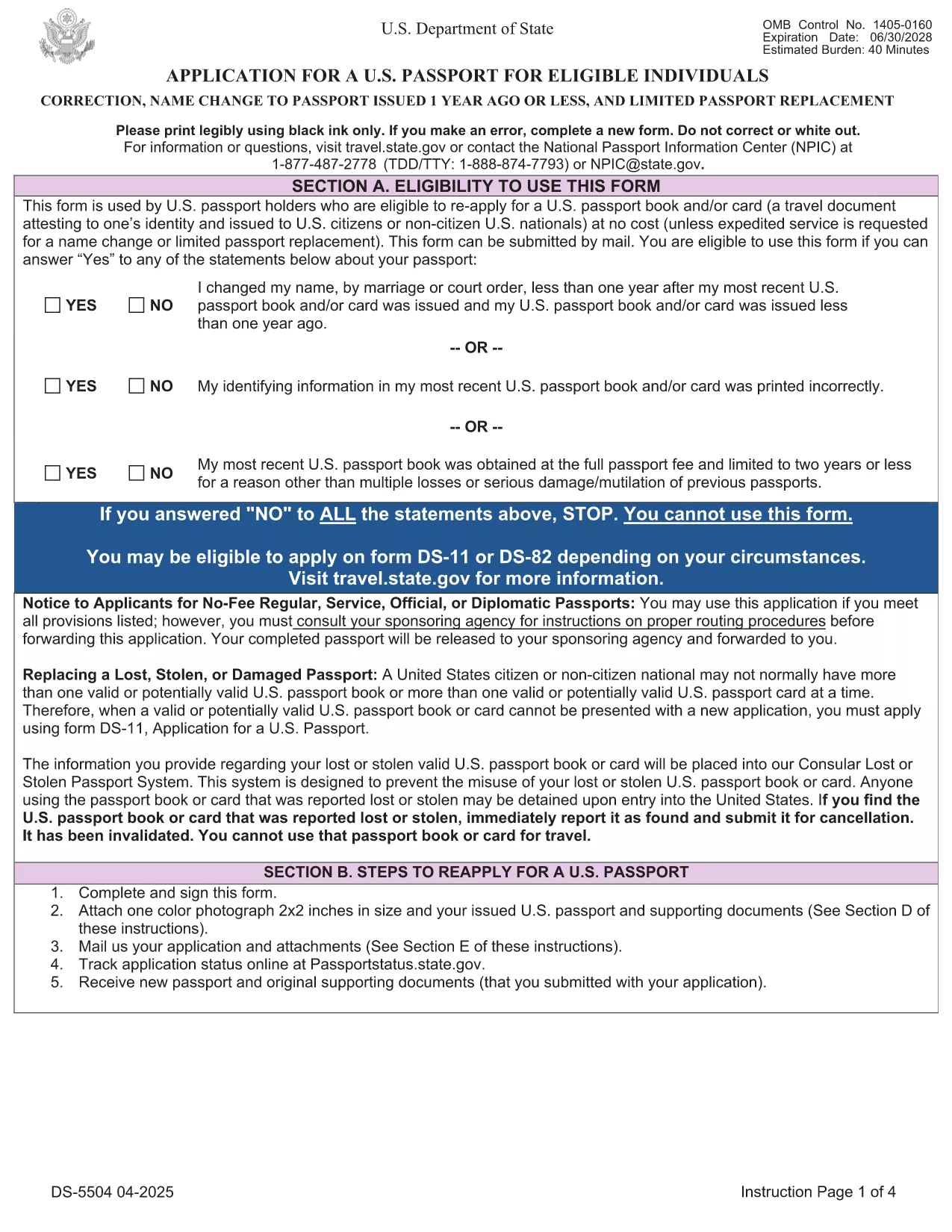
The DS-5504 is the official U.S. Department of State application used when you need to change the name on a passport, correct a printing error, or replace a limited‑validity passport. With Formize’s fillable PDF tool you can complete the form online, avoid manual errors, and print a clean copy ready for submission.

What Is the DS-5504 Form?

DS-5504 is designed for three specific situations:

  • Name change – if your legal name changed within one year of your last passport issuance.
  • Data correction – to fix a typo or incorrect personal information on an existing passport.
  • Limited passport replacement – when a temporary or limited‑validity passport expires or is damaged.

How to Fill Out DS-5504 with Formize

Instead of downloading the PDF and opening a separate editor, simply click the “Fill out this form” button on this page. The Formize PDF Filler app loads in your browser, letting you:

  1. Enter personal details directly into interactive fields.
  2. Upload a passport‑style photo.
  3. Save a draft and return later if needed.
  4. Download the completed, printable PDF with one click.

Common Mistakes to Avoid

  • Using a name change older than one year – the form will be rejected.
  • Leaving the signature line blank or signing on the wrong page.
  • Submitting an incorrect passport number or expiration date.
  • Forgetting to attach the required supporting documents (photo, legal name‑change proof, etc.).

Required Supporting Documents

Depending on your request, you will need to include:

  • Current valid U.S. passport (or limited‑validity passport).
  • One recent color passport photo (2" x 2").
  • Legal name‑change documentation (marriage certificate, court order) – if applicable.
  • Proof of the printing error (e.g., a copy of the original passport showing the mistake).

Where to Submit Your Completed Form

After printing, mail the DS-5504 package to the address listed in the form’s instructions or bring it to a regional passport agency. The application is free of charge; expedited processing is available for a fee.

Need help? Review the official DS‑5504 PDF for detailed instructions.

التعليمات
  • Can I use DS-5504 for a name change after one year?

    No. The DS‑5504 is only valid for name changes that occurred within one year of your most recent passport issuance. For older changes, use form DS‑82.

  • Is there a fee to file DS-5504?

    The DS‑5504 application itself is free. Fees only apply if you request expedited processing or need a new passport book.

  • Do I need a photo for a data‑correction request?

    Yes. All DS‑5504 submissions require one recent color passport photo, even if you are only correcting printed information.

  • Can I submit the completed form electronically?

    The State Department currently requires a printed, signed PDF with supporting documents. Electronic submission is not accepted for DS‑5504.

  • What if my limited‑validity passport is still valid?

    You can use DS‑5504 to replace a limited‑validity passport that is damaged, lost, or you simply need a full‑validity book. Include the limited passport and a written explanation.

  • How long does processing take?

    Regular processing usually takes 6‑8 weeks. Expedited service (for a fee) can reduce the time to 2‑3 weeks.

  • Can I use Formize on a mobile device?

    Yes. The Formize PDF Filler works on most modern smartphones and tablets, letting you fill out DS‑5504 on the go.

كيف

كيفية ملء DS-5504 مجانًا عبر الإنترنت في 5 خطوات سهلة:

  1. 1
    Open the Fillable Form
    Click the "Fill out this form" button on the page. The Formize PDF Filler loads instantly in your browser.
  2. 2
    Enter Your Information
    Complete each interactive field – personal details, passport number, reason for the request, and upload your passport‑style photo.
  3. 3
    Review & Sign
    Double‑check all entries for accuracy, then add your electronic signature in the designated box.
  4. 4
    Download & Print
    Save the completed PDF, print a clean copy on white paper, and attach any required supporting documents.
  5. 5
    Submit to the State Department
    Mail or deliver the package to the address specified in the form instructions, or schedule an appointment at a passport agency.
Formize تطبيق PDF Filler
حول

نماذج وزارة الخارجية (DOS).

DS-5504 هو أحد نماذج الطلبات التي تستخدمها وزارة الخارجية الأمريكية (DOS) لجمع المعلومات ومعالجة الخدمات المتنوعة المتعلقة بالسفر الدولي والتأشيرات وجوازات السفر والخدمات القنصلية. وزارة الخارجية مسؤولة عن إدارة السياسة الخارجية للولايات المتحدة والعلاقات الدولية وتقديم الخدمات للمواطنين الأمريكيين والمواطنين الأجانب.

فيما يلي بعض الأمثلة على نماذج وزارة الخارجية:

نماذج طلب جواز السفر: تُستخدم هذه النماذج لتقديم طلب للحصول على جواز سفر أمريكي، وهو مستند رسمي صادر عن الحكومة يسمح للأفراد بالسفر دوليًا. تجمع نماذج طلب جواز السفر المعلومات الشخصية وتفاصيل حول الجنسية والهوية وغيرها من المعلومات المطلوبة.

نماذج طلب تأشيرة غير المهاجرين: تشرف وزارة الخارجية على إصدار تأشيرات غير المهاجرين، والتي تسمح للمواطنين الأجانب بزيارة الولايات المتحدة بشكل مؤقت لأغراض مختلفة مثل السياحة أو العمل أو الدراسة أو العمل. تُستخدم نماذج طلب تأشيرة غير المهاجرين، مثل DS-160 أو DS-156 أو DS-260، لجمع معلومات حول التفاصيل الشخصية لمقدم الطلب وتاريخ السفر والغرض من السفر والمعلومات الأخرى ذات الصلة.

نماذج طلب تأشيرة الهجرة: بالنسبة للأفراد الذين يسعون للهجرة إلى الولايات المتحدة، يتم استخدام نماذج طلب تأشيرة الهجرة. تجمع هذه النماذج معلومات مفصلة حول التاريخ الشخصي لمقدم الطلب وأفراد الأسرة والتاريخ الوظيفي والمعلومات الأخرى ذات الصلة. تشمل الأمثلة نموذج DS-260 للهجرة العائلية أو نموذج DS-230 للفائزين في يانصيب تأشيرة التنوع.

نموذج التقرير القنصلي للولادة في الخارج (CRBA): يُستخدم هذا النموذج لتوثيق ولادة طفل مواطن أمريكي في الخارج لأبوين مواطنين أمريكيين. يقوم بجمع معلومات عن الطفل وأولياء الأمور والوثائق الداعمة.

نماذج إقرار الدعم: عند رعاية مهاجر إلى الولايات المتحدة، قد يحتاج مواطن أمريكي أو مقيم دائم قانوني إلى تقديم نموذج إقرار خطي بالدعم. يُستخدم هذا النموذج، مثل I-864 أو I-134، لإثبات القدرة المالية على دعم المهاجرين الراغبين ومنعهم من أن يصبحوا عبئًا عامًا.

نماذج الخدمات القنصلية: توفر وزارة الخارجية خدمات قنصلية متنوعة للمواطنين الأمريكيين والمواطنين الأجانب، مثل خدمات التوثيق، أو طلبات المساعدة الطارئة، أو التخلي عن الجنسية الأمريكية. يتم استخدام نماذج محددة لهذه الخدمات، بما في ذلك النماذج DS-11 أو DS-3053 أو DS-4079، اعتمادًا على طبيعة الخدمة المطلوبة.

من المهم ملاحظة أن النماذج المحددة التي تستخدمها وزارة الخارجية الأمريكية يمكن أن تتغير بمرور الوقت، وقد تتطلب الخدمات المختلفة نماذج مختلفة. يُنصح بزيارة الموقع الرسمي لوزارة الخارجية الأمريكية أو استشارة أقرب سفارة أو قنصلية أمريكية للحصول على أحدث المعلومات وأكثرها دقة فيما يتعلق بالنماذج المحددة المطلوبة لمختلف الخدمات.

سمات

حشو PDF

أسهل طريقة لملء نماذج PDF عبر الإنترنت

  • املأ بسرعة DS-5504
    هل تبحث عن طريقة لملء كلمة DS-5504 بسرعة عبر الإنترنت؟ من خلال برنامج تعبئة نماذج PDF المجاني عبر الإنترنت ، ستعرف كيفية تحرير وتعبئة مستند pdf هذا في أقل من دقيقة.
  • محرر PDF سهل الاستخدام عبر الإنترنت
    هل سئمت طباعة ملفات PDF حتى تتمكن من تحريرها قبل إعادة مسحها ضوئيًا وإرسالها مرة أخرى؟ تحرير مستندات PDF مجانًا عبر الإنترنت. استخدم محرر pdf على الإنترنت لتوفير الوقت والورق.
  • أدوات رائعة ، جميع المنصات
    هل تتساءل عن كيفية ملء DS-5504 على جهاز Mac ، أو ربما كيفية استخدام حشو PDF مجانًا؟ تعمل أدوات PDF الخاصة بنا عبر الإنترنت على جميع الأنظمة الأساسية.
  • تخزين الملفات الآمن
    يتم تخزين ملفات "DS-5504" المكتملة في قاعدة بيانات آمنة تديرها استضافة Amazon Cloud. يمكنك حذف ملفاتك من نظامنا في أي وقت. على أي حال ، يتم حذف هذه الملفات تلقائيًا بعد 24 ساعة.
  • الدردشة مع {كلمة رئيسية}
    قم بالدردشة مع "DS-5504" على Chatize وهو مساعد مجاني لقارئ PDF. اطرح الأسئلة واحصل على الإجابات من "DS-5504". فقط انقر على زر الدردشة مع المستند أعلاه.

حذف جلسة التعبئة

حذف جلسة التعبئة المحددة؟ في هذه الحالة، سيتم فقد تقدمك في إكمال النموذج.

حذف جلسة التحرير

هل تريد حذف جلسة التحرير المحددة؟ في هذه الحالة، سيتم فقدان التقدم الذي أحرزته في إنشاء النموذج وتحريره.