
اختار اللغة

DS-60 Affidavit Regarding a Change of Name – Fillable PDF

  1. لغة إنجليزي
  2. دولة الولايات المتحدة الأمريكية
  3. قسم إدارة مقاطعة
DS-60 Affidavit Regarding a Change of Name – Fillable PDF

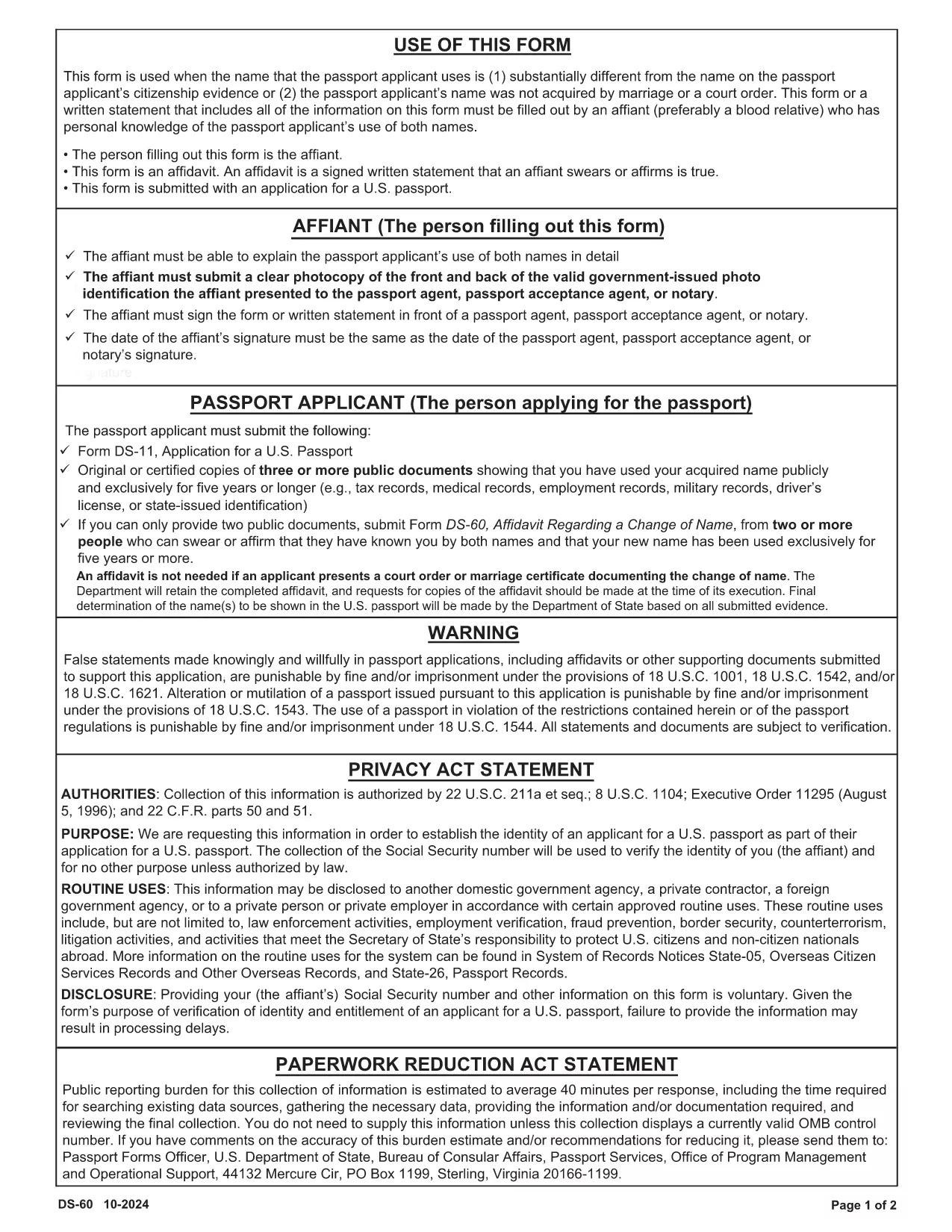
The DS-60 is the U.S. Department of State’s affidavit used when a passport applicant’s current name differs substantially from the name on their citizenship evidence, or when the name was not acquired through marriage or a court order. An affiant—usually a close relative who knows the applicant’s name usage—must complete the form.

Our fillable PDF version lets you complete the DS-60 directly in your browser. No printing, scanning, or PDF editors are required. Just click the button, fill the fields, and download a ready‑to‑submit document.

What Is the DS-60 Form and When Is It Required?

The DS-60 serves as a sworn statement that the applicant is known by two names. It is typically attached to a passport application (Form DS‑11) when:

  • The applicant uses a name that is substantially different from the name on their birth certificate or naturalization certificate.
  • The name change was not the result of marriage, divorce, or a court order.
  • The affiant can personally attest to the applicant’s use of both names.

How to Complete the DS-60 Online with Formize

Follow these simple steps to fill out the DS-60 without leaving your desk:

  1. Click the "Fill out this form" button on the page.
  2. Wait a few seconds while the Formize PDF Filler app loads.
  3. Enter the requested information in each fillable field (affiant name, relationship, applicant’s two names, etc.).
  4. Review the completed form for accuracy.
  5. Click Save & Download to get a PDF you can attach to your passport package.

Common Mistakes to Avoid on Your DS-60

  • Leaving fields blank: Every line must be completed, even if the answer is "None" or "N/A".
  • Incorrect relationship description: Specify the exact relationship (e.g., "maternal aunt") to avoid processing delays.
  • Signature errors: The affiant must sign in the designated area; electronic signatures are accepted when using Formize.
  • Mismatched names: Ensure the two names match exactly what appears on the applicant’s supporting documents.

By using our fillable DS-60, you reduce the risk of these errors and speed up your passport application.

التعليمات
  • Who can act as the affiant on a DS-60?

    The affiant should be a close relative (parent, sibling, child, aunt, uncle, grandparent, etc.) who personally knows the applicant’s use of both names.

  • Do I need to notarize the DS-60?

    No. The DS-60 is a sworn affidavit and does not require notarization, but the affiant must sign the form.

  • Can I submit a digital signature?

    Yes. When you fill out the form using Formize, an electronic signature is accepted by the U.S. Department of State.

  • What supporting documents should I include with the DS-60?

    Attach copies of the applicant’s current passport, birth certificate, naturalization certificate, or any document that shows the name discrepancy.

  • How long does it take for the DS-60 to be processed?

    The DS-60 itself is processed as part of the overall passport application. Processing time depends on the passport service you request (routine, expedited, etc.).

  • Is the DS-60 required for a name change due to marriage?

    No. For name changes due to marriage, divorce, or a court order, use the appropriate legal documents instead of the DS-60.

  • Can I edit the DS-60 after downloading it?

    Yes. With Formize you can reopen the saved PDF, make corrections, and re‑download the final version.

كيف

كيفية ملء DS-60 form مجانًا عبر الإنترنت في 4 خطوات سهلة:

  1. 1
    Open the Fillable Form
    Click the "Fill out this form" button on the page. The Formize PDF Filler will open in a new tab.
  2. 2
    Enter All Required Information
    Type the affiant’s details, relationship to the applicant, and both names exactly as they appear on supporting documents.
  3. 3
    Review and Sign
    Double‑check each field for accuracy, then add your electronic signature in the signature box.
  4. 4
    Save and Download
    Click the "Save & Download" button to obtain a completed PDF ready to be submitted with the passport application.
Formize تطبيق PDF Filler
حول

نماذج وزارة الخارجية (DOS).

DS-60 form هو أحد نماذج الطلبات التي تستخدمها وزارة الخارجية الأمريكية (DOS) لجمع المعلومات ومعالجة الخدمات المتنوعة المتعلقة بالسفر الدولي والتأشيرات وجوازات السفر والخدمات القنصلية. وزارة الخارجية مسؤولة عن إدارة السياسة الخارجية للولايات المتحدة والعلاقات الدولية وتقديم الخدمات للمواطنين الأمريكيين والمواطنين الأجانب.

فيما يلي بعض الأمثلة على نماذج وزارة الخارجية:

نماذج طلب جواز السفر: تُستخدم هذه النماذج لتقديم طلب للحصول على جواز سفر أمريكي، وهو مستند رسمي صادر عن الحكومة يسمح للأفراد بالسفر دوليًا. تجمع نماذج طلب جواز السفر المعلومات الشخصية وتفاصيل حول الجنسية والهوية وغيرها من المعلومات المطلوبة.

نماذج طلب تأشيرة غير المهاجرين: تشرف وزارة الخارجية على إصدار تأشيرات غير المهاجرين، والتي تسمح للمواطنين الأجانب بزيارة الولايات المتحدة بشكل مؤقت لأغراض مختلفة مثل السياحة أو العمل أو الدراسة أو العمل. تُستخدم نماذج طلب تأشيرة غير المهاجرين، مثل DS-160 أو DS-156 أو DS-260، لجمع معلومات حول التفاصيل الشخصية لمقدم الطلب وتاريخ السفر والغرض من السفر والمعلومات الأخرى ذات الصلة.

نماذج طلب تأشيرة الهجرة: بالنسبة للأفراد الذين يسعون للهجرة إلى الولايات المتحدة، يتم استخدام نماذج طلب تأشيرة الهجرة. تجمع هذه النماذج معلومات مفصلة حول التاريخ الشخصي لمقدم الطلب وأفراد الأسرة والتاريخ الوظيفي والمعلومات الأخرى ذات الصلة. تشمل الأمثلة نموذج DS-260 للهجرة العائلية أو نموذج DS-230 للفائزين في يانصيب تأشيرة التنوع.

نموذج التقرير القنصلي للولادة في الخارج (CRBA): يُستخدم هذا النموذج لتوثيق ولادة طفل مواطن أمريكي في الخارج لأبوين مواطنين أمريكيين. يقوم بجمع معلومات عن الطفل وأولياء الأمور والوثائق الداعمة.

نماذج إقرار الدعم: عند رعاية مهاجر إلى الولايات المتحدة، قد يحتاج مواطن أمريكي أو مقيم دائم قانوني إلى تقديم نموذج إقرار خطي بالدعم. يُستخدم هذا النموذج، مثل I-864 أو I-134، لإثبات القدرة المالية على دعم المهاجرين الراغبين ومنعهم من أن يصبحوا عبئًا عامًا.

نماذج الخدمات القنصلية: توفر وزارة الخارجية خدمات قنصلية متنوعة للمواطنين الأمريكيين والمواطنين الأجانب، مثل خدمات التوثيق، أو طلبات المساعدة الطارئة، أو التخلي عن الجنسية الأمريكية. يتم استخدام نماذج محددة لهذه الخدمات، بما في ذلك النماذج DS-11 أو DS-3053 أو DS-4079، اعتمادًا على طبيعة الخدمة المطلوبة.

من المهم ملاحظة أن النماذج المحددة التي تستخدمها وزارة الخارجية الأمريكية يمكن أن تتغير بمرور الوقت، وقد تتطلب الخدمات المختلفة نماذج مختلفة. يُنصح بزيارة الموقع الرسمي لوزارة الخارجية الأمريكية أو استشارة أقرب سفارة أو قنصلية أمريكية للحصول على أحدث المعلومات وأكثرها دقة فيما يتعلق بالنماذج المحددة المطلوبة لمختلف الخدمات.

سمات

حشو PDF

أسهل طريقة لملء نماذج PDF عبر الإنترنت

  • املأ بسرعة DS-60 form
    هل تبحث عن طريقة لملء كلمة DS-60 form بسرعة عبر الإنترنت؟ من خلال برنامج تعبئة نماذج PDF المجاني عبر الإنترنت ، ستعرف كيفية تحرير وتعبئة مستند pdf هذا في أقل من دقيقة.
  • محرر PDF سهل الاستخدام عبر الإنترنت
    هل سئمت طباعة ملفات PDF حتى تتمكن من تحريرها قبل إعادة مسحها ضوئيًا وإرسالها مرة أخرى؟ تحرير مستندات PDF مجانًا عبر الإنترنت. استخدم محرر pdf على الإنترنت لتوفير الوقت والورق.
  • أدوات رائعة ، جميع المنصات
    هل تتساءل عن كيفية ملء DS-60 form على جهاز Mac ، أو ربما كيفية استخدام حشو PDF مجانًا؟ تعمل أدوات PDF الخاصة بنا عبر الإنترنت على جميع الأنظمة الأساسية.
  • تخزين الملفات الآمن
    يتم تخزين ملفات "DS-60 form" المكتملة في قاعدة بيانات آمنة تديرها استضافة Amazon Cloud. يمكنك حذف ملفاتك من نظامنا في أي وقت. على أي حال ، يتم حذف هذه الملفات تلقائيًا بعد 24 ساعة.
  • الدردشة مع {كلمة رئيسية}
    قم بالدردشة مع "DS-60 form" على Chatize وهو مساعد مجاني لقارئ PDF. اطرح الأسئلة واحصل على الإجابات من "DS-60 form". فقط انقر على زر الدردشة مع المستند أعلاه.

حذف جلسة التعبئة

حذف جلسة التعبئة المحددة؟ في هذه الحالة، سيتم فقد تقدمك في إكمال النموذج.

حذف جلسة التحرير

هل تريد حذف جلسة التحرير المحددة؟ في هذه الحالة، سيتم فقدان التقدم الذي أحرزته في إنشاء النموذج وتحريره.