
اختار اللغة

MVR-27TH Fillable PDF Form – Instant Online Completion

  1. لغة إنجليزي
  2. دولة الولايات المتحدة الأمريكية
  3. نشاط استمارة المركبة
  4. قسم DMV
MVR-27TH Fillable PDF Form – Instant Online Completion

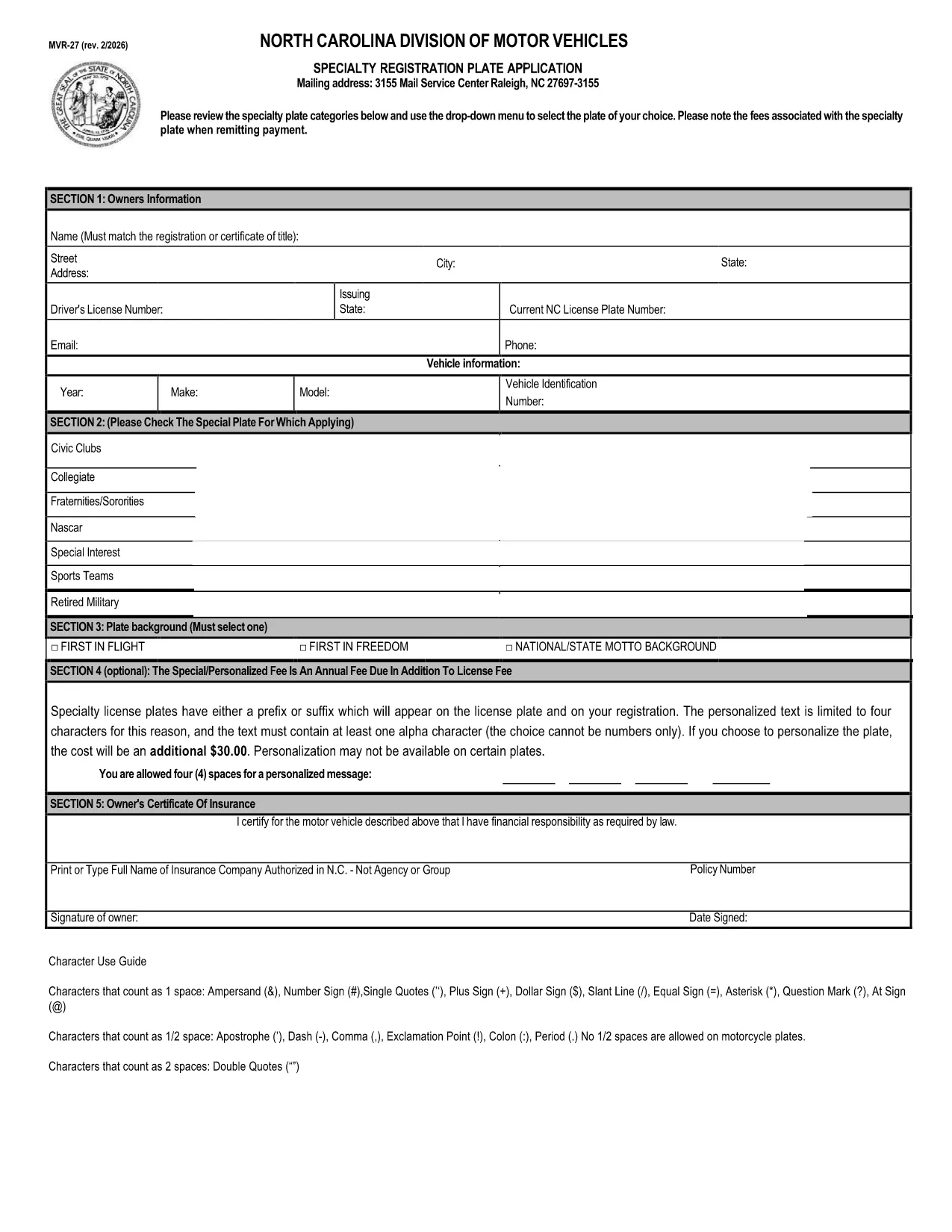
The MVR-27TH is the North Carolina DMV’s official vehicle registration form used for specialty plate requests, out‑of‑state permits, and other motor‑vehicle transactions. Instead of printing, signing, and mailing a paper copy, you can now complete the form directly in your browser with Formize’s secure fillable PDF technology.

Our page provides a single click access to the official PDF, an intuitive online filler, and step‑by‑step guidance so you can submit a correct, error‑free application the first time.

Whether you are applying for a custom license plate, requesting a temporary permit, or updating registration details, the MVR-27TH form covers all needed fields. Just follow the instructions below, and you’ll be done in minutes.

التعليمات
  • What is the purpose of the MVR‑27TH form?

    The MVR‑27TH is used for specialty license plate requests, out‑of‑state vehicle permits, and other specific motor‑vehicle registration actions in North Carolina.

  • Do I need to print the form after filling it online?

    No. You can download the completed PDF and either email it to the DMV or bring a printed copy to your local office, depending on the submission method required.

  • Is the Formize filler secure?

    Yes. Formize processes the PDF entirely in your browser; no data is stored on external servers, keeping your personal information private.

  • Can I save my progress and finish later?

    Absolutely. Use the “Save” button in the Formize app to download a partially‑filled PDF, then reopen it later to continue.

  • What common mistakes should I avoid?

    Make sure VIN numbers match your title, use the exact spelling of names, and double‑check expiration dates. Missing or mismatched information can delay processing.

  • How long does it take to process the MVR‑27TH?

    Processing times vary by DMV office, but most submissions are reviewed within 7‑10 business days after receipt.

  • Is there a fee for using the MVR‑27TH form?

    Yes, fees depend on the type of specialty plate or permit you’re requesting. Refer to the fee schedule on the form itself.

  • Can I submit the form electronically to the DMV?

    Some counties accept emailed PDFs; others require a hard copy. Check your local DMV’s submission guidelines after completing the form.

كيف

كيفية ملء MVR-27TH مجانًا عبر الإنترنت في 5 خطوات سهلة:

  1. 1
    Click the Fill‑out Button
    On this page, click the bright “Fill out this form” button. The Formize PDF Filler app will open in a new tab.
  2. 2
    Wait for the Formize App to Load
    The app loads the official MVR‑27TH PDF automatically. You’ll see all fields highlighted and ready for input.
  3. 3
    Complete Every Required Field
    Enter your personal, vehicle, and contact information exactly as it appears on your registration documents. Use the drop‑down menus where provided.
  4. 4
    Review and Validate
    After filling, click the “Validate” button. Formize will flag any missing or incorrectly formatted entries.
  5. 5
    Save or Submit
    When everything is correct, download the completed PDF or submit it directly to your local DMV office according to the instructions on the form.
Formize تطبيق PDF Filler
حول

استمارات تسجيل المركبة

MVR-27TH هو أحد نماذج تسجيل المركبات وهي عبارة عن مستندات تُستخدم لتسجيل مركبة لدى الهيئة الحكومية ذات الصلة، عادةً إدارة المركبات الآلية (DMV) أو وكالة مماثلة. هذه النماذج مطلوبة عندما يشتري شخص سيارة جديدة أو مستعملة، أو ينقل ملكية مركبة، أو ينتقل إلى ولاية قضائية جديدة بمركبة.

يمكن أن تختلف نماذج تسجيل المركبات المحددة حسب الولاية القضائية، ولكنها تتطلب عمومًا المعلومات التالية:

معلومات السيارة: تتضمن تفاصيل حول السيارة، مثل الصنع والطراز والسنة ورقم تعريف السيارة (VIN) وقراءة عداد المسافات.

معلومات المالك: سيتطلب النموذج معلومات حول مالك السيارة، بما في ذلك اسمه وعنوانه ومعلومات الاتصال ورقم رخصة القيادة.

إثبات الملكية: اعتمادًا على الظروف، قد يكون إثبات الملكية مطلوبًا، مثل شهادة ملكية، أو فاتورة بيع، أو شهادة منشأ الشركة المصنعة (للمركبات الجديدة).

معلومات التأمين: عادةً ما يكون إثبات التغطية التأمينية الصالحة للمركبة مطلوبًا. وقد يشمل ذلك تقديم رقم بوليصة التأمين وتواريخ التغطية وتفاصيل شركة التأمين.

دفع الرسوم: يتضمن تسجيل المركبة دفع رسوم مختلفة، مثل رسوم التسجيل والضرائب وربما رسوم أخرى خاصة بالولاية القضائية.

بالإضافة إلى هذه المتطلبات الأساسية، قد يكون لدى بعض الولايات القضائية نماذج أو متطلبات وثائق إضافية. على سبيل المثال، قد تكون نتائج اختبار الانبعاثات أو عمليات فحص السلامة أو إثبات الإقامة ضرورية في مناطق معينة.

بمجرد استكمال نماذج تسجيل المركبة وتقديمها، ستقوم الجهة الحكومية بإصدار شهادة التسجيل ولوحات الترخيص وملصقات التسجيل. تشير هذه المستندات إلى أن السيارة مسجلة قانونيًا ومصرح لها بالسير على الطرق العامة.

من المهم ملاحظة أن متطلبات تسجيل المركبات يمكن أن تختلف بشكل كبير حسب الولاية القضائية. ولذلك، يوصى باستشارة DMV المحلية أو وكالة مماثلة لمعرفة النماذج والإجراءات المحددة المطبقة على موقعك.

سمات

حشو PDF

أسهل طريقة لملء نماذج PDF عبر الإنترنت

  • املأ بسرعة MVR-27TH
    هل تبحث عن طريقة لملء كلمة MVR-27TH بسرعة عبر الإنترنت؟ من خلال برنامج تعبئة نماذج PDF المجاني عبر الإنترنت ، ستعرف كيفية تحرير وتعبئة مستند pdf هذا في أقل من دقيقة.
  • محرر PDF سهل الاستخدام عبر الإنترنت
    هل سئمت طباعة ملفات PDF حتى تتمكن من تحريرها قبل إعادة مسحها ضوئيًا وإرسالها مرة أخرى؟ تحرير مستندات PDF مجانًا عبر الإنترنت. استخدم محرر pdf على الإنترنت لتوفير الوقت والورق.
  • أدوات رائعة ، جميع المنصات
    هل تتساءل عن كيفية ملء MVR-27TH على جهاز Mac ، أو ربما كيفية استخدام حشو PDF مجانًا؟ تعمل أدوات PDF الخاصة بنا عبر الإنترنت على جميع الأنظمة الأساسية.
  • تخزين الملفات الآمن
    يتم تخزين ملفات "MVR-27TH" المكتملة في قاعدة بيانات آمنة تديرها استضافة Amazon Cloud. يمكنك حذف ملفاتك من نظامنا في أي وقت. على أي حال ، يتم حذف هذه الملفات تلقائيًا بعد 24 ساعة.
  • الدردشة مع {كلمة رئيسية}
    قم بالدردشة مع "MVR-27TH" على Chatize وهو مساعد مجاني لقارئ PDF. اطرح الأسئلة واحصل على الإجابات من "MVR-27TH". فقط انقر على زر الدردشة مع المستند أعلاه.

حذف جلسة التعبئة

حذف جلسة التعبئة المحددة؟ في هذه الحالة، سيتم فقد تقدمك في إكمال النموذج.

حذف جلسة التحرير

هل تريد حذف جلسة التحرير المحددة؟ في هذه الحالة، سيتم فقدان التقدم الذي أحرزته في إنشاء النموذج وتحريره.