
اختار اللغة

Form 5454 – Request for Interactive Driver Records (Fillable PDF)

  1. لغة إنجليزي
  2. دولة الولايات المتحدة الأمريكية
  3. نشاط رخصة السائق
  4. دولة ميزوري
Form 5454 – Request for Interactive Driver Records (Fillable PDF)

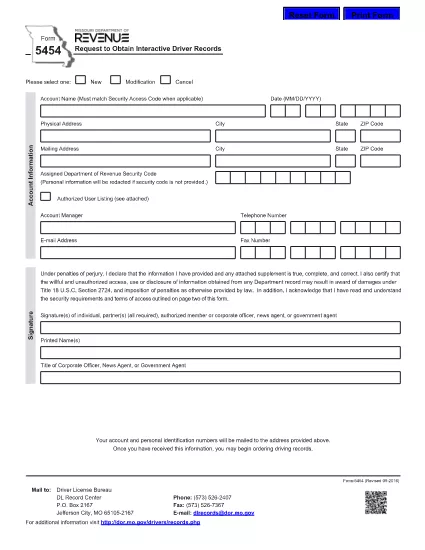
Form 5454 is the official Missouri Department of Revenue document used to request interactive driver records. Whether you’re an employer, a background‑check provider, or an individual needing a personal driving history, this fillable PDF makes the process fast and error‑free.

Our online Formize PDF Filler loads the exact same form you would receive by mail, but with the convenience of digital entry, automatic validation, and instant download of the completed document.

Below you’ll find everything you need to know about the purpose of Form 5454, step‑by‑step instructions for filling it out, common pitfalls to watch for, and where to send the finished form.

التعليمات
  • Who is required to use Form 5454?

    Any individual, employer, or agency that needs an official, interactive driver record from the Missouri Department of Revenue must submit Form 5454.

  • Is the PDF truly fillable online?

    Yes. After clicking the “Fill out this form” button, the Formize PDF Filler turns the static PDF into an interactive document you can complete directly in your browser.

  • Can I submit the form electronically?

    The Missouri Department of Revenue still requires a printed copy with a signature, but you can download the completed PDF, print it, sign it, and mail it in.

  • What fees are associated with requesting driver records?

    Fees vary based on the type of record requested. Refer to the fee schedule on the Missouri Department of Revenue website for the most current rates.

  • How long does it take to receive the records?

    Processing typically takes 5‑10 business days after the signed form is received, though expedited services may be available for an additional charge.

  • What common mistakes should I avoid?

    Do not leave required fields blank, ensure the driver’s license number is typed exactly as it appears, and double‑check the mailing address for accuracy.

كيف

كيفية ملء Form 5454 مجانًا عبر الإنترنت في 5 خطوات سهلة:

  1. 1
    Click the Fill‑out Button
    On this page, click the bright “Fill out this form” button. The Formize PDF Filler app will open in a new tab.
  2. 2
    Wait for the Filler to Load
    The app automatically loads the exact Form 5454 PDF. A loading spinner appears for a few seconds – this ensures all fields are interactive.
  3. 3
    Enter Your Information
    Type directly into each field (name, address, driver’s license number, etc.). Required fields are highlighted in red if left blank.
  4. 4
    Review and Validate
    Use the built‑in validation to check for formatting errors (e.g., ZIP code, date of birth). Correct any warnings before proceeding.
  5. 5
    Save, Download, or Submit
    When the form is complete, click “Save PDF” to download a copy for your records, or use the “Email” button to send it directly to the Missouri Department of Revenue.
Formize تطبيق PDF Filler
حول

نماذج طلب رخصة القيادة

في معظم البلدان ، من الضروري الحصول على رخصة قيادة قبل أن تتمكن من الوصول إلى الطريق. يعد الحصول على رخصة قيادة معلمًا هامًا لمن يريد قيادة سيارة.

Form 5454 هي إحدى نماذج طلب رخصة القيادة وهي مستندات تُستخدم لجمع المعلومات من الأشخاص الذين يرغبون في التقدم للحصول على رخصة قيادة. يحتوي عادةً على حقول لاسم مقدم الطلب وتاريخ الميلاد ورقم الهوية ومعلومات الاتصال بالإضافة إلى سجل رخصة القيادة والخبرة.

سمات

حشو PDF

أسهل طريقة لملء نماذج PDF عبر الإنترنت

  • املأ بسرعة Form 5454
    هل تبحث عن طريقة لملء كلمة Form 5454 بسرعة عبر الإنترنت؟ من خلال برنامج تعبئة نماذج PDF المجاني عبر الإنترنت ، ستعرف كيفية تحرير وتعبئة مستند pdf هذا في أقل من دقيقة.
  • محرر PDF سهل الاستخدام عبر الإنترنت
    هل سئمت طباعة ملفات PDF حتى تتمكن من تحريرها قبل إعادة مسحها ضوئيًا وإرسالها مرة أخرى؟ تحرير مستندات PDF مجانًا عبر الإنترنت. استخدم محرر pdf على الإنترنت لتوفير الوقت والورق.
  • أدوات رائعة ، جميع المنصات
    هل تتساءل عن كيفية ملء Form 5454 على جهاز Mac ، أو ربما كيفية استخدام حشو PDF مجانًا؟ تعمل أدوات PDF الخاصة بنا عبر الإنترنت على جميع الأنظمة الأساسية.
  • تخزين الملفات الآمن
    يتم تخزين ملفات "Form 5454" المكتملة في قاعدة بيانات آمنة تديرها استضافة Amazon Cloud. يمكنك حذف ملفاتك من نظامنا في أي وقت. على أي حال ، يتم حذف هذه الملفات تلقائيًا بعد 24 ساعة.
  • الدردشة مع {كلمة رئيسية}
    قم بالدردشة مع "Form 5454" على Chatize وهو مساعد مجاني لقارئ PDF. اطرح الأسئلة واحصل على الإجابات من "Form 5454". فقط انقر على زر الدردشة مع المستند أعلاه.

حذف جلسة التعبئة

حذف جلسة التعبئة المحددة؟ في هذه الحالة، سيتم فقد تقدمك في إكمال النموذج.

حذف جلسة التحرير

هل تريد حذف جلسة التحرير المحددة؟ في هذه الحالة، سيتم فقدان التقدم الذي أحرزته في إنشاء النموذج وتحريره.