
اختار اللغة

Form 5839 – Physician’s Statement and Authorization (Fillable PDF)

  1. لغة إنجليزي
  2. دولة الولايات المتحدة الأمريكية
  3. نشاط رخصة السائق
  4. دولة ميزوري
Form 5839 – Physician’s Statement and Authorization (Fillable PDF)

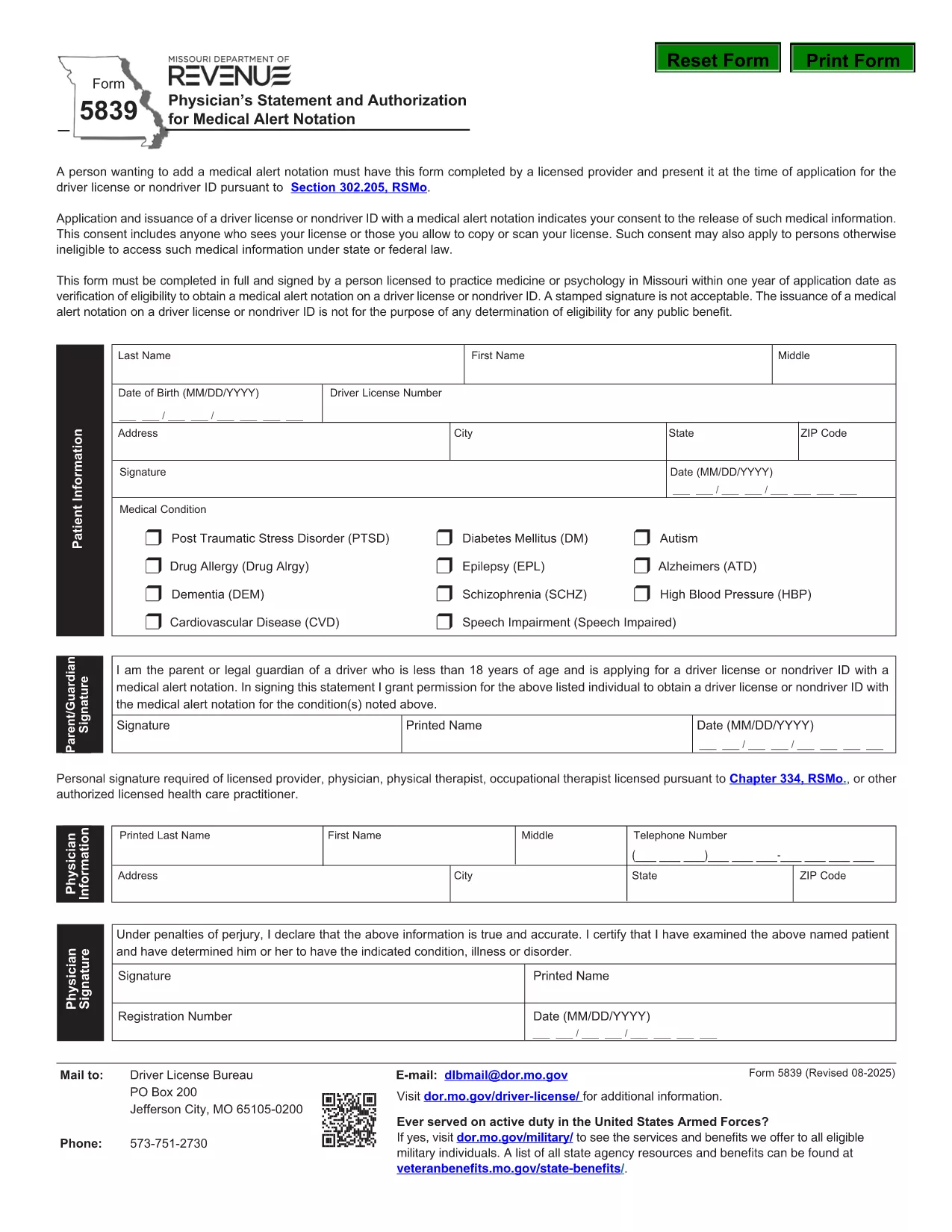
Form 5839 is the official Missouri Physician’s Statement and Authorization required when you want a medical alert notation placed on a driver’s license or non‑driver ID. The form must be completed by a licensed health‑care provider and presented at the time of application.

What Is Form 5839 and Who Needs It?

This form is used under Section 302.205, RSMo to certify medical conditions that affect driving ability. It is typically needed by individuals with conditions such as epilepsy, diabetes, vision impairments, or any health issue that the Missouri Department of Revenue deems relevant for a medical alert.

How to Complete Form 5839 Online

Instead of downloading the PDF and editing it manually, simply click the "Fill out this form" button on this page. The Formize PDF Filler app will load, allowing you to complete every field directly in your browser. Once finished, you can save or print the completed form.

Common Mistakes to Avoid on Form 5839

  • Leaving any required fields blank – the form will be rejected.
  • Using an unsigned or non‑licensed provider’s signature.
  • Providing outdated contact information for the physician.
  • Submitting a scanned copy with low resolution; use the online filler for a clear PDF.

Where to Submit the Completed Form

After filling out Form 5839, bring the printed copy (or a saved electronic version) to your local Missouri Department of Revenue office when applying for or renewing a driver’s license or ID. The office will verify the medical information before adding the alert notation.

FAQs About Form 5839

Below are answers to the most common questions about this form. For more details, refer to the downloadable PDF linked at the bottom of the page.

التعليمات
  • Who is authorized to sign Form 5839?

    Only a licensed physician, osteopathic doctor, or other qualified health‑care professional can sign the form.

  • Can I submit a scanned copy of the form?

    Yes, but the scan must be clear and legible. Using the online Formize filler ensures a high‑quality PDF.

  • Do I need to attach medical records?

    Generally no, unless the Department of Revenue specifically requests supporting documentation.

  • How long does the medical alert stay on my license?

    The alert remains until the physician provides a new statement indicating the condition has resolved.

  • Is there a fee to file Form 5839?

    No separate fee is charged for the medical statement; any standard licensing fees still apply.

  • What if my physician’s signature is missing?

    The form will be rejected. Contact the physician to obtain a proper signature before submission.

كيف

كيفية ملء Form 5839 مجانًا عبر الإنترنت في 4 خطوات سهلة:

  1. 1
    Click the Fill‑out Button
    Press the "Fill out this form" button on the page. The Formize PDF Filler loads in your browser.
  2. 2
    Enter All Required Information
    Complete each field – patient details, physician’s credentials, and the medical condition description.
  3. 3
    Save or Print the Completed Form
    When all sections are filled, click "Save" to download a copy or "Print" to obtain a hard‑copy for submission.
  4. 4
    Submit to the Missouri Department of Revenue
    Take the printed form (or a saved PDF) to your local DMV office when applying for or renewing your license.
Formize تطبيق PDF Filler
حول

نماذج طلب رخصة القيادة

Form 5839 هي أحد نماذج رخصة القيادة وهي عبارة عن مستندات تستخدم في عملية الحصول على رخصة القيادة أو تجديدها، وهي وثيقة رسمية صادرة عن الحكومة تسمح للأفراد بقيادة مركبة آلية على الطرق العامة. قد تختلف هذه النماذج وفقًا للولاية القضائية، ولكنها تتضمن عمومًا ما يلي:

نموذج الطلب: يُستخدم هذا النموذج للتقدم بطلب للحصول على رخصة قيادة ويطلب عادةً معلومات شخصية مثل الاسم والعنوان وتاريخ الميلاد ورقم الضمان الاجتماعي.

وثائق الهوية: إلى جانب نموذج الطلب، يُطلب من الأفراد عادةً تقديم وثائق هوية محددة لإثبات هويتهم وإقامتهم ووجودهم القانوني في البلد. قد تشمل هذه جواز سفر ساري المفعول، أو شهادة ميلاد، أو بطاقة الضمان الاجتماعي، أو أي بطاقة هوية أخرى صادرة عن الحكومة.

إثبات الإقامة: تطلب العديد من السلطات القضائية من المتقدمين تقديم إثبات الإقامة، مثل فاتورة المرافق، أو عقد الإيجار، أو كشف حساب مصرفي، للتحقق من عنوانهم.

نموذج الفحص الطبي: قد تطلب بعض السلطات القضائية إجراء فحص طبي للتأكد من أن مقدم الطلب يستوفي المتطلبات الجسدية والعقلية اللازمة للقيادة الآمنة. عادةً ما يقوم أحد المتخصصين الطبيين بإكمال هذا النموذج.

نموذج إكمال تعليم القيادة: بالنسبة للسائقين لأول مرة، قد يلزم إكمال برنامج تعليم القيادة. غالبًا ما يكون النموذج أو الشهادة التي تشير إلى الإكمال الناجح ضروريًا للتقدم بطلب للحصول على رخصة قيادة.

نموذج اختبار الرؤية: يتم إجراء اختبار الرؤية بشكل شائع أثناء عملية طلب رخصة القيادة. سيقوم أخصائي العناية بالعيون أو الموظفين المعتمدين بتقييم حدة البصر لمقدم الطلب واستكمال النموذج المطلوب.

تتوفر هذه النماذج عادةً في إدارة المركبات الآلية (DMV) المحلية أو وكالة حكومية معادلة مسؤولة عن ترخيص السائقين. من المهم التحقق من المتطلبات والنماذج المحددة المطبقة في نطاق اختصاصك، لأنها قد تختلف.

سمات

حشو PDF

أسهل طريقة لملء نماذج PDF عبر الإنترنت

  • املأ بسرعة Form 5839
    هل تبحث عن طريقة لملء كلمة Form 5839 بسرعة عبر الإنترنت؟ من خلال برنامج تعبئة نماذج PDF المجاني عبر الإنترنت ، ستعرف كيفية تحرير وتعبئة مستند pdf هذا في أقل من دقيقة.
  • محرر PDF سهل الاستخدام عبر الإنترنت
    هل سئمت طباعة ملفات PDF حتى تتمكن من تحريرها قبل إعادة مسحها ضوئيًا وإرسالها مرة أخرى؟ تحرير مستندات PDF مجانًا عبر الإنترنت. استخدم محرر pdf على الإنترنت لتوفير الوقت والورق.
  • أدوات رائعة ، جميع المنصات
    هل تتساءل عن كيفية ملء Form 5839 على جهاز Mac ، أو ربما كيفية استخدام حشو PDF مجانًا؟ تعمل أدوات PDF الخاصة بنا عبر الإنترنت على جميع الأنظمة الأساسية.
  • تخزين الملفات الآمن
    يتم تخزين ملفات "Form 5839" المكتملة في قاعدة بيانات آمنة تديرها استضافة Amazon Cloud. يمكنك حذف ملفاتك من نظامنا في أي وقت. على أي حال ، يتم حذف هذه الملفات تلقائيًا بعد 24 ساعة.
  • الدردشة مع {كلمة رئيسية}
    قم بالدردشة مع "Form 5839" على Chatize وهو مساعد مجاني لقارئ PDF. اطرح الأسئلة واحصل على الإجابات من "Form 5839". فقط انقر على زر الدردشة مع المستند أعلاه.

حذف جلسة التعبئة

حذف جلسة التعبئة المحددة؟ في هذه الحالة، سيتم فقد تقدمك في إكمال النموذج.

حذف جلسة التحرير

هل تريد حذف جلسة التحرير المحددة؟ في هذه الحالة، سيتم فقدان التقدم الذي أحرزته في إنشاء النموذج وتحريره.