
اختار اللغة

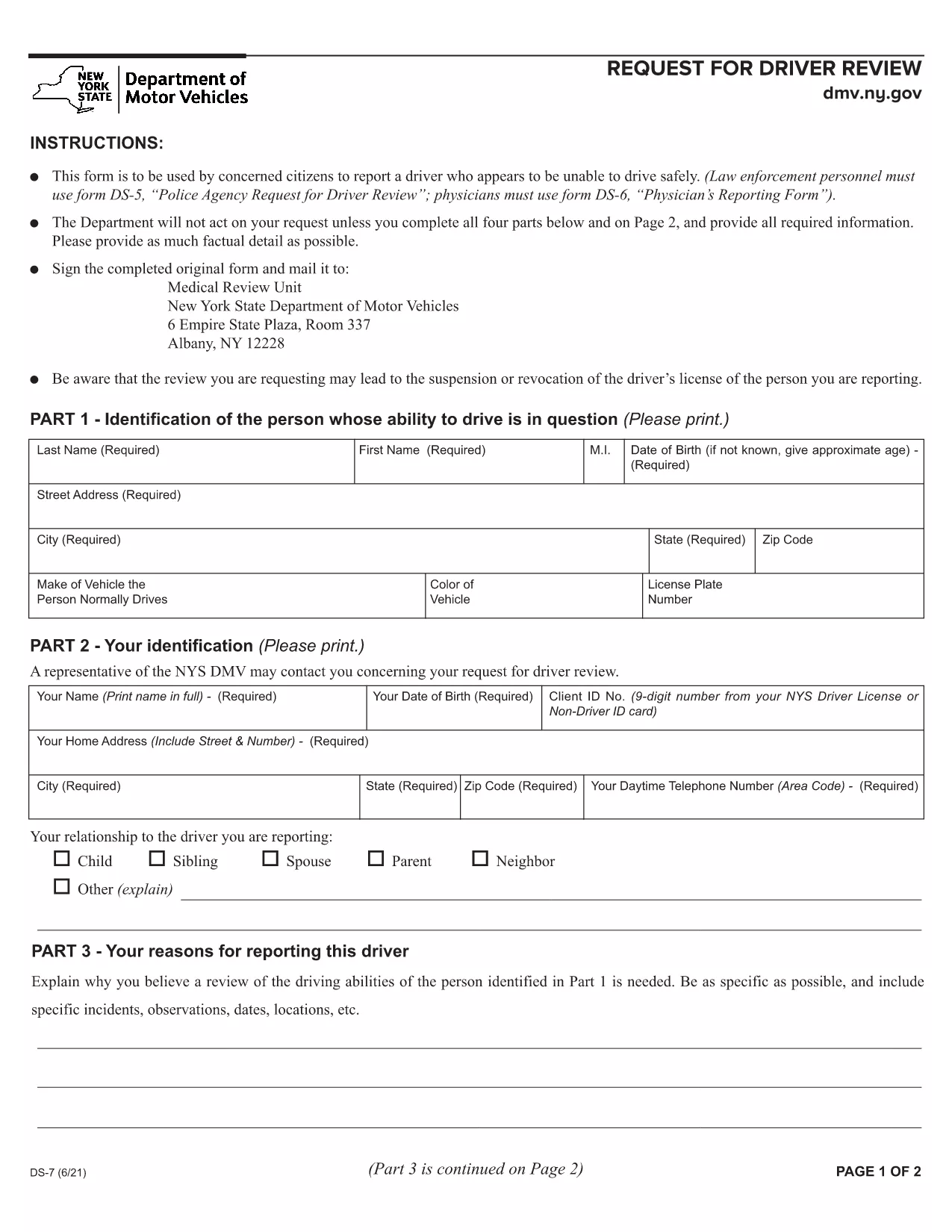
New York DMV Form DS‑7 – Driver Review Request (Fillable PDF)

  1. لغة إنجليزي
  2. دولة الولايات المتحدة الأمريكية
  3. نشاط رخصة السائق
  4. دولة نيويورك
New York DMV Form DS‑7 – Driver Review Request (Fillable PDF)

The New York Department of Motor Vehicles (DMV) requires a completed Form DS‑7 when a citizen wants to report a driver who may be unsafe on the road. This form is used by law‑enforcement, physicians, and concerned citizens to initiate a driver safety review.

Our online fillable PDF lets you complete the entire DS‑7 directly in your browser—no extra software needed. Simply click the “Fill out this form” button, wait for the Formize PDF Filler to load, and start entering your information.

Below you’ll find a quick overview of the form, detailed instructions, and tips to avoid common errors.

What Is Form DS‑7?

Form DS‑7, titled “Request for Driver Review,” collects detailed information about the driver’s behavior, vehicle details, and incident description. The DMV uses this data to determine whether a formal investigation or licensing action is required.

How to Fill Out DS‑7 Online

Follow the step‑by‑step guide in the How To section. The online filler automatically validates required fields, so you won’t miss any critical information.

Common Mistakes to Avoid

  • Leaving any required field blank – the filler will highlight missing sections.
  • Using vague descriptions – provide specific dates, times, and locations.
  • Submitting without a signature – you can sign digitally within the filler.

Submit Your Completed Form

After completing the form, click the “Submit” button to download a signed PDF. Mail or fax the PDF to the address listed on the last page of the form, or bring a printed copy to any DMV office.

Download the Fillable PDF

If you prefer to work offline, you can download the official fillable PDF directly from the New York DMV website.

التعليمات
  • Who can submit Form DS‑7?

    Any concerned citizen, law‑enforcement officer, or medical professional can submit a DS‑7 to request a driver safety review.

  • Is the online filler free to use?

    Yes, Formize provides a free, secure fillable PDF experience for the DS‑7 form.

  • Can I save my progress and return later?

    The filler allows you to save a draft locally on your computer and resume editing at any time before final submission.

  • Do I need to print the form after filling it out?

    Printing is optional. You can submit the signed PDF electronically by mail or fax, or bring a printed copy to a DMV office.

  • What happens after I submit the DS‑7?

    The DMV reviews the information, may contact the driver for additional details, and determines whether a formal investigation or license action is needed.

  • How long does the review process take?

    Processing times vary, but the DMV typically acknowledges receipt within 10 business days and may take several weeks for a full review.

  • Can I attach supporting documents?

    Yes, you can attach photos, police reports, or medical records as separate PDF files when you mail or fax the completed DS‑7.

  • Is there a fee to file Form DS‑7?

    No, filing a DS‑7 request is free of charge.

كيف

كيفية ملء DS-7 form مجانًا عبر الإنترنت في 4 خطوات سهلة:

  1. 1
    Open the Fillable Form
    Click the “Fill out this form” button on the page. The Formize PDF Filler app will load in a new tab.
  2. 2
    Enter Your Information
    Complete each section—driver details, incident description, and witness information. Required fields are marked with an asterisk.
  3. 3
    Add a Digital Signature
    Use the built‑in signature tool to sign the form electronically. This satisfies the DMV’s signature requirement.
  4. 4
    Download and Submit
    After saving, click “Download PDF.” Print the document or send the PDF by mail/fax to the DMV address shown on the form.
Formize تطبيق PDF Filler
حول

نماذج طلب رخصة القيادة

DS-7 form هي إحدى نماذج رخصة القيادة وهي عبارة عن مستندات تستخدم للتقدم بطلب للحصول على رخصة قيادة أو لطلب خدمات متنوعة تتعلق برخص القيادة. يتم توفير هذه النماذج عادةً من قبل الإدارة أو الوكالة المسؤولة عن إصدار رخص القيادة في نطاق سلطة محدد، مثل إدارة المركبات الآلية (DMV) في الولايات المتحدة.

تتضمن نماذج رخصة القيادة الشائعة ما يلي:

طلب رخصة القيادة: يُستخدم هذا النموذج لتقديم طلب للحصول على رخصة قيادة جديدة أو لتجديد رخصة موجودة. يتطلب عادةً معلومات شخصية مثل الاسم والعنوان وتاريخ الميلاد ورقم الضمان الاجتماعي.

وثائق الهوية: تتطلب بعض السلطات القضائية وثائق هوية محددة للتحقق من هوية مقدم الطلب وإقامته. قد تشمل هذه النماذج مثل شهادة الميلاد أو جواز السفر أو بطاقة الضمان الاجتماعي.

فحص الرؤية: تتطلب العديد من طلبات الحصول على رخصة القيادة نموذج فحص الرؤية، حيث يشهد أخصائي طبي معتمد أو أخصائي رعاية العيون أن مقدم الطلب يستوفي الحد الأدنى من متطلبات الرؤية للقيادة.

نماذج تعليم القيادة: في بعض الحالات، قد يحتاج الأفراد إلى تقديم دليل على إكمال دورة تعليم القيادة، مثل شهادة إكمال تعليم القيادة أو نموذج موقع من المعلم.

التقييم الطبي: قد تتطلب بعض الحالات الطبية استكمال نماذج إضافية بواسطة متخصص في الرعاية الصحية. تتحقق هذه النماذج من اللياقة البدنية والعقلية لمقدم الطلب للقيادة.

نموذج تغيير العنوان: إذا انتقل صاحب رخصة القيادة إلى عنوان جديد، فقد يحتاج إلى ملء نموذج تغيير العنوان لتحديث معلومات رخصة القيادة الخاصة به.

يمكن الحصول على نماذج رخصة القيادة من مكتب DMV المحلي أو تنزيلها من موقعه على الويب. من المهم إكمال النماذج المطلوبة وإرسالها بعناية مع أي مستندات داعمة لضمان سلاسة تقديم الطلب أو عملية الخدمة.

سمات

حشو PDF

أسهل طريقة لملء نماذج PDF عبر الإنترنت

  • املأ بسرعة DS-7 form
    هل تبحث عن طريقة لملء كلمة DS-7 form بسرعة عبر الإنترنت؟ من خلال برنامج تعبئة نماذج PDF المجاني عبر الإنترنت ، ستعرف كيفية تحرير وتعبئة مستند pdf هذا في أقل من دقيقة.
  • محرر PDF سهل الاستخدام عبر الإنترنت
    هل سئمت طباعة ملفات PDF حتى تتمكن من تحريرها قبل إعادة مسحها ضوئيًا وإرسالها مرة أخرى؟ تحرير مستندات PDF مجانًا عبر الإنترنت. استخدم محرر pdf على الإنترنت لتوفير الوقت والورق.
  • أدوات رائعة ، جميع المنصات
    هل تتساءل عن كيفية ملء DS-7 form على جهاز Mac ، أو ربما كيفية استخدام حشو PDF مجانًا؟ تعمل أدوات PDF الخاصة بنا عبر الإنترنت على جميع الأنظمة الأساسية.
  • تخزين الملفات الآمن
    يتم تخزين ملفات "DS-7 form" المكتملة في قاعدة بيانات آمنة تديرها استضافة Amazon Cloud. يمكنك حذف ملفاتك من نظامنا في أي وقت. على أي حال ، يتم حذف هذه الملفات تلقائيًا بعد 24 ساعة.
  • الدردشة مع {كلمة رئيسية}
    قم بالدردشة مع "DS-7 form" على Chatize وهو مساعد مجاني لقارئ PDF. اطرح الأسئلة واحصل على الإجابات من "DS-7 form". فقط انقر على زر الدردشة مع المستند أعلاه.

حذف جلسة التعبئة

حذف جلسة التعبئة المحددة؟ في هذه الحالة، سيتم فقد تقدمك في إكمال النموذج.

حذف جلسة التحرير

هل تريد حذف جلسة التحرير المحددة؟ في هذه الحالة، سيتم فقدان التقدم الذي أحرزته في إنشاء النموذج وتحريره.