
اختار اللغة

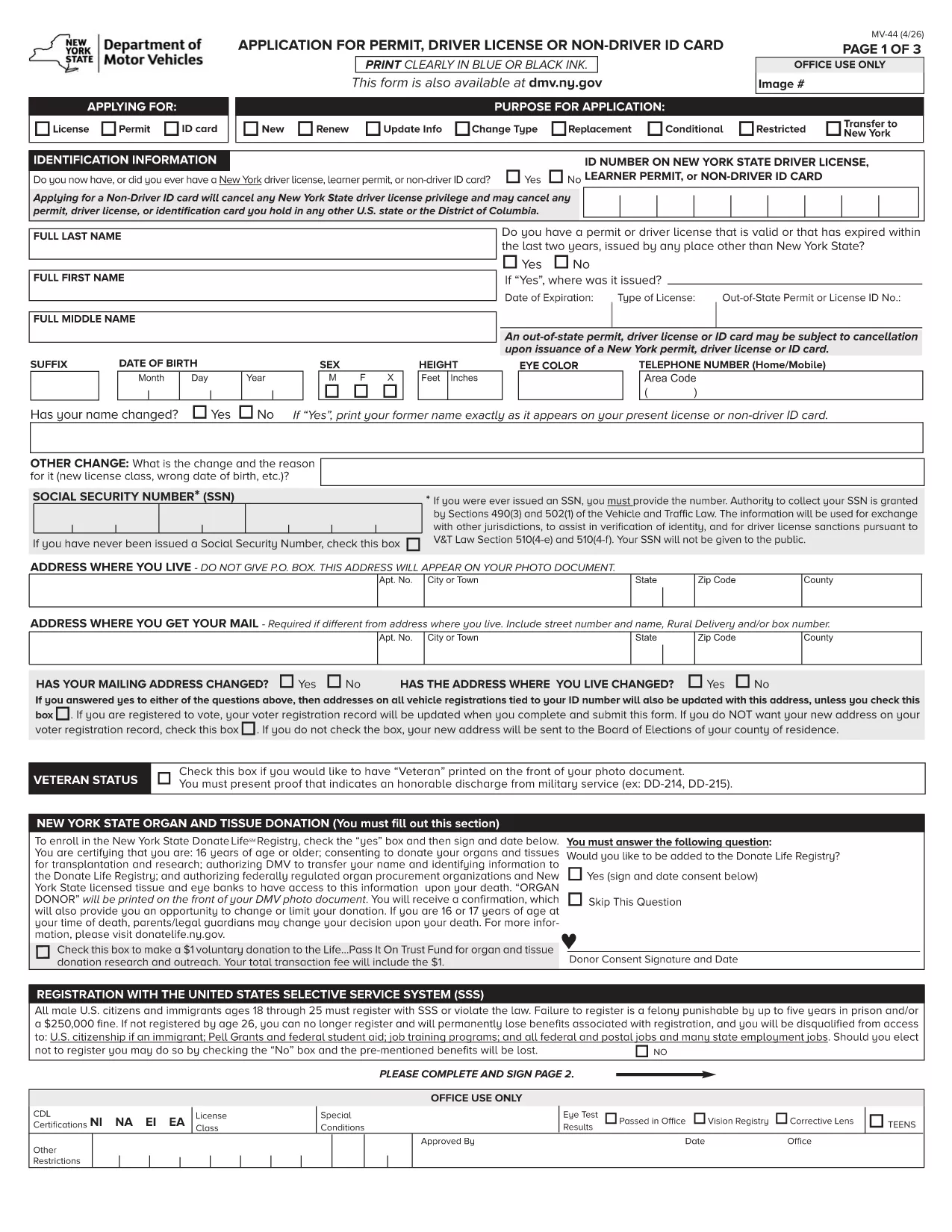
MV-44 Application Form – Permit, Driver License & Non‑Driver ID

  1. لغة إنجليزي
  2. دولة الولايات المتحدة الأمريكية
  3. نشاط رخصة السائق
  4. دولة نيويورك
MV-44 Application Form – Permit, Driver License & Non‑Driver ID

The MV-44 is the official New York State application used to request a learner’s permit, a driver’s license, or a non‑driver identification card. This form is required for first‑time applicants, renewals, and certain name‑change situations.

Formize.com offers a fully fillable PDF version of the MV‑44, so you can complete the entire application directly in your web browser—no Adobe Acrobat needed.

Below you’ll find everything you need to know about the MV‑44, step‑by‑step instructions for filling it out online, and tips to avoid common errors that can delay processing.

Key benefits of using the Formize fillable PDF:

  • Instant loading in the Formize PDF Filler app
  • Auto‑save as you type, preventing data loss
  • Built‑in validation to catch missing or incorrect information
  • Easy electronic signature and direct download of the completed form

Ready to start? Simply click the "Fill out this form" button and let the Formize PDF Filler do the rest.

التعليمات
  • Can I save my progress and finish the MV‑44 later?

    Yes. The Formize PDF Filler auto‑saves your entries locally. Simply close the tab and reopen the form to continue where you left off.

  • Do I need a PDF reader to use this form?

    No. The fillable version runs entirely in your browser via the Formize PDF Filler, eliminating the need for Adobe Acrobat or other PDF software.

  • What identification documents do I need to attach?

    You’ll need a valid photo ID (passport, existing NY driver’s license, or non‑driver ID) and proof of residency such as a utility bill or lease agreement. Upload scans after completing the form.

  • How long does the DMV take to process the MV‑44?

    Processing times vary, but most applications are reviewed within 7‑10 business days after the completed form and required documents are submitted.

  • Is the MV‑44 form free to download?

    Yes. The MV‑44 is a free, government‑provided form. Formize only hosts the fillable version at no cost.

  • Can I submit the completed MV‑44 electronically?

    The NY DMV currently requires a printed and signed copy. After downloading, print the form, sign it, and mail or deliver it to your local DMV office.

  • What should I do if I make a mistake on the form?

    If you notice an error before printing, simply go back in the Formize filler, correct the field, and re‑download the PDF. Once printed and signed, you’ll need to start a new form.

  • Do I need a separate form for a duplicate license?

    For a duplicate or replacement, you must complete Form MV‑44 and check the “Duplicate” box. Additional documentation may be required.

كيف

كيفية ملء MV-44 مجانًا عبر الإنترنت في 4 خطوات سهلة:

  1. 1
    Click the Fill‑out Button
    On this page, locate the bright "Fill out this form" button and click it. The Formize PDF Filler will open in a new tab.
  2. 2
    Wait for the PDF Filler to Load
    The fillable MV‑44 PDF loads automatically. A loading spinner indicates the app is preparing the document.
  3. 3
    Enter Your Information
    Complete each field using the on‑screen prompts. Required fields are marked with an asterisk. The filler validates dates, numbers, and signatures in real time.
  4. 4
    Review, Sign & Download
    After filling all sections, review the data, add your electronic signature, and click "Download Completed Form". You can then print or submit the PDF as instructed by the DMV.
Formize تطبيق PDF Filler
حول

نماذج طلب رخصة القيادة

MV-44 هي أحد نماذج رخصة القيادة وهي عبارة عن مستندات تستخدم في عملية الحصول على رخصة القيادة أو تجديدها، وهي وثيقة رسمية صادرة عن الحكومة تسمح للأفراد بقيادة مركبة آلية على الطرق العامة. قد تختلف هذه النماذج وفقًا للولاية القضائية، ولكنها تتضمن عمومًا ما يلي:

نموذج الطلب: يُستخدم هذا النموذج للتقدم بطلب للحصول على رخصة قيادة ويطلب عادةً معلومات شخصية مثل الاسم والعنوان وتاريخ الميلاد ورقم الضمان الاجتماعي.

وثائق الهوية: إلى جانب نموذج الطلب، يُطلب من الأفراد عادةً تقديم وثائق هوية محددة لإثبات هويتهم وإقامتهم ووجودهم القانوني في البلد. قد تشمل هذه جواز سفر ساري المفعول، أو شهادة ميلاد، أو بطاقة الضمان الاجتماعي، أو أي بطاقة هوية أخرى صادرة عن الحكومة.

إثبات الإقامة: تطلب العديد من السلطات القضائية من المتقدمين تقديم إثبات الإقامة، مثل فاتورة المرافق، أو عقد الإيجار، أو كشف حساب مصرفي، للتحقق من عنوانهم.

نموذج الفحص الطبي: قد تطلب بعض السلطات القضائية إجراء فحص طبي للتأكد من أن مقدم الطلب يستوفي المتطلبات الجسدية والعقلية اللازمة للقيادة الآمنة. عادةً ما يقوم أحد المتخصصين الطبيين بإكمال هذا النموذج.

نموذج إكمال تعليم القيادة: بالنسبة للسائقين لأول مرة، قد يلزم إكمال برنامج تعليم القيادة. غالبًا ما يكون النموذج أو الشهادة التي تشير إلى الإكمال الناجح ضروريًا للتقدم بطلب للحصول على رخصة قيادة.

نموذج اختبار الرؤية: يتم إجراء اختبار الرؤية بشكل شائع أثناء عملية طلب رخصة القيادة. سيقوم أخصائي العناية بالعيون أو الموظفين المعتمدين بتقييم حدة البصر لمقدم الطلب واستكمال النموذج المطلوب.

تتوفر هذه النماذج عادةً في إدارة المركبات الآلية (DMV) المحلية أو وكالة حكومية معادلة مسؤولة عن ترخيص السائقين. من المهم التحقق من المتطلبات والنماذج المحددة المطبقة في نطاق اختصاصك، لأنها قد تختلف.

سمات

حشو PDF

أسهل طريقة لملء نماذج PDF عبر الإنترنت

  • املأ بسرعة MV-44
    هل تبحث عن طريقة لملء كلمة MV-44 بسرعة عبر الإنترنت؟ من خلال برنامج تعبئة نماذج PDF المجاني عبر الإنترنت ، ستعرف كيفية تحرير وتعبئة مستند pdf هذا في أقل من دقيقة.
  • محرر PDF سهل الاستخدام عبر الإنترنت
    هل سئمت طباعة ملفات PDF حتى تتمكن من تحريرها قبل إعادة مسحها ضوئيًا وإرسالها مرة أخرى؟ تحرير مستندات PDF مجانًا عبر الإنترنت. استخدم محرر pdf على الإنترنت لتوفير الوقت والورق.
  • أدوات رائعة ، جميع المنصات
    هل تتساءل عن كيفية ملء MV-44 على جهاز Mac ، أو ربما كيفية استخدام حشو PDF مجانًا؟ تعمل أدوات PDF الخاصة بنا عبر الإنترنت على جميع الأنظمة الأساسية.
  • تخزين الملفات الآمن
    يتم تخزين ملفات "MV-44" المكتملة في قاعدة بيانات آمنة تديرها استضافة Amazon Cloud. يمكنك حذف ملفاتك من نظامنا في أي وقت. على أي حال ، يتم حذف هذه الملفات تلقائيًا بعد 24 ساعة.
  • الدردشة مع {كلمة رئيسية}
    قم بالدردشة مع "MV-44" على Chatize وهو مساعد مجاني لقارئ PDF. اطرح الأسئلة واحصل على الإجابات من "MV-44". فقط انقر على زر الدردشة مع المستند أعلاه.

حذف جلسة التعبئة

حذف جلسة التعبئة المحددة؟ في هذه الحالة، سيتم فقد تقدمك في إكمال النموذج.

حذف جلسة التحرير

هل تريد حذف جلسة التحرير المحددة؟ في هذه الحالة، سيتم فقدان التقدم الذي أحرزته في إنشاء النموذج وتحريره.