
اختار اللغة

SFN 61560 – North Dakota CDL Third‑Party Tester Form (Fillable PDF)

  1. لغة إنجليزي
  2. دولة الولايات المتحدة الأمريكية
  3. نشاط رخصة السائق
  4. دولة شمال داكوتا
SFN 61560 – North Dakota CDL Third‑Party Tester Form (Fillable PDF)

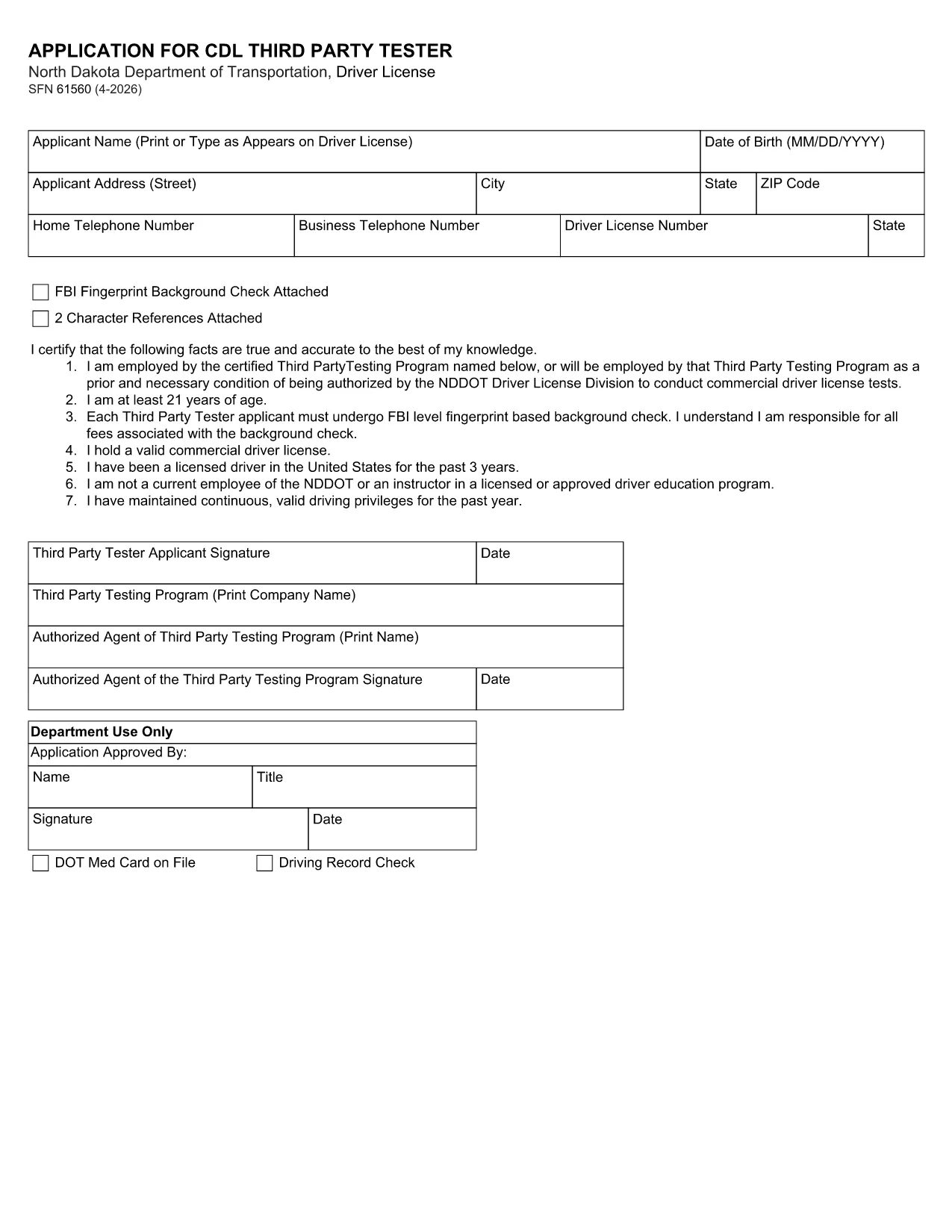
The SFN 61560 is the North Dakota Department of Transportation (ND DOT) application used by third‑party testers to request a Commercial Driver’s License (CDL) testing authorization. This form is now available as a fully fillable PDF, so you can complete it from any device without printing.

What Is the SFN 61560 Form?

SFN 61560 is the official ND DOT application for CDL third‑party testers. It collects personal information, licensing history, and the required FBI fingerprint background check. The completed form is submitted to the ND DOT to verify eligibility before you can administer CDL skills tests.

Who Needs to Complete SFN 61560?

  • Independent CDL testing companies
  • Driving schools that provide third‑party testing services
  • Any individual or organization seeking ND approval to conduct CDL skills examinations

How to Fill Out the Form Online

Instead of downloading, printing, and scanning, simply click the "Fill out this form" button on this page. The Formize PDF Filler will load in seconds, letting you type directly into each field.

Common Mistakes to Avoid

  • Leaving the FBI fingerprint section blank – a background check is mandatory.
  • Using an expired driver’s license number.
  • Forgetting to attach the two required character references.
  • Submitting the form without a notarized signature where required.

Download & Fill the Form Instantly

When you’re ready, click the button below to open the fillable PDF in Formize. After completing all fields, review the data, then either print for mail‑in submission or save a PDF copy for electronic upload if your local ND DOT office accepts it.

التعليمات
  • What is the purpose of the SFN 61560 form?

    It authorizes a third‑party tester to administer CDL skills tests in North Dakota after a background check and verification of qualifications.

  • Is the PDF fillable online?

    Yes. Using Formize’s PDF Filler you can type directly into the PDF fields without printing.

  • Do I need to submit a hard copy?

    Most ND DOT offices require a printed, signed form. Save the completed PDF and print it for mailing unless you receive electronic submission instructions.

  • What supporting documents are required?

    A recent FBI fingerprint background check, two character references, and a notarized signature (if required).

  • How long does the approval process take?

    After the ND DOT receives a complete form, processing typically takes 10‑14 business days.

  • Can I edit the form after I’ve saved it?

    Yes. Open the saved PDF again in Formize or any PDF editor to make changes before final submission.

  • Is there a filing fee?

    There is no fee for the SFN 61560 application itself, but any required background‑check fees are paid to the FBI.

  • Where do I send the completed form?

    Mail it to the North Dakota Department of Transportation, Driver Licensing Division, 600 East Boulevard Ave, Bismarck, ND 58501.

  • What if I make a mistake on the form?

    Correct the error in the PDF, re‑save, and submit a clean copy. If you’ve already mailed it, contact the ND DOT licensing office for guidance.

  • Can I get help filling out SFN 61560?

    Contact the ND DOT Driver Licensing Division at (701) 328‑2725 for questions about required information.

كيف

كيفية ملء SFN 61560 مجانًا عبر الإنترنت في 5 خطوات سهلة:

  1. 1
    Step 1 – Click “Fill out this form”
    Press the button on this page to launch the Formize PDF Filler. No software download is required.
  2. 2
    Step 2 – Wait for the filler to load
    The fillable PDF loads in your browser within a few seconds. All fields become editable.
  3. 3
    Step 3 – Complete each field
    Enter your personal data, licensing details, and attach the required fingerprint and character reference documents.
  4. 4
    Step 4 – Review and save
    Double‑check every entry, then click “Save” to download a completed PDF or “Print” to send a hard copy to ND DOT.
  5. 5
    Step 5 – Submit
    Mail the printed form to the address on the ND DOT website, or upload the saved PDF if electronic submission is accepted.
Formize تطبيق PDF Filler
حول

نماذج طلب رخصة القيادة

في معظم البلدان ، من الضروري الحصول على رخصة قيادة قبل أن تتمكن من الوصول إلى الطريق. يعد الحصول على رخصة قيادة معلمًا هامًا لمن يريد قيادة سيارة.

SFN 61560 هي إحدى نماذج طلب رخصة القيادة وهي مستندات تُستخدم لجمع المعلومات من الأشخاص الذين يرغبون في التقدم للحصول على رخصة قيادة. يحتوي عادةً على حقول لاسم مقدم الطلب وتاريخ الميلاد ورقم الهوية ومعلومات الاتصال بالإضافة إلى سجل رخصة القيادة والخبرة.

سمات

حشو PDF

أسهل طريقة لملء نماذج PDF عبر الإنترنت

  • املأ بسرعة SFN 61560
    هل تبحث عن طريقة لملء كلمة SFN 61560 بسرعة عبر الإنترنت؟ من خلال برنامج تعبئة نماذج PDF المجاني عبر الإنترنت ، ستعرف كيفية تحرير وتعبئة مستند pdf هذا في أقل من دقيقة.
  • محرر PDF سهل الاستخدام عبر الإنترنت
    هل سئمت طباعة ملفات PDF حتى تتمكن من تحريرها قبل إعادة مسحها ضوئيًا وإرسالها مرة أخرى؟ تحرير مستندات PDF مجانًا عبر الإنترنت. استخدم محرر pdf على الإنترنت لتوفير الوقت والورق.
  • أدوات رائعة ، جميع المنصات
    هل تتساءل عن كيفية ملء SFN 61560 على جهاز Mac ، أو ربما كيفية استخدام حشو PDF مجانًا؟ تعمل أدوات PDF الخاصة بنا عبر الإنترنت على جميع الأنظمة الأساسية.
  • تخزين الملفات الآمن
    يتم تخزين ملفات "SFN 61560" المكتملة في قاعدة بيانات آمنة تديرها استضافة Amazon Cloud. يمكنك حذف ملفاتك من نظامنا في أي وقت. على أي حال ، يتم حذف هذه الملفات تلقائيًا بعد 24 ساعة.
  • الدردشة مع {كلمة رئيسية}
    قم بالدردشة مع "SFN 61560" على Chatize وهو مساعد مجاني لقارئ PDF. اطرح الأسئلة واحصل على الإجابات من "SFN 61560". فقط انقر على زر الدردشة مع المستند أعلاه.

حذف جلسة التعبئة

حذف جلسة التعبئة المحددة؟ في هذه الحالة، سيتم فقد تقدمك في إكمال النموذج.

حذف جلسة التحرير

هل تريد حذف جلسة التحرير المحددة؟ في هذه الحالة، سيتم فقدان التقدم الذي أحرزته في إنشاء النموذج وتحريره.