
اختار اللغة

Pennsylvania DL-201 Certification of Motor Vehicle Judgment (Fillable PDF)

  1. لغة إنجليزي
  2. دولة الولايات المتحدة الأمريكية
  3. نشاط رخصة السائق
  4. دولة بنسلفانيا
Pennsylvania DL-201 Certification of Motor Vehicle Judgment (Fillable PDF)

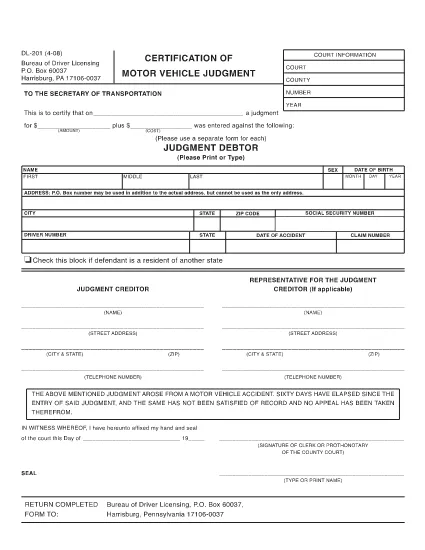
The DL-201 is Pennsylvania's official Certification of Motor Vehicle Judgment. It is required when you need to certify a judgment, lien, or other legal action related to a vehicle registered in PA. Instead of printing, printing, and mailing, you can now fill the form instantly online with Formize’s secure PDF filler.

What Is the DL-201 Form?

The DL-201 is issued by the Pennsylvania Department of Transportation (PennDOT). It records details such as the judgment amount, the vehicle identification number (VIN), and the parties involved. The form is commonly used by attorneys, lienholders, and private individuals to prove a legal claim against a vehicle.

How to Complete the DL-201 Online

Follow these simple steps to fill out the DL-201 without leaving your browser:

  1. Click the "Fill out this form" button on this page.
  2. Wait a few seconds while the Formize PDF Filler app loads the official DL-201 PDF.
  3. Enter the required information into each fillable field (judgment details, VIN, parties, etc.).
  4. Review your entries, then click Submit to download the completed PDF.

Common Mistakes to Avoid

  • Leaving fields blank: Every field marked with an asterisk (*) is mandatory.
  • Incorrect VIN format: Use the 17‑character VIN exactly as it appears on the vehicle title.
  • Mismatched names: Ensure the legal names match the judgment documents.
  • Wrong date format: Use MM/DD/YYYY throughout the form.

Where to Submit the Completed Form

After you download the filled PDF, mail or fax it to the PennDOT Bureau of Driver Licensing at the address printed on the form. Some courts also accept the form electronically; check with your local jurisdiction.

Download the Official PDF

If you prefer to work offline, you can download the official, uneditable version of the DL-201 below. The online filler will use the same document, guaranteeing compliance with PennDOT standards.

Download DL-201 PDF (official)

التعليمات
  • Is the DL-201 form available as a fillable PDF?

    Yes. Formize provides an online fillable version that mirrors the official Pennsylvania DL-201 PDF.

  • Do I need a PDF editor to complete the DL-201?

    No. The Formize PDF Filler works directly in your browser—no additional software is required.

  • Can I save my progress and finish the form later?

    The online filler does not store data. Complete the form in one session, then download the finished PDF.

  • What should I do if I make a mistake after downloading?

    Open the downloaded PDF in any PDF editor, correct the error, and re‑save. Alternatively, refill the form using the online filler.

  • Where do I send the completed DL-201?

    Mail or fax the completed form to the PennDOT Bureau of Driver Licensing address printed on the form, or follow any court‑specific instructions.

  • Is there a filing fee for the DL-201?

    PennDOT does not charge a fee for the DL-201 itself, but related court or lien filing fees may apply.

  • Can I use the DL-201 for vehicles registered in other states?

    The DL-201 is specific to Pennsylvania. Other states have their own certification forms.

كيف

كيفية ملء DL-201 مجانًا عبر الإنترنت في 3 خطوات سهلة:

  1. 1
    Open the Fillable Form
    Click the "Fill out this form" button on the page. The Formize PDF Filler app will open the DL-201 automatically.
  2. 2
    Enter Your Information
    Complete each fillable field with the required data (judgment details, VIN, parties, dates, etc.).
  3. 3
    Save or Print
    After reviewing, click "Submit" to download the completed PDF. You can then print, mail, or fax it as required.
Formize تطبيق PDF Filler
حول

نماذج طلب رخصة القيادة

DL-201 هي أحد نماذج رخصة القيادة وهي عبارة عن مستندات تستخدم في عملية الحصول على رخصة القيادة أو تجديدها، وهي وثيقة رسمية صادرة عن الحكومة تسمح للأفراد بقيادة مركبة آلية على الطرق العامة. قد تختلف هذه النماذج وفقًا للولاية القضائية، ولكنها تتضمن عمومًا ما يلي:

نموذج الطلب: يُستخدم هذا النموذج للتقدم بطلب للحصول على رخصة قيادة ويطلب عادةً معلومات شخصية مثل الاسم والعنوان وتاريخ الميلاد ورقم الضمان الاجتماعي.

وثائق الهوية: إلى جانب نموذج الطلب، يُطلب من الأفراد عادةً تقديم وثائق هوية محددة لإثبات هويتهم وإقامتهم ووجودهم القانوني في البلد. قد تشمل هذه جواز سفر ساري المفعول، أو شهادة ميلاد، أو بطاقة الضمان الاجتماعي، أو أي بطاقة هوية أخرى صادرة عن الحكومة.

إثبات الإقامة: تطلب العديد من السلطات القضائية من المتقدمين تقديم إثبات الإقامة، مثل فاتورة المرافق، أو عقد الإيجار، أو كشف حساب مصرفي، للتحقق من عنوانهم.

نموذج الفحص الطبي: قد تطلب بعض السلطات القضائية إجراء فحص طبي للتأكد من أن مقدم الطلب يستوفي المتطلبات الجسدية والعقلية اللازمة للقيادة الآمنة. عادةً ما يقوم أحد المتخصصين الطبيين بإكمال هذا النموذج.

نموذج إكمال تعليم القيادة: بالنسبة للسائقين لأول مرة، قد يلزم إكمال برنامج تعليم القيادة. غالبًا ما يكون النموذج أو الشهادة التي تشير إلى الإكمال الناجح ضروريًا للتقدم بطلب للحصول على رخصة قيادة.

نموذج اختبار الرؤية: يتم إجراء اختبار الرؤية بشكل شائع أثناء عملية طلب رخصة القيادة. سيقوم أخصائي العناية بالعيون أو الموظفين المعتمدين بتقييم حدة البصر لمقدم الطلب واستكمال النموذج المطلوب.

تتوفر هذه النماذج عادةً في إدارة المركبات الآلية (DMV) المحلية أو وكالة حكومية معادلة مسؤولة عن ترخيص السائقين. من المهم التحقق من المتطلبات والنماذج المحددة المطبقة في نطاق اختصاصك، لأنها قد تختلف.

سمات

حشو PDF

أسهل طريقة لملء نماذج PDF عبر الإنترنت

  • املأ بسرعة DL-201
    هل تبحث عن طريقة لملء كلمة DL-201 بسرعة عبر الإنترنت؟ من خلال برنامج تعبئة نماذج PDF المجاني عبر الإنترنت ، ستعرف كيفية تحرير وتعبئة مستند pdf هذا في أقل من دقيقة.
  • محرر PDF سهل الاستخدام عبر الإنترنت
    هل سئمت طباعة ملفات PDF حتى تتمكن من تحريرها قبل إعادة مسحها ضوئيًا وإرسالها مرة أخرى؟ تحرير مستندات PDF مجانًا عبر الإنترنت. استخدم محرر pdf على الإنترنت لتوفير الوقت والورق.
  • أدوات رائعة ، جميع المنصات
    هل تتساءل عن كيفية ملء DL-201 على جهاز Mac ، أو ربما كيفية استخدام حشو PDF مجانًا؟ تعمل أدوات PDF الخاصة بنا عبر الإنترنت على جميع الأنظمة الأساسية.
  • تخزين الملفات الآمن
    يتم تخزين ملفات "DL-201" المكتملة في قاعدة بيانات آمنة تديرها استضافة Amazon Cloud. يمكنك حذف ملفاتك من نظامنا في أي وقت. على أي حال ، يتم حذف هذه الملفات تلقائيًا بعد 24 ساعة.
  • الدردشة مع {كلمة رئيسية}
    قم بالدردشة مع "DL-201" على Chatize وهو مساعد مجاني لقارئ PDF. اطرح الأسئلة واحصل على الإجابات من "DL-201". فقط انقر على زر الدردشة مع المستند أعلاه.

حذف جلسة التعبئة

حذف جلسة التعبئة المحددة؟ في هذه الحالة، سيتم فقد تقدمك في إكمال النموذج.

حذف جلسة التحرير

هل تريد حذف جلسة التحرير المحددة؟ في هذه الحالة، سيتم فقدان التقدم الذي أحرزته في إنشاء النموذج وتحريره.