
اختار اللغة

TPT 556 Surety Bond Affidavit – Fillable PDF

  1. دولة الولايات المتحدة الأمريكية
  2. لغة إنجليزي
  3. نشاط رخصة السائق
  4. دولة فرجينيا
TPT 556 Surety Bond Affidavit – Fillable PDF

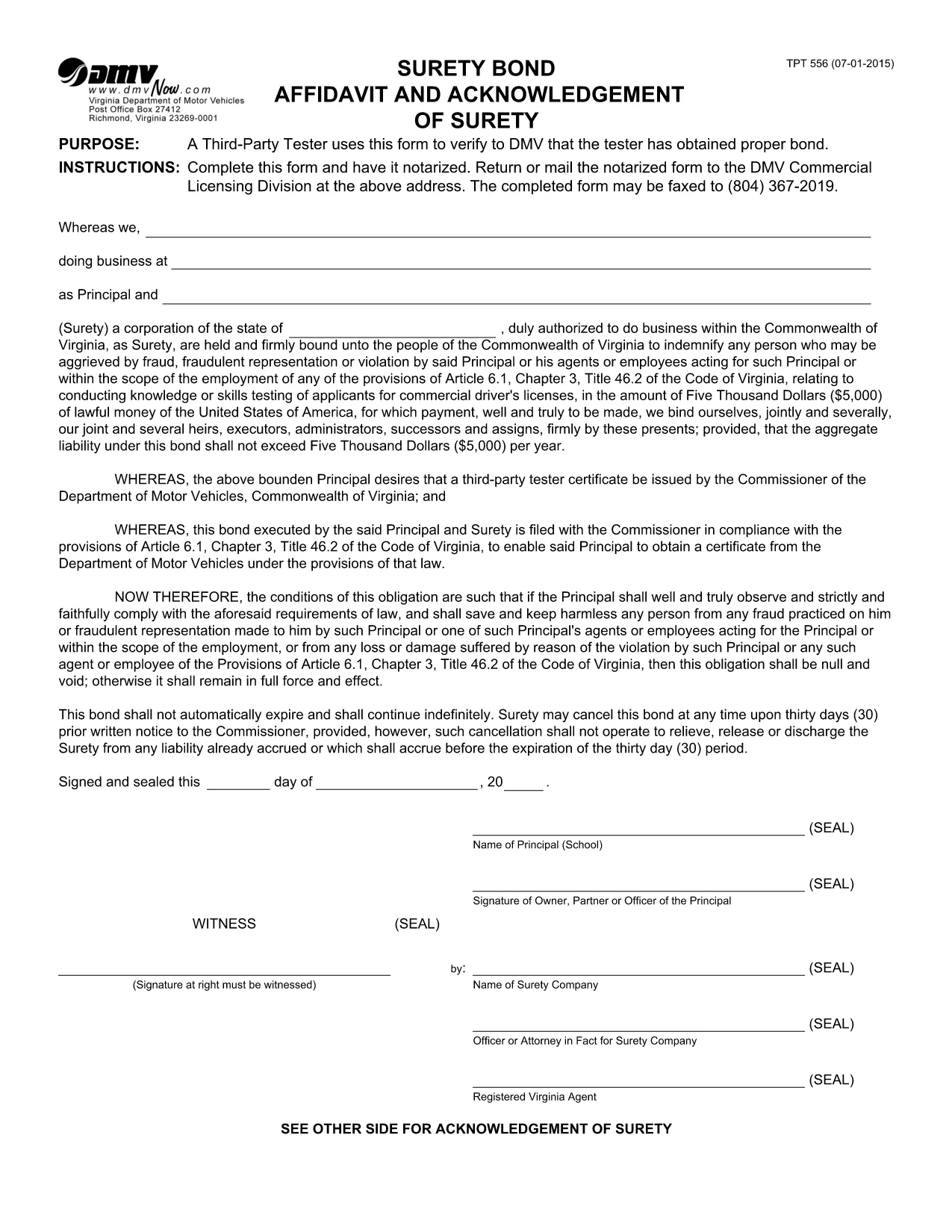
The TPT 556 is the Virginia Department of Motor Vehicles (DMV) Surety Bond Affidavit required by third‑party testers to prove they have secured the proper bond before performing vehicle inspections. Instead of printing, signing, and scanning a paper copy, you can now complete the form online with Formize’s fillable PDF tool.

Our fillable version preserves the exact layout of the official DMV document while allowing you to type directly into each field, add digital signatures, and save a copy for your records. This saves time, reduces errors, and ensures compliance with Virginia DMV regulations.

Below you’ll find a quick overview of the form, step‑by‑step instructions for filling it out, and tips to avoid the most common mistakes.

التعليمات
  • What is the purpose of the TPT 556 form?

    The TPT 556 certifies that a third‑party vehicle tester has obtained the required surety bond, which is a legal prerequisite for performing DMV‑authorized inspections in Virginia.

  • Do I need to print the form to submit it?

    No. The Virginia DMV accepts a digitally signed PDF. Use Formize’s filler to add your signature, then download the completed file and upload it through the DMV portal or email it as instructed.

  • Can I edit the form after I’ve saved it?

    Yes. The fillable PDF remains fully editable. Open the saved file again in Formize or any standard PDF editor to make changes before final submission.

  • What information is required on the TPT 556?

    You must provide the tester’s name, business address, bond amount, bond number, insurer details, and a certified signature from the surety company.

  • Is there a fee to use Formize’s PDF filler?

    Formize offers a free basic filler that works perfectly for the TPT 556. No payment is required to fill, save, or download the form.

  • How long is the TPT 556 valid?

    The bond affidavit is valid for the period covered by the surety bond, typically one year, after which a new bond and updated TPT 556 must be filed.

كيف

كيفية ملء TPT 556 مجانًا عبر الإنترنت في 4 خطوات سهلة:

  1. 1
    Click the Fill‑out Button
    On this page, click the bright “Fill out this form” button. The Formize PDF Filler app will open in a new tab.
  2. 2
    Wait for the Filler to Load
    The fillable PDF loads automatically. You’ll see editable fields appear over the original TPT 556 layout.
  3. 3
    Enter Your Information
    Type directly into each field, upload any required attachments, and add a digital signature where indicated.
  4. 4
    Save or Print Your Completed Form
    When you’re done, click “Save” to download a completed copy or “Print” to produce a hard‑copy version for DMV submission.
Formize تطبيق PDF Filler
حول

نماذج طلب رخصة القيادة

في معظم البلدان ، من الضروري الحصول على رخصة قيادة قبل أن تتمكن من الوصول إلى الطريق. يعد الحصول على رخصة قيادة معلمًا هامًا لمن يريد قيادة سيارة.

TPT 556 هي إحدى نماذج طلب رخصة القيادة وهي مستندات تُستخدم لجمع المعلومات من الأشخاص الذين يرغبون في التقدم للحصول على رخصة قيادة. يحتوي عادةً على حقول لاسم مقدم الطلب وتاريخ الميلاد ورقم الهوية ومعلومات الاتصال بالإضافة إلى سجل رخصة القيادة والخبرة.

سمات

حشو PDF

أسهل طريقة لملء نماذج PDF عبر الإنترنت

  • املأ بسرعة TPT 556
    هل تبحث عن طريقة لملء كلمة TPT 556 بسرعة عبر الإنترنت؟ من خلال برنامج تعبئة نماذج PDF المجاني عبر الإنترنت ، ستعرف كيفية تحرير وتعبئة مستند pdf هذا في أقل من دقيقة.
  • محرر PDF سهل الاستخدام عبر الإنترنت
    هل سئمت طباعة ملفات PDF حتى تتمكن من تحريرها قبل إعادة مسحها ضوئيًا وإرسالها مرة أخرى؟ تحرير مستندات PDF مجانًا عبر الإنترنت. استخدم محرر pdf على الإنترنت لتوفير الوقت والورق.
  • أدوات رائعة ، جميع المنصات
    هل تتساءل عن كيفية ملء TPT 556 على جهاز Mac ، أو ربما كيفية استخدام حشو PDF مجانًا؟ تعمل أدوات PDF الخاصة بنا عبر الإنترنت على جميع الأنظمة الأساسية.
  • تخزين الملفات الآمن
    يتم تخزين ملفات "TPT 556" المكتملة في قاعدة بيانات آمنة تديرها استضافة Amazon Cloud. يمكنك حذف ملفاتك من نظامنا في أي وقت. على أي حال ، يتم حذف هذه الملفات تلقائيًا بعد 24 ساعة.
  • الدردشة مع {كلمة رئيسية}
    قم بالدردشة مع "TPT 556" على Chatize وهو مساعد مجاني لقارئ PDF. اطرح الأسئلة واحصل على الإجابات من "TPT 556". فقط انقر على زر الدردشة مع المستند أعلاه.

حذف جلسة التعبئة

حذف جلسة التعبئة المحددة؟ في هذه الحالة، سيتم فقد تقدمك في إكمال النموذج.

حذف جلسة التحرير

هل تريد حذف جلسة التحرير المحددة؟ في هذه الحالة، سيتم فقدان التقدم الذي أحرزته في إنشاء النموذج وتحريره.