اختار اللغة

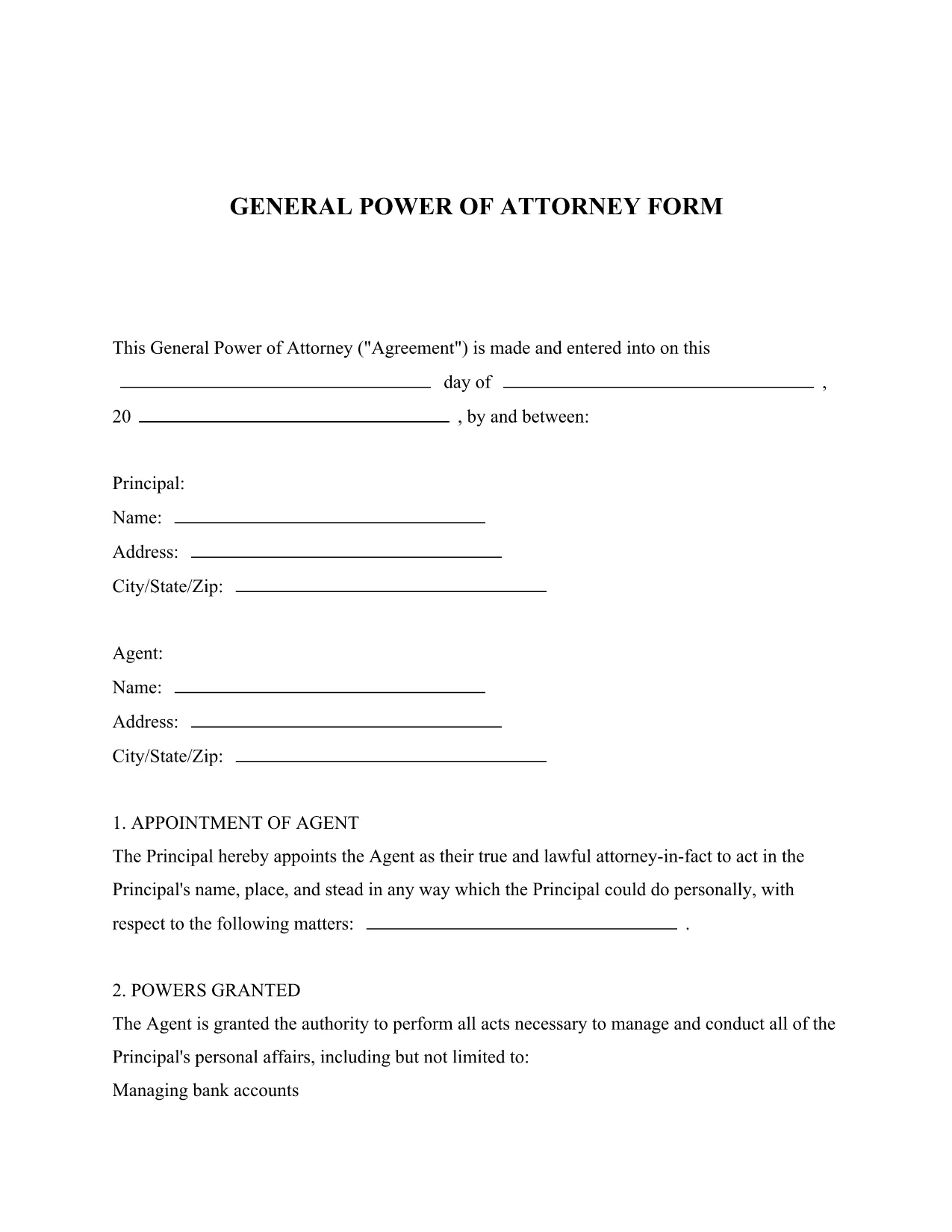
General Power of Attorney Form – Free Fillable PDF Template

  1. لغة إنجليزي
  2. دولة الولايات المتحدة الأمريكية
  3. نشاط Legal Documents Power of Attorney
General Power of Attorney Form – Free Fillable PDF Template

Looking for a reliable legal form template that lets you grant someone authority to act on your behalf? Our General Power of Attorney fillable PDF provides a simple, legally‑compliant way to appoint an attorney‑in‑fact for financial, property, and personal matters.

What Is a General Power of Attorney?

A General Power of Attorney (GPOA) gives a chosen agent broad powers to manage your affairs. It is commonly used when you are unavailable, traveling, or need assistance with day‑to‑day decisions. The form is recognized across all U.S. states when properly executed.

Key Features of Our Fillable PDF Form

  • Fully fillable fields – no printing needed before you start.
  • Clear sections for principal, agent, and notary signatures.
  • Built‑in guidance notes to help you understand each question.
  • Compatible with the Formize PDF Filler for a seamless online experience.

How to Complete the Form in Seconds

Follow the simple steps below to fill, save, and print your Power of Attorney without ever leaving your browser.

Common Mistakes to Avoid

  • Leaving required fields blank – the Formize validator will highlight missing information.
  • Using an unsigned or improperly witnessed form – a notary public is required in most states.
  • Choosing an agent who is not legally capable of acting on your behalf.

Where to Get Help After Submission

If you need legal advice, consult a qualified attorney. Many state bar associations offer free or low‑cost consultations for Power of Attorney questions.

التعليمات
  • Is a General Power of Attorney valid in every state?

    Yes, a properly executed General Power of Attorney is recognized nationwide, though some states have specific witnessing or notarization requirements.

  • Do I need a lawyer to fill out this form?

    While you can complete the form yourself, consulting an attorney ensures the agent you choose is appropriate and that all legal requirements are met.

  • Can I revoke the Power of Attorney later?

    Absolutely. You can revoke it at any time by creating a written revocation document, signing it, and notifying your agent and any institutions that rely on the POA.

  • What if I make a mistake while filling the PDF?

    The Formize PDF Filler lets you edit any field before saving. If you download the PDF and notice an error, simply reopen it in the filler, correct the mistake, and save again.

  • Is a notarized signature always required?

    Most states require a notary for a General Power of Attorney to be legally binding. Check your state’s specific rules; some may also accept two witnesses instead of a notary.

  • Can I use this form for a minor’s affairs?

    A General Power of Attorney cannot be granted by a minor. For a child’s affairs, a Guardian‑ad Litem or a specific “Minor’s POA” form is needed.

  • How long does the form stay valid?

    Unless you set an expiration date, a General Power of Attorney remains effective until you revoke it, become incapacitated, or pass away.

  • Can I assign more than one agent?

    Yes, you can name multiple agents. The form includes a section for “Successor Agents” if the primary agent cannot serve.

  • Is there a fee to download the PDF?

    No, the General Power of Attorney template is completely free to download and fill using Formize.

  • What should I do after the form is notarized?

    Provide copies to banks, medical providers, and any institutions that will rely on the POA. Keep the original in a safe place.

كيف

كيفية ملء general power of attorney مجانًا عبر الإنترنت في 5 خطوات سهلة:

  1. 1
    Click the Fill Out This Form Button
    Locate the bright “Fill out this form” button on the page and click it to launch the Formize PDF Filler.
  2. 2
    Wait for the Formize PDF Filler to Load
    The web‑based filler loads in seconds. All fields become editable directly in your browser.
  3. 3
    Complete Each Section
    Enter the principal’s details, select your agent, and fill in any optional instructions. Required fields are marked with an asterisk.
  4. 4
    Save and Download
    When you’re finished, click “Save” to store a copy in your account, then download the completed PDF for printing and notarization.
  5. 5
    Print, Sign, and Notarize
    Print the saved PDF, sign in the presence of a notary public, and have the notary witness your signature as required by state law.
Formize تطبيق PDF Filler
حول

نموذج general power of attorney

باستخدام مجموعة الميزات التقليدية لعرض مستند PDF وتعبئته ، جنبًا إلى جنب مع مزايا تطبيق الويب والتخطيط سريع الاستجابة ، يمكنك إكمال general power of attorney في دقائق.

سمات

حشو PDF

أسهل طريقة لملء نماذج PDF عبر الإنترنت

  • املأ بسرعة general power of attorney
    هل تبحث عن طريقة لملء كلمة general power of attorney بسرعة عبر الإنترنت؟ من خلال برنامج تعبئة نماذج PDF المجاني عبر الإنترنت ، ستعرف كيفية تحرير وتعبئة مستند pdf هذا في أقل من دقيقة.
  • محرر PDF سهل الاستخدام عبر الإنترنت
    هل سئمت طباعة ملفات PDF حتى تتمكن من تحريرها قبل إعادة مسحها ضوئيًا وإرسالها مرة أخرى؟ تحرير مستندات PDF مجانًا عبر الإنترنت. استخدم محرر pdf على الإنترنت لتوفير الوقت والورق.
  • أدوات رائعة ، جميع المنصات
    هل تتساءل عن كيفية ملء general power of attorney على جهاز Mac ، أو ربما كيفية استخدام حشو PDF مجانًا؟ تعمل أدوات PDF الخاصة بنا عبر الإنترنت على جميع الأنظمة الأساسية.
  • تخزين الملفات الآمن
    يتم تخزين ملفات "general power of attorney" المكتملة في قاعدة بيانات آمنة تديرها استضافة Amazon Cloud. يمكنك حذف ملفاتك من نظامنا في أي وقت. على أي حال ، يتم حذف هذه الملفات تلقائيًا بعد 24 ساعة.
  • الدردشة مع {كلمة رئيسية}
    قم بالدردشة مع "general power of attorney" على Chatize وهو مساعد مجاني لقارئ PDF. اطرح الأسئلة واحصل على الإجابات من "general power of attorney". فقط انقر على زر الدردشة مع المستند أعلاه.

حذف جلسة التعبئة

حذف جلسة التعبئة المحددة؟ في هذه الحالة، سيتم فقد تقدمك في إكمال النموذج.

حذف جلسة التحرير

هل تريد حذف جلسة التحرير المحددة؟ في هذه الحالة، سيتم فقدان التقدم الذي أحرزته في إنشاء النموذج وتحريره.