
اختار اللغة

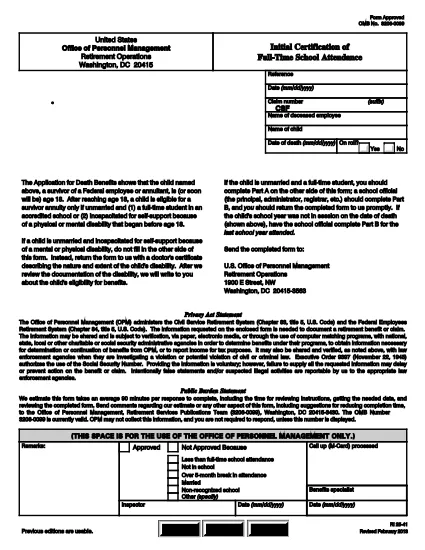
RI 25‑41 Fillable PDF – Initial Certification of Full‑Time School Attendance

  1. دولة الولايات المتحدة الأمريكية
  2. لغة إنجليزي
  3. قسم مكتب إدارة شؤون الموظفين
  4. قطاع نماذج التقاعد والتأمين
RI 25‑41 Fillable PDF – Initial Certification of Full‑Time School Attendance

The RI 25‑41 is the federal “Initial Certification of Full‑Time School Attendance” used by the Office of Personnel Management (OPM) to verify a student’s eligibility for federal education benefits. This form is required for each school year and must be completed by both the payee (the student’s parent or guardian) and an official of the educational institution.

What Is the RI 25‑41 Form?

RI 25‑41 collects detailed information about the student’s enrollment, the school’s accreditation, and the anticipated dates of attendance. Part A is filled out by the payee, while Part B is completed by a school official. The form must be signed and returned to OPM before benefits are paid.

How to Fill Out RI 25‑41 Online with Formize

Instead of printing, scanning, or editing the PDF in a separate program, you can fill the form directly on our site. Follow the simple steps below:

  1. Click the “Fill out this form” button on the page.
  2. Wait a few seconds while the Formize PDF Filler app loads the fillable RI 25‑41 document.
  3. Enter your information in each field. Use the TAB key to jump between fields.
  4. When all required fields are completed, click Save & Download to get a copy of the completed PDF.
  5. Print the signed copy (if a signature is required) and submit it to OPM as instructed.

Key Sections & Common Mistakes to Avoid

  • Part A – Payee Information: Double‑check the Social Security Number and date of birth; a typo will delay processing.
  • Part B – School Official: Ensure the official’s title and phone number are current; OPM may contact them for verification.
  • Attendance Dates: Use the exact start and end dates of the academic term. Do not leave blanks.
  • Signatures: Electronic signatures are accepted only if the PDF is printed, signed, and scanned back. The online filler does not replace a handwritten signature where required.
  • Attachments: If the school requires additional documentation (e.g., enrollment verification), attach those files before downloading the final PDF.

Where to Submit the Completed Form

After saving the completed RI 25‑41, mail or fax the signed PDF to the address listed on the OPM website. For most federal employees, the preferred method is to upload the PDF to the OPM portal under “Retirement & Insurance Forms.”

Need a printable version? Use the direct download link below.

التعليمات
  • Can I submit the RI 25‑41 electronically?

    Yes. After completing the form in the Formize filler, you can download the PDF and upload it to the OPM portal. If a signature is required, print, sign, and scan the document before uploading.

  • Who can fill out Part B of the form?

    Part B must be completed by an authorized official of the educational institution, such as the registrar or dean.

  • What happens if I make a mistake on the form?

    Incorrect or missing information can delay benefit payments. Review all entries carefully and correct any errors before submitting.

  • Do I need to attach proof of enrollment?

    OPM may request additional enrollment verification. Attach any required documents before downloading the final PDF.

  • Is the RI 25‑41 form still valid for 2024‑2025 school years?

    Yes. The RI 25‑41 form is the current version for all upcoming school years unless OPM announces a revision.

  • How long does it take for OPM to process the form?

    Processing typically takes 10‑14 business days after receipt of a complete and signed form.

كيف

كيفية ملء RI 25-41 مجانًا عبر الإنترنت في 4 خطوات سهلة:

  1. 1
    Open the Fillable Form
    Click the “Fill out this form” button on this page. The Formize PDF Filler will open the RI 25‑41 document automatically.
  2. 2
    Enter Your Information
    Type directly into each field. Use TAB to move to the next field. All required fields are marked with an asterisk.
  3. 3
    Save and Download
    When you’re finished, click “Save & Download” to get a copy of the completed PDF. Print and sign if a handwritten signature is required.
  4. 4
    Submit to OPM
    Mail, fax, or upload the signed PDF to the OPM portal as instructed in the form’s instructions.
Formize تطبيق PDF Filler
حول

نماذج مكتب إدارة شؤون الموظفين (OPM).

RI 25-41 هو أحد النماذج الرسمية التي يستخدمها مكتب إدارة شؤون الموظفين بالولايات المتحدة، وهو وكالة مستقلة تابعة للحكومة الفيدرالية مسؤولة عن إدارة القوى العاملة في الخدمة المدنية ومزايا الموظفين الفيدراليين. يضع OPM السياسات واللوائح المتعلقة بالتوظيف الفيدرالي، ويدير برامج الموظفين المختلفة، ويقدم الخدمات للموظفين الفيدراليين والمتقاعدين والمتقدمين للوظائف.

فيما يلي بعض الأمثلة على نماذج مكتب إدارة شؤون الموظفين:

النموذج القياسي 86 (SF-86) : يستخدم هذا النموذج في عملية التحقيق في خلفية الأفراد المتقدمين للحصول على تصريح أمني. فهو يجمع معلومات شخصية ووظيفية وتعليمية ومالية شاملة، بالإضافة إلى تفاصيل حول الاتصالات والأنشطة الأجنبية.

النموذج القياسي 2809 (SF-2809) : يُستخدم هذا النموذج للتسجيل في برنامج المزايا الصحية للموظفين الفيدراليين (FEHB)، الذي يوفر تغطية التأمين الصحي للموظفين الفيدراليين والمتقاعدين وأفراد أسرهم المؤهلين.

النموذج القياسي 2817 (SF-2817): يُستخدم هذا النموذج للتقدم بطلب استمرار التغطية بموجب برنامج التأمين على الأسنان والبصر للموظفين الفيدراليين (FEDVIP) بعد التقاعد أو الانفصال عن الخدمة الفيدرالية.

النموذج القياسي 3107 (SF-3107) : يستخدم هذا النموذج لتقديم طلبات الحصول على مزايا التقاعد بموجب نظام تقاعد الخدمة المدنية (CSRS).

النموذج القياسي 2801 (SF-2801) : يستخدم هذا النموذج لتقديم طلب للحصول على مزايا التقاعد بموجب نظام تقاعد الموظفين الفيدراليين (FERS).

النموذج القياسي 15 (SF-15) : يستخدم هذا النموذج لتقديم طلب للحصول على تفضيل المحاربين القدامى في التوظيف الفيدرالي. يتم تقديمه من قبل المحاربين القدامى أو أفراد أسرهم المؤهلين الذين يبحثون عن فرص عمل في الحكومة الفيدرالية.

تمثل هذه الأمثلة بعض نماذج OPM الشائعة المستخدمة في سياق التوظيف الفيدرالي واستحقاقات الموظفين. ومع ذلك، لدى OPM مجموعة من الأشكال الأخرى المتعلقة ببرامج الموظفين المختلفة، والتقاعد، والتأمين، والجوانب الأخرى للتوظيف الفيدرالي. قد تختلف النماذج المحددة المطلوبة اعتمادًا على طبيعة المعاملة أو البرنامج أو المنفعة المطلوبة. يُنصح باستشارة الموقع الرسمي لمكتب إدارة شؤون الموظفين بالولايات المتحدة (www.opm.gov) أو طلب إرشادات من مكتب إدارة شؤون الموظفين أو موظفي الموارد البشرية ذوي الصلة للحصول على معلومات دقيقة وحديثة. معلومات حديثة بخصوص نماذج OPM المحددة ذات الصلة بوظيفتك الفيدرالية أو احتياجاتك المتعلقة بالمزايا.

سمات

حشو PDF

أسهل طريقة لملء نماذج PDF عبر الإنترنت

  • املأ بسرعة RI 25-41
    هل تبحث عن طريقة لملء كلمة RI 25-41 بسرعة عبر الإنترنت؟ من خلال برنامج تعبئة نماذج PDF المجاني عبر الإنترنت ، ستعرف كيفية تحرير وتعبئة مستند pdf هذا في أقل من دقيقة.
  • محرر PDF سهل الاستخدام عبر الإنترنت
    هل سئمت طباعة ملفات PDF حتى تتمكن من تحريرها قبل إعادة مسحها ضوئيًا وإرسالها مرة أخرى؟ تحرير مستندات PDF مجانًا عبر الإنترنت. استخدم محرر pdf على الإنترنت لتوفير الوقت والورق.
  • أدوات رائعة ، جميع المنصات
    هل تتساءل عن كيفية ملء RI 25-41 على جهاز Mac ، أو ربما كيفية استخدام حشو PDF مجانًا؟ تعمل أدوات PDF الخاصة بنا عبر الإنترنت على جميع الأنظمة الأساسية.
  • تخزين الملفات الآمن
    يتم تخزين ملفات "RI 25-41" المكتملة في قاعدة بيانات آمنة تديرها استضافة Amazon Cloud. يمكنك حذف ملفاتك من نظامنا في أي وقت. على أي حال ، يتم حذف هذه الملفات تلقائيًا بعد 24 ساعة.
  • الدردشة مع {كلمة رئيسية}
    قم بالدردشة مع "RI 25-41" على Chatize وهو مساعد مجاني لقارئ PDF. اطرح الأسئلة واحصل على الإجابات من "RI 25-41". فقط انقر على زر الدردشة مع المستند أعلاه.

حذف جلسة التعبئة

حذف جلسة التعبئة المحددة؟ في هذه الحالة، سيتم فقد تقدمك في إكمال النموذج.

حذف جلسة التحرير

هل تريد حذف جلسة التحرير المحددة؟ في هذه الحالة، سيتم فقدان التقدم الذي أحرزته في إنشاء النموذج وتحريره.