
اختار اللغة

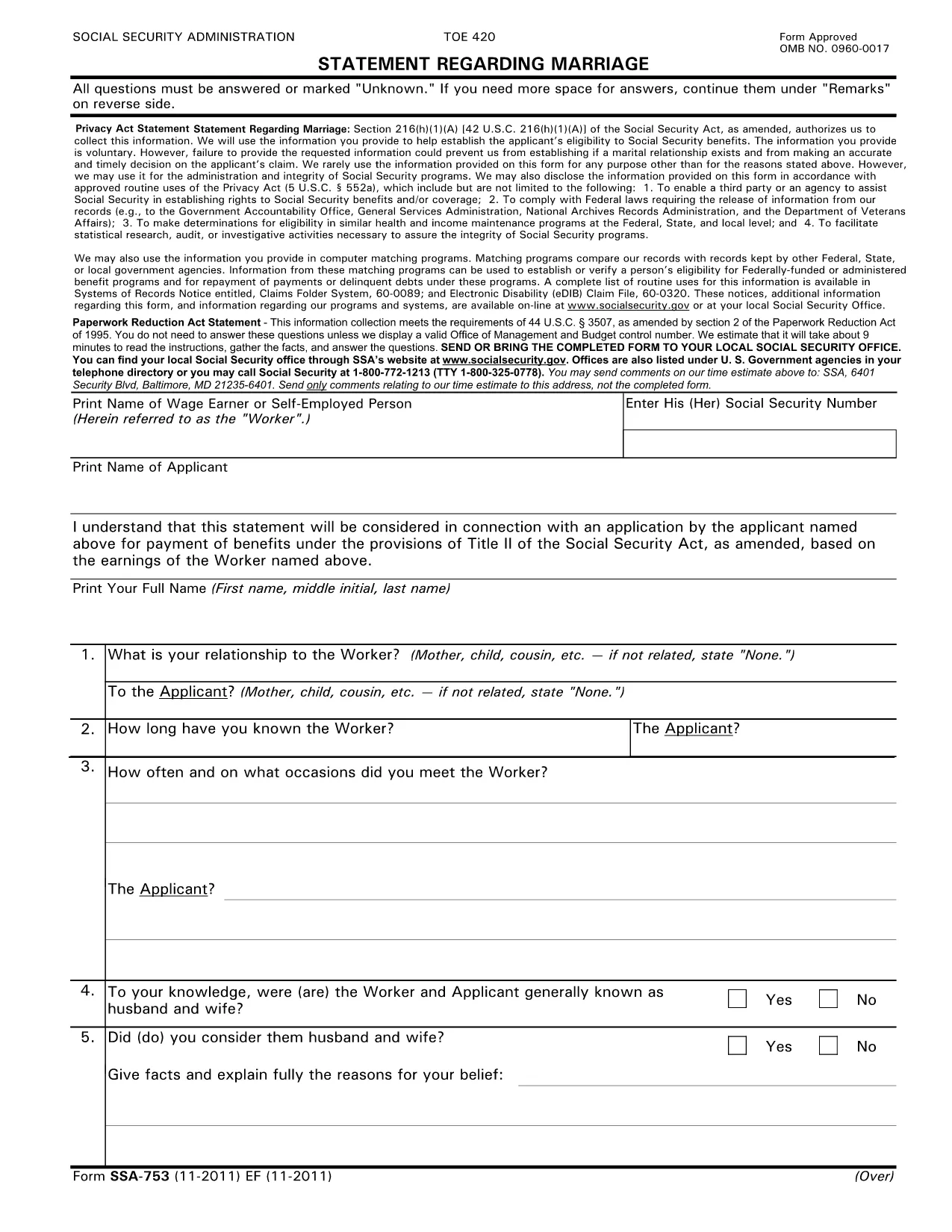
SSA-753 Statement Regarding Marriage – Fillable PDF

  1. لغة إنجليزي
  2. دولة الولايات المتحدة الأمريكية
  3. نشاط الضمان الاجتماعي
املأ هذا النموذج
SSA-753 Statement Regarding Marriage – Fillable PDF

The SSA-753 Statement Regarding Marriage is the Social Security Administration’s official form used to report a change in marital status. Whether you’re getting married, divorced, or widowed, this form helps the SSA determine your eligibility for benefits.

What Is the SSA-753 Form?

The SSA-753 collects basic personal information, details about the marriage, and the impact on Social Security benefits. It is required for:

  • Applying for spousal or survivor benefits
  • Updating your existing benefit record
  • Confirming eligibility for a spouse’s retirement or disability benefits

How to Complete the SSA-753 Online

Instead of printing and scanning, you can fill the form directly on our site using the Formize PDF Filler. The process is quick, secure, and saves you a trip to the post office.

Common Mistakes to Avoid

  • Leaving required fields blank – the form will not submit if any required field is empty.
  • Incorrect dates – double‑check the marriage or divorce date; errors can delay benefit processing.
  • Mismatched signatures – the applicant and spouse (if applicable) must sign exactly as shown on the Social Security card.

Where to Submit the Completed Form

After you finish, you can:

  • Download the completed PDF and mail it to your local Social Security office.
  • Print and bring it in person during your next SSA appointment.

Download the Official PDF

If you prefer the original document, you can download the official SSA‑753 PDF directly from the Social Security Administration’s archive.

التعليمات
  • Do I need a PDF editor to fill out SSA-753?

    No. With Formize you can fill the form online in your browser—no additional software required.

  • Is the online filler secure?

    Yes. All data is encrypted in transit and processed on a secure server before you download or print the completed form.

  • Can I save my progress and return later?

    The Formize filler auto‑saves your entries, but you must download the PDF before closing the browser to keep a permanent copy.

  • What if I make a mistake?

    You can edit any field at any time before you submit. Simply click the field and correct the information.

  • Where do I mail the completed SSA-753?

    Send the finished form to your local Social Security office. Addresses are listed on the SSA website under “Contact Us.”

  • Is there a fee to use the Formize PDF Filler?

    No. Filling out the SSA-753 with Formize is completely free.

  • Do I need to print the form after filling it online?

    Printing is recommended if you plan to mail the form. You can also present the printed copy at an SSA office.

كيف

كيفية ملء SSA-753 مجانًا عبر الإنترنت في 4 خطوات سهلة:

  1. 1
    Click the Fill‑out Button
    Press the “Fill out this form” button below to launch the Formize PDF Filler.
  2. 2
    Wait for the Filler to Load
    A few seconds will pass while the secure online editor initializes.
  3. 3
    Complete Each Field
    Enter your information directly into the fillable fields. The app saves your changes automatically.
  4. 4
    Submit or Download
    When finished, either submit the form to the SSA via mail or download the completed PDF for your records.
Formize تطبيق PDF Filler
حول

نماذج الضمان الاجتماعي

SSA-753 هي أحد نماذج الضمان الاجتماعي التي تُستخدم للتقدم بطلب للحصول على مزايا وخدمات متنوعة تقدمها إدارة الضمان الاجتماعي بالولايات المتحدة (SSA). SSA هي وكالة فيدرالية تدير البرامج المصممة لتقديم المساعدة المالية للأفراد والأسر المؤهلين ، بما في ذلك مزايا التقاعد ، ومزايا العجز ، ومزايا الناجين ، ودخل الضمان الإضافي (SSI).

تتضمن بعض أشكال الضمان الاجتماعي الشائعة ما يلي:

طلب مزايا التقاعد للضمان الاجتماعي : يستخدم هذا النموذج للتقدم بطلب للحصول على مزايا التقاعد بناءً على تاريخ العمل والأرباح للفرد.

طلب استحقاقات الضمان الاجتماعي للإعاقة : يستخدم هذا النموذج لتقديم طلب للحصول على مزايا الإعاقة إذا كان الفرد يعاني من حالة بدنية أو عقلية تمنعه ​​من العمل.

طلب استحقاقات البقاء على قيد الحياة من الضمان الاجتماعي : يستخدم هذا النموذج لتقديم طلب للحصول على استحقاقات الباقي على قيد الحياة في حالة وفاة زوج أو والد أحدهم وكانوا مؤهلين للحصول على مزايا الورثة.

طلب تسجيل Medicare : يستخدم هذا النموذج للتسجيل في برنامج Medicare ، برنامج التأمين الصحي الفيدرالي للأفراد الذين تزيد أعمارهم عن 65 عامًا والذين يعانون من إعاقات أو حالات طبية معينة.

تغيير نموذج العنوان : يستخدم هذا النموذج لتحديث عنوان الفرد باستخدام SSA.

نموذج طلب سجل الأرباح : يستخدم هذا النموذج لطلب نسخة من سجل أرباح الفرد ، والذي يستخدم لحساب مزايا الضمان الاجتماعي.

يمكن إكمال هذه النماذج عبر الإنترنت أو بالبريد أو شخصيًا في مكتب الضمان الاجتماعي المحلي. من المهم مراجعة واستكمال جميع النماذج اللازمة بعناية لضمان معالجة دقيقة وفي الوقت المناسب لمزايا الضمان الاجتماعي.

سمات

حشو PDF

أسهل طريقة لملء نماذج PDF عبر الإنترنت

  • املأ بسرعة SSA-753
    هل تبحث عن طريقة لملء كلمة SSA-753 بسرعة عبر الإنترنت؟ من خلال برنامج تعبئة نماذج PDF المجاني عبر الإنترنت ، ستعرف كيفية تحرير وتعبئة مستند pdf هذا في أقل من دقيقة.
  • محرر PDF سهل الاستخدام عبر الإنترنت
    هل سئمت طباعة ملفات PDF حتى تتمكن من تحريرها قبل إعادة مسحها ضوئيًا وإرسالها مرة أخرى؟ تحرير مستندات PDF مجانًا عبر الإنترنت. استخدم محرر pdf على الإنترنت لتوفير الوقت والورق.
  • أدوات رائعة ، جميع المنصات
    هل تتساءل عن كيفية ملء SSA-753 على جهاز Mac ، أو ربما كيفية استخدام حشو PDF مجانًا؟ تعمل أدوات PDF الخاصة بنا عبر الإنترنت على جميع الأنظمة الأساسية.
  • تخزين الملفات الآمن
    يتم تخزين ملفات "SSA-753" المكتملة في قاعدة بيانات آمنة تديرها استضافة Amazon Cloud. يمكنك حذف ملفاتك من نظامنا في أي وقت. على أي حال ، يتم حذف هذه الملفات تلقائيًا بعد 24 ساعة.
  • الدردشة مع {كلمة رئيسية}
    قم بالدردشة مع "SSA-753" على Chatize وهو مساعد مجاني لقارئ PDF. اطرح الأسئلة واحصل على الإجابات من "SSA-753". فقط انقر على زر الدردشة مع المستند أعلاه.

حذف جلسة التعبئة

حذف جلسة التعبئة المحددة؟ في هذه الحالة، سيتم فقد تقدمك في إكمال النموذج.

حذف جلسة التحرير

هل تريد حذف جلسة التحرير المحددة؟ في هذه الحالة، سيتم فقدان التقدم الذي أحرزته في إنشاء النموذج وتحريره.