اختار اللغة

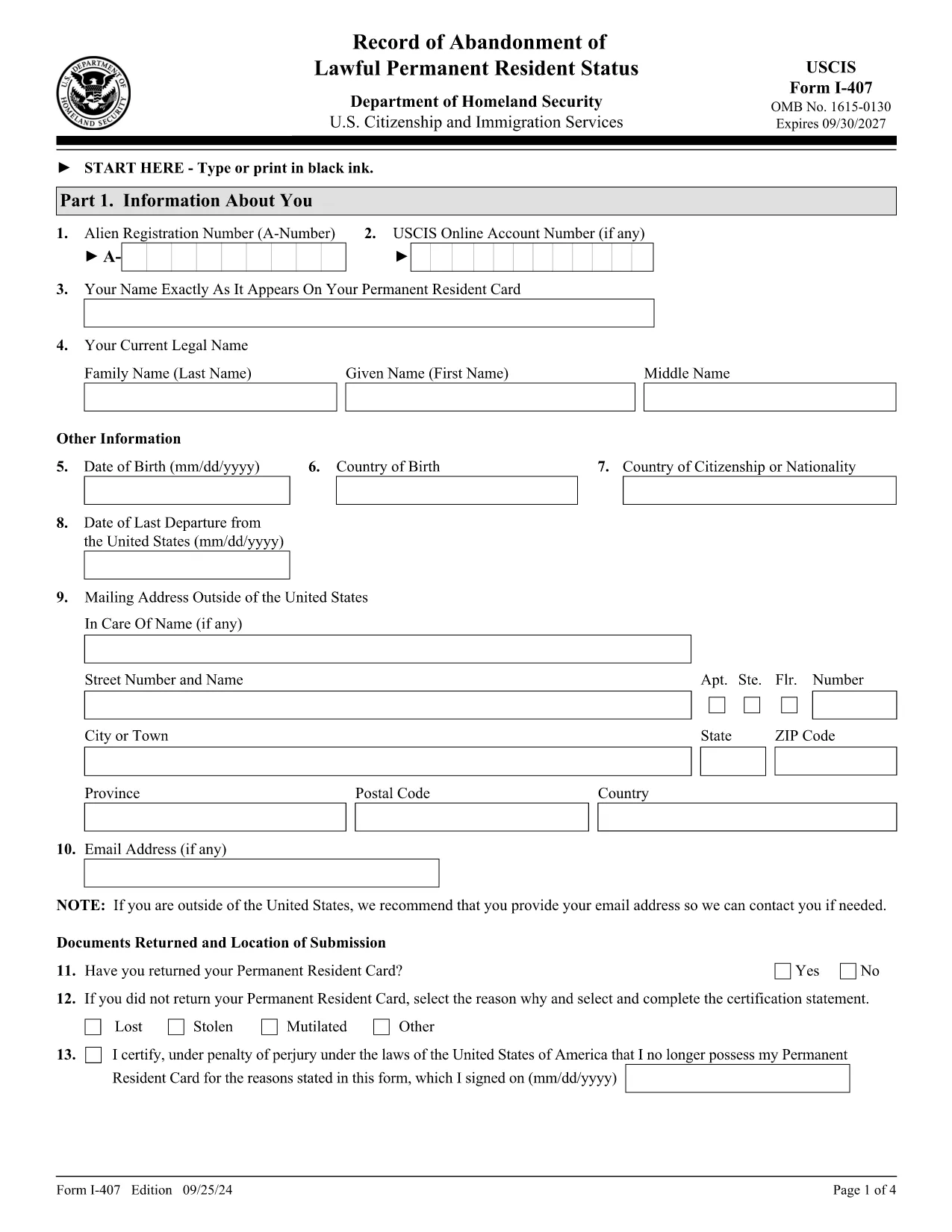
The Form I-407 is the official USCIS document used to voluntarily abandon lawful permanent resident (LPR) status in the United States. Whether you are moving abroad, changing visa categories, or need proof of abandonment for tax reasons, completing this form correctly is essential.

What Is Form I-407 and When Is It Required?

I-407, Record of Abandonment of Lawful Permanent Resident Status, notifies USCIS that you are giving up your green‑card rights. You should file it when:

  • You are leaving the U.S. permanently and will not maintain LPR status.
  • You need official proof of abandonment for an A or G visa, U.S. consular services, or tax filings.
  • You are a minor (under 14) or an incapacitated adult; a parent, guardian, or legal representative must sign.

How to Complete the I-407 Online with Formize

Instead of printing, signing, and scanning, use Formize’s built‑in PDF filler. Follow these simple steps:

  1. Click the "Fill out this form" button on this page.
  2. Wait a few seconds while the Formize PDF Filler app loads the official I-407 PDF.
  3. Enter your personal information, LPR details, and reason for abandonment directly in the browser.
  4. Review each field for accuracy; the filler highlights required fields.
  5. Electronically sign the form (or print to add a handwritten signature if required).
  6. Download the completed PDF or send it directly to USCIS via email if your office allows electronic submission.

Common Mistakes to Avoid When Submitting I-407

  • Missing Signature: An unsigned form is automatically rejected.
  • Incorrect Edition Date: Use the most recent edition (09/25/24) – visible at the bottom of each page.
  • Wrong Mailing Address: Send to the USCIS Lee’s Summit, MO facility unless you have specific instructions from a field office.
  • Including Unnecessary Documents: Only submit the I-407 form; do not attach driver’s licenses, SS cards, or other IDs.
  • Failing to Provide Guardian Proof: For minors or incapacitated adults, attach proof of relationship or legal guardianship.

Where to Mail or Submit Your Completed Form

Standard filing is by mail to:

USCIS
Attn: I-407
7 Product Way
Lee’s Summit, MO 64002
USA

In rare cases, you may submit the form in person to a USCIS international field office, a U.S. embassy/consulate, or a U.S. Customs and Border Protection officer at a port of entry.

After filing, USCIS will notify the Internal Revenue Service of your abandonment date, which may affect your tax obligations.

التعليمات
  • Do I have to pay a fee to file Form I-407?

    No. The I-407 filing is free of charge. However, you may incur postage costs when mailing the form.

  • Can I submit I-407 electronically?

    USCIS currently requires a physical copy for most cases. You can fill it out online, then print and mail it.

  • What happens to my green card after I file I-407?

    USCIS will cancel the card and update its records to show you are no longer a lawful permanent resident.

  • Do I need to inform the IRS after abandoning LPR status?

    Yes. USCIS notifies the IRS of your abandonment date, which may trigger expatriation tax filing requirements.

  • Can a minor file I-407 without a parent?

    No. A parent, custodial parent, or legal guardian must sign and provide proof of relationship.

  • How long does USCIS take to process I-407?

    Processing times vary, but most cases are confirmed within 30 days of receipt.

  • Is the I-407 form the same as the I-407A?

    No. I-407 is the abandonment record. I-407A is a supplemental form used in very limited circumstances.

  • What if I make a mistake on the form?

    Correct the error, sign again, and resend the corrected form. USCIS may reject forms with visible errors.

  • Can I use the I-407 form to apply for a new visa?

    The I-407 itself does not grant a visa, but it provides proof of abandonment which may be required for certain visa applications.

  • Where can I find the official I-407 PDF?

    The official, up‑to‑date PDF is available from USCIS and linked below.

كيف

كيفية ملء I-407 form مجانًا عبر الإنترنت في 5 خطوات سهلة:

  1. 1
    Open the Fillable Form
    Click the "Fill out this form" button on the page. The Formize PDF Filler will open the official I-407 PDF.
  2. 2
    Enter Your Information
    Type your name, A‑Number, address, and reason for abandonment into the highlighted fields.
  3. 3
    Add Required Signatures
    If you are the applicant, sign electronically. For minors or incapacitated adults, have the parent or guardian sign.
  4. 4
    Review and Validate
    Use the built‑in validation to ensure all required fields are completed and the edition date is correct.
  5. 5
    Download or Submit
    Save the completed PDF to your computer or print it for mailing to the USCIS Lee’s Summit address.
Formize تطبيق PDF Filler
حول

نموذج I-407 form

باستخدام مجموعة الميزات التقليدية لعرض مستند PDF وتعبئته ، جنبًا إلى جنب مع مزايا تطبيق الويب والتخطيط سريع الاستجابة ، يمكنك إكمال I-407 form في دقائق.

سمات

حشو PDF

أسهل طريقة لملء نماذج PDF عبر الإنترنت

  • املأ بسرعة I-407 form
    هل تبحث عن طريقة لملء كلمة I-407 form بسرعة عبر الإنترنت؟ من خلال برنامج تعبئة نماذج PDF المجاني عبر الإنترنت ، ستعرف كيفية تحرير وتعبئة مستند pdf هذا في أقل من دقيقة.
  • محرر PDF سهل الاستخدام عبر الإنترنت
    هل سئمت طباعة ملفات PDF حتى تتمكن من تحريرها قبل إعادة مسحها ضوئيًا وإرسالها مرة أخرى؟ تحرير مستندات PDF مجانًا عبر الإنترنت. استخدم محرر pdf على الإنترنت لتوفير الوقت والورق.
  • أدوات رائعة ، جميع المنصات
    هل تتساءل عن كيفية ملء I-407 form على جهاز Mac ، أو ربما كيفية استخدام حشو PDF مجانًا؟ تعمل أدوات PDF الخاصة بنا عبر الإنترنت على جميع الأنظمة الأساسية.
  • تخزين الملفات الآمن
    يتم تخزين ملفات "I-407 form" المكتملة في قاعدة بيانات آمنة تديرها استضافة Amazon Cloud. يمكنك حذف ملفاتك من نظامنا في أي وقت. على أي حال ، يتم حذف هذه الملفات تلقائيًا بعد 24 ساعة.
  • الدردشة مع {كلمة رئيسية}
    قم بالدردشة مع "I-407 form" على Chatize وهو مساعد مجاني لقارئ PDF. اطرح الأسئلة واحصل على الإجابات من "I-407 form". فقط انقر على زر الدردشة مع المستند أعلاه.

حذف جلسة التعبئة

حذف جلسة التعبئة المحددة؟ في هذه الحالة، سيتم فقد تقدمك في إكمال النموذج.

حذف جلسة التحرير

هل تريد حذف جلسة التحرير المحددة؟ في هذه الحالة، سيتم فقدان التقدم الذي أحرزته في إنشاء النموذج وتحريره.