
اختار اللغة

SP-121 New Jersey Vehicle Registration Form – Fillable PDF

  1. لغة إنجليزي
  2. دولة الولايات المتحدة الأمريكية
  3. نشاط استمارة المركبة
  4. دولة نيو جيرسي
SP-121 New Jersey Vehicle Registration Form – Fillable PDF

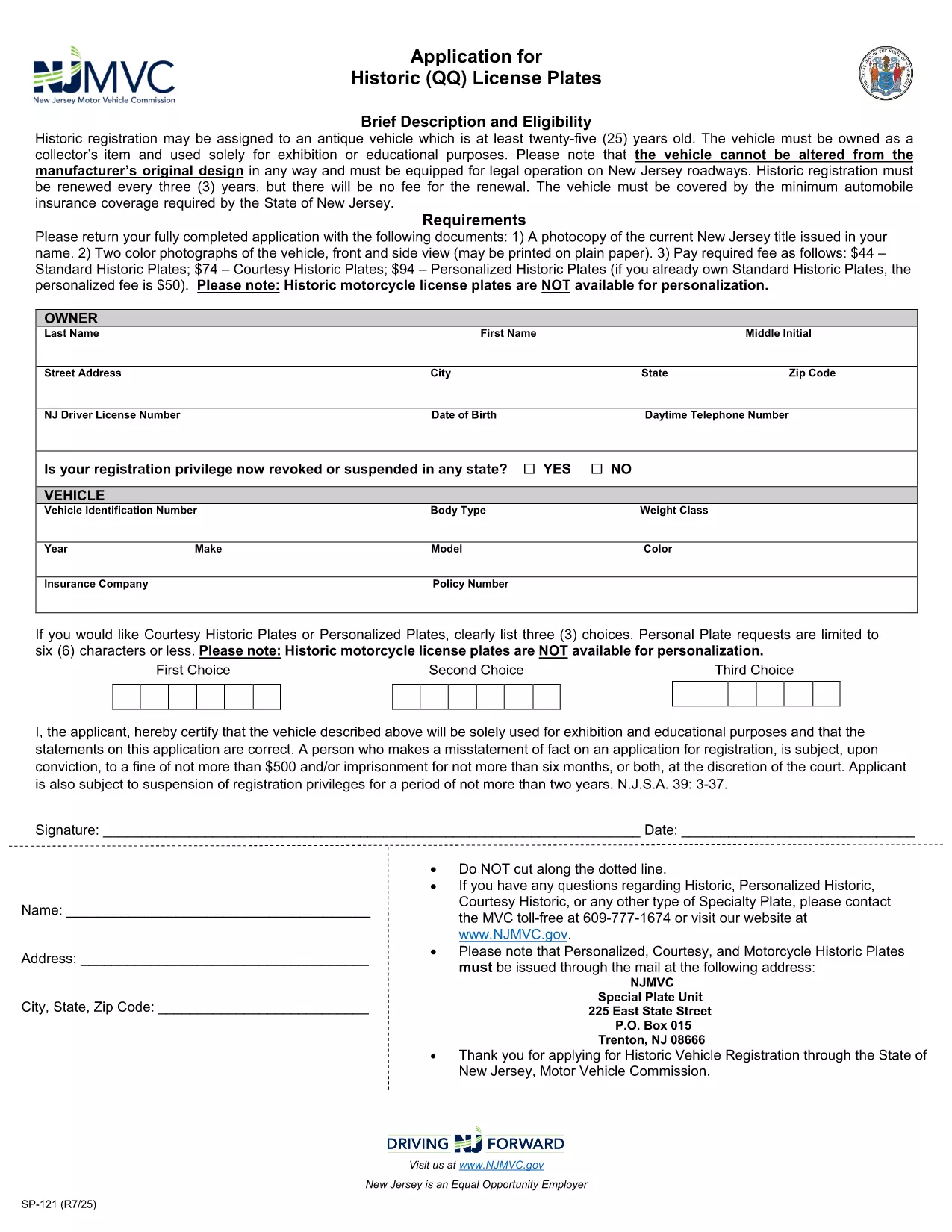
The SP-121 is the official New Jersey Motor Vehicle Commission (NJ MVC) application used to register a vehicle, request historic license plates, or update ownership information. This fillable PDF version lets you complete the form directly in your browser, eliminating the need to print, scan, or mail paperwork.

What Is Form SP-121?

Form SP-121 collects essential vehicle details (make, model, year, VIN) and owner information (name, address, contact). It is required for:

  • Standard vehicle registration
  • Historic (QQ) license plate applications
  • Title transfers and ownership changes

How to Fill Out Form SP-121 Online

Our Fill out this form button launches the Formize PDF Filler app. Follow these simple steps:

  1. Click the "Fill out this form" button above.
  2. Wait a few seconds while the fillable PDF loads in the Formize viewer.
  3. Enter the required information in each field. The form automatically validates dates and VIN format.
  4. When finished, click Save to download a completed copy or Print to submit in person.

Required Documents and Common Mistakes

Before you start, gather these documents to avoid delays:

  • Current NJ vehicle title (photocopy)
  • Two color photos of the vehicle (front and side)
  • Proof of insurance meeting NJ minimum coverage
  • Identification (driver's license or state ID)

Common mistakes to avoid:

  • Leaving the VIN field blank or entering an incorrect number.
  • Using the wrong vehicle year format (e.g., "202" instead of "2023").
  • Omitting the required photographs for historic plate requests.
  • Failing to sign the form electronically before saving.

Submit Your Completed Form

After saving the filled PDF, you can:

  • Mail it with the supporting documents to your local NJ MVC office.
  • Deliver it in person at a Motor Vehicle Commission location.
  • Use the NJ MVC online portal if you prefer electronic submission (check the portal for eligibility).

Using the fillable PDF saves time, reduces errors, and speeds up processing.

التعليمات
  • Is the SP-121 form available as a fillable PDF?

    Yes. Formize provides a fully interactive fillable version of the official NJ SP-121 PDF.

  • Do I need to print the form after filling it online?

    You can download the completed PDF and print it for submission, or you may submit the electronic file if the NJ MVC portal accepts it.

  • What fees are associated with historic license plates on SP-121?

    Standard historic plates cost $44, courtesy historic plates $74, and personalized historic plates $94 (fees are subject to change).

  • Can I sign the SP-121 form electronically?

    Yes. The Formize PDF Filler includes an e‑signature field that complies with NJ MVC requirements.

  • What should I do if I make a mistake after saving?

    Open the saved PDF again in Formize, correct the error, and re‑save the file before submitting.

  • Which documents must accompany the SP-121 submission?

    A photocopy of the current NJ title, two color vehicle photos, proof of insurance, and a valid ID.

  • How long does the NJ MVC take to process a completed SP-121?

    Processing typically takes 7‑10 business days once all required documents are received.

كيف

كيفية ملء SP-121 مجانًا عبر الإنترنت في 4 خطوات سهلة:

  1. 1
    Click the Fill Out Button
    Press the "Fill out this form" button on the page to launch the Formize PDF Filler.
  2. 2
    Wait for the Form to Load
    The fillable SP-121 PDF will appear in the viewer within a few seconds.
  3. 3
    Complete All Required Fields
    Enter vehicle and owner information, upload required photos, and sign electronically.
  4. 4
    Save or Print Your Completed Form
    Download the finished PDF or print it to submit with your supporting documents.
Formize تطبيق PDF Filler
حول

استمارات تسجيل المركبة

SP-121 هو أحد نماذج تسجيل المركبات وهي عبارة عن مستندات تُستخدم لتسجيل مركبة لدى الهيئة الحكومية ذات الصلة، عادةً إدارة المركبات الآلية (DMV) أو وكالة مماثلة. هذه النماذج مطلوبة عندما يشتري شخص سيارة جديدة أو مستعملة، أو ينقل ملكية مركبة، أو ينتقل إلى ولاية قضائية جديدة بمركبة.

يمكن أن تختلف نماذج تسجيل المركبات المحددة حسب الولاية القضائية، ولكنها تتطلب عمومًا المعلومات التالية:

معلومات السيارة: تتضمن تفاصيل حول السيارة، مثل الصنع والطراز والسنة ورقم تعريف السيارة (VIN) وقراءة عداد المسافات.

معلومات المالك: سيتطلب النموذج معلومات حول مالك السيارة، بما في ذلك اسمه وعنوانه ومعلومات الاتصال ورقم رخصة القيادة.

إثبات الملكية: اعتمادًا على الظروف، قد يكون إثبات الملكية مطلوبًا، مثل شهادة ملكية، أو فاتورة بيع، أو شهادة منشأ الشركة المصنعة (للمركبات الجديدة).

معلومات التأمين: عادةً ما يكون إثبات التغطية التأمينية الصالحة للمركبة مطلوبًا. وقد يشمل ذلك تقديم رقم بوليصة التأمين وتواريخ التغطية وتفاصيل شركة التأمين.

دفع الرسوم: يتضمن تسجيل المركبة دفع رسوم مختلفة، مثل رسوم التسجيل والضرائب وربما رسوم أخرى خاصة بالولاية القضائية.

بالإضافة إلى هذه المتطلبات الأساسية، قد يكون لدى بعض الولايات القضائية نماذج أو متطلبات وثائق إضافية. على سبيل المثال، قد تكون نتائج اختبار الانبعاثات أو عمليات فحص السلامة أو إثبات الإقامة ضرورية في مناطق معينة.

بمجرد استكمال نماذج تسجيل المركبة وتقديمها، ستقوم الجهة الحكومية بإصدار شهادة التسجيل ولوحات الترخيص وملصقات التسجيل. تشير هذه المستندات إلى أن السيارة مسجلة قانونيًا ومصرح لها بالسير على الطرق العامة.

من المهم ملاحظة أن متطلبات تسجيل المركبات يمكن أن تختلف بشكل كبير حسب الولاية القضائية. ولذلك، يوصى باستشارة DMV المحلية أو وكالة مماثلة لمعرفة النماذج والإجراءات المحددة المطبقة على موقعك.

سمات

حشو PDF

أسهل طريقة لملء نماذج PDF عبر الإنترنت

  • املأ بسرعة SP-121
    هل تبحث عن طريقة لملء كلمة SP-121 بسرعة عبر الإنترنت؟ من خلال برنامج تعبئة نماذج PDF المجاني عبر الإنترنت ، ستعرف كيفية تحرير وتعبئة مستند pdf هذا في أقل من دقيقة.
  • محرر PDF سهل الاستخدام عبر الإنترنت
    هل سئمت طباعة ملفات PDF حتى تتمكن من تحريرها قبل إعادة مسحها ضوئيًا وإرسالها مرة أخرى؟ تحرير مستندات PDF مجانًا عبر الإنترنت. استخدم محرر pdf على الإنترنت لتوفير الوقت والورق.
  • أدوات رائعة ، جميع المنصات
    هل تتساءل عن كيفية ملء SP-121 على جهاز Mac ، أو ربما كيفية استخدام حشو PDF مجانًا؟ تعمل أدوات PDF الخاصة بنا عبر الإنترنت على جميع الأنظمة الأساسية.
  • تخزين الملفات الآمن
    يتم تخزين ملفات "SP-121" المكتملة في قاعدة بيانات آمنة تديرها استضافة Amazon Cloud. يمكنك حذف ملفاتك من نظامنا في أي وقت. على أي حال ، يتم حذف هذه الملفات تلقائيًا بعد 24 ساعة.
  • الدردشة مع {كلمة رئيسية}
    قم بالدردشة مع "SP-121" على Chatize وهو مساعد مجاني لقارئ PDF. اطرح الأسئلة واحصل على الإجابات من "SP-121". فقط انقر على زر الدردشة مع المستند أعلاه.

حذف جلسة التعبئة

حذف جلسة التعبئة المحددة؟ في هذه الحالة، سيتم فقد تقدمك في إكمال النموذج.

حذف جلسة التحرير

هل تريد حذف جلسة التحرير المحددة؟ في هذه الحالة، سيتم فقدان التقدم الذي أحرزته في إنشاء النموذج وتحريره.