
اختار اللغة

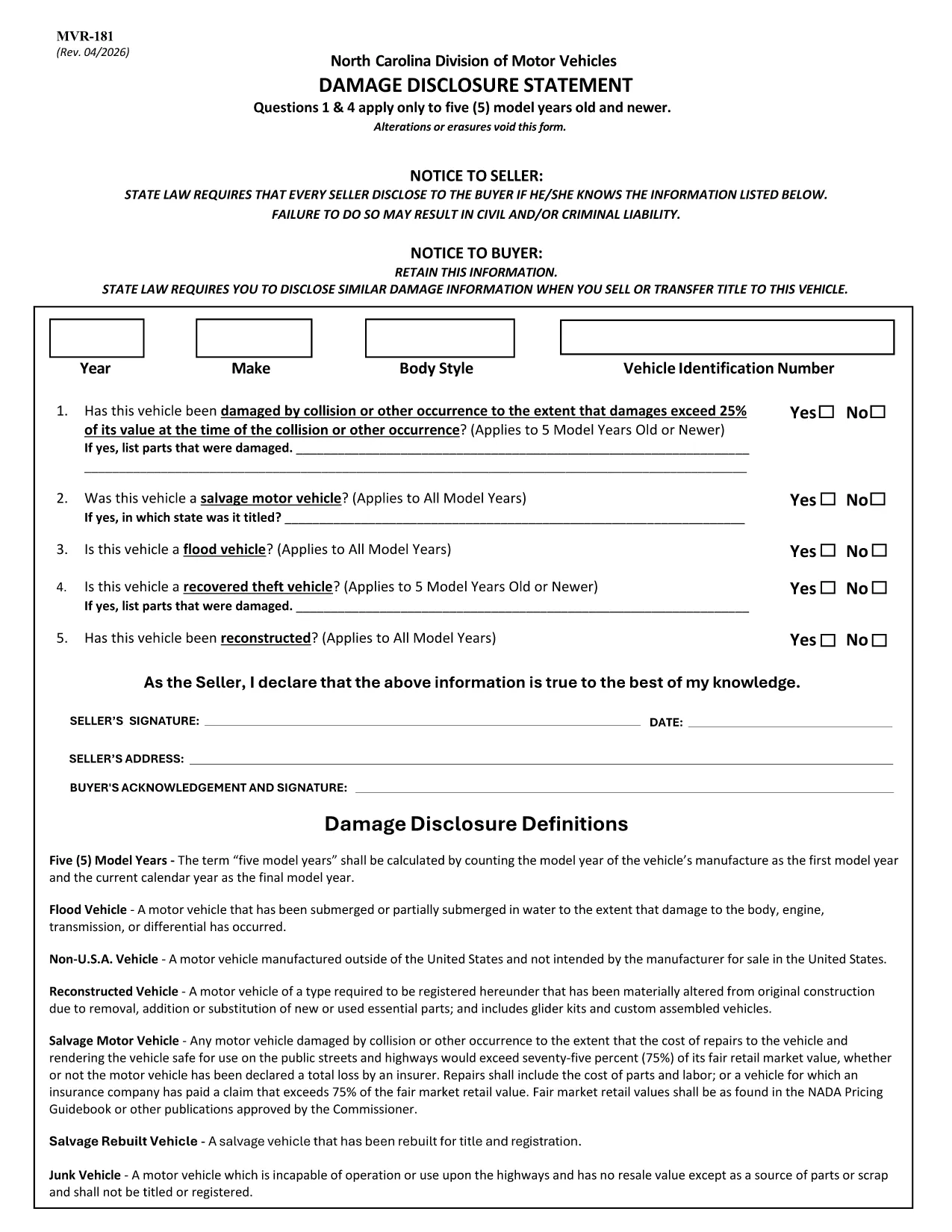
The MVR-181 Damage Disclosure Statement is a legally required form in North Carolina that sellers must complete to disclose any known damage, salvage status, or alterations to a motor vehicle before a sale. Providing accurate information protects both the seller and the buyer from future disputes.

What Is the MVR-181 Damage Disclosure Statement?

The form asks for details such as:

  • Vehicle identification (VIN, make, model, year)
  • Any prior collision or flood damage
  • Whether the vehicle has been declared a total loss or salvaged
  • Signatures of both seller and buyer confirming the information is true

Questions 1 & 4 only apply to vehicles that are five model years old or newer.

Why Choose a Fillable PDF for MVR-181?

Using a fillable PDF saves time, eliminates illegible handwriting, and ensures every required field is completed before submission. With Formize’s online editor you can:

  • Enter data directly on the form
  • Add a legally binding electronic signature
  • Validate the form instantly
  • Download or email the completed PDF in seconds

How to Complete the MVR-181 Online

Follow the simple steps below to fill out the form without leaving your browser.

Common Mistakes to Avoid

  • Leaving any required checkbox unchecked – the form will not validate.
  • Altering or erasing printed text – any changes void the statement.
  • Forgetting both signatures – an unsigned form is not enforceable.

Download the Official NC MVR-181 PDF

Click the button below to open the official North Carolina MVR‑181 PDF in Formize’s secure filler. No software download is required.

التعليمات
  • Who is required to complete the MVR-181?

    Any private seller or dealer transferring ownership of a motor vehicle in North Carolina must complete the Damage Disclosure Statement.

  • Is an electronic signature accepted on the MVR-181?

    Yes. North Carolina law recognizes ESIGN‑compliant electronic signatures as valid for the MVR‑181.

  • Can I use the same MVR-181 for multiple vehicles?

    No. Each vehicle requires its own completed form with the specific VIN and damage details.

  • What happens if I leave a required box unchecked?

    The form will not validate, and the transaction could be considered non‑compliant, exposing both parties to liability.

  • Do I need to submit the form to a government agency?

    The completed MVR‑181 is kept with the vehicle’s title paperwork. It is not filed with the DMV, but it must be presented at the time of sale.

  • Can I edit the form after I’ve signed it?

    Once an electronic signature is applied, the document is locked to preserve integrity. If changes are needed, create a new form.

  • Is the PDF provided by Formize the official version?

    Yes. The download link points to the official North Carolina Department of Transportation version of MVR‑181.

  • Do I need special software to fill out the PDF?

    No. Formize’s online filler works in any modern browser – no additional software is required.

كيف

كيفية ملء MVR-181 مجانًا عبر الإنترنت في 5 خطوات سهلة:

  1. 1
    Open the Fillable Form
    Click the “Fill out this form” button on the page. The Formize PDF Filler app loads the MVR‑181 directly in your browser.
  2. 2
    Enter the Required Information
    Type into each fillable field – VIN, make, model, damage details, etc. The form highlights any missing required fields.
  3. 3
    Add Your Electronic Signature
    Use the built‑in e‑sign tool to sign as the seller and the buyer. The signature is legally binding and compliant with ESIGN.
  4. 4
    Review and Validate
    Click “Validate” to let Formize check for incomplete sections or unchecked boxes. Correct any issues before proceeding.
  5. 5
    Download or Email the Completed PDF
    When validation passes, choose “Download” to save a copy or “Email” to send the completed form directly to the other party.
Formize تطبيق PDF Filler
حول

استمارات تسجيل المركبة

MVR-181 هو أحد نماذج DMV، والمعروف أيضًا باسم نماذج قسم المركبات الآلية، وهي عبارة عن مستندات تستخدم في المعاملات والعمليات المختلفة المتعلقة بالمركبات الآلية. DMV هي وكالة حكومية مسؤولة عن ترخيص السائقين وتسجيل المركبات وإنفاذ قوانين المركبات. يمكن أن تختلف نماذج DMV المحددة المتاحة حسب الولاية القضائية، ولكن فيما يلي بعض الأمثلة الشائعة:

نماذج رخصة القيادة: تُستخدم هذه النماذج لتقديم طلب للحصول على رخصة قيادة أو لطلب تغييرات أو تجديدات. وهي تتطلب عادةً معلومات شخصية وإثبات الهوية، وقد تتضمن أقسامًا للمعلومات الطبية أو سجل القيادة.

نماذج تسجيل المركبات: تُستخدم هذه النماذج لتسجيل مركبة آلية لدى DMV. أنها تتطلب معلومات السيارة، وتفاصيل الملكية، وإثبات التأمين.

نماذج نقل الملكية: عند شراء أو بيع مركبة، تُستخدم هذه النماذج لنقل الملكية من طرف إلى آخر. وهي تتطلب معلومات حول المشتري والبائع وتفاصيل السيارة، وقد تتضمن فاتورة بيع.

نماذج الإعفاء من مسؤولية السيارة: عند بيع أو نقل ملكية مركبة، تُخطر هذه النماذج DMV بأن البائع لم يعد مسؤولاً عن السيارة. فهو يساعد على حماية البائع من المسؤولية عن الحوادث أو الأحداث المتعلقة بالمركبة بعد البيع.

نماذج تجديد تسجيل لوحة الترخيص والتسجيل: تُستخدم هذه النماذج لتجديد تسجيل المركبة أو طلب لوحات ترخيص جديدة. وهي تتطلب عادةً معلومات حول المالك المسجل وتفاصيل التسجيل الحالية ودفع الرسوم المطبقة.

نماذج طلب سجلات القيادة: تسمح هذه النماذج للأفراد بطلب سجلات القيادة الخاصة بهم من DMV، والتي توفر معلومات حول مخالفات القيادة، وحالة الترخيص، والتفاصيل الأخرى ذات الصلة.

نماذج لوحة الترخيص المخصصة أو المخصصة: تُستخدم هذه النماذج لتقديم طلب للحصول على لوحات ترخيص مخصصة أو خاصة، والتي تسمح للأفراد بتخصيص لوحة الترخيص الخاصة بهم بأحرف أو تصميمات محددة.

هذه مجرد أمثلة قليلة على النماذج العديدة التي قد تكون متاحة من خلال DMV. يمكن أن تختلف النماذج والمتطلبات المحددة حسب الولاية القضائية، لذلك من المهم استشارة موقع DMV المحلي أو زيارة أحد مكاتب DMV للحصول على النماذج الصحيحة التي تلبي احتياجاتك الخاصة.

سمات

حشو PDF

أسهل طريقة لملء نماذج PDF عبر الإنترنت

  • املأ بسرعة MVR-181
    هل تبحث عن طريقة لملء كلمة MVR-181 بسرعة عبر الإنترنت؟ من خلال برنامج تعبئة نماذج PDF المجاني عبر الإنترنت ، ستعرف كيفية تحرير وتعبئة مستند pdf هذا في أقل من دقيقة.
  • محرر PDF سهل الاستخدام عبر الإنترنت
    هل سئمت طباعة ملفات PDF حتى تتمكن من تحريرها قبل إعادة مسحها ضوئيًا وإرسالها مرة أخرى؟ تحرير مستندات PDF مجانًا عبر الإنترنت. استخدم محرر pdf على الإنترنت لتوفير الوقت والورق.
  • أدوات رائعة ، جميع المنصات
    هل تتساءل عن كيفية ملء MVR-181 على جهاز Mac ، أو ربما كيفية استخدام حشو PDF مجانًا؟ تعمل أدوات PDF الخاصة بنا عبر الإنترنت على جميع الأنظمة الأساسية.
  • تخزين الملفات الآمن
    يتم تخزين ملفات "MVR-181" المكتملة في قاعدة بيانات آمنة تديرها استضافة Amazon Cloud. يمكنك حذف ملفاتك من نظامنا في أي وقت. على أي حال ، يتم حذف هذه الملفات تلقائيًا بعد 24 ساعة.
  • الدردشة مع {كلمة رئيسية}
    قم بالدردشة مع "MVR-181" على Chatize وهو مساعد مجاني لقارئ PDF. اطرح الأسئلة واحصل على الإجابات من "MVR-181". فقط انقر على زر الدردشة مع المستند أعلاه.

حذف جلسة التعبئة

حذف جلسة التعبئة المحددة؟ في هذه الحالة، سيتم فقد تقدمك في إكمال النموذج.

حذف جلسة التحرير

هل تريد حذف جلسة التحرير المحددة؟ في هذه الحالة، سيتم فقدان التقدم الذي أحرزته في إنشاء النموذج وتحريره.