
اختار اللغة

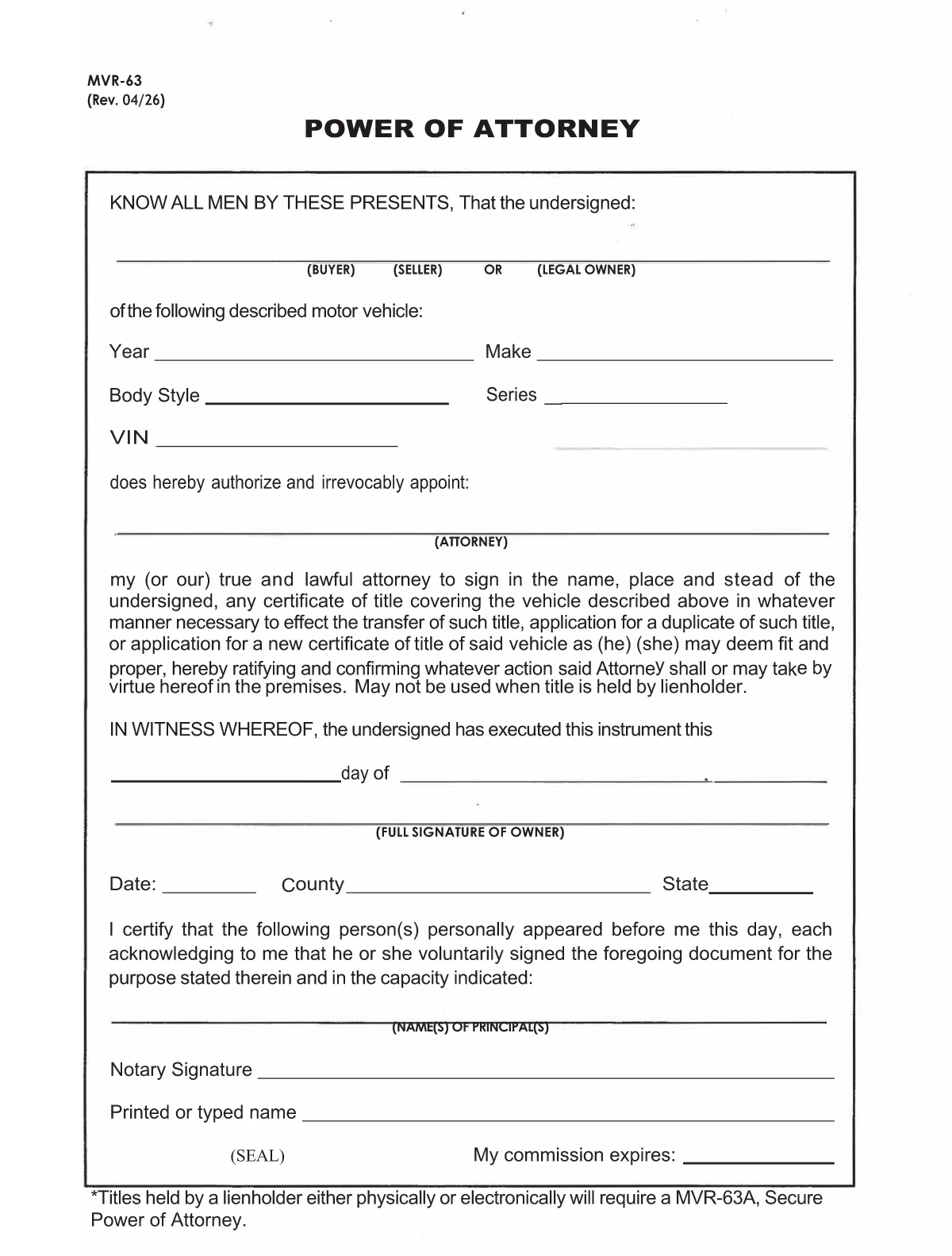
The MVR-63 is North Carolina’s Motor Vehicle Power of Attorney. It authorizes another person (the attorney‑in‑fact) to act on your behalf for vehicle‑related matters such as titling, registration, lien recording, or duplicate title requests. Using Formize’s fillable PDF, you can complete the form directly in your browser—no Adobe Acrobat required.

Our online PDF filler automatically preserves the exact layout of the official NCDOT document, ensuring the completed form is accepted by the Division of Motor Vehicles (DMV). Simply click the button below, fill in the required fields, and download the signed PDF ready for notarization.

Below you’ll find a quick overview of the form’s sections, step‑by‑step instructions, and tips to avoid common errors.

التعليمات
  • What is the purpose of the MVR-63 form?

    The MVR-63 grants a designated person the legal authority to handle motor‑vehicle transactions for the owner, such as titling, registration, lien recording, or obtaining duplicate titles.

  • Do I need a notary for the MVR-63?

    Yes. North Carolina law requires the MVR-63 to be notarized before the DMV will accept it.

  • Can I submit the MVR-63 electronically?

    The DMV still requires a notarized, printed copy. However, you can fill out the form online, print it, and then have it notarized.

  • Is there a fee to download the MVR-63 PDF?

    No. The official form is provided free of charge by the North Carolina Department of Transportation.

  • What information is required for the vehicle description?

    You must list the vehicle’s year, make, model, VIN (Vehicle Identification Number), and body type.

  • Can I give the attorney limited powers?

    Yes. The form includes checkboxes allowing you to specify which actions the attorney may perform (e.g., only title transfer or only registration).

  • How long is the MVR-63 valid?

    The form remains valid until the owner revokes it in writing or the DMV cancels it for any reason.

  • What if I make a mistake on the form?

    Cross out the error with a single line, initial it, and correct the information in the appropriate field before signing and notarizing.

كيف

كيفية ملء MVR-63 مجانًا عبر الإنترنت في 7 خطوات سهلة:

  1. 1
    Open the Fillable Form
    Click the “Fill out this form” button on this page. The Formize PDF Filler app will open in a new tab.
  2. 2
    Wait for the Filler to Load
    The app loads the official MVR-63 PDF and makes every field editable. This usually takes a few seconds.
  3. 3
    Enter Owner Information
    Fill in the vehicle owner’s name, address, driver’s license number, and vehicle details (VIN, make, model, year).
  4. 4
    Add Attorney‑in‑Fact Details
    Provide the attorney’s full name, address, and relationship to the owner. Choose the specific powers you are granting.
  5. 5
    Sign and Date
    Type the owner’s signature in the signature field, add the date, and, if required, the county and state.
  6. 6
    Notarize the Form
    Print the completed PDF and have it notarized in person, or use an online notary service accepted by the NCDOT.
  7. 7
    Download or Submit
    After notarization, download the final PDF and submit it to your local DMV office or the designated agency.
Formize تطبيق PDF Filler
حول

استمارات تسجيل المركبة

إذا كنت تمتلك أو تستأجر سيارة أو مقطورة أو قاربًا ، فيجب عليك الوفاء بالتزامات معينة للحفاظ على سيارتك مسجلة قانونيًا وآمنة.

يُعد MVR-63 أحد نماذج تسجيل المركبات التي تُستخدم لتسجيل مركبة بمحرك مع سلطة الولاية أو المقاطعة ذات الصلة. عادة ما تكون هذه النماذج مطلوبة عندما يشتري شخص ما سيارة جديدة أو مستعملة أو عندما ينتقل إلى ولاية أو مقاطعة جديدة بسيارة.

يمكن أن تختلف المتطلبات والنماذج الدقيقة اللازمة لتسجيل السيارة حسب الموقع ، ولكن بشكل عام ، تتضمن العملية تقديم معلومات حول السيارة والمالك وأي امتيازات على السيارة.

بمجرد تقديم استمارات التسجيل والرسوم ، ستصدر سلطة الولاية أو المقاطعة شهادة تسجيل أو لوحة ترخيص لمالك السيارة. يسمح هذا التسجيل بتشغيل السيارة بشكل قانوني على الطرق العامة والطرق السريعة.

سمات

حشو PDF

أسهل طريقة لملء نماذج PDF عبر الإنترنت

  • املأ بسرعة MVR-63
    هل تبحث عن طريقة لملء كلمة MVR-63 بسرعة عبر الإنترنت؟ من خلال برنامج تعبئة نماذج PDF المجاني عبر الإنترنت ، ستعرف كيفية تحرير وتعبئة مستند pdf هذا في أقل من دقيقة.
  • محرر PDF سهل الاستخدام عبر الإنترنت
    هل سئمت طباعة ملفات PDF حتى تتمكن من تحريرها قبل إعادة مسحها ضوئيًا وإرسالها مرة أخرى؟ تحرير مستندات PDF مجانًا عبر الإنترنت. استخدم محرر pdf على الإنترنت لتوفير الوقت والورق.
  • أدوات رائعة ، جميع المنصات
    هل تتساءل عن كيفية ملء MVR-63 على جهاز Mac ، أو ربما كيفية استخدام حشو PDF مجانًا؟ تعمل أدوات PDF الخاصة بنا عبر الإنترنت على جميع الأنظمة الأساسية.
  • تخزين الملفات الآمن
    يتم تخزين ملفات "MVR-63" المكتملة في قاعدة بيانات آمنة تديرها استضافة Amazon Cloud. يمكنك حذف ملفاتك من نظامنا في أي وقت. على أي حال ، يتم حذف هذه الملفات تلقائيًا بعد 24 ساعة.
  • الدردشة مع {كلمة رئيسية}
    قم بالدردشة مع "MVR-63" على Chatize وهو مساعد مجاني لقارئ PDF. اطرح الأسئلة واحصل على الإجابات من "MVR-63". فقط انقر على زر الدردشة مع المستند أعلاه.

حذف جلسة التعبئة

حذف جلسة التعبئة المحددة؟ في هذه الحالة، سيتم فقد تقدمك في إكمال النموذج.

حذف جلسة التحرير

هل تريد حذف جلسة التحرير المحددة؟ في هذه الحالة، سيتم فقدان التقدم الذي أحرزته في إنشاء النموذج وتحريره.