
اختار اللغة

Pennsylvania MV-511B Requisition Form – Fillable PDF

  1. لغة إنجليزي
  2. دولة الولايات المتحدة الأمريكية
  3. نشاط استمارة المركبة
  4. دولة بنسلفانيا
Pennsylvania MV-511B Requisition Form – Fillable PDF

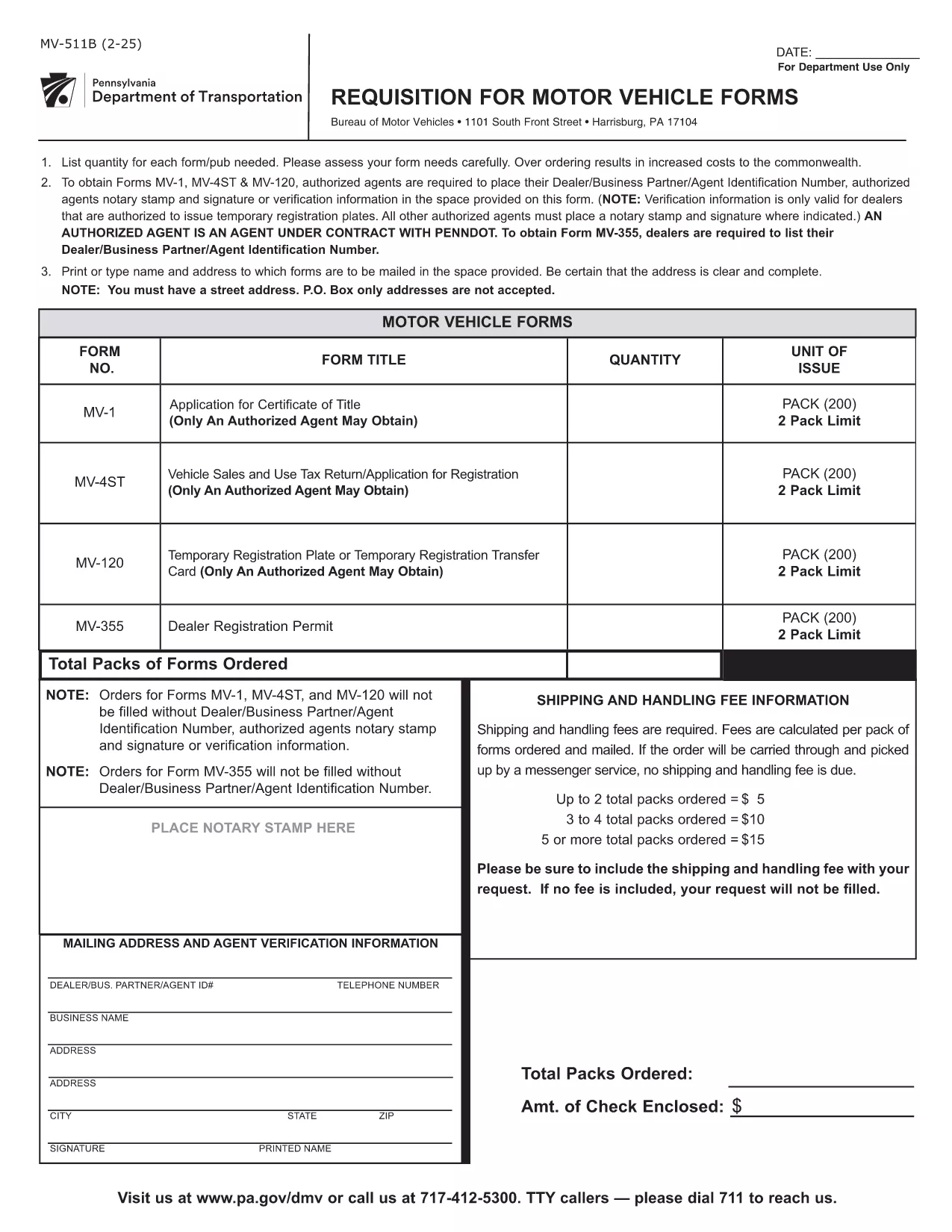
The MV-511B is Pennsylvania’s official requisition for motor vehicle registration. It is used by dealers, authorized agents, and private owners who need a temporary registration, verification, or a change of ownership. The form is now available as a fillable PDF, so you can complete it online without printing or scanning.

What Is the MV-511B Form?

This form is issued by the Pennsylvania Department of Transportation (PennDOT) and the Bureau of Motor Vehicles (BMV). It captures essential vehicle information, owner details, and the reason for the requisition (e.g., temporary plates, title transfer, or dealer verification).

How to Fill Out MV-511B Online with Formize

Instead of downloading the PDF and editing it in a separate program, simply click the "Fill out this form" button on this page. The Formize PDF Filler app will load in your browser, allowing you to:

  • Enter data directly into each field
  • Upload supporting documents
  • Apply a digital signature
  • Save or download the completed form

All changes are saved automatically, and you can submit the PDF to your local BMV office via email or print it for in‑person delivery.

Common Mistakes to Avoid

  • Incorrect DIN/Agent Number: Authorized agents must enter their exact Department Identification Number.
  • Missing Notary Stamp: If a notary is required, the stamp must be placed in the designated box.
  • Wrong Vehicle Identification Number (VIN): Double‑check the VIN for typos; an incorrect VIN will delay processing.
  • Leaving Signature Fields Blank: The form is invalid without a signature from the owner or authorized agent.

Where to Submit the Completed Form

After filling out the MV-511B, you have three submission options:

  1. Email: Send the filled PDF to bmv@pa.gov with a brief description.
  2. In‑Person: Print the form and bring it to any PennDOT BMV office.
  3. Mail: Mail the printed form to the address listed on the form’s last page.

FAQs About MV-511B

Below are answers to the most common questions regarding the MV-511B form.

التعليمات
  • Who can use the MV-511B form?

    The form is used by vehicle dealers, authorized agents, and private owners who need a temporary registration, verification, or a title change in Pennsylvania.

  • Do I need a notary for the MV-511B?

    A notary stamp is required only when the form is being used for certain dealer transactions or when a notarized verification is specifically requested.

  • Can I submit the form electronically?

    Yes. After completing the fillable PDF with Formize, you can email the PDF to the BMV or upload it through the PennDOT online portal if available.

  • What is a DIN/Agent Number?

    The DIN (Dealer Identification Number) is a unique identifier assigned to authorized agents and dealers by PennDOT. It must be entered accurately on the form.

  • How long is a temporary registration valid?

    Temporary registrations issued via MV-511B are typically valid for 30 days, but the exact period is printed on the completed form.

  • What should I do if I make a mistake after submitting?

    Contact your local BMV office immediately. They may require you to submit a corrected MV-511B or provide an amendment form.

كيف

كيفية ملء MV-511B مجانًا عبر الإنترنت في 4 خطوات سهلة:

  1. 1
    Click the Fill Out Button
    On this page, click the "Fill out this form" button. The Formize PDF Filler will open in a new tab.
  2. 2
    Enter All Required Information
    Type your data into each highlighted field. Use dropdowns where available and upload any supporting documents.
  3. 3
    Apply Your Digital Signature
    When you reach the signature box, choose "Add Signature" and either draw or upload your e‑signature.
  4. 4
    Review and Save
    Double‑check every entry, then click "Save" to download a copy or "Submit" to send it directly to PennDOT.
Formize تطبيق PDF Filler
حول

استمارات تسجيل المركبة

إذا كنت تمتلك أو تستأجر سيارة أو مقطورة أو قاربًا ، فيجب عليك الوفاء بالتزامات معينة للحفاظ على سيارتك مسجلة قانونيًا وآمنة.

يُعد MV-511B أحد نماذج تسجيل المركبات التي تُستخدم لتسجيل مركبة بمحرك مع سلطة الولاية أو المقاطعة ذات الصلة. عادة ما تكون هذه النماذج مطلوبة عندما يشتري شخص ما سيارة جديدة أو مستعملة أو عندما ينتقل إلى ولاية أو مقاطعة جديدة بسيارة.

يمكن أن تختلف المتطلبات والنماذج الدقيقة اللازمة لتسجيل السيارة حسب الموقع ، ولكن بشكل عام ، تتضمن العملية تقديم معلومات حول السيارة والمالك وأي امتيازات على السيارة.

بمجرد تقديم استمارات التسجيل والرسوم ، ستصدر سلطة الولاية أو المقاطعة شهادة تسجيل أو لوحة ترخيص لمالك السيارة. يسمح هذا التسجيل بتشغيل السيارة بشكل قانوني على الطرق العامة والطرق السريعة.

سمات

حشو PDF

أسهل طريقة لملء نماذج PDF عبر الإنترنت

  • املأ بسرعة MV-511B
    هل تبحث عن طريقة لملء كلمة MV-511B بسرعة عبر الإنترنت؟ من خلال برنامج تعبئة نماذج PDF المجاني عبر الإنترنت ، ستعرف كيفية تحرير وتعبئة مستند pdf هذا في أقل من دقيقة.
  • محرر PDF سهل الاستخدام عبر الإنترنت
    هل سئمت طباعة ملفات PDF حتى تتمكن من تحريرها قبل إعادة مسحها ضوئيًا وإرسالها مرة أخرى؟ تحرير مستندات PDF مجانًا عبر الإنترنت. استخدم محرر pdf على الإنترنت لتوفير الوقت والورق.
  • أدوات رائعة ، جميع المنصات
    هل تتساءل عن كيفية ملء MV-511B على جهاز Mac ، أو ربما كيفية استخدام حشو PDF مجانًا؟ تعمل أدوات PDF الخاصة بنا عبر الإنترنت على جميع الأنظمة الأساسية.
  • تخزين الملفات الآمن
    يتم تخزين ملفات "MV-511B" المكتملة في قاعدة بيانات آمنة تديرها استضافة Amazon Cloud. يمكنك حذف ملفاتك من نظامنا في أي وقت. على أي حال ، يتم حذف هذه الملفات تلقائيًا بعد 24 ساعة.
  • الدردشة مع {كلمة رئيسية}
    قم بالدردشة مع "MV-511B" على Chatize وهو مساعد مجاني لقارئ PDF. اطرح الأسئلة واحصل على الإجابات من "MV-511B". فقط انقر على زر الدردشة مع المستند أعلاه.

حذف جلسة التعبئة

حذف جلسة التعبئة المحددة؟ في هذه الحالة، سيتم فقد تقدمك في إكمال النموذج.

حذف جلسة التحرير

هل تريد حذف جلسة التحرير المحددة؟ في هذه الحالة، سيتم فقدان التقدم الذي أحرزته في إنشاء النموذج وتحريره.