
اختار اللغة

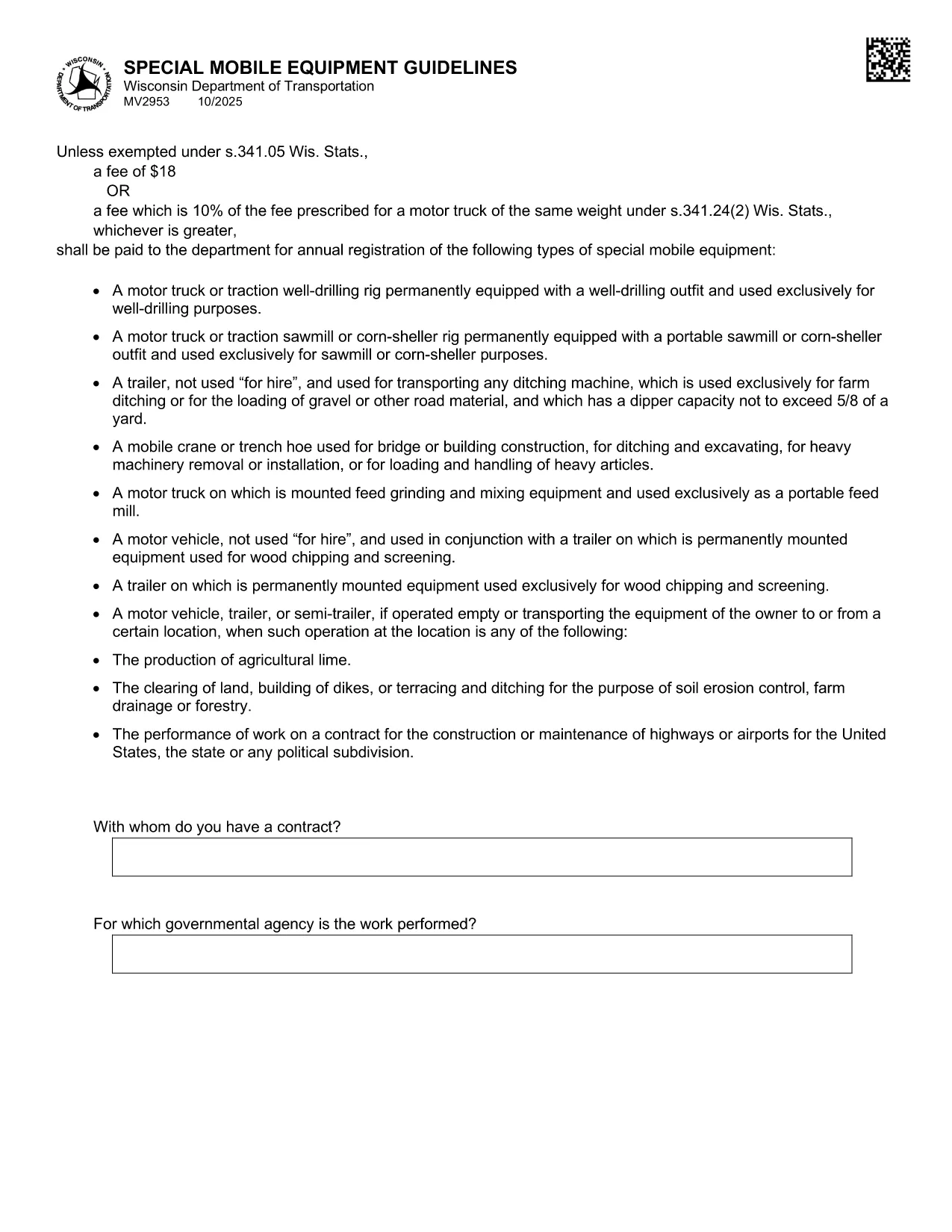
The MV2953 is the Wisconsin Department of Transportation (WisDOT) form used to register special mobile equipment such as cranes, snowplows, and other specialized vehicles. This form must be completed annually, and a fee is required unless an exemption applies.

What Is the MV2953 Form?

The MV2953 collects details about the equipment, owner information, weight class, and intended use. It ensures that special mobile equipment complies with state safety standards and is properly taxed.

How to Fill Out the MV2953 Online

Instead of downloading a static PDF, simply click the "Fill out this form" button below. The Formize PDF Filler app will load instantly, allowing you to type directly into each field, add signatures, and save your progress.

  • Click the fillable PDF button.
  • Wait for the Formize PDF Filler to load (usually a few seconds).
  • Enter the required information in each highlighted field.
  • Review the form for accuracy.
  • Save, download, or print the completed form.

Common Mistakes to Avoid

  • Leaving the "Owner Address" blank – the DOT requires a complete mailing address.
  • Incorrect weight classification – verify the vehicle’s GVWR before entering.
  • Missing signatures – unsigned forms are rejected.
  • Using the wrong fee amount – the fee is either $18 or 10% of the comparable motor‑truck fee, whichever is greater.

Fees and Registration Requirements

The standard fee is $18, but if the equipment falls under a higher fee schedule (10% of the fee for a motor‑truck of the same weight), that amount applies. Exemptions are listed in Wis. Stat. §341.05.

Where to Submit Your Completed Form

After completing the MV2953 online, you can:

  • Print and mail it to your local WisDOT office.
  • Upload the saved PDF through the WisDOT online portal (if available).
  • Bring a printed copy to a WisDOT Service Center.

Using the Formize fillable PDF ensures a clean, legible submission that speeds up processing.

التعليمات
  • What types of equipment require the MV2953 form?

    Any special mobile equipment such as cranes, snowplows, bulldozers, and other non‑standard vehicles used on public roads must be registered using MV2953.

  • Can I submit the MV2953 form electronically?

    Yes. After completing the fillable PDF with Formize, you can upload the saved file through the WisDOT online portal or email it if the county office permits.

  • What is the fee for registering special mobile equipment?

    The fee is $18 or 10% of the fee for a motor‑truck of the same weight, whichever is greater, unless an exemption under Wis. Stat. §341.05 applies.

  • Do I need a signature on the MV2953 form?

    A valid signature from the vehicle owner or authorized agent is required. Without it, the registration will be rejected.

  • How often must the MV2953 be renewed?

    The form must be filed annually. The renewal date aligns with your vehicle’s registration expiration.

  • What if I make a mistake after submitting?

    Contact your local WisDOT office immediately. You may need to submit a corrected MV2953 form and possibly pay an additional processing fee.

  • Is there an exemption from the registration fee?

    Yes, certain government, nonprofit, or emergency service vehicles may be exempt under Wis. Stat. §341.05. Check the statute or contact WisDOT for details.

كيف

كيفية ملء MV2953 مجانًا عبر الإنترنت في 5 خطوات سهلة:

  1. 1
    Open the Fillable Form
    Click the "Fill out this form" button on the page. The Formize PDF Filler will load automatically.
  2. 2
    Enter Your Information
    Type directly into each highlighted field. The form saves your input in real time.
  3. 3
    Review and Sign
    Double‑check all entries, add your electronic signature where required, and ensure the fee amount is correct.
  4. 4
    Save or Print
    When finished, click "Save" to download the completed PDF or "Print" to produce a hard copy for mailing.
  5. 5
    Submit the Form
    Mail, upload, or deliver the printed form to your local WisDOT office as instructed.
Formize تطبيق PDF Filler
حول

استمارات تسجيل المركبة

MV2953 هو أحد نماذج DMV، والمعروف أيضًا باسم نماذج قسم المركبات الآلية، وهي عبارة عن مستندات تستخدم في المعاملات والعمليات المختلفة المتعلقة بالمركبات الآلية. DMV هي وكالة حكومية مسؤولة عن ترخيص السائقين وتسجيل المركبات وإنفاذ قوانين المركبات. يمكن أن تختلف نماذج DMV المحددة المتاحة حسب الولاية القضائية، ولكن فيما يلي بعض الأمثلة الشائعة:

نماذج رخصة القيادة: تُستخدم هذه النماذج لتقديم طلب للحصول على رخصة قيادة أو لطلب تغييرات أو تجديدات. وهي تتطلب عادةً معلومات شخصية وإثبات الهوية، وقد تتضمن أقسامًا للمعلومات الطبية أو سجل القيادة.

نماذج تسجيل المركبات: تُستخدم هذه النماذج لتسجيل مركبة آلية لدى DMV. أنها تتطلب معلومات السيارة، وتفاصيل الملكية، وإثبات التأمين.

نماذج نقل الملكية: عند شراء أو بيع مركبة، تُستخدم هذه النماذج لنقل الملكية من طرف إلى آخر. وهي تتطلب معلومات حول المشتري والبائع وتفاصيل السيارة، وقد تتضمن فاتورة بيع.

نماذج الإعفاء من مسؤولية السيارة: عند بيع أو نقل ملكية مركبة، تُخطر هذه النماذج DMV بأن البائع لم يعد مسؤولاً عن السيارة. فهو يساعد على حماية البائع من المسؤولية عن الحوادث أو الأحداث المتعلقة بالمركبة بعد البيع.

نماذج تجديد تسجيل لوحة الترخيص والتسجيل: تُستخدم هذه النماذج لتجديد تسجيل المركبة أو طلب لوحات ترخيص جديدة. وهي تتطلب عادةً معلومات حول المالك المسجل وتفاصيل التسجيل الحالية ودفع الرسوم المطبقة.

نماذج طلب سجلات القيادة: تسمح هذه النماذج للأفراد بطلب سجلات القيادة الخاصة بهم من DMV، والتي توفر معلومات حول مخالفات القيادة، وحالة الترخيص، والتفاصيل الأخرى ذات الصلة.

نماذج لوحة الترخيص المخصصة أو المخصصة: تُستخدم هذه النماذج لتقديم طلب للحصول على لوحات ترخيص مخصصة أو خاصة، والتي تسمح للأفراد بتخصيص لوحة الترخيص الخاصة بهم بأحرف أو تصميمات محددة.

هذه مجرد أمثلة قليلة على النماذج العديدة التي قد تكون متاحة من خلال DMV. يمكن أن تختلف النماذج والمتطلبات المحددة حسب الولاية القضائية، لذلك من المهم استشارة موقع DMV المحلي أو زيارة أحد مكاتب DMV للحصول على النماذج الصحيحة التي تلبي احتياجاتك الخاصة.

سمات

حشو PDF

أسهل طريقة لملء نماذج PDF عبر الإنترنت

  • املأ بسرعة MV2953
    هل تبحث عن طريقة لملء كلمة MV2953 بسرعة عبر الإنترنت؟ من خلال برنامج تعبئة نماذج PDF المجاني عبر الإنترنت ، ستعرف كيفية تحرير وتعبئة مستند pdf هذا في أقل من دقيقة.
  • محرر PDF سهل الاستخدام عبر الإنترنت
    هل سئمت طباعة ملفات PDF حتى تتمكن من تحريرها قبل إعادة مسحها ضوئيًا وإرسالها مرة أخرى؟ تحرير مستندات PDF مجانًا عبر الإنترنت. استخدم محرر pdf على الإنترنت لتوفير الوقت والورق.
  • أدوات رائعة ، جميع المنصات
    هل تتساءل عن كيفية ملء MV2953 على جهاز Mac ، أو ربما كيفية استخدام حشو PDF مجانًا؟ تعمل أدوات PDF الخاصة بنا عبر الإنترنت على جميع الأنظمة الأساسية.
  • تخزين الملفات الآمن
    يتم تخزين ملفات "MV2953" المكتملة في قاعدة بيانات آمنة تديرها استضافة Amazon Cloud. يمكنك حذف ملفاتك من نظامنا في أي وقت. على أي حال ، يتم حذف هذه الملفات تلقائيًا بعد 24 ساعة.
  • الدردشة مع {كلمة رئيسية}
    قم بالدردشة مع "MV2953" على Chatize وهو مساعد مجاني لقارئ PDF. اطرح الأسئلة واحصل على الإجابات من "MV2953". فقط انقر على زر الدردشة مع المستند أعلاه.

حذف جلسة التعبئة

حذف جلسة التعبئة المحددة؟ في هذه الحالة، سيتم فقد تقدمك في إكمال النموذج.

حذف جلسة التحرير

هل تريد حذف جلسة التحرير المحددة؟ في هذه الحالة، سيتم فقدان التقدم الذي أحرزته في إنشاء النموذج وتحريره.