اختار اللغة

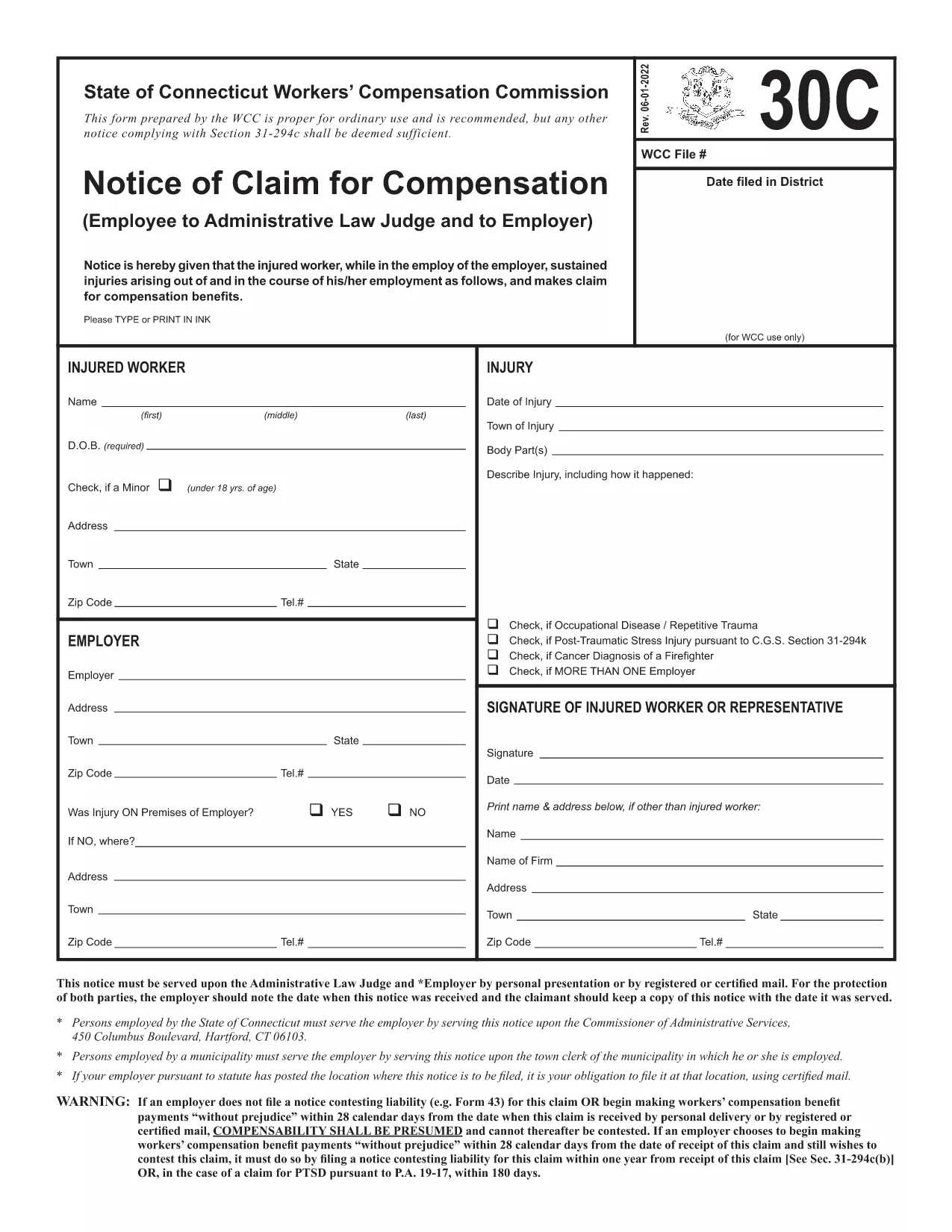
The Form 30C is the official "Notice of Claim for Compensation" used in Connecticut workers’ compensation cases. It must be filed promptly after a work‑related injury or occupational disease to protect your right to benefits.

What Is Form 30C and When Is It Required?

Form 30C is required whenever an employee suffers an injury or illness that is believed to be job‑related. Connecticut law sets a filing deadline of one year from the date of injury (or three years from the first manifestation of a disease). Submitting this form starts the claims process with the Workers’ Compensation Commission (WCC).

How to Complete the Fillable Form 30C Online

Instead of downloading a static PDF, simply click the "Fill out this form" button on this page. The Formize PDF Filler app will load the fillable version of Form 30C, allowing you to type directly into each field, add dates, and sign electronically.

  • Step 1: Click the blue "Fill out this form" button.
  • Step 2: Wait a few seconds while the Formize PDF Filler loads.
  • Step 3: Complete every required field – the app highlights missing information.
  • Step 4: Save your progress or submit the form directly to the WCC district office and your employer.

Common Mistakes to Avoid When Filing Form 30C

Even a small error can delay your claim. Keep these tips in mind:

  • Missing signatures: Both the employee and employer must sign.
  • Incorrect dates: Verify the injury date and the date you are filing.
  • Incomplete contact info: Provide a current phone number and mailing address.
  • Failing to attach supporting documents: Include medical reports or accident reports when required.

Using the online fillable version reduces these errors because required fields are flagged in real time.

Need a printable copy? You can still download the original PDF below, but we highly recommend the online filler for a faster, error‑free experience.

التعليمات
  • What is the filing deadline for Form 30C?

    You must file Form 30C within one year of the injury date, or within three years from the first symptom of an occupational disease.

  • Can I file Form 30C online?

    Yes. Using the Formize PDF Filler, you can complete the fillable version directly in your browser without downloading a static PDF.

  • Do I need a lawyer to fill out Form 30C?

    A lawyer is not required to complete the form, but you may consult one if you have complex medical or legal questions.

  • What happens if I miss the filing deadline?

    Missing the deadline may result in a denial of benefits. In some cases, you can request an extension, but it must be approved by the Workers’ Compensation Commission.

  • Do I need to attach supporting documents?

    Yes. Include any medical reports, accident reports, or employer statements that support your claim.

  • Can I print the completed form for my records?

    After completing the form online, you can download a PDF copy and print it for your personal records.

  • Where do I send the completed Form 30C?

    Send a copy to the appropriate WCC district office and provide a copy to your employer. The online filler can generate the correct mailing addresses.

كيف

كيفية ملء Form 30C مجانًا عبر الإنترنت في 3 خطوات سهلة:

  1. 1
    Open the Fillable Form
    Click the "Fill out this form" button on the page. The Formize PDF Filler will open the fillable Form 30C in your browser.
  2. 2
    Enter Your Information
    Type directly into each highlighted field. The filler validates dates, signatures, and required sections in real time.
  3. 3
    Save or Submit
    When all fields are complete, either save a copy for your records or submit the form electronically to the Connecticut Workers’ Compensation Commission and your employer.
Formize تطبيق PDF Filler
حول

نموذج Form 30C

باستخدام مجموعة الميزات التقليدية لعرض مستند PDF وتعبئته ، جنبًا إلى جنب مع مزايا تطبيق الويب والتخطيط سريع الاستجابة ، يمكنك إكمال Form 30C في دقائق.

سمات

حشو PDF

أسهل طريقة لملء نماذج PDF عبر الإنترنت

  • املأ بسرعة Form 30C
    هل تبحث عن طريقة لملء كلمة Form 30C بسرعة عبر الإنترنت؟ من خلال برنامج تعبئة نماذج PDF المجاني عبر الإنترنت ، ستعرف كيفية تحرير وتعبئة مستند pdf هذا في أقل من دقيقة.
  • محرر PDF سهل الاستخدام عبر الإنترنت
    هل سئمت طباعة ملفات PDF حتى تتمكن من تحريرها قبل إعادة مسحها ضوئيًا وإرسالها مرة أخرى؟ تحرير مستندات PDF مجانًا عبر الإنترنت. استخدم محرر pdf على الإنترنت لتوفير الوقت والورق.
  • أدوات رائعة ، جميع المنصات
    هل تتساءل عن كيفية ملء Form 30C على جهاز Mac ، أو ربما كيفية استخدام حشو PDF مجانًا؟ تعمل أدوات PDF الخاصة بنا عبر الإنترنت على جميع الأنظمة الأساسية.
  • تخزين الملفات الآمن
    يتم تخزين ملفات "Form 30C" المكتملة في قاعدة بيانات آمنة تديرها استضافة Amazon Cloud. يمكنك حذف ملفاتك من نظامنا في أي وقت. على أي حال ، يتم حذف هذه الملفات تلقائيًا بعد 24 ساعة.
  • الدردشة مع {كلمة رئيسية}
    قم بالدردشة مع "Form 30C" على Chatize وهو مساعد مجاني لقارئ PDF. اطرح الأسئلة واحصل على الإجابات من "Form 30C". فقط انقر على زر الدردشة مع المستند أعلاه.

حذف جلسة التعبئة

حذف جلسة التعبئة المحددة؟ في هذه الحالة، سيتم فقد تقدمك في إكمال النموذج.

حذف جلسة التحرير

هل تريد حذف جلسة التحرير المحددة؟ في هذه الحالة، سيتم فقدان التقدم الذي أحرزته في إنشاء النموذج وتحريره.