Избери език

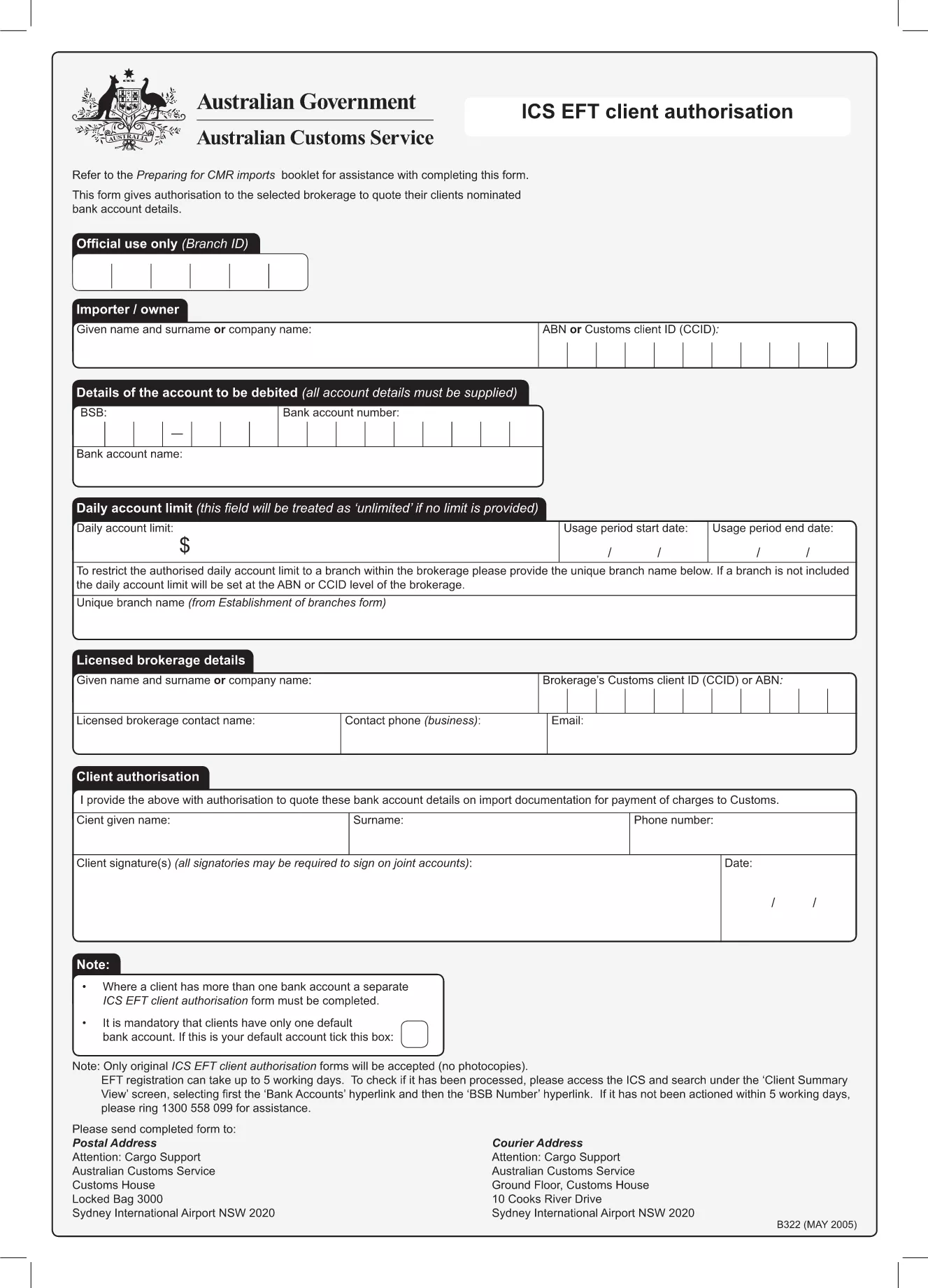
EFT Sign‑Up Form – Fillable PDF for Instant Registration

  1. език Английски
  2. Държава Австралия
  3. Отдел Banking
  4. Дейност Electronic Funds Transfer
EFT Sign‑Up Form – Fillable PDF for Instant Registration

Looking for a fast, secure way to register for Electronic Funds Transfer (EFT)? Our fillable EFT sign‑up form lets you complete the entire registration online without printing, scanning, or faxing. The PDF is fully interactive, compatible with all browsers, and automatically saves your entries.

Why Use a Fillable EFT Registration Form

A fillable PDF eliminates manual errors, speeds up processing (often under 5 business days), and provides a paper‑less audit trail. Financial institutions in Australia accept this form for new bank‑account authorisations, payroll setups, and supplier payments.

Key Sections of the EFT Sign‑Up PDF

  • Account Details: BSB, account number, and account name.
  • Authorisation Clause: Your signature authorises electronic payments.
  • Contact Information: Phone, email, and mailing address.
  • Bank Verification: Optional fields for bank‑issued confirmation.

Step‑by‑Step Guide to Complete the Form

Follow the simple steps below to fill out the form directly on this page. No extra software is required.

Common Mistakes to Avoid

  • Leaving the BSB or account number blank.
  • Using an outdated signature image.
  • Skipping the authorisation checkbox.
  • Submitting the form without a supporting bank letter when required.

How to Submit Your Completed EFT Form

Once you have filled out the form, click the Submit button to securely email the PDF to the designated processing address, or download it for manual submission to your bank.

ЧЗВ
  • Is the EFT sign‑up form really fillable online?

    Yes. The PDF is fully interactive and loads in the Formize PDF Filler, so you can type directly into the fields without any extra software.

  • Do I need to print the form to sign it?

    No. You can add a digital signature within the Formize app, or upload a scanned image of your handwritten signature.

  • How long does processing take after I submit?

    Most banks process a new EFT registration within 3‑5 business days, provided all required fields are completed correctly.

  • Can I edit the form after I have submitted it?

    Once submitted, the form is locked for security. If you need changes, download a new copy, edit, and resubmit.

  • What if I make a mistake while filling out the form?

    The Formize filler lets you clear or modify any field before you submit. Simply click the field you wish to change and re‑enter the correct information.

  • Is my personal and banking information safe?

    Formize uses SSL encryption for all data transfers. Your information is stored only temporarily during the session and is never shared with third parties.

  • Do I need a specific browser to use the filler?

    The Formize PDF Filler works with all modern browsers—Chrome, Firefox, Edge, and Safari.

  • Can I use this form for payroll EFT enrolment?

    Yes. The same registration form is accepted by most Australian payroll providers for direct‑deposit authorisation.

КАК ДА

Как да попълните eft sign-up form безплатно онлайн в 4 лесни стъпки:

  1. 1
    Open the Fillable Form
    Click the "Fill out this form" button on the page. The Formize PDF Filler app will load instantly in your browser.
  2. 2
    Enter Your Information
    Complete each field—account details, contact info, and authorisation—using your keyboard or touch screen.
  3. 3
    Save Your Progress
    The app automatically saves your entries. You can close the window and return later without losing data.
  4. 4
    Submit or Download
    When finished, choose "Submit" to email the completed form securely, or "Download" to save a copy for manual submission.
Приложение Formize PDF Filler
ОТНОСНО

eft sign-up form шаблон

С традиционния набор от функции за преглед и попълване на PDF документ, съчетан с предимствата на уеб приложение и адаптивно оформление, можете да завършите eft sign-up form за минути.

ХАРАКТЕРИСТИКА

PDF пълнител

Най-лесният начин да попълните eft sign-up form онлайн

  • Бързо попълнете eft sign-up form
    Търсите начин бързо да попълните eft sign-up form онлайн? С нашия онлайн безплатен инструмент за попълване на PDF формуляри ще знаете как да редактирате и попълвате този PDF документ за по-малко от минута.
  • Лесен за използване онлайн PDF редактор
    Писнало ви е да разпечатвате PDF файлове, за да можете да ги редактирате, преди да сканирате повторно и да ги изпратите обратно? Редактирайте PDF документи безплатно онлайн. Използвайте нашия онлайн pdf редактор, за да спестите време и хартия.
  • Страхотни инструменти, всички платформи
    Чудите се как да попълните eft sign-up form на Mac или може би как да използвате PDF пълнител безплатно? Нашите онлайн PDF инструменти работят на всички платформи.
  • Сигурно съхранение на файлове
    Завършените „eft sign-up form“ файлове се съхраняват в защитена база данни, управлявана от Amazon Cloud хостинг. Можете да изтриете вашите файлове от нашата система по всяко време. Във всеки случай тези файлове се изтриват автоматично след 24 часа.
  • Чат с eft sign-up form
    Разговаряйте с „eft sign-up form“ в Chatize, който е безплатен асистент за четене на PDF файлове. Задавайте въпроси и получавайте отговори от „eft sign-up form“. Просто щракнете върху бутона Чат с документ по-горе.

Изтриване на сесията за пълнене

Изтриване на избраната сесия за пълнене? В този случай вашият напредък в попълването на формуляра ще бъде загубен.

Изтриване на сесия за редактиране

Изтриване на избраната сесия за редактиране? В този случай вашият напредък в създаването и редактирането на формуляра ще бъде загубен.