Избери език

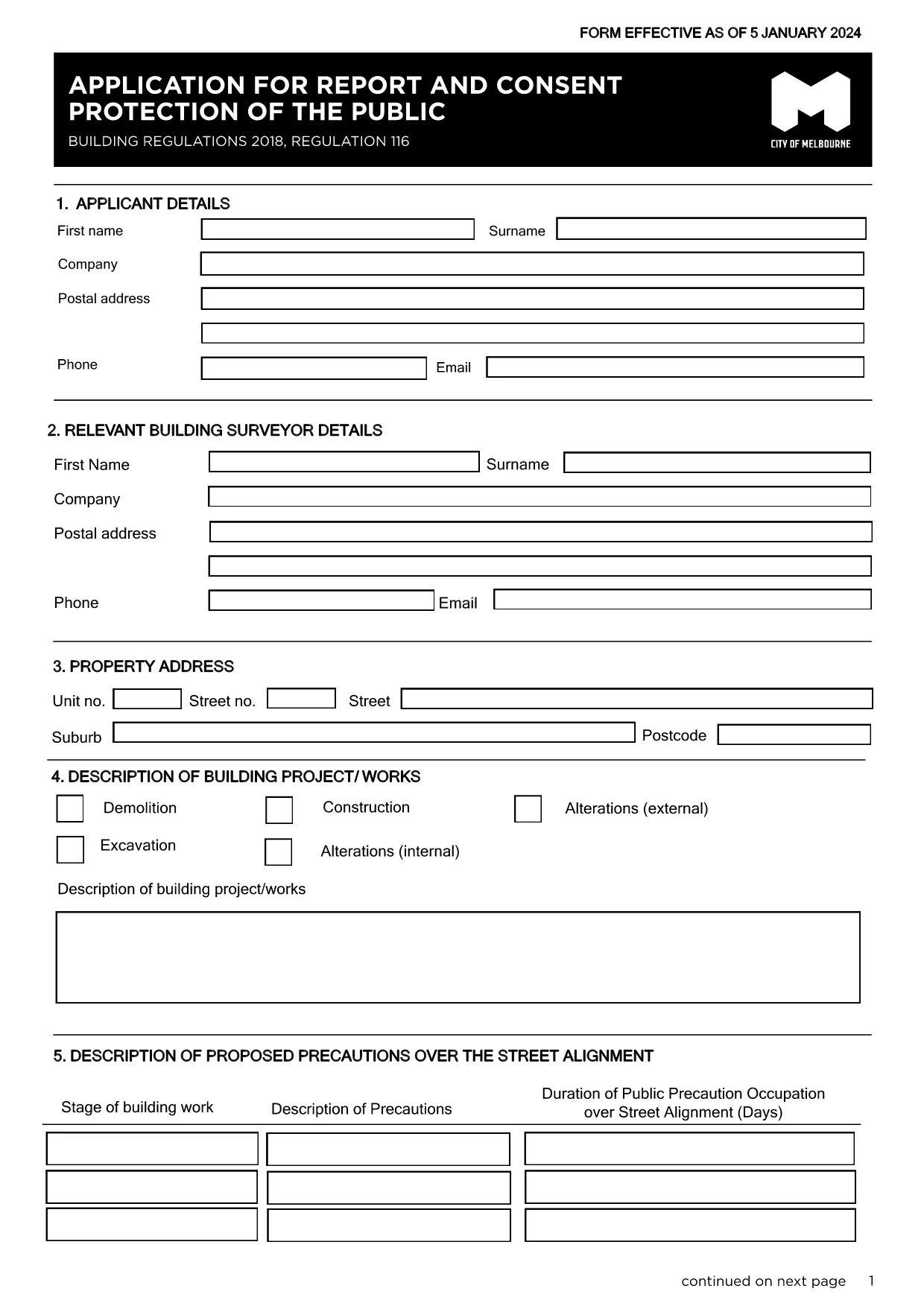
Reg 116 Report & Consent Form – Fillable PDF

  1. език Английски
  2. Държава Австралия
  3. Отдел City of Melbourne
  4. Дейност Building Regulations
Reg 116 Report & Consent Form – Fillable PDF

The Regulation 116 Report and Consent is required for any construction or demolition work that could affect public safety in the City of Melbourne. This fillable PDF lets you provide all necessary details quickly, securely, and in compliance with the Building Act 1993.

What Is the Reg 116 Report & Consent?

Reg 116 is a specific provision of the Building Regulations 2018 that mandates a formal report and consent before starting public‑protection measures such as hoardings, scaffolding, gantries, or exclusion zones. The form captures project details, risk assessments, and proposed safety measures.

When Do You Need This Form?

  • Any new construction, alteration, or demolition that impacts public spaces.
  • When a Construction Management Plan (CMP) is required.
  • Before installing hoardings, scaffolding, or temporary structures near footpaths or roads.

How to Complete the Form Online with Formize

Instead of downloading the PDF and editing it in a separate program, simply click the "Fill out this form" button on this page. The Formize PDF Filler app will load automatically, allowing you to:

  1. Enter text directly into each field.
  2. Upload supporting drawings or risk‑assessment documents.
  3. Save a draft and return later if needed.
  4. Submit the completed form securely to the City of Melbourne.

Common Mistakes to Avoid

  • Leaving required fields blank – the system will highlight missing information before you can submit.
  • Using an outdated version – always use the latest PDF linked below.
  • Submitting without a signature – you can add a digital signature in Formize or print, sign, and scan.

Where to Submit the Completed Form

After you finish, the Formize platform routes the file to the City of Melbourne’s Building Department. You will receive a confirmation email with a reference number. If you prefer a hard copy, you can print the PDF and deliver it to:

Building Department
City of Melbourne
Administration Building, 120 Swanston St
Melbourne VIC 3000

For any questions, refer to the FAQ section below.

ЧЗВ
  • What is Regulation 116?

    Regulation 116 requires a Report and Consent for any work that could affect public safety, such as hoardings, scaffolding, or temporary structures.

  • Do I need a digital signature?

    A digital signature is accepted when using Formize. If you prefer a handwritten signature, print, sign, and scan the completed PDF before uploading.

  • Can I save a draft and finish later?

    Yes. Formize lets you save your progress and return to the form at any time using the same browser session or by logging into your account.

  • How long does the approval take?

    The City of Melbourne typically reviews Reg 116 submissions within 5‑10 business days, depending on project complexity.

  • Is there a fee for filing Reg 116?

    Yes. As of the latest schedule, the fee for a public‑protection consent is $334.50. Check the City’s fee schedule for updates.

  • What if I submit the wrong version of the form?

    The system will reject outdated versions. Always use the latest PDF linked on this page to avoid delays.

  • Can I submit the form by email?

    While you can email a completed PDF, using the Formize online submission ensures the file is logged and tracked automatically.

  • What supporting documents are required?

    Attach a site plan, risk assessment, and any relevant engineering drawings. The form’s attachment section lists all required files.

  • Who can I contact for help?

    For technical assistance with the Formize filler, refer to the help icon on the form. For regulatory questions, contact the City of Melbourne Building Department at building@melbourne.vic.gov.au.

КАК ДА

Как да попълните Reg 116 report and consent безплатно онлайн в 5 лесни стъпки:

  1. 1
    Open the Fillable Form
    Click the "Fill out this form" button on the page. The Formize PDF Filler will load in your browser.
  2. 2
    Enter Your Details
    Complete each field – project description, site address, risk assessments, and proposed safety measures.
  3. 3
    Add Attachments
    Upload any required drawings, risk‑assessment PDFs, or supporting documents using the attachment icon.
  4. 4
    Review and Sign
    Use the built‑in digital signature tool or print, sign, and scan the form before final submission.
  5. 5
    Submit Securely
    Press the Submit button. You’ll receive an email confirmation with a reference number for tracking.
Приложение Formize PDF Filler
ОТНОСНО

Reg 116 report and consent шаблон

С традиционния набор от функции за преглед и попълване на PDF документ, съчетан с предимствата на уеб приложение и адаптивно оформление, можете да завършите Reg 116 report and consent за минути.

ХАРАКТЕРИСТИКА

PDF пълнител

Най-лесният начин да попълните Reg 116 report and consent онлайн

  • Бързо попълнете Reg 116 report and consent
    Търсите начин бързо да попълните Reg 116 report and consent онлайн? С нашия онлайн безплатен инструмент за попълване на PDF формуляри ще знаете как да редактирате и попълвате този PDF документ за по-малко от минута.
  • Лесен за използване онлайн PDF редактор
    Писнало ви е да разпечатвате PDF файлове, за да можете да ги редактирате, преди да сканирате повторно и да ги изпратите обратно? Редактирайте PDF документи безплатно онлайн. Използвайте нашия онлайн pdf редактор, за да спестите време и хартия.
  • Страхотни инструменти, всички платформи
    Чудите се как да попълните Reg 116 report and consent на Mac или може би как да използвате PDF пълнител безплатно? Нашите онлайн PDF инструменти работят на всички платформи.
  • Сигурно съхранение на файлове
    Завършените „Reg 116 report and consent“ файлове се съхраняват в защитена база данни, управлявана от Amazon Cloud хостинг. Можете да изтриете вашите файлове от нашата система по всяко време. Във всеки случай тези файлове се изтриват автоматично след 24 часа.
  • Чат с Reg 116 report and consent
    Разговаряйте с „Reg 116 report and consent“ в Chatize, който е безплатен асистент за четене на PDF файлове. Задавайте въпроси и получавайте отговори от „Reg 116 report and consent“. Просто щракнете върху бутона Чат с документ по-горе.

Изтриване на сесията за пълнене

Изтриване на избраната сесия за пълнене? В този случай вашият напредък в попълването на формуляра ще бъде загубен.

Изтриване на сесия за редактиране

Изтриване на избраната сесия за редактиране? В този случай вашият напредък в създаването и редактирането на формуляра ще бъде загубен.