Избери език

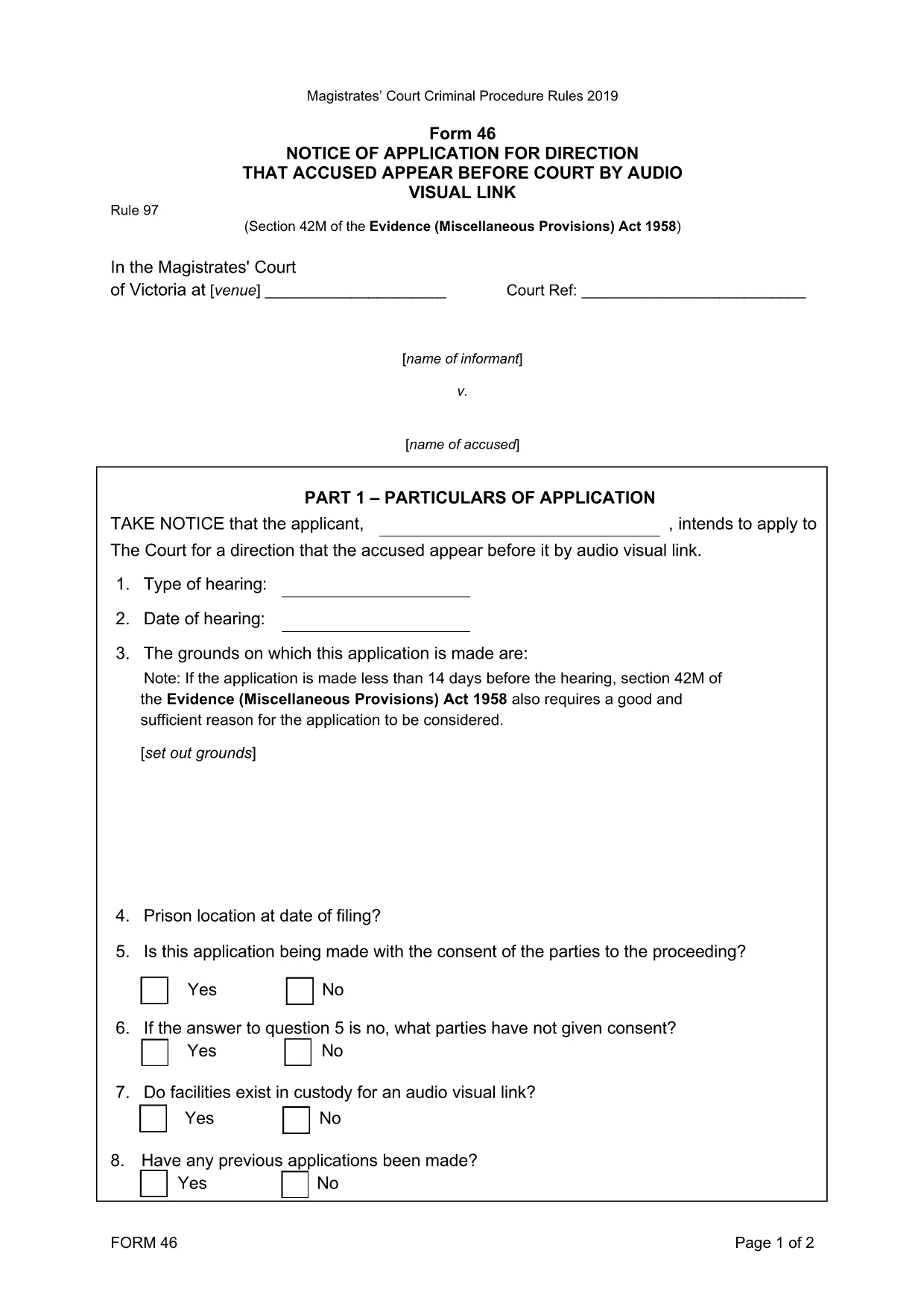
Form 46‑0414: Application for Appearance by Audio‑Visual Link

  1. език Английски
  2. Държава Австралия
  3. Дейност Legal Forms
  4. Отдел Magistrates' Court
Form 46‑0414: Application for Appearance by Audio‑Visual Link

Form 46‑0414 is the official application used in the Magistrates' Court of Victoria when a defendant or a witness needs to appear in court via an audio‑visual link (AVL). This form streamlines the request, ensuring the court has all required details to grant an AVL appearance.

What is Form 46‑0414?

The form captures essential information such as the case number, parties involved, reason for the AVL request, and any supporting documentation. It is a mandatory filing whenever a physical appearance is impractical due to health, distance, or other valid reasons.

How to Fill Form 46‑0414 Online

Instead of downloading the PDF and editing it manually, simply click the "Fill out this form" button on this page. The Formize PDF Filler app will load instantly, letting you type directly into each field, add signatures, and save your progress.

  • Step 1: Click the blue "Fill out this form" button.
  • Step 2: The Formize filler loads – the PDF appears with editable fields.
  • Step 3: Complete each section, attaching any required documents.
  • Step 4: Review, then click "Save & Download" to get the finished PDF.

Common Mistakes to Avoid

  • Leaving the "Reason for AVL" section blank – the court needs a clear justification.
  • Using an outdated case number – verify the number on your court notice.
  • Forgetting to attach supporting medical or travel documents.
  • Signing the form with a typed name only – use the electronic signature tool in Formize.

Where to Submit the Completed Form

After saving the filled PDF, you can:

  • Email it to the court registry (check the address on your notice).
  • Upload it via the Magistrates' Court online portal.
  • Deliver a printed copy in person to the court clerk.

Download the Fillable PDF

If you prefer to work offline, you can download the original fillable PDF directly from the court’s website. The file is fully searchable and compatible with most PDF editors.

ЧЗВ
  • Who can use Form 46‑0414?

    Any defendant, accused person, or witness who has been ordered to appear in person but needs an audio‑visual link due to health, distance, or other valid reasons.

  • Is the form available in a printable version?

    Yes. You can download the original fillable PDF from the court’s website and print it if you prefer a paper submission.

  • What supporting documents are required?

    Typically a medical certificate, travel restriction notice, or any other proof that explains why a physical appearance is not possible.

  • How long does the court take to approve an AVL request?

    Approval time varies, but most courts aim to respond within 5‑7 business days after receiving a complete application.

  • Can I submit the form electronically?

    Yes. After completing the form with Formize, you can email the PDF or upload it through the Magistrates' Court online portal.

  • What happens if I forget to sign the form?

    The court will reject the application. Use the electronic signature tool in Formize to add a valid signature before submitting.

  • Do I need a lawyer to fill out Form 46‑0414?

    A lawyer is not required, but legal advice can help ensure all details are accurate and improve the chance of approval.

КАК ДА

Как да попълните Form 46‑0414 безплатно онлайн в 4 лесни стъпки:

  1. 1
    Open the Fillable Form
    Click the "Fill out this form" button on the page. The Formize PDF Filler will open in a new window.
  2. 2
    Enter Your Information
    Type directly into each highlighted field – case number, parties, reason for AVL, and any supporting details.
  3. 3
    Add Attachments
    Use the paperclip icon to upload medical certificates or travel documents required by the court.
  4. 4
    Save and Download
    When finished, click "Save & Download". The completed PDF is ready to email or upload to the court.
Приложение Formize PDF Filler
ОТНОСНО

Form 46‑0414 шаблон

С традиционния набор от функции за преглед и попълване на PDF документ, съчетан с предимствата на уеб приложение и адаптивно оформление, можете да завършите Form 46‑0414 за минути.

ХАРАКТЕРИСТИКА

PDF пълнител

Най-лесният начин да попълните Form 46‑0414 онлайн

  • Бързо попълнете Form 46‑0414
    Търсите начин бързо да попълните Form 46‑0414 онлайн? С нашия онлайн безплатен инструмент за попълване на PDF формуляри ще знаете как да редактирате и попълвате този PDF документ за по-малко от минута.
  • Лесен за използване онлайн PDF редактор
    Писнало ви е да разпечатвате PDF файлове, за да можете да ги редактирате, преди да сканирате повторно и да ги изпратите обратно? Редактирайте PDF документи безплатно онлайн. Използвайте нашия онлайн pdf редактор, за да спестите време и хартия.
  • Страхотни инструменти, всички платформи
    Чудите се как да попълните Form 46‑0414 на Mac или може би как да използвате PDF пълнител безплатно? Нашите онлайн PDF инструменти работят на всички платформи.
  • Сигурно съхранение на файлове
    Завършените „Form 46‑0414“ файлове се съхраняват в защитена база данни, управлявана от Amazon Cloud хостинг. Можете да изтриете вашите файлове от нашата система по всяко време. Във всеки случай тези файлове се изтриват автоматично след 24 часа.
  • Чат с Form 46‑0414
    Разговаряйте с „Form 46‑0414“ в Chatize, който е безплатен асистент за четене на PDF файлове. Задавайте въпроси и получавайте отговори от „Form 46‑0414“. Просто щракнете върху бутона Чат с документ по-горе.

Изтриване на сесията за пълнене

Изтриване на избраната сесия за пълнене? В този случай вашият напредък в попълването на формуляра ще бъде загубен.

Изтриване на сесия за редактиране

Изтриване на избраната сесия за редактиране? В този случай вашият напредък в създаването и редактирането на формуляра ще бъде загубен.