
Избери език

LTOPF Application Form – Fillable PDF Ready for Immediate Use

  1. език Английски
  2. Държава Австралия
  3. Отдел Transport for NSW
  4. Дейност Регистрация на превозно средство
LTOPF Application Form – Fillable PDF Ready for Immediate Use

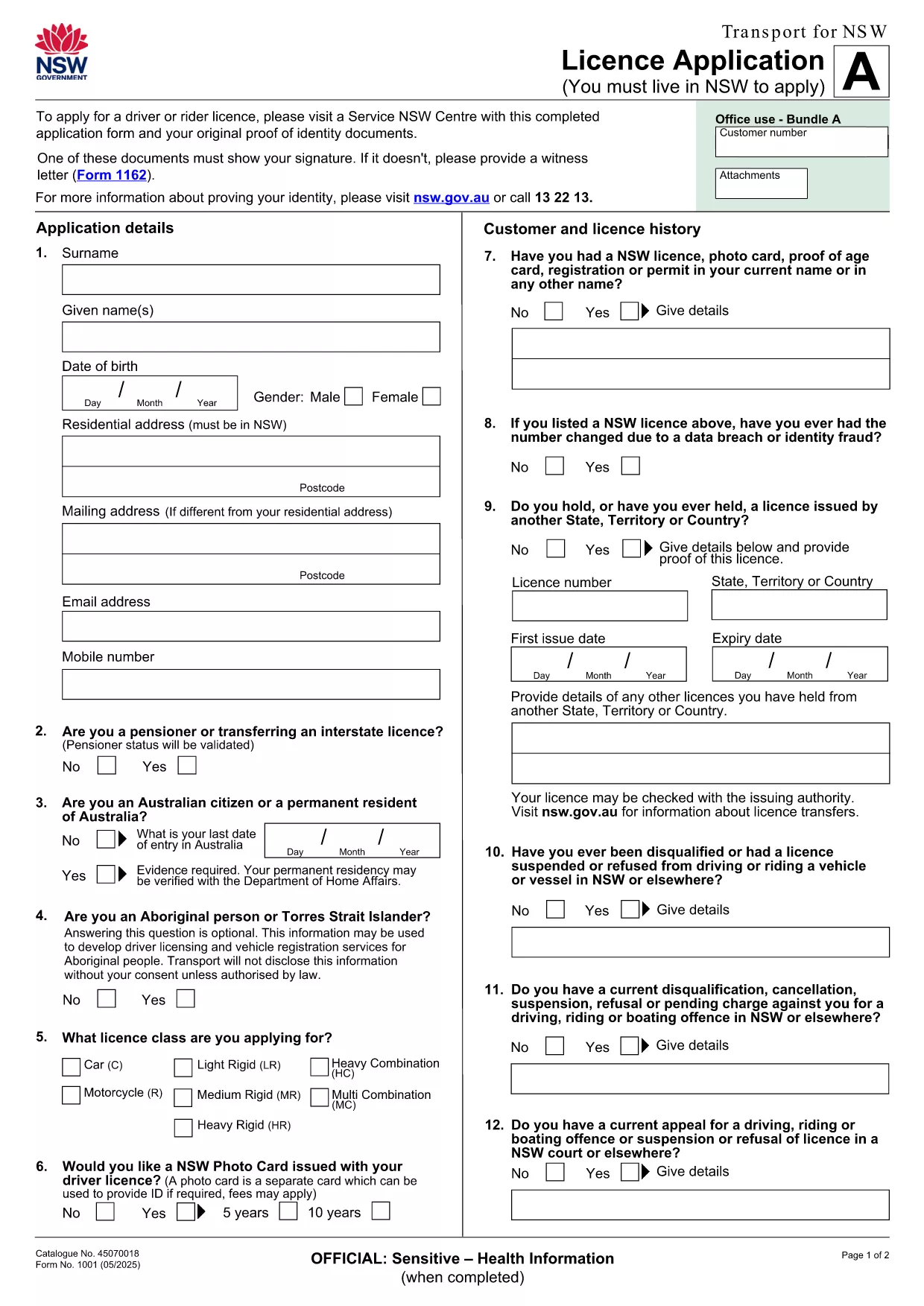
The LTOPF application form is required for certain transport‑related licences in New South Wales. Instead of printing, printing‑then‑scanning, or hand‑writing, you can now complete the official form directly in your browser using our secure Formize PDF Filler app.

Our fillable PDF mirrors the exact layout of the original Transport for NSW licence application, ensuring every field aligns with government requirements. The PDF linked below is the official document provided by Transport for NSW, so you can trust its authenticity.

What Is the LTOPF Application Form?

The LTOPF (Licence Transfer or Permission Form) is used when you need to transfer a licence, update personal details, or apply for a new transport licence. It includes sections for personal identification, licence history, and supporting documentation.

How to Fill the Form Online with Formize

Follow these simple steps to complete the form without leaving your browser:

  • Click the "Fill out this form" button on this page.
  • Wait a few seconds while the Formize PDF Filler loads the official licence‑application PDF.
  • Enter your information in each fillable field – the interface validates dates, numbers, and required fields automatically.
  • Attach scanned copies of your identity documents directly in the designated upload sections.
  • When you’re finished, click "Submit" to download a completed PDF that you can email or print.

Common Mistakes & Tips for a Successful Submission

  • Missing signature: Every page that requires a signature must have one. Use the "Draw Signature" tool in Formize.
  • Incorrect document format: Upload only PDF, JPG, or PNG files for identity proof.
  • Skipping mandatory fields: Required fields are highlighted in red until they are filled.
  • Using an outdated version: This page always links to the latest Transport for NSW licence‑application PDF, so you won’t need to search for updates.

Where to Submit the Completed LTOPF Form

After downloading the completed PDF, you can submit it via the official Transport for NSW online portal, email it to the address listed on the form, or deliver a printed copy to your nearest Service Centre.

Need more guidance? Review the official instructions on the Transport for NSW website or contact their help line for specific queries about licence transfers.

ЧЗВ
  • Is the LTOPF form free to download?

    Yes. The official licence‑application PDF provided by Transport for NSW is free to download and complete.

  • Can I edit the form on a mobile device?

    Absolutely. The Formize PDF Filler works on all modern browsers, including iOS and Android, allowing you to fill the form on phones or tablets.

  • Do I need Adobe Acrobat to fill the form?

    No. The form is fully editable within the Formize online filler, so you don’t need any additional software.

  • What if I make a mistake after submitting?

    Download a fresh copy of the PDF, correct the error, and re‑submit. The online filler validates entries to reduce mistakes.

  • How long does the Formize PDF Filler take to load?

    The PDF loads in under 5 seconds on a typical broadband connection.

  • Do I need to print the form after completing it online?

    Only if the receiving agency requires a hard copy. Otherwise, you can email the completed PDF directly.

  • Is my personal data safe when using Formize?

    Yes. All data is processed locally in your browser and never stored on our servers unless you choose to download the file.

КАК ДА

Как да попълните LTOPF application form безплатно онлайн в 5 лесни стъпки:

  1. 1
    Open the Fillable Form
    Click the "Fill out this form" button on the page. The Formize PDF Filler loads the official licence‑application PDF automatically.
  2. 2
    Enter Your Details
    Complete each highlighted field. Use the built‑in validation to ensure dates, numbers, and required fields are correct.
  3. 3
    Upload Supporting Documents
    Attach scans of your identity proof, signature, or any additional paperwork in the designated upload sections.
  4. 4
    Review & Submit
    Double‑check all entries, then click "Submit" to generate a completed PDF you can download, email, or print.
  5. 5
    Send the Form
    Follow the submission instructions on the last page of the PDF—online portal, email, or Service Centre.
Приложение Formize PDF Filler
ОТНОСНО

Формуляри за регистрация на превозни средства

Ако притежавате или наемате моторно превозно средство, ремарке или лодка, трябва да изпълните определени задължения, за да поддържате превозното си средство законно регистрирано и безопасно.

LTOPF application form е един от формулярите за регистрация на превозно средство, които са документи, които се използват за регистриране на моторно превозно средство в съответния държавен или провинциален орган. Тези формуляри обикновено се изискват, когато човек закупи ново или употребявано превозно средство или когато се премести в нов щат или провинция с превозно средство.

Точните изисквания и формуляри, необходими за регистрация на превозно средство, могат да варират в зависимост от местоположението, но като цяло процесът включва предоставяне на информация за превозното средство, собственика и всякакви права върху превозното средство.

След като формулярите за регистрация и таксите бъдат изпратени, държавният или провинциален орган ще издаде свидетелство за регистрация или регистрационен номер на собственика на превозното средство. Тази регистрация позволява превозното средство да се използва законно по обществени пътища и магистрали.

ХАРАКТЕРИСТИКА

PDF пълнител

Най-лесният начин да попълните LTOPF application form онлайн

  • Бързо попълнете LTOPF application form
    Търсите начин бързо да попълните LTOPF application form онлайн? С нашия онлайн безплатен инструмент за попълване на PDF формуляри ще знаете как да редактирате и попълвате този PDF документ за по-малко от минута.
  • Лесен за използване онлайн PDF редактор
    Писнало ви е да разпечатвате PDF файлове, за да можете да ги редактирате, преди да сканирате повторно и да ги изпратите обратно? Редактирайте PDF документи безплатно онлайн. Използвайте нашия онлайн pdf редактор, за да спестите време и хартия.
  • Страхотни инструменти, всички платформи
    Чудите се как да попълните LTOPF application form на Mac или може би как да използвате PDF пълнител безплатно? Нашите онлайн PDF инструменти работят на всички платформи.
  • Сигурно съхранение на файлове
    Завършените „LTOPF application form“ файлове се съхраняват в защитена база данни, управлявана от Amazon Cloud хостинг. Можете да изтриете вашите файлове от нашата система по всяко време. Във всеки случай тези файлове се изтриват автоматично след 24 часа.
  • Чат с LTOPF application form
    Разговаряйте с „LTOPF application form“ в Chatize, който е безплатен асистент за четене на PDF файлове. Задавайте въпроси и получавайте отговори от „LTOPF application form“. Просто щракнете върху бутона Чат с документ по-горе.

Изтриване на сесията за пълнене

Изтриване на избраната сесия за пълнене? В този случай вашият напредък в попълването на формуляра ще бъде загубен.

Изтриване на сесия за редактиране

Изтриване на избраната сесия за редактиране? В този случай вашият напредък в създаването и редактирането на формуляра ще бъде загубен.